Project risk management software records each risk, scores it by probability and impact, assigns an owner and a mitigation action, and shows which risks changed since the last review. The tools split into two families, and it matters which one you need. Work management tools such as Celoxis, Smartsheet, monday.com, Wrike and Jira hold a risk register next to tasks and schedules, while Monte Carlo tools such as RiskyProject, @RISK and Deltek Acumen Risk simulate how risks move a finish date or a cost.
We looked at eight tools and judged each by how it handles a single risk, from logging it to closing the mitigation, which plan holds that feature and what it costs. We read vendor material and did not run these products.
Best project risk management software by situation
The best project risk management software depends on whether you need a register your whole team updates or a simulation of your schedule. Celoxis is the only tool here with a built-in risk app and a published price. Smartsheet, monday.com and Wrike hold a register you assemble from fields, Jira tracks the mitigation work and keeps the register itself in Confluence, and the three Monte Carlo tools answer a different question: how likely is the finish date.
 Best built-in risk app with a published priceCeloxisA Risk app with probability, impact and a calculated score, four risk states and a register report, from Professional at $35 per user per month.
 Best if the register should look like a spreadsheetSmartsheetA sheet with intake forms, formula scores and conditional formatting, from Pro at $9 per member. Portfolios start on Enterprise.
 Best for a register that non-project staff will updatemonday.comA board built from templates with probability, impact and score columns, plus dashboards. Portfolio management is Enterprise only.
 Best for early AI warnings on schedule riskWrikeA low, medium or high risk flag per project and a weekly report on Business at $25, with a DIY scored register on top.
 Best if engineering tracks mitigation in JiraJiraNo risk module: the register sits in Confluence and Jira tracks the response work. Cross-project dependency views need Premium.
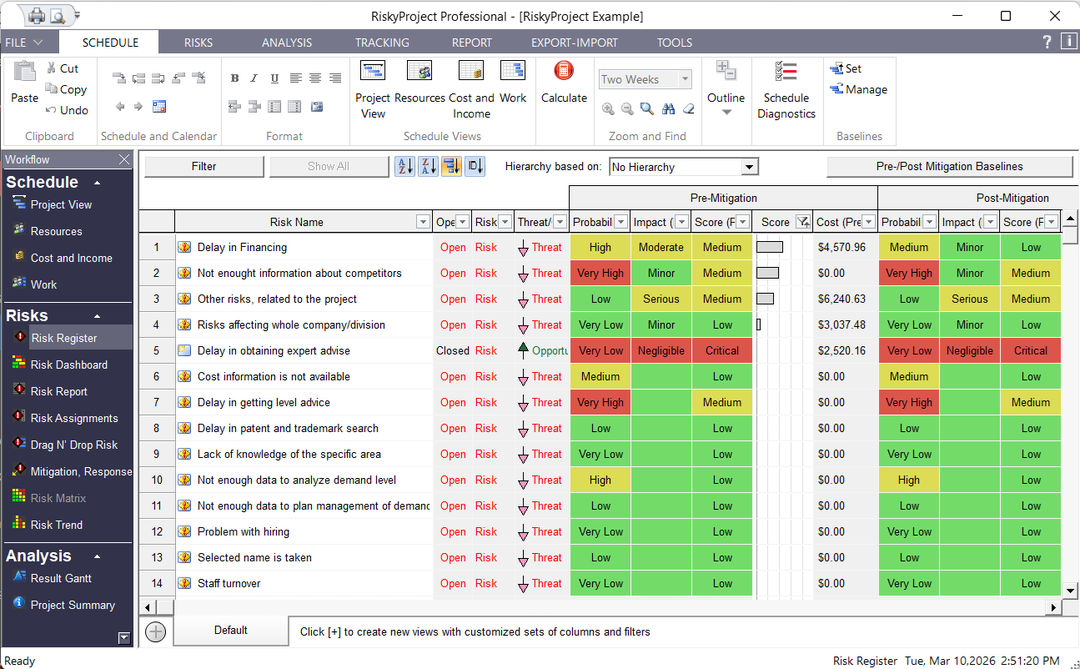
 Best register plus Monte Carlo for one schedulerRiskyProjectA desktop risk register with schedule and cost simulation and a Microsoft Project add-in, from $685 a year.
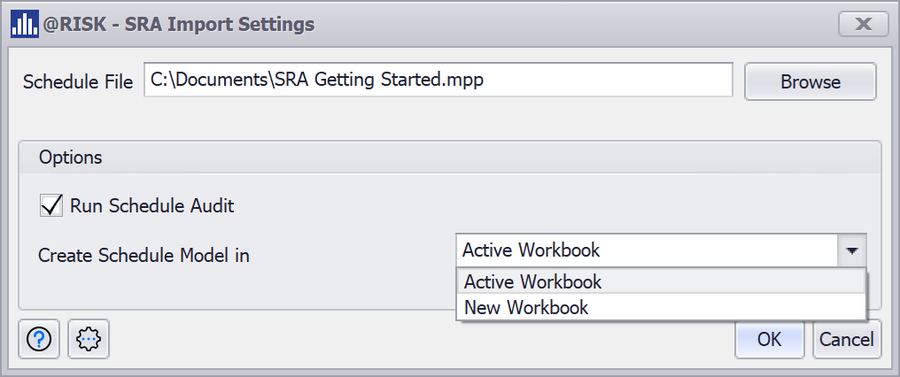
 Best for simulation inside Excel@RISKImports Microsoft Project and Primavera P6 files and returns tornado charts and probabilistic finish dates. Windows desktop Excel only.
 Best for Primavera P6 schedules and contingencyDeltek Acumen RiskSizes contingency from confidence levels and ranks risk drivers per milestone. Quote only.
What project risk management software does
A project risk tool replaces the spreadsheet where risks are listed once and never reviewed. At minimum it keeps a risk register: the risk statement, probability, impact, a score, an owner, a response and a status. Better tools link each risk to the tasks or milestones it threatens, send an alert when a score or status changes, and roll risks up across projects.
Three product classes share the word "risk", and only the first two belong in this list.
- Register tools sit inside work management, with the register as a board, sheet or app next to the schedule, and this is where most project and program teams start.
- Quantitative schedule and cost risk tools take a schedule, apply uncertainty to durations and costs, run thousands of Monte Carlo iterations and report the odds of finishing by a date or under a budget.
- Enterprise risk and compliance platforms such as MetricStream, Archer and IBM OpenPages manage audit, controls and regulatory risk across a company. They aren't project tools, and we don't review any of them here.
Project risk management software compared
| Tool | How it handles a risk | Starting price | G2 rating |
|---|---|---|---|
| Celoxis | Built-in Risk app with probability, impact, calculated score, four risk states and a register report | Core $10, Essentials $25, Professional $35 (risk app), Business $45 per user per month billed yearly; 5 users minimum | 4.6 (768) |
| Smartsheet | Register built as a sheet with forms, formula scores, conditional formatting and automations | Pro $9, Business $19 per member per month billed yearly; no free plan | 4.4 (23,291) |
| monday.com | Register built as a board from templates with score formulas, dashboards and automations | Free (2 seats); Basic $9, Standard $12, Pro $19 per seat per month billed yearly | 4.7 (17,975) |
| Wrike | AI risk flag per project on Business; register built from custom fields and calculated fields | Free; Team $10, Business $25 per user per month billed yearly | 4.2 (4,648) |
| Jira | No risk module: register in Confluence, response work tracked as Jira work items | Free up to 10 users; Standard $8.48, Premium $15.56 per user per month at 300 users billed monthly | 4.3 (8,092) |
| RiskyProject | Desktop risk register with Monte Carlo schedule and cost analysis and mitigation baselines | Lite $685, Professional $979 per year; Enterprise by quote | No reviews yet |
| @RISK | Monte Carlo simulation in Excel on an imported Microsoft Project or Primavera P6 schedule | Professional $2,225, Industrial $2,895 per user per year; volume by quote | 4.2 (11) |
| Deltek Acumen Risk | Risk events and uncertainty on a P6, Open Plan or Microsoft Project schedule; histogram and Risk Drivers chart | Quote only | No reviews yet |
 The Program Manager Our product | Maps dependencies across Jira and Asana and watches milestones for risk | Team from $59 per workspace per month; card required at checkout | No reviews yet |
The first five tools are registers you share with a team. The last three are analysis tools, usually run by one scheduler or risk analyst who hands the result to the program, which makes them especially useful before a baseline is approved. Plenty of programs use one of each: a register in the work tool for day-to-day control and a simulation before a baseline is approved.
Where the risk features sit on each plan
Risk features sit on different tiers, and four of the five work tools have no risk plan at all. The table shows where each capability starts.
| Tool | Scored register | Alerts when a risk changes | Rollup across projects | Monte Carlo |
|---|---|---|---|---|
| Celoxis | Professional, as a built-in Risk app | RAG health emails from the dashboard | Register report across organizational and project risks | No |
| Smartsheet | Any plan, built from a sheet | Automations: 250 a month on Pro, unlimited from Business | Reports and dashboards; Portfolios on Enterprise | No |
| monday.com | Any plan, built from a template board | Automations; 25,000 actions a month on Pro | Dashboards; portfolio management on Enterprise | No |
| Wrike | Built from custom fields; AI risk flag on Business | Weekly risk report email with the AI flag | Dashboards and reports; manual setup | No |
| Jira | Confluence page or a Marketplace app | Automation rules on every plan | Plans with cross-project dependencies on Premium | No |
| RiskyProject | Every edition | Not documented | Shared register on Enterprise only | Every edition |
| @RISK | Not included; Predict! is a separate product | Not applicable | Not applicable | Every edition |
| Deltek Acumen Risk | Integrated register | Not documented | Not confirmed | Yes |
Only Celoxis publishes a plan ladder in which risk management has its own rung, so it's the one to read before you budget.
Celoxis- Core ($10)Portfolio dashboards, workload tracking and capacity planning; no risk app
- Essentials ($25)Executive portfolio reporting, job roles, work calendars and resource conflicts
- Professional ($35)Risk management and issue tracking, with scored intake
- Business ($45)Billing on top of everything below
Cost for 5 people on the plan that holds the risk feature
Seat prices matter less than the minimums. Celoxis needs 5 full-access users, so it's about $2,100 a year before you add anyone. The two simulation tools are priced per analyst, not per team member, so they cost far more per seat and are usually bought for one or two people.
List prices in USD from the vendor pages, checked November 2026. Yearly desktop licenses are divided by 12. Jira's per-user price depends on team size and Atlassian lists $15.56 at 300 users. Excludes add-ons and taxes. Deltek Acumen Risk has no public price and isn't included.
Eight tools reviewed
Each entry covers how the tool handles one risk, which plan you need, who should skip it and what it costs, and none of them is a pure register or a pure simulator.
Celoxis
Celoxis
Built-in Risk app, published price ladder
Celoxis fits a mid-size PMO that wants risks, issues and the schedule in one tool, with a price it can budget before a demo.
How it handles a risk: risks live in a built-in Risk app inside the same workspace as projects, tasks and resources. Each risk carries three fields, Risk Probability, Risk Impact and a Risk Score that Celoxis calculates. A risk moves through four states: Not Occurred, Occurred, Deferred and Mitigated, and an occurred risk is assigned to the person handling it. A predefined Risk Register report lists organizational and project risks with their impact, probability and score.
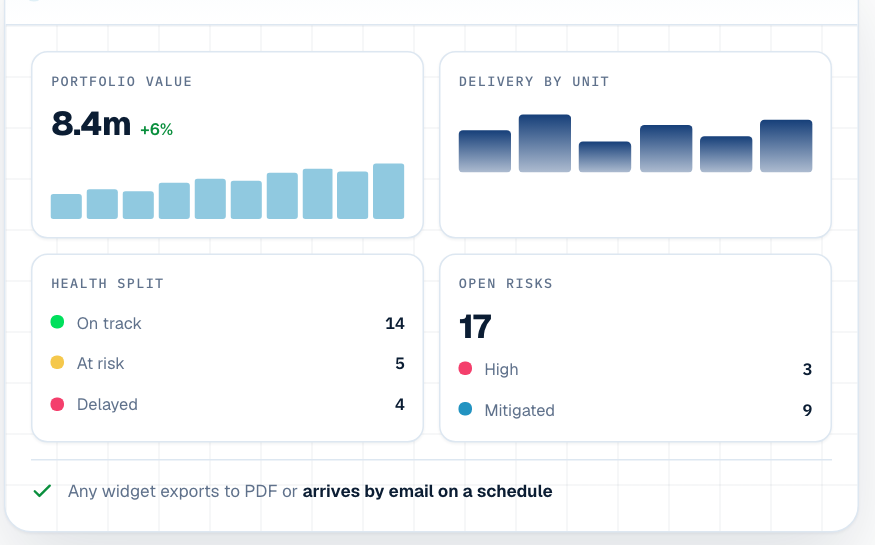
Around the register: the features page lists built-in apps for risks, issues, change requests, bugs and RAID logs, a dashboard widget that counts open risks by severity and mitigation status, and automatic RAG health with email alerts when a project drifts. Custom fields are capped by plan at 25, 50, 100, 200 and 1,000 from Core to Enterprise.
Plan and seats: Risk Management and Issue Tracking start on Professional at $35 per user per month billed yearly, and the 5 full-access user minimum puts the floor near $2,100 a year. Celoxis's help pages describe a score field and a register report, not a probability by impact heat map. Jira, Azure DevOps, QuickBooks and Zapier are add-ons below Enterprise.
- you want risks, issues and RAID items in the same system as the schedule and resource plan, from Professional at $35
- your risk review needs a ready-made Risk Register report across organizational and project risks
- you need a light register for fewer than 5 people: the minimum of 5 full-access users sets the price floor
- you need a native Jira link on a small budget: the Jira connector is an add-on below Enterprise
- Users like
- project management, tracking, ease of use, time tracking and dashboards
- Users dislike
- a learning curve and a complex interface
- Source: G2, 768 reviews
- Starting price
- Core $10, Essentials $25, Professional $35 and Business $45 per user per month billed yearly; 5 full-access users minimum
- Program tier
- Essentials, $25 per user per month (executive portfolio reporting)
- Dependencies
- All four types across projects, with lead and lag
- Portfolio reports
- 8 built in
- Resource workload and capacity
- Workload tracking and capacity planning listed on every plan from Core; job roles, work calendars, timesheets and instant conflicts from Essentials
- Optimal load
- Admin sets a range (for example 80 to 90 percent); blue under, green optimal, red over-allocated
- Auto vs manual scheduling
- Each task is auto-scheduled or manually scheduled; auto tasks follow predecessors and the assignee's work calendar
- Baselines
- Every plan per the pricing table
- Work calendars
- Essentials and up
- Intake
- Requests from email, web forms and spreadsheets go into one queue and are ranked against your own KPIs; project intake management starts on Professional
- Capacity
- Workload is read across every project a person is booked on; capacity planning is listed on every plan from Core; job roles, work calendars, timesheets and resource-conflict visibility from Essentials
- Financials
- Budgets at project and task level, job-role rates, planned versus actual by project and portfolio; expenses and costing from Professional, billing from Business
- Seats
- Minimum 5 full-access users; read-only users free; 14-day free trial, no credit card
- Integrations
- Jira, Azure DevOps, QuickBooks Online and Zapier are add-ons below Enterprise
- Scenario planning
- The features page names what-if analysis under request tracking and gives no detail
- What-if
- A What-if project state you create in Admin, then filter Resource Load by it; the knowledge base notes there is no undo
- Minimum
- 5 full-access users; 14-day trial, no credit card
- Risk plan
- Professional
- Risk states
- Not Occurred, Occurred, Deferred, Mitigated
- Free plan
- 14-day trial
Smartsheet
Smartsheet
Sheet-based register with forms and automations
Smartsheet fits a PMO that already thinks in sheets and wants intake forms, formulas and automations around a register it designs itself.
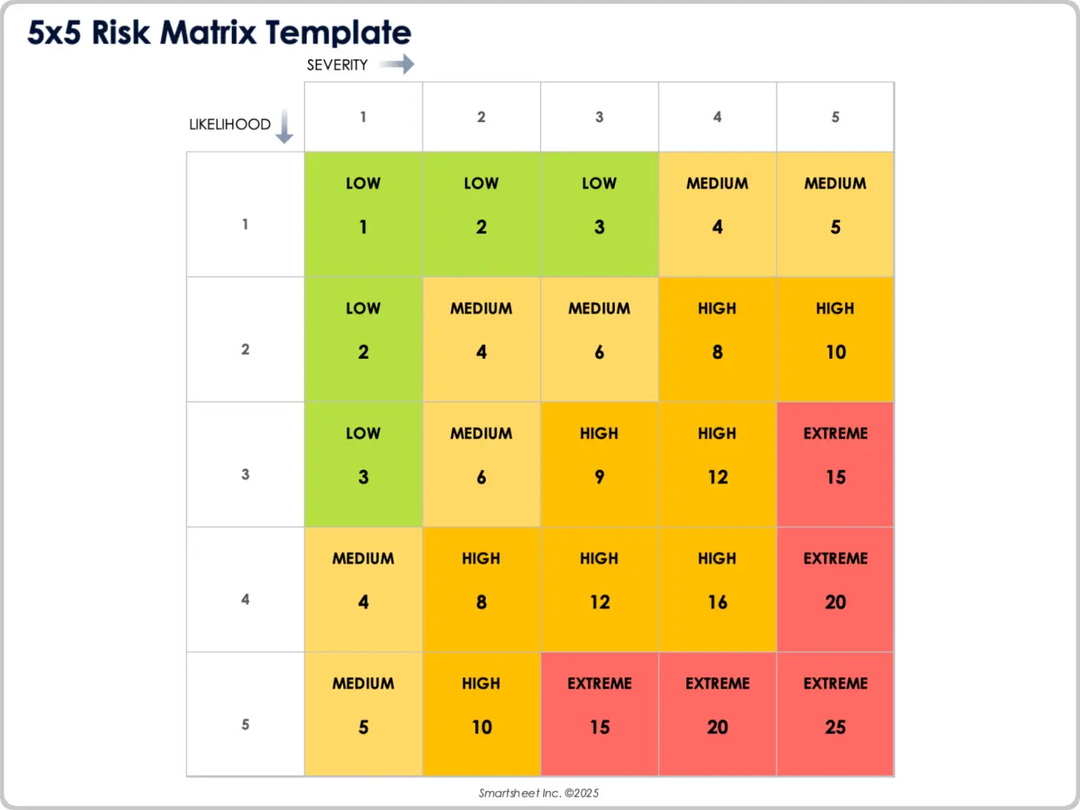
How it handles a risk: there's no dedicated risk object. A register is a sheet, usually started from a template, with columns for description, owner, probability, impact, a formula-driven score, status and mitigation plan. Stakeholders submit risks through a form, conditional formatting marks the high-priority rows, and each row carries a mitigation deadline and attached contingency documents. Probability and impact run on 1 to 5 or 1 to 10 scales in Smartsheet's templates, and the matrix is a color-coded template rather than a native heat map object.
Alerts and rollups: automations notify an owner when a risk is added or its level changes, and Pro caps them at 250 a month while Business is unlimited. Slack and Teams alerts work on every plan. Reports and dashboards roll risk sheets from several projects together, and native Portfolios needs Enterprise. Dependencies are on the pricing page for Pro, and baselines start on Business.
Plan and seats: Pro is $9 per member per month billed yearly for 1 to 10 members and Business is $19 for 3 or more. Jira, GitHub and Salesforce appear on Smartsheet's risk page as integrations.
- your risk owners already work in spreadsheets and you want the register as a sheet with intake forms and formula scores
- you need baselines against the schedule, which start on Business at $19
- you need risk rollups through a native portfolio object: Portfolios start on Enterprise, which has no public price
- you need more than 250 risk automations a month on a small budget: Pro caps them there and unlimited starts on Business
- Users like
- ease of use (2,360 mentions), organization and automation (1,666) and team collaboration and integrations (1,516)
- Users dislike
- a steep learning curve (1,183 mentions), missing features such as limited support and printout branding (899) and unintuitive filters, pivot tables and form options (842)
- Source: G2, 23,291 reviews
- Starting price
- Pro $9 and Business $19 per member per month billed yearly; no free plan
- Free tier
- None permanent, 30 days free trial without credit card
- Trello import
- Direct importer from File > Import on Pro, Business, Enterprise; 5,000 cards or 50 lists, archived cards skipped
- Board view
- Pro, Business, Enterprise; groups by one dropdown, contact or symbol column; legacy Card View replaced by board view in September 2026
- Dependencies and critical path
- Pro and up; critical path shows in red in Gantt view, baselines and timeline view need Business
- Guests
- Pro: unlimited free Contributors; Business and up: unlimited free Guests
- SAML SSO
- Enterprise and AWM only
- Portfolios
- Enterprise
- Event reporting, data egress controls, customer-managed keys
- Enterprise or Advanced Work Management
- Regions
- US, EU, Australia; Gov in AWS GovCloud
- Sheet limits
- 20,000 rows, 400 columns, 500,000 cells
- Trust page
- SOC 2, ISO 27001, ISO 27701, FedRAMP; HIPAA through a BAA on Enterprise
- Baselines
- One baseline per sheet; baseline bars don't show in reports, dashboards or printed Gantt
- Dependency types
- FS, SS, FF, SF with lag and lead; an owner or admin enables dependencies per sheet
- Baselines plan
- Smartsheet help lists Pro, Business and Enterprise; the pricing page summary read in October lists Business and up
- Free external seats
- Pro: unlimited Contributors; Business+: unlimited Guests
- Guest rights
- View, comment or edit only where granted; cannot create sheets
- Dynamic View
- Business and up; add-on from $125/month
- WorkApps
- Enterprise and AWM; unpaid viewers need Collaborator pack
- Branding and activity log
- Custom colors and logos, activity log: Business+
- Approvals and DocuSign
- Approval requests all plans; DocuSign Enterprise only
- Client seat rule
- No for Contributors on Pro and Guests on Business and up (unlimited and free); WorkApps sharing with unpaid users needs the paid Collaborator pack.
- Plan gates (pricing page, 2026-11-13)
- Timeline view, workload tracking, baselines, proofing, conditional form logic: Business and up; Portfolios, Collections, Scenario Planning: Enterprise and up; Resource Management: add-on on Business and up with no listed price
- Pro limits
- Reports pull from 1 sheet, 10 widgets per dashboard, 250 automation runs per month, 20 GB storage; Business and up unlimited
- Large sheets
- Business plans stay at 20,000 rows, 400 columns and 500,000 cells; large-scale sheets (100,000 rows, 1,000,000 cells) are Enterprise and up and don't support automated workflows, connectors or the mobile app
- Export
- File > Export: Excel, Google Sheets, PDF, PNG (Gantt only) and Microsoft Project XML (Gantt only); Excel export drops formulas, attachments, groupings and summary rows
- Dependencies plan
- Pricing page lists dependencies from Pro; one help article says Business and Enterprise (conflict, checked 2026-11-18)
- Rows per sheet
- Business: 20,000 rows, 400 columns, 500,000 cells; Enterprise and Advanced Work Management: 100,000 rows
- Cross-sheet references
- Up to 100 unique cross-sheet references per sheet; formula based, no relational link field
- Register
- A sheet built from a template
- Automations
- 250 a month on Pro, unlimited on Business
monday.com
monday.com
Board-based register for wide participation
monday.com fits a program where many non-project people, such as legal, finance and operations, have to log and update risks on a board.
How it handles a risk: there's no fixed risk module. Teams build a register as a board from monday's template library, with columns for risk ID, category, probability, impact, a calculated score, owner, mitigation actions, deadline and status. Scores come from formulas defined once on those columns, and dashboards and a portfolio view then aggregate risks across boards. A separate Program Risk Register template exists for program-level logs.
Alerts and AI: automation rules can notify stakeholders or launch a review when a threshold is crossed, and Pro adds 25,000 automation actions a month. monday also describes AI features, Portfolio Risk Insights and a Project Analyzer agent, that flag risks by severity and schedule conflicts.
Plan and seats: Free covers 2 seats, paid plans start at 3 users, and Basic, Standard and Pro cost $9, $12 and $19 per seat per month billed yearly. The pricing page lists portfolio management under Enterprise only, so a rollup across programs is an Enterprise question. The integrations page names Slack, Teams and Salesforce, and shows a Jira logo.
- the people who must update risks aren't project managers and need a board they can read at a glance
- you want a program-level risk log template and dashboards before you commit to a portfolio plan
- you need risk rollups across programs on a mid-tier plan: portfolio management is listed under Enterprise
- you want a ready scored register out of the box: scoring is formulas you set up on columns
- Users like
- intuitive daily use (1,312 mentions), flexible customization of boards and workflows (797) and easy setup and adoption (630)
- Users dislike
- a steep learning curve (216 mentions), slow performance on large boards (172) and high pricing (170)
- Source: G2, 17,975 reviews
- Starting price
- Free (2 seats); Basic $9, Standard $12 and Pro $19 per seat per month billed yearly
- Kanban
- Available on every plan including Free; cards come from Status labels, per-column task limit via Set column limit, lanes via Divide by
- Trello import
- Built-in importer carries task name, label and dates; descriptions, checklists, activities and files are not supported; 10K rows at a time
- Dependencies
- Dependency column on Pro and Enterprise (support.monday.com article 360007402599); Gantt from Standard, milestones and critical path from Pro and Enterprise; cross-project dependencies, portfolio connection and Resource planner Enterprise only
- Automation actions per month
- Standard 250, Pro 25,000, Enterprise 250,000; multi-recipient notifications use one action each
- Guests
- None on Basic; Standard 3 free then every group of 4 guests counts as 1 billed seat; unlimited on Pro and Enterprise
- Portfolio
- Portfolio management on Enterprise; Pro projects are standalone
- SCIM
- Enterprise only
- Trust center
- SOC 2 Type II, ISO 27001:2022, ISO 27017, 27018, 27701, HIPAA through a BAA; FedRAMP not listed
- Enterprise limits
- 250 workflows, 250,000 automation and integration actions per month, 25,000 API calls per day (Pro: 20, 25,000, 10,000); 99.9% uptime SLA
- Guests on Basic
- Not available; shareable boards start at Standard
- Guests on Standard
- 3 free, then every 4 guests use 1 billed seat
- Guests on Pro/Enterprise
- Unlimited guests
- Viewers
- Unlimited, free, read-only; see all Main boards
- Guest scope
- Only shareable boards they are invited to
- Guest edits
- Can add items, columns, comments; cannot own boards
- WorkForms
- Public link, no account needed; creates board items
- Guest email rule
- Must use a different email domain than your account
- Client seat rule
- Partly: Standard includes 3 free guests, then every group of 4 guests counts as one billed seat; Pro and Enterprise have unlimited guests. Basic has none. Viewers are free.
- Time tracking
- Time Tracking column on Pro and Enterprise only; no native billable rates or invoicing (billable cost is a formula column)
- Proofing
- No plan-tiered proofing product confirmed; file annotations (pin comments on images, PDFs and video) are described as a trial feature
- Intake forms
- Forms view on Free and all paid plans
- Workload
- Workload view on Pro and Enterprise; resource planner and capacity manager on Enterprise
- Adobe Creative Cloud
- Plugin exists per the vendor's Adobe integration page
- Retainers and invoicing
- Not confirmed in work management (invoices exist in monday CRM, a separate product)
- Dashboards
- Connected boards per dashboard: Free 1, Standard 5, Pro 20, Enterprise 50; total items under 20,000
- AI credits
- Basic 1,000, Standard 2,000, Pro 3,000 a month; Enterprise custom
- Seat rules
- Seats sold in buckets: minimum 3, then multiples of 5 (support article 4405633151634); quote above 40 users; Enterprise minimum term 12 months
- Resource management
- Enterprise (Resource planner, Capacity manager)
- Basecamp import
- Built-in importer (profile menu, Import data, Basecamp): brings to-dos only into a board with a link column back to Basecamp; works with Basecamp version 4 only; messages, files and chat aren't mentioned
- Updates and files
- Discussion lives in each item's Updates section, there's no board-level message board; file annotations on images, PDFs and videos are labeled a trial feature
- Integrations
- 850+ integrations and apps stated by the vendor
- Currency note
- USD list prices as of 2026-11-15; the vendor lists the same numbers in euros by billing country (9, 12 and 19 per seat per month billed yearly)
- Connect Boards and Mirror
- Linked items use the Connect Boards column and the Mirror column; up to 60 Connect Boards columns per board
- Dashboard sources
- One board per dashboard on Free and Basic, 5 on Standard, 20 on Pro, 50 on Enterprise
- Register
- A board built from templates
- Automation actions on Pro
- 25,000 a month
- Portfolio management
- Enterprise
Wrike
Wrike
AI risk flag plus a DIY register
Wrike fits a PMO already on Wrike that wants an early warning on at-risk projects more than a scored register.
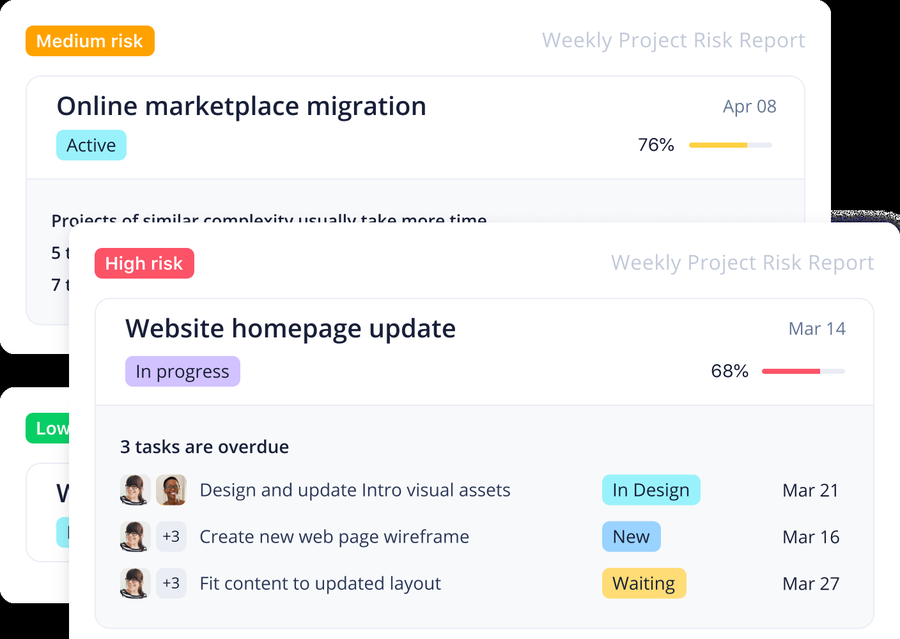
How it handles a risk: Wrike's native risk feature is predictive. AI Project Risk Prediction rates a project low, medium or high from its dates and the outcomes of similar past projects, and a weekly risk report arrives by email. Wrike's Help Center places the prediction on Business and above and calls it experimental. A classic register is something you build: custom fields for impact and probability as 1 to 5 dropdowns, a calculated field for the score, and Table view with reports to rank the rows. Templates such as Project Risk Analysis and IT Risk Assessment give a starting structure.
Around the register: custom request forms can create and assign tasks, automation recipes handle escalation, and an executive dashboard shows status across portfolios. Wrike's pages describe no built-in probability by impact heat map.
Plan and seats: Team is $10 per user per month for 2 to 15 users and Business is $25 for 5 to 200 users, billed yearly. Pinnacle and Apex are by quote. Slack, Microsoft Teams, Jira and GitHub are listed integrations.
- you want a weekly low, medium or high risk flag per project without scoring each risk by hand
- your teams already run requests and approvals in Wrike and a custom-field register is enough
- you need the AI risk flag on Team at $10: Wrike's Help Center places it on Business and above
- you want a register with a ready probability by impact matrix: Wrike's pages describe one built from custom fields and calculated fields
- Users like
- flexibility and scalability for project management (477 mentions), real-time collaboration (456) and task management (450)
- Users dislike
- a steep learning curve (305 mentions), not intuitive (239), missing features such as visualizations and advanced reporting (203), limited advanced calculations (190) and an overwhelming feature set (171)
- Source: G2, 4,648 reviews
- Starting price
- Team $10 and Business $25 per user per month billed yearly; Pinnacle and Apex by quote
- Free plan limit
- 200 active tasks and one shared space, no Gantt
- Board view
- All plans including Free
- Task dependencies
- Team and up, FS, SS, FF, SF
- Workload charts and request forms
- Business and up
- Programme timeline
- Pinnacle and Apex (quote)
- Automation actions per month
- 50 per seat Team, 200 Business
- SAML SSO
- Pinnacle and Apex only; SCIM also Pinnacle and Apex
- Audit reports
- Pinnacle and Apex: logins, role changes, SSO and 2FA changes, exports, sharing; export cap 65,000 events as XLS
- Portfolios
- Team and up
- Resource management
- Workload and time tracking from Business; job roles, bookings, budgeting and utilization dashboard on Pinnacle and Apex
- Trust Center
- SOC 2 Type II, ISO 27001, ISO 27018, HIPAA, GDPR
- Regions
- US and EU data centers; plan tier not stated
- Critical path
- Business, Pinnacle and Apex; not Free or Team (Wrike help)
- Gantt dependencies
- All four types with lead and lag; dependents move with a moved task, completed tasks stay put (Wrike Gantt page)
- Client seat rule
- Partly: viewers are free (view and comment); contributors and external users who edit are paid limited seats. Guest reviewers need no seat but start on Business.
- Client proofing
- File proofing, guest approvals and custom approval flows on Business and up; HTML5 proofing on Pinnacle and up. Guest reviewers get an email invite and see only files assigned to them.
- Time tracking
- Business and up (timer, manual entries, timesheets)
- Billable time and budgets
- Billable vs non-billable time and budgeting with bill and cost rates on Pinnacle and up, not Business
- Request forms
- Business and up; a public link lets non-seat users submit; conditional logic
- Resource planning
- Resources view and workload charts on Business; job roles, bookings and utilization on Pinnacle
- Adobe Creative Cloud
- Extension on Business and up; QuickBooks and Power BI on Pinnacle and up
- Native client invoicing
- Not confirmed
- Basecamp import
- No Basecamp import documented; the import help covers Excel, Outlook and Microsoft Project files
- Time tracking source note
- Wrike's help center lists timesheets from Business; the pricing page names time tracking only in the Pinnacle feature summary
- Integrations
- 400+ applications stated by the vendor
- AI risk prediction
- Business and above, low, medium or high
- Register
- Custom fields and a calculated score
- Team plan limit
- 15 users
Jira
Jira
Mitigation tracking in the delivery backlog
Jira fits an engineering-led program that already tracks work in Jira and wants mitigation tasks in the same backlog as delivery.
How it handles a risk: Jira has no dedicated project risk module. Atlassian's own risk register guide frames the register as a Confluence page, with a risk ID, an assessment by likelihood and outcome, a response plan and an owner, and positions Jira for tracking the response work from identification to resolution. Teams can instead create a risk work item type, add custom fields for likelihood, impact, owner and status, and use boards, lists, dashboards and automation.
Program view: Plans, formerly Advanced Roadmaps, is on Premium and Enterprise. It shows dependencies including ones outside the plan, sandbox editing and scenario comparison, which helps see which delivery risk touches which team. It's a planning view, not a quantitative simulation. Standard has single-project dependencies only.
Add-ons: heat maps, scoring matrices and Monte Carlo analysis come from Marketplace apps. SoftComply Risk Manager Plus and Hedge are two, and per SoftComply's own post its model supports up to 10 characteristics and 10 iterations. There's no native Microsoft Project or Excel importer, so the CSV importer is the route.
- your engineers already close work in Jira and you want mitigation tasks in the same backlog as delivery
- you need cross-project dependency views on Premium to show which risks touch which team
- you want a scored register with a heat map out of the box: that needs Confluence or a Marketplace app
- you need a Monte Carlo finish-date estimate: Plans compares scenarios but doesn't simulate probabilities
- Users like
- ease of use (1,157 mentions in G2's pros summary) and flexibility (857)
- Users dislike
- the learning curve (682 mentions), interface complexity (504), difficulty for new users (455), feeling overwhelmed (344) and slow performance on large projects (327); the first four overlap
- Source: G2, 8,092 reviews
- Starting price
- Free up to 10 users; Standard $8.48 and Premium $15.56 per user per month at 300 users on monthly billing; Enterprise by quote
- Program tier
- Premium, $19.60 per user per month (monthly, 10 to 100 users); annual 10 users $1,950 per year
- Dependencies
- Single project on Free and Standard, cross-project on Premium and Enterprise
- Automation
- Free 150 steps per subscription, Standard 400, Premium 750, Enterprise 1,000 steps per user per month
- WIP limits
- Min and max per column; header turns red or yellow, moves are not blocked
- Trello import
- Official importer; archived cards, checklists and custom fields not imported in software spaces
- Other reviews
- TrustRadius 8.4 of 10 (4,390 ratings), Software Advice 4.4 of 5, checked 2026-10-26
- SSO and SCIM
- Atlassian Guard Standard; included with Enterprise, a separate subscription on Standard and Premium
- Data residency
- Standard, Premium and Enterprise; regions include US, EU, UK, Canada, Australia, India, Japan, Singapore, Germany, Switzerland, South Korea
- Strategy Collection
- Focus and Jira Align; needs Jira Cloud Premium or higher
- Enterprise
- Contact sales; 99.95% uptime guarantee
- Data Center
- End of sale for new customers March 30, 2026, for existing customers March 30, 2028, end of life March 28, 2029; Server support ended February 15, 2024 (Atlassian)
- Price update
- List prices rose again on October 13, 2026: Standard $9.05 to $9.70, Premium $18.30 to $19.60 per user per month (1 to 100 users); Atlassian's 2025 increase was 5 percent Standard, 7.5 percent Premium
- Free plan
- Up to 10 users
- Export
- CSV export of up to 10,000 work items at a time; Backup manager includes attachments only if ticked, with 48 hours between backups with attachments; automation flows and app data are not in the backup
- Capacity in Plans
- Premium and Enterprise only: per-team sprint capacity, split equally across team members; plans need boards as work sources and estimates
- Capacity view
- Announced 27 July 2026, Premium and Enterprise: weekly allocations per person, fixed 40-hour week, over 100 percent is flagged, not blocked
- Register
- Confluence page or Marketplace app
- Cross-project dependencies
- Premium and Enterprise
RiskyProject
RiskyProject
Desktop register plus Monte Carlo
RiskyProject fits one scheduler or risk lead who wants a register and Monte Carlo finish dates on a Microsoft Project or Primavera schedule.
How it handles a risk: you open or import a schedule through the Microsoft Project add-in or the Oracle Primavera integration, log risk events with probability, impact and a score for both threats and opportunities, and add three-point uncertainty to durations and costs. A Monte Carlo run then returns finish-date and cost probabilities. Mitigation and response plans are stored against each risk and compared with waterfall diagrams and multi-baseline analysis.
Editions: Monte Carlo, the Microsoft Project add-in and the Primavera integration come in every edition. Sensitivity analysis, histograms and mitigation baselines start on Professional, and so does the customizable risk matrix. Enterprise adds a shared SQL-backed register with roles and an approval workflow.
Price: Intaver's purchase page lists yearly subscriptions at $685 for Lite and $979 for Professional. Perpetual licenses are by contact, and Enterprise is perpetual only with at least 5 desktop licenses plus a server.
- one analyst wants a risk register and schedule simulation in a single desktop tool for under $1,000 a year
- you need to compare mitigation options against baselines with waterfall diagrams, from Professional
- several people must edit one shared register with approvals: that is Enterprise only, with a server
- you want a customizable risk matrix or sensitivity charts on the entry edition: both start on Professional
- Starting price
- Lite $685 and Professional $979 per year; Enterprise by quote
- Editions
- Lite, Professional, Enterprise
- Schedule integration
- Microsoft Project add-in and Oracle Primavera integration, all editions
- Register
- Probability, impact, score and status for threats and opportunities
- Enterprise
- Shared register, roles, approval workflow and SQL corporate database
- Schedule tools
- Microsoft Project add-in and Primavera integration
- Shared register
- Enterprise
- Entry price
- $685 a year (Lite)
@RISK
@RISK
Monte Carlo inside desktop Excel
@RISK fits risk analysts who already live in Excel and need probability-based finish dates and tornado charts on an imported schedule.
How it handles a risk: you describe uncertain inputs in a workbook with probability distributions, 90+ of them, and run thousands of simulations. Results come as histograms, tornado charts and sensitivity tables. For schedules, the Import Project File command accepts Microsoft Project (.MPP, .XML) and Primavera P6 (.XER, .XML) files, can run a Schedule Audit, and builds a schedule risk model in a worksheet. A Probabilistic Gantt shows the simulated result after a run.
What it isn't: @RISK has no scoring matrix or mitigation workflow. A risk register with portfolio roll-up is the separate Predict! product, which @RISK connects to.
Platform and price: it needs Windows 10 or 11 and desktop Excel 2016 or later. Lumivero sells Professional at $2,225 and Industrial at $2,895 per user per year in the USD list prices, and Industrial adds RISKOptimizer, time-series simulation and multi-core processing. Results export to Word, Excel, PowerPoint and Power BI.
- your analysts model schedule and cost in Excel and want tornado charts across 90+ distributions
- you import Microsoft Project or Primavera P6 files and want a schedule audit before you simulate
- your team uses a Mac or Excel for the web: @RISK runs only in Windows desktop Excel
- you need a shared register with owners and mitigation tracking: that's the separate Predict! product
- Users like
- Monte Carlo capability
- Users dislike
- load times in Excel
- Source: G2, 11 reviews
- Starting price
- Professional $2,225 and Industrial $2,895 per user per year; volume licensing by quote
- Platform
- Windows desktop Excel 2016 or later
- Schedule import
- Microsoft Project and Primavera P6
- Outputs
- Histograms, tornado charts, sensitivity, Probabilistic Gantt
- Editions
- Professional and Industrial
Deltek Acumen Risk
Deltek Acumen Risk
Contingency and risk drivers on P6 schedules
Deltek Acumen Risk fits a schedule team on Primavera P6 or Open Plan that must justify a contingency figure at a stated confidence level.
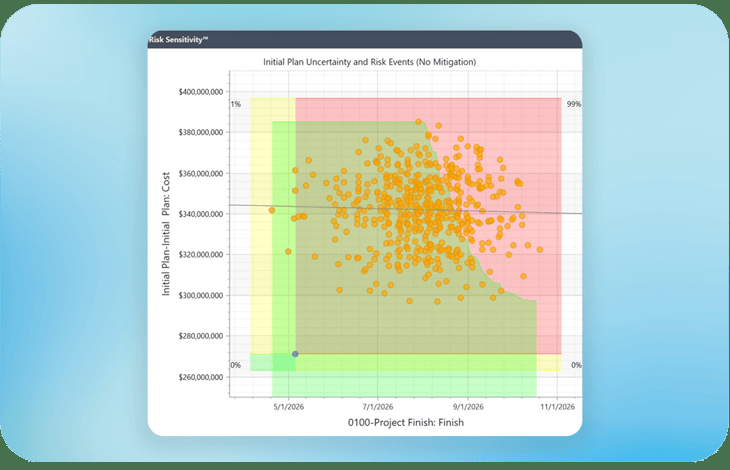
How it handles a risk: you import a schedule from P6, Open Plan or Microsoft Project, apply duration or cost uncertainty to activities with sliders that cascade to child activities, and add discrete risk events that map to activities. The Monte Carlo run returns a risk exposure histogram with confidence levels and contingency, and a Risk Drivers chart ranks which activities and risk events move a milestone most. A liquidated damages risk type models delay penalties with a configurable cap.
Round trip: risk-adjusted schedules export back to P6, Open Plan, Microsoft Project, Phoenix and Asta Powerproject with logic preserved. Deltek also describes an AI assistant that suggests risks and mitigations tied to the risk drivers.
Price and scope: the product page offers a demo request and no price. Portfolio rollups on Deltek's pages belong to its schedule-quality products, so a program-wide risk rollup is something to ask about in the demo.
- your schedules live in Primavera P6 or Open Plan and you need contingency stated at a confidence level
- you want a Risk Drivers ranking that names the activities pushing a milestone date
- you want a published price before a sales call: the product page lists none
- you want a program-wide risk rollup: Deltek's portfolio rollups belong to its schedule-quality products, not to Risk
- Starting price
- Quote only
- Schedule import
- P6, Open Plan, Microsoft Project
- Export
- Risk-adjusted schedules back to P6, Open Plan, Microsoft Project, Phoenix and Asta Powerproject
- Outputs
- Exposure histogram, confidence levels, Risk Drivers
- Modeling
- Duration and cost uncertainty sliders plus discrete risk events mapped to activities; liquidated damages risk type
- Price
- Quote only
What a project risk tool must track
A tool earns its place when every risk answers six questions, and the answers shouldn't live in someone's head: what could happen, how likely and how bad, who owns it, what's the response, what triggers it and when it's reviewed next. Check each tool against the list below before you sign anything.
- A risk statement written as cause, event and effect, not a topic word
- Probability and impact on a scale you set, with a score that calculates itself
- One named owner per risk and a due date on every mitigation action
- A trigger or early-warning signal, so the owner knows when to act
- A status that separates open, occurred and closed, so a risk becomes an issue deliberately
- A link from each risk to the task or milestone it threatens
- An alert or report when a score or status changes
- A view that shows the top risks across every project in the program
Test the last two items with real data. A register that looks tidy for one project often breaks when ten projects write to it, but the tools above differ most in how they roll risks up across projects.
Do you need a dedicated tool or a register in your project tool?
A register in your work management tool is enough while the risks are qualitative and the owners are few, and it's particularly easy to start. Smartsheet, monday.com, Wrike and Jira all hold one, and you pay in configuration time, not in a risk plan. Move to a dedicated tool when you have to defend a date or a contingency number to a sponsor, because a register can't tell you the probability of finishing on time; only simulation can.
You need Monte Carlo when a sponsor asks how likely the finish date is, and you don't need it when the question is who owns which risk and what's being done about it. If @RISK doesn't fit because your team isn't on Windows desktop Excel, RiskyProject and Deltek Acumen Risk are the other schedule risk analysis options here.
For a quick decision: choose Celoxis if you want one tool with a risk app and a published price, choose RiskyProject if a single scheduler needs a register and simulation for under $1,000 a year, and choose @RISK or Deltek Acumen Risk if the schedule lives in Microsoft Project or Primavera and the sponsor asks for confidence levels. For the register itself, how to build a risk register covers the fields and review rhythm that any of these tools needs.
Where a risk tool stops and a program view starts
All eight tools manage risks inside one project or one schedule. A program has a second layer: a delay in one team's work that threatens a milestone owned by another team, across tools nobody shares. Jira's Plans and Smartsheet's Portfolios cover part of that inside their own platforms, but a simulation tool doesn't see it at all.
Frequently asked questions
What is project risk management software?
Project risk management software records each project risk with its probability, impact, owner and mitigation action, scores it and tracks it until it's closed. Some tools keep a register next to the schedule, such as Celoxis, Smartsheet and monday.com, and others simulate schedule and cost risk with Monte Carlo analysis, such as RiskyProject, @RISK and Deltek Acumen Risk.
Can I manage project risks in a spreadsheet?
Yes, for a single project with a few owners. A spreadsheet or a Smartsheet sheet holds the fields and calculates the score. It struggles once several projects write to it, because rollups, alerts and a link from each risk to its task need rebuilding by hand.
Does Jira have risk management?
Jira has no dedicated risk module. Atlassian's own risk register guide keeps the register in Confluence and uses Jira to track the response work, and heat maps or scoring matrices come from Marketplace apps. Plans on Premium adds cross-project dependency views and scenario comparison, but it doesn't simulate probabilities.
What does Monte Carlo risk software do?
Monte Carlo risk software runs a schedule or cost model thousands of times with uncertain durations and costs, then reports the probability of finishing by a date or under a budget. RiskyProject, @RISK and Deltek Acumen Risk do this on imported Microsoft Project or Primavera schedules.
How much does project risk management software cost?
Seat-based work tools run from $9 to $35 per user per month billed yearly, for example Smartsheet Pro at $9 and Celoxis Professional at $35, which holds its risk app. Desktop simulation tools cost per analyst per year: RiskyProject from $685 and @RISK from $2,225. Deltek Acumen Risk is quote only.
Which tool is best for program risk across several projects?
Celoxis publishes a register report across organizational and project risks from Professional at $35. Smartsheet Portfolios and monday.com portfolio management start on Enterprise, and Jira Plans on Premium. None of them replaces a view of dependencies between teams in different tools.