The best construction project management software depends on who carries the risk on the job. A residential builder needs the schedule, change orders and client invoices to move together. A commercial general contractor needs RFIs, submittals and budgets tied to drawings across dozens of active projects, while a crew in the field just needs plans and punch items on a phone. Almost every tool in this category covers some of that, but they differ most in how they charge for it.
We compared seven tools on those points. For each one, we read the US pricing page, a feature page, a help-center article that shows how one core workflow behaves, and a review site. If you're after day-to-day task tracking for office work instead of a jobsite, our guide to project management software covers that question.
- tools compared
- 7
- publish no price at all (Procore, Buildertrend, Primavera)
- 3
- include unlimited users in the fee (Procore, Buildertrend)
- 2
- has a verified free plan (Fieldwire Basic)
- 1
Which construction project management software is best?
The best construction project management software depends on your kind of work and how you'd like to pay. Here are our picks by situation, and you'll find the full entry for each one below. It's worth reading the pricing model in each tag, because it decides the real cost.
 Best for commercial contractors with many active projectsProcoreRFIs, submittals, budget and schedule in one system, company-level portfolio reporting and unlimited users, priced by annual construction volume.
 Best for residential builders and remodelersBuildertrendA Gantt schedule that updates when change orders land, with invoices and job costs on the same job. Quote only, unlimited users.
 Best for teams in the Autodesk stack that want a published priceAutodesk BuildPer-user plans at $67 and $117 a month, with schedule import from P6, Microsoft Project and Asta.
 Best for field crews and a free startFieldwirePlans, task pins and markups on phones, with a free plan for 5 users and 3 projects.
 Best for daily reports and timecardsRakenDaily reports that combine your crew with subcontractor reports, from $23 per user per month.
 Best for a PMO that already runs on spreadsheetsSmartsheetA portfolio layer over project sheets, but portfolios sit on the Enterprise plan.
 Best for large programs with contract schedulesOracle Primavera P6Critical-path scheduling and resource capacity across projects. Sold by quote only.
 Our product · for the gaps between toolsThe Program ManagerIt isn't a construction tool. It maps dependencies across Jira and Asana and watches milestones for risk.
What construction project management software does that general PM tools do not
Construction project management software connects the documents and money of a building job to its schedule. A general task tool tracks work items and doesn't know what an RFI is. A construction tool knows who answers an RFI, and what a change order does to the budget and the finish date.
Six objects separate the two, and that's the test we use for the rest of this page.
- Drawings and markups. Sheets are versioned, and issues get pinned to a spot on the plan.
- RFIs (requests for information). A question from the field goes to a named person, and the official answer is on record.
- Submittals. Product and material approvals get logged against the spec.
- Change orders. A scope or price change gets approved by the client and flows into the budget.
- Daily logs. Crews report weather, manpower, work done and photos for each day, and the log is the record if a dispute comes up later.
- Punch lists. Open defects are tracked on the plan until they're closed.
Cost tracking sits across all six. A tool can cover the field objects but still lack job costing, and that's why contractors often run two systems.
How we chose these construction tools
A tool made this list if it handles drawings or field reports and at least one of RFIs, change orders or daily logs, and it's got either a US price or a clearly stated quote model. For each tool we recorded the pricing model, the starting price, whether a free plan exists, what the schedule does, and which accounting or scheduling systems it connects to. Every price comes from the vendor's US pricing page, checked in October 2026. Ratings come from G2 or Capterra, and each entry says which one it's using.
We left out estimating-only tools, equipment-tracking systems and full construction ERPs, because they answer different questions. The Program Manager is our own product, and it isn't ranked here because it isn't a construction tool.
Construction project management software compared
| Tool | How it charges | Free option | Starting price (USD) | Rating |
|---|---|---|---|---|
| Procore | Annual fee per product, based on annual construction volume; unlimited users | None published | Quote only, priced by annual construction volume | 4.6 (4,598) |
| Autodesk Build | Per user: Essentials $67, full $117, paid annually; unlimited users and projects by quote | None on the pricing page | From $117/user/month paid annually; unlimited tier is quote only | 4.4 (5,667) |
| Buildertrend | Custom quote; unlimited users and projects; 10% off if paid annually upfront | None published | Custom quote only, unlimited users and projects, 10% off if paid annually upfront | 4.3 (231) |
| Fieldwire | Per user: Pro $39, Business $64, Business Plus $89, billed annually | Basic: 5 users, 3 projects, 100 sheets | Free (5 users, 3 projects); Pro $39, Business $64, Business Plus $89 per user/month billed annually; custom contracts via sales | 4.5 (586) |
| Raken | Per user: Basic $23, Performance $59, minimum 3 users, billed annually; unlimited projects | None listed | From $23/user/mo (Basic), Performance $59/user/mo, min 3 users, billed annually | 4.6 (114) |
| Smartsheet | Per member: Pro $9, Business $19; portfolios on custom-priced Enterprise | None, 30-day trial | $9 per member per month (Pro, billed yearly; $12 billed monthly), Business $19 yearly | 4.4 (22,872) |
| Oracle Primavera P6 | Quote through Oracle or a reseller; Primavera Cloud is licensed per hosted named user by module | None | USD price not published (quote from Oracle or a reseller) | 4.4 (Capterra, 182) |
| The Program Manager Our product | Maps dependencies across Jira and Asana and watches milestones for risk | The Program Manager maps dependencies across Jira and Asana, watches every milestone for risk, and keeps blockers, decisions and approvals in one graph. | Invite-only | No reviews yet |
Starting prices are USD per user per month where a unit is given. Autodesk's rating is for the whole Autodesk Forma suite on G2, and Primavera's rating is from Capterra.
How construction software is priced
Construction tools charge in four different ways, and the model matters more than the sticker price. A per-user tool gets expensive when subcontractors and clients need logins, while a volume-based tool prices the company, not the seat.
| Pricing model | Tools | What you pay for |
|---|---|---|
| Annual construction volume | Procore | An annual fee per product, scaled to the dollar value of work you build, with unlimited users |
| Quote with unlimited users and projects | Buildertrend, Autodesk Build (top tier) | A negotiated subscription, with no per-seat fee |
| Per user per month | Fieldwire, Raken, Autodesk Build, Smartsheet | Each person who logs in, with plan tiers that unlock features |
| Quote by module | Primavera P6 and Primavera Cloud | Oracle or reseller licensing, by product and named user |
Fieldwire shows the third model most clearly, since its tiers decide which construction objects you get at all.
Fieldwire- Basic ($0)Plans, tasks and markups for 5 users, 3 projects and 100 sheets
- Pro ($39)Unlimited projects and sheets, reports and project templates
- Business ($64)Custom fields and forms, integrations, BIM viewer and the Microsoft Project importer
- Business Plus ($89)RFIs, submittals, change orders and budget
The 7 best construction project management tools
Each entry starts with the kind of contractor it fits, then says what it does on a real job and where it stops. You'll find prices in the side panel and in the table above.
Procore
Procore is a full construction platform covering RFIs, submittals, budget, schedule and field tools, with a company-level Portfolio and Company 360 Reporting for multi-project views. Pricing is an annual fee per product based on annual construction volume, with unlimited users.
Procore fits a commercial general contractor that's running many projects at once, because RFIs, submittals, budget, schedule and field tools share one system, and every project can have unlimited subcontractor and client users.
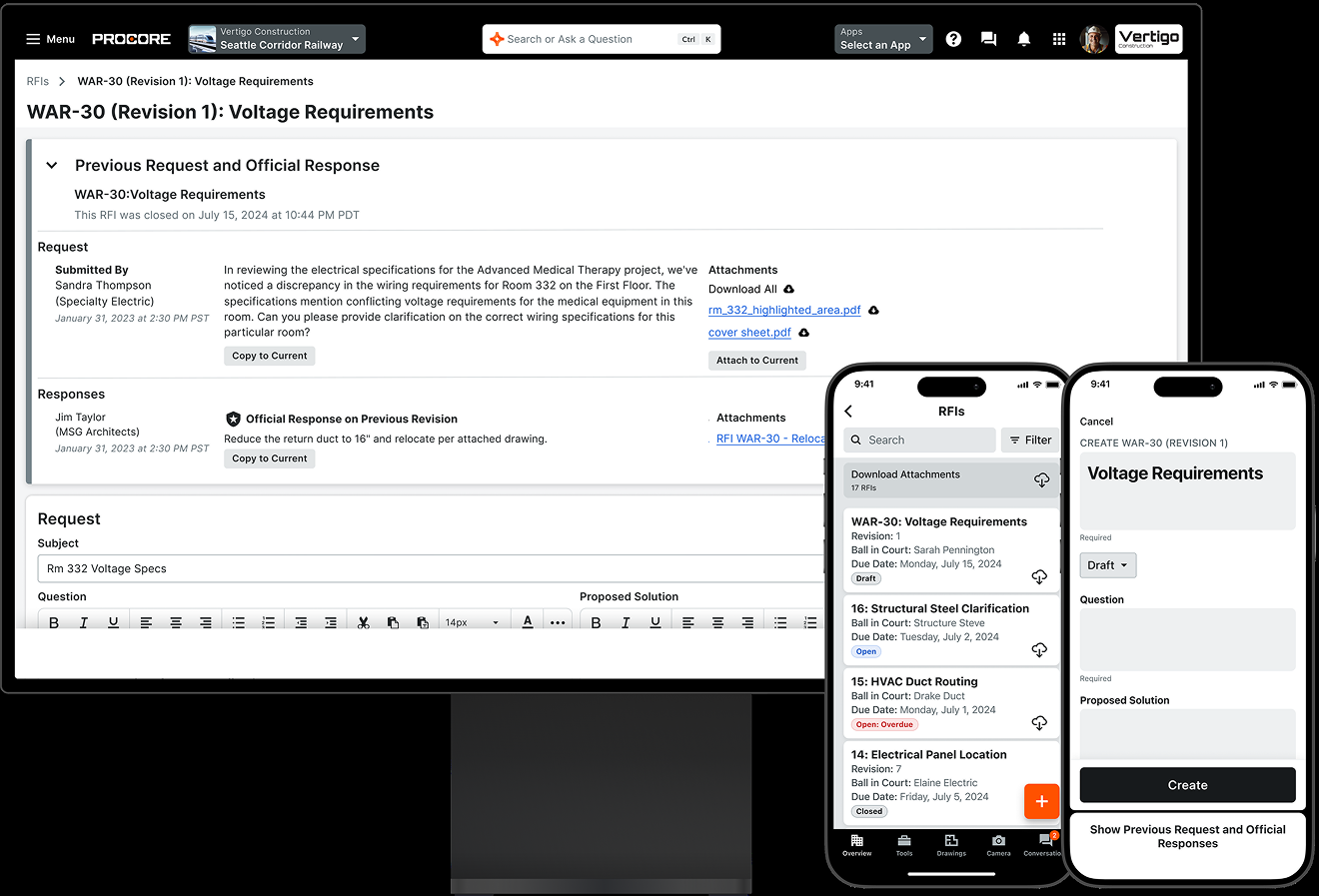
An RFI in Procore has a question, replies and an official response that the RFI manager picks. A Standard user can only save a draft or send it to the RFI manager for review, unless they've got the "Act as RFI Manager" setting. To open an RFI you need a number, a subject, assignees, a due date and the question, and duplicate numbers aren't allowed. RFIs link to drawings, and Procore ties the budget to field labor and commitments, so a change order that's raised in the field lands in the cost picture.
For several projects at once, Procore has a company-level Portfolio tool that lists every project as a list, thumbnails or a map, plus an Executive Dashboard, a Health Dashboard and Company 360 Reporting for custom reports across projects. Access is set by permission level, not by a published plan, and Standard and Read Only users only see the projects they're on. Procore's help page describes the older Portfolio tool and says Procore Home is replacing it, so ask for a demo of the current one, not the documentation.
- you run many active projects and want company-level portfolio, health and financial dashboards, with unlimited subcontractor and client users in one volume-based fee
- you need ERP sync (Sage Intacct, Vista, Spectrum, NetSuite, CMiC and others on Procore's official list) and you're after the option G2 reviewers rate easiest to use in this group
- you need a published per-seat price you can budget without a sales cycle, since Procore doesn't publish prices or tiers
- you rely on live two-way P6 scheduling or Primavera Cloud, because schedules are read-only in Procore, updates are manual uploads, and Primavera Cloud isn't supported by Procore Drive
- Users like
- Ease of use (506 mentions)
- Users dislike
- Missing features (163) and learning curve (156)
- Source: G2, 4,598 reviews
How it works in practice
Schedules come in through Procore Drive, which imports a Primavera P6 schedule with its activities, one baseline, dates, percent complete, predecessors and successors, but the schedule is read-only in Procore, updates happen by manual upload, and Primavera Cloud isn't supported. Field Productivity is the one product that's priced per full-time employee instead of by volume, and G2 reviewers report an average implementation time of 3 months.
Procore's pricing page publishes no numbers, so expect a sales process. We couldn't verify Procore's resource capacity planning or cross-project dependencies on a product or docs page, so don't assume they're included. It's a sales-led purchase, so don't expect a quick pilot.
- Starting price
- Quote only, priced by annual construction volume
- Pricing model
- Annual fee per product, based on annual construction volume
- Users
- Unlimited, including subcontractors and clients
- Portfolio
- Company Portfolio and Company 360 Reporting
- ERP sync
- 14 connectors on Procore's official list, including Sage Intacct, Vista, Spectrum, NetSuite and CMiC
- Mobile
- Drawings, daily logs and photos, with offline use on remote sites
Autodesk Build
Autodesk Build, now branded Forma Build, covers RFIs, submittals, cost management, scheduling and field tools, with an account-level Insight report for cross-project budgets. It has published per-user prices ($67 Essentials, $117 full) and a contact-sales tier for unlimited users and projects.
Autodesk Build, now branded Forma Build, fits teams whose designers already work in Autodesk tools and who'd like to see a price before they talk to sales.
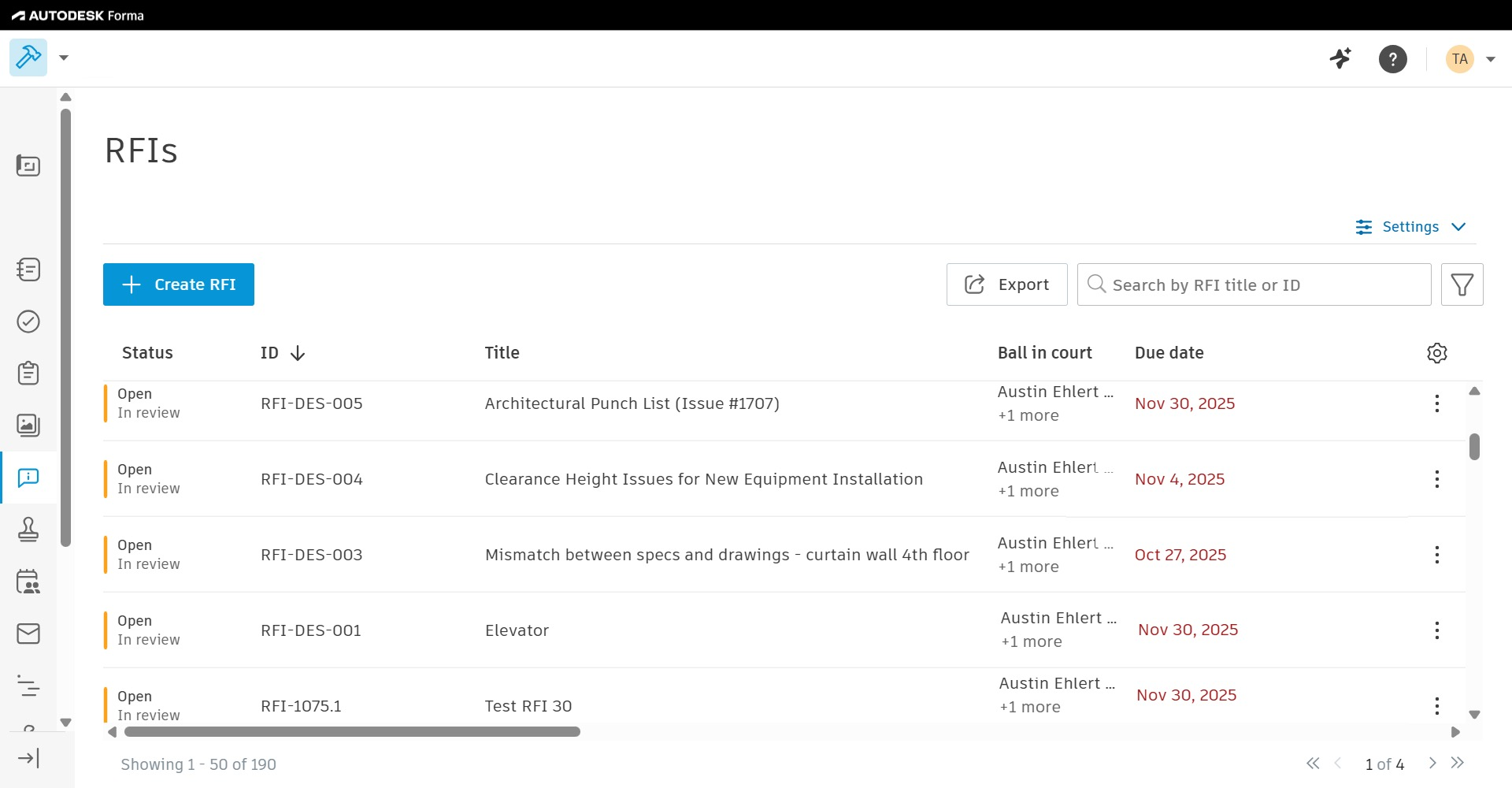
To raise an RFI, the creator picks an RFI type, sets who has the ball in court (a person, a company or a role) and adds up to 10 reviewers. Optional reviewers can answer at any point, and they don't block the workflow. On mobile, you can pin an RFI to a spot on a sheet, which is how a field lead flags a problem where it is. Autodesk also offers an AI check that says whether an RFI is needed, recommended or undetermined, and its own help page says you've got to verify the output. There's a limit of 100 queries per member and 500 per project in 24 hours.
The Schedule tool imports from Primavera P6, Microsoft Project and Asta Powerproject, and it can compare schedule versions, which is handy when the architect sends a revised plan. Cost management, submittals, meeting minutes and closeout sit in the same product, so it's a full platform, not a field app.
- you'd like a published per-user price to start with, and you can grow into the unlimited users and projects tier later
- your scheduling lives in P6, Microsoft Project or Asta and you want to import it for the field, and your design team already works in Autodesk tools
- you need native ERP sync, because the accounting links on Autodesk's own guide mostly run through partners or an integration platform such as Agave, Morpheus, hh2 or Forma Construction Connect
- you need proven portfolio dashboards and resource capacity planning, since the only cross-project report we found is a 2022 executive budget report and we didn't verify any capacity planning
- Users like
- ease of use (556 mentions); the G2 listing covers the whole Autodesk Forma suite, not Build alone
- Users dislike
- missing features (299 mentions) and limitations (226)
- Source: G2, 5,667 reviews
How it works in practice
The full per-user plan adds unlimited sheets, cost management and field execution on top of what the $67 Essentials plan offers. Essentials covers everyday work onsite, such as sheets, issues, forms, photos and daily reports, and it's a single-user subscription.
For several projects, the only cross-project report we could verify is an executive budget report in the Insight module, described in a 2022 Autodesk post. We couldn't confirm which plan includes it, so ask before you count on it. Most accounting links run through partners or an integration platform (Agave, Morpheus, hh2 or Forma Construction Connect), not native connectors, according to Autodesk's own ERP guide.
- Starting price
- From $117/user/month paid annually; unlimited tier is quote only
- Per-user price
- Essentials $67, full $117 per month, paid annually
- Unlimited users
- Contact sales tier only
- Schedule import
- Primavera P6, Microsoft Project, Asta
- Unlimited users and projects
- Contact sales tier only
- Accounting links
- Mostly partners or an integration platform
Buildertrend
All-in-one platform for home builders and remodelers that ties a Gantt schedule (predecessors, critical path, baseline) to change orders, invoices, selections and job costing. Priced by sales quote with unlimited users and projects, so there is no public tier ladder.
Buildertrend fits a residential builder or remodeler with 5 or more jobs a year, because the schedule, change orders, invoices and budget all update each other.
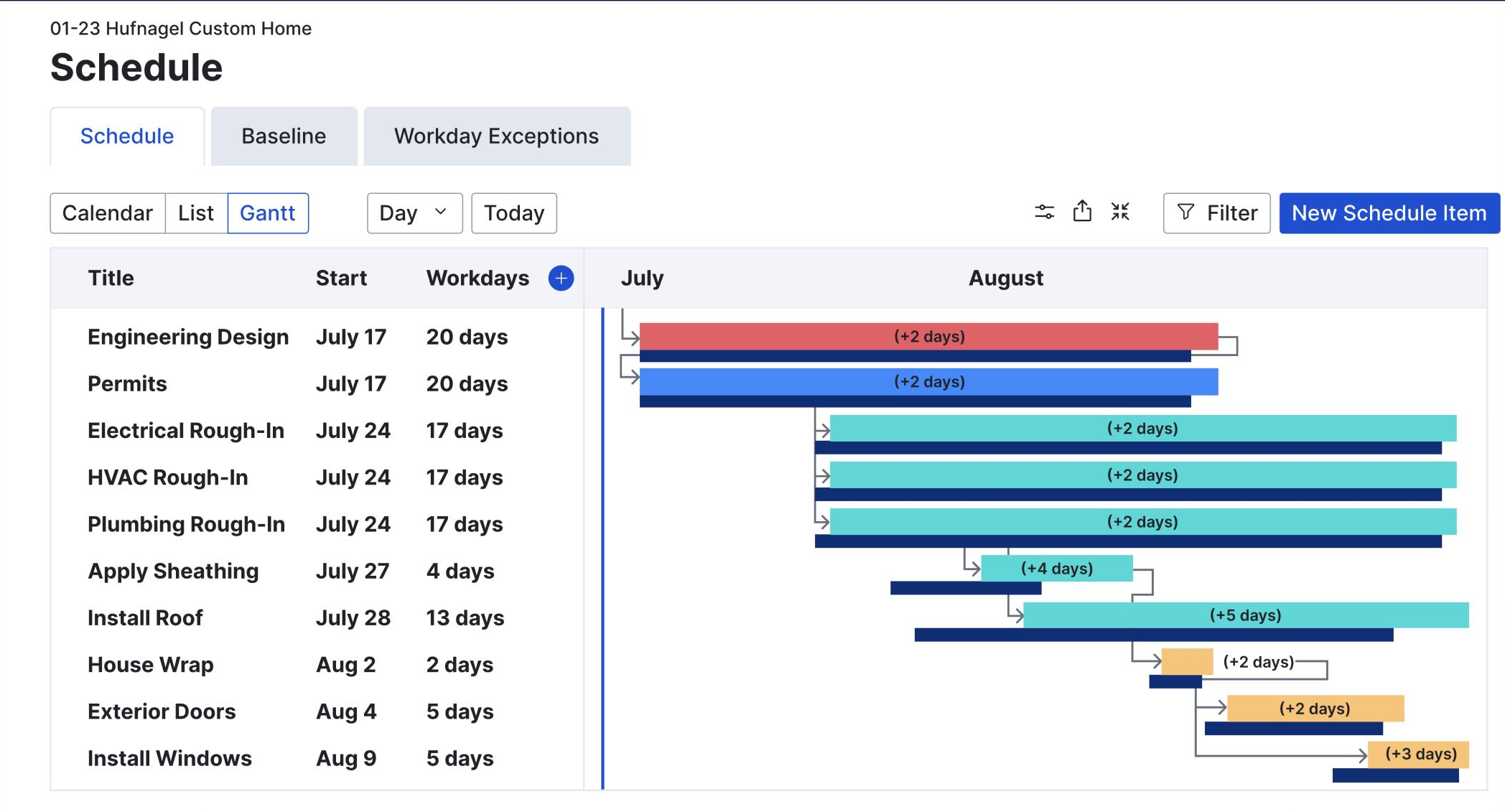
The schedule is a Gantt, agenda and calendar view. You link two items by dragging from the end of one to the start of the next, with finish-to-start and start-to-start links and lag or lead time, and if the predecessor moves, the successor adjusts on its own. Critical path scheduling and a baseline of the original timeline are listed on the product page, and Buildertrend says the schedule updates when change orders affect task timelines.
A change order is created inside a job with a title, an approval deadline, a payment option and either a flat fee or line items. Buildertrend recommends line items, because a flat fee doesn't allocate cost to specific budget cost codes. Once the client approves, Buildertrend creates and sends the invoice for the change order amount. Subs and clients see the schedule through portals, and it's available offline on mobile.
- you run 5 or more residential or remodel jobs a year and want schedule changes, change orders, invoices and budgets to update each other in one system
- you want unlimited users (subs, clients, office) without per-seat fees, and you're fine buying through a sales call
- you need a published price or month-to-month flexibility: pricing is quote-only, and one G2 reviewer says they were pushed onto an annual contract
- you need dedicated resource capacity planning or executive portfolio rollups, because we couldn't verify either on Buildertrend's pages (only a vendor FAQ line about comparing timelines on one dashboard)
- Users like
- Ease of use (10 mentions), project management (6), document management (6)
- Users dislike
- Expensive (4 mentions), complexity (3)
- Source: G2, 231 reviews
How it works in practice
The quote form asks for your type of builder and your annual construction volume, in ranges from under $500,000 to above $31 million. Buildertrend's pricing page says unlimited users and projects are included and that there's no per-user fee.
For several jobs at once, a vendor FAQ says you can see all job schedules on one dashboard and compare timelines, but we couldn't verify dedicated resource capacity planning or executive portfolio reports. One G2 reviewer, in September 2026, said the company pushed them onto an annual contract. G2 reviewers also name cost and complexity as the main complaints, and it's a heavy system to roll out to a small crew.
- Starting price
- Custom quote only, unlimited users and projects, 10% off if paid annually upfront
- Pricing model
- Custom quote, unlimited users and projects
- Dependencies
- Finish-to-start and start-to-start, with lag and lead; critical path; baseline
- Accounting
- QuickBooks (all plans), Sage Intacct, Xero
- Annual discount
- 10% off if paid annually upfront
Fieldwire
Plan-and-task-centered field app from Hilti: drawings with markups, task pins, forms and reports, with RFIs, submittals, change orders and budget only on the top tier. Cross-project analysis relies on Smartsheet or Power BI integrations rather than a native portfolio view.
Fieldwire fits a crew or a small contractor that works from drawings on phones and tablets and would rather start without a contract.
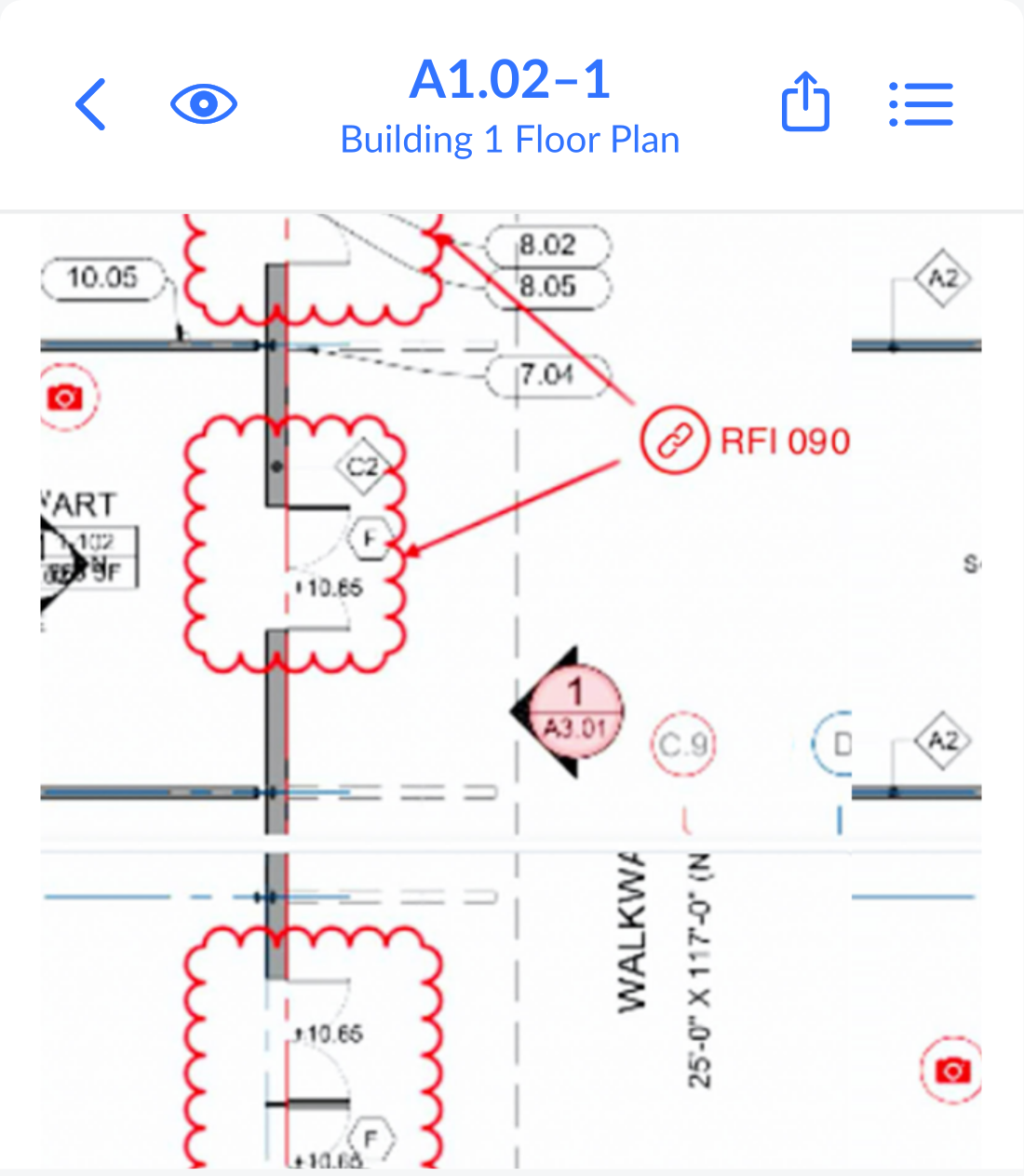
Fieldwire is built around plans and tasks, not around the budget. A task is a timestamped history of an issue, and it holds messages, photos, files and checklists, a priority status, an assignee and dates. You drop a task pin on a drawing, and plans keep a version history, so the crew always sees the current sheet. Only project admins can mark a task verified. The task tab has dashboard, calendar and Gantt views, and that's where the schedule lives.
The plan you pick decides how much of the job lives in Fieldwire. Reports and project templates start at Pro, custom forms and integrations at Business, and RFIs, submittals, change orders and budget only at Business Plus, which is $89 per user per month billed annually. The apps work offline for each project you enable, but they only sync over Wi-Fi by default.
- your crews work from drawings on phones and tablets, and you'd like a free tier for up to 3 projects before per-user pricing starts
- you already schedule in Microsoft Project or Primavera P6 and want those schedules pushed into field tasks (the Microsoft Project importer needs Business or Business Plus)
- you need task dependencies, critical path or baselines: the scheduling page describes Gantt and calendar views and 'related tasks', not predecessor links
- you need change orders, budget or RFIs but don't want to pay for Business Plus ($89 per user per month, billed annually), or you need a built-in multi-project dashboard for executives
- Users like
- Ease of use, project management, team collaboration (theme counts not shown)
- Users dislike
- Limited customization, limited functionality, slow performance (theme counts not shown)
- Source: G2, 586 reviews
How it works in practice
Fieldwire's scheduling page describes Gantt and calendar views and "related tasks" that flag trade conflicts, but not predecessor links, critical path or baselines, so we couldn't verify those. There's no native portfolio dashboard on the published vendor pages. Its integrations list names Smartsheet and Power BI for analysis across projects, and Procore and Bluebeam aren't on it.
G2's pricing for Fieldwire is out of date, so use the vendor page instead. Its help center also mentions a Premier plan that doesn't appear on the pricing page, so ask which plan name is current.
- Starting price
- Free (5 users, 3 projects); Pro $39, Business $64, Business Plus $89 per user/month billed annually; custom contracts via sales
- Free tier
- 5 users, 3 projects, 100 sheets
- Change orders and budget
- Business Plus only
- Integrations
- Business and above; API and SSO via sales
- Schedule import
- Microsoft Project (Business and up) and Primavera P6
- Cross-project analysis
- Through Smartsheet or Power BI integrations
Raken
Raken is a mobile-first field app for construction daily reports, timecards and production tracking, with unlimited projects on every plan. Its reporting is project-level (daily and Super Daily PDFs, Insights dashboards) rather than a program-level scheduling or capacity view.
Raken fits a contractor whose main pain is daily reporting: who was on site, what they did and what it cost in labor hours, subcontractors included.
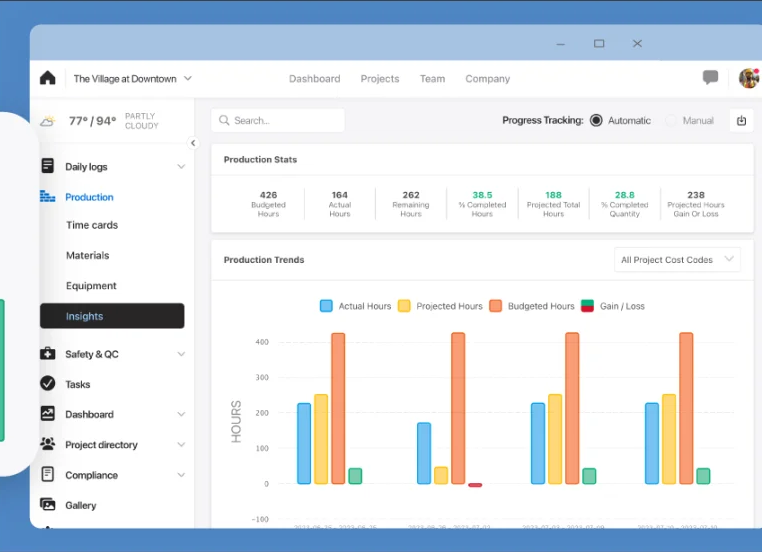
A daily report in Raken is a PDF of one project's completed report for one date, with work logs, notes, photos and time cards. A super daily report combines your own report with your subcontractors' reports for the same date, which gives a general contractor a single view of the day. Time card entries always roll up into the Work Logs section, and the manpower report pulls from both work logs and time cards, so you don't enter hours twice.
Raken's two plans both include unlimited projects, so you aren't paying per job, and that's unusual for a per-user tool. Basic includes branded daily reports, photos and videos, tasks and messaging, and that's what most small crews need. Performance adds time tracking, production tracking, safety and quality management, RFIs, forms and Insights dashboards, so a contractor who wants timecards pays $59 per user, not $23. You'll want Performance if payroll depends on the hours.
- you need daily reports and timecards that include your subcontractors and flow to payroll or accounting (Sage, QuickBooks, Viewpoint and CMiC are listed)
- you want unlimited projects at a flat per-user price, without a quote process
- you need cross-project dependencies, CPM scheduling or resource capacity planning, because Raken doesn't describe them
- you want timecards or production tracking on the cheapest tier, since those need Performance at $59 per user
How it works in practice
Raken's integrations page also lists Procore, Autodesk and Bluebeam, so it can sit next to a larger platform, though we couldn't verify which plan includes the integrations.
Raken describes project-level reporting only, and we found no cross-project scheduling, dependencies or capacity view on its pages. No G2 review themes are cited for Raken either, so this entry shows the rating without a strength or complaint.
- Starting price
- From $23/user/mo (Basic), Performance $59/user/mo, min 3 users, billed annually
- plans
- Basic $23 / Performance $59 per user per month, annual billing
- minimum_users
- 3
- gated_to_performance
- time tracking, production tracking, safety and quality, RFIs, Insights dashboards
- Pricing
- Basic $23, Performance $59 per user per month, billed annually
- Minimum
- 3 users
- Projects
- Unlimited on both plans
- Accounting and payroll
- Sage, QuickBooks, Viewpoint, Foundation, CMiC and Paychex are listed
Smartsheet
Spreadsheet-style work management that adds a portfolio layer, with a project list, template-based project setup and rollup dashboards, on its custom-priced Enterprise plan.
Smartsheet fits a PMO or owner's team that already tracks projects in sheets and wants a portfolio view over a mix of jobs, without adopting a construction platform.
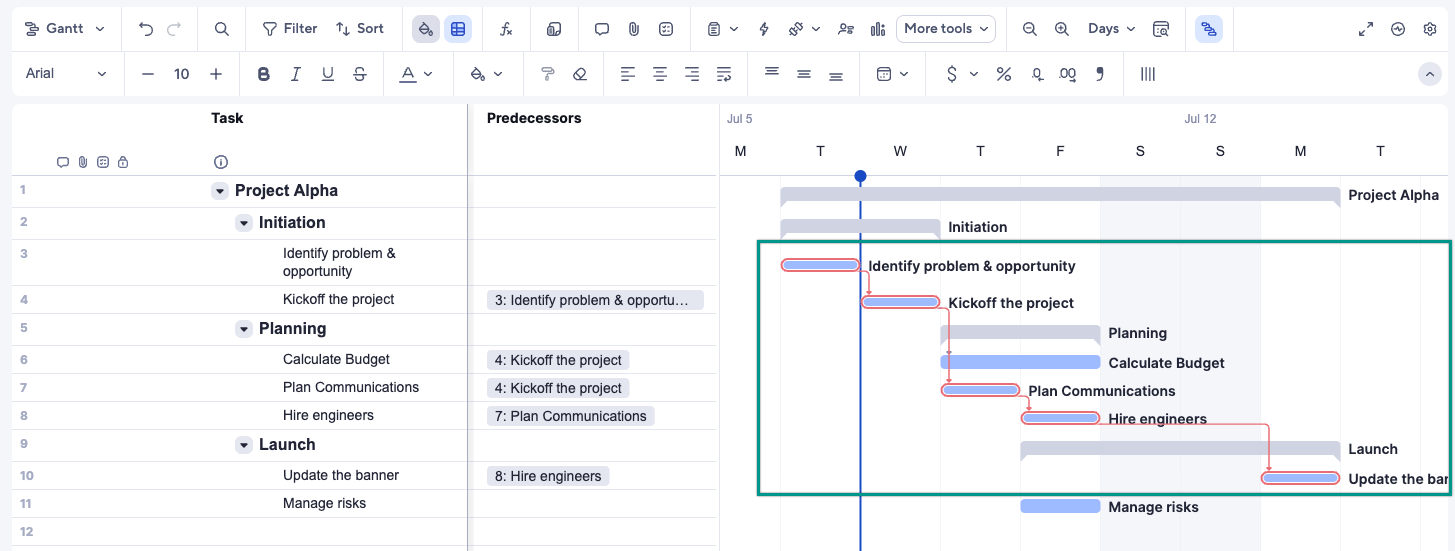
Smartsheet's construction page describes a multi-project portal overview of all projects, tracking from budgets to submittals, and template sets for a project management office and for construction and facilities management. Dependencies come with every plan, so when a date changes, it moves the tasks that follow it.
The portfolio layer is where the plan matters most. Portfolio management is included only on Enterprise and Advanced Work Management. Control Center and Dynamic View are add-ons on Business and Enterprise, and Resource Management is a separately priced add-on from Business up. Smartsheet's construction pages say it connects with Procore, but the Procore sync in its marketplace is a third-party app, not a Smartsheet product.
- your project teams already run their plans in Smartsheet sheets and you need one portfolio list and dashboard on top
- a PMO wants every new project set up from the same template with a RAID log and health dashboard
- you're buying at the $9 or $19 price for portfolio work: Portfolios sit on Enterprise, which has no published price
- you need capacity across the whole portfolio: Resource Management isn't supported inside Portfolios and is a separately priced add-on
- Users like
- ease of use (2,831 mentions in G2's pros summary)
- Users dislike
- a steep learning curve (1,183 mentions), tied to limited formulas and unintuitive features
- Source: G2, 22,872 reviews
How it works in practice
We couldn't verify a dedicated RFI tracker, a named submittal template, or Bluebeam or Autodesk connectors on Smartsheet's pages, so don't assume they exist. A construction team would build those workflows from sheets and forms. That suits a PMO, but it costs a site team more setup time, and it's the reason Smartsheet ranks below the construction platforms for jobsite use.
- Starting price
- $9 per member per month (Pro, billed yearly; $12 billed monthly), Business $19 yearly
- Portfolios from
- Enterprise (custom pricing, 10+ members)
- Portfolio size
- Up to 100 projects and 5 templates recommended
- Capacity
- Resource Management add-on, price not published
- Dependencies
- All plans
- Procore link
- Third-party Sync for Procore app
Oracle Primavera P6
Oracle's critical-path scheduling suite for large construction and engineering programs, sold as P6 EPPM or the newer Primavera Cloud, with pricing through Oracle sales only.
Primavera P6 fits a contractor or owner running a large program, where the contract requires a critical-path schedule and resources have to be balanced across projects.
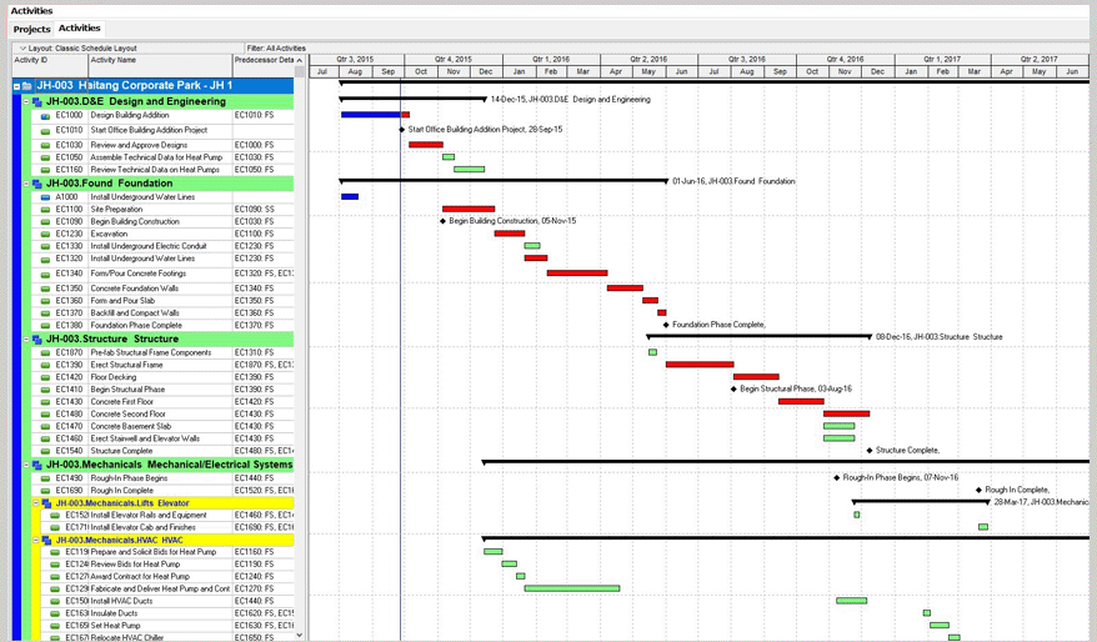
P6 EPPM is positioned for projects, programs and portfolios. Oracle's page says you can open and schedule multiple projects at once, and it lists demand and capacity planning, what-if analysis and utilization graphs for roles and resources. With Unifier, cost codes tie to the work breakdown structure, and a P6 baseline feeds cost forecasts, so a project manager can see progress without opening P6.
Primavera Cloud is a separate Oracle product, and Oracle's own page says it's not P6. It adds a risk register, quantitative risk simulation, a link between the contract schedule and the field schedule, and a central resource pool that shows bottlenecks within and across projects. The two exchange XER files. Oracle's docs say no risk data is exported when you use XER from a P6 EPPM database, so don't plan on moving risk results that way.
- you run large construction, engineering or infrastructure programs, or your contracts require P6 schedule files
- you need critical-path scheduling, baselines, resource planning and schedule risk analysis from one vendor
- you want a published per-user price or a self-serve start
- your team is small or new to scheduling tools: reviewers call it hard to learn
- Users like
- scheduling depth for very large projects
- Users dislike
- hard to learn and a dated interface
- Source: Capterra, 182 reviews
How it works in practice
Field tools usually take the P6 schedule in as a copy, and they don't write back. Procore's import is read-only and manual, and Primavera Cloud isn't supported by Procore Drive. We couldn't verify whether an owner requires XER files, because that's set in the contract, or how P6 baselines behave in an XER export. It's a specialist's tool, so plan for training.
- Starting price
- USD price not published (quote from Oracle or a reseller)
- Products
- P6 EPPM and Primavera Cloud are separate Oracle products
- Licensing
- Primavera Cloud is sold per hosted named user, by module
- Export format
- XER, round trip between P6 and Primavera Cloud
- Field handoff
- Procore, Autodesk and Fieldwire import P6 schedules
Residential, commercial and specialty contractors: which fits
The related searches on this topic split by contractor type, and so do the tools. This table maps each type to the tool whose entry above fits it best, and the reason.
| Contractor type | Best fit | Why |
|---|---|---|
| Residential builder or remodeler | Buildertrend | The schedule, change orders, invoices and cost codes update each other, and clients and subs get portals |
| Commercial general contractor with many projects | Procore | RFIs, submittals and budgets in one system, company-level reporting and unlimited users |
| Team on Autodesk design tools | Autodesk Build | A published per-user price and schedule import from P6, Microsoft Project and Asta |
| Specialty contractor or small crew | Fieldwire | Free for 5 users and 3 projects, with plans and task pins on a phone |
| Contractor with daily reporting and timecard pain | Raken | Daily reports that combine subcontractor reports, from $23 per user |
| Owner's PMO or portfolio office | Smartsheet | A portfolio layer over project sheets, on the Enterprise plan |
| Large program with a contract schedule | Primavera P6 | Critical-path scheduling and resource capacity across projects |
For a small business, the practical split is cost model. Fieldwire and Raken publish per-user prices, so a five-person team can budget today, but Buildertrend and Procore make you take a quote.
Free construction project management software
Only one of the seven tools has a free plan that we could verify, and it's got hard limits. The others are paid or quote-only, so a trial is the safer way to test them, and that's why a test on a real job matters more than a free plan.
| Tool | Free option | Limits |
|---|---|---|
| Fieldwire | Basic plan, $0 | 5 users, 3 projects, 100 sheets |
| Procore | None published | Quote only |
| Autodesk Build | None on the pricing page | Lowest plan is Essentials at $67 per month |
| Buildertrend | None published | Quote only |
| Raken | None listed | Basic plan from $23 per user, minimum 3 users |
| Smartsheet | No free plan | 30-day trial |
| Primavera P6 | None | Quote only |
Where a program office fits on top of construction software
Field tools run each job, but a program office needs something different: the milestones, dependencies and risks across all the jobs, usually in one report for executives or an owner. Procore and Smartsheet both have portfolio layers, and P6 is built for multi-project schedules, yet each one works inside its own data.
If your program also depends on work in Jira or Asana, such as software for a building's systems or a corporate rollout, and you're trying to see those dependencies, The Program Manager maps dependencies across those two tools and watches milestones for risk. It isn't a construction tool, it doesn't have RFIs or daily logs, and its live connectors are Jira Cloud, Asana and Slack. That's the gap a program office fills. Our guide to program management software covers the broader category, and a RAID log is a simple way to track risks across jobs.
How to test construction software in a trial
A demo shows the best case, but a trial on one real job shows whether the people who aren't in your office will actually use it. Run this test before you sign, and if a vendor won't let you try it with your own subs, that's a warning sign.
- Upload one set of drawings and check that sheets are named and versioned correctly
- Send an RFI to a subcontractor who has no account, and see what they have to do to answer
- Log one day with weather, manpower and photos, and export the report
- Create a change order, send it for approval and check where the amount lands in the budget
- Pin a punch item on a plan from a phone, and close it
- Switch the phone to airplane mode on site and check what still works
- Move one schedule date and check which tasks move with it
- Connect your accounting system and check what syncs, and in which direction
- Ask for the price in writing, with a line for subcontractor and client users
Frequently asked questions
What is the best construction project management software?
The best construction project management software depends on your kind of work. Procore fits commercial contractors with many projects, Buildertrend fits residential builders, Autodesk Build fits teams in the Autodesk stack, and Fieldwire fits field crews that want a free start. Check the pricing model first, because per-user, volume and quote-based tools don't cost the same.
Is there free construction project management software?
Fieldwire has a free Basic plan for up to 5 users, 3 projects and 100 sheets, and that's the only free plan we could verify. Of the other tools in this list, none publishes a free plan. Smartsheet offers a 30-day trial, but Procore, Buildertrend and Primavera are quote-only.
What is the best construction project management software for small businesses?
For a small business that wants to budget today, Fieldwire and Raken both publish per-user prices. Fieldwire has a free plan, and Raken starts at $23 per user per month with a 3-user minimum. A residential builder with 5 or more jobs a year can ask Buildertrend for a quote, which includes unlimited users.
How is construction software different for residential and commercial work?
Residential tools tie the schedule to client approvals, selections and invoices, and that's how Buildertrend is built. Commercial tools emphasize RFIs, submittals, budgets across many projects and subcontractor coordination, and that's where Procore and Autodesk Build focus.
Is construction estimating software the same thing?
No. Estimating software prices a job before you win it, while the tools in this list run the job afterward. We didn't research estimating tools for this list, so you'll want to check them separately.
Leave a Reply