The best project planning software is the one whose scheduling engine can hold the plan you actually have to keep. For most teams that means a Gantt chart that moves dependent tasks when a date changes, plus a baseline to measure slippage against and a critical path once the plan gets long. Almost every tool offers a Gantt chart, but they differ in which plan unlocks dependencies, baselines, critical path and workload, and that's where the price jumps happen.
We compared ten tools on exactly those points. For each one we read the US pricing page, a feature page, a help-center article that shows how the scheduler behaves, and a review site. If you need day-to-day task tracking rather than a schedule, our guide to project management software covers that question.
- tools compared
- 10
- gate critical path above their cheapest paid plan
- 5
- offer a Gantt chart on a free plan
- 4
- baseline per project in Smartsheet and Wrike (Celoxis keeps 6)
- 1
Which project planning software is best?
The best project planning software depends on the schedule you have to defend. A plan owned by one project manager inside Microsoft 365 needs different things than a client-facing Gantt chart or a megaproject schedule. These are our picks by situation, and each links to its full entry below.
 Best for Microsoft 365 teamsMicrosoft Planner and ProjectTimeline and dependencies start at Plan 1 for $10; baselines and critical path need Plan 3 at $30.
 Best scheduling depth per dollarCeloxisSix baselines, all four dependency types and automatic scheduling on every plan, with a five-user minimum.
 Best for baseline, critical path and workload in one planWrikeBusiness at $25 adds all three to a Gantt chart that reschedules dependent tasks.
 Best for a Gantt chart clients can readTeamGanttDrag-and-drop planning on a free plan, critical path on every paid plan and flat account pricing.
 Best free plannerOpenProjectThe free self-hosted Community edition includes Gantt charts and multi-project timelines.
 Best for spreadsheet-first plannersSmartsheetGantt, dependencies and an automatic critical path from $9, with one baseline per sheet.
 Best for megaproject schedulingOracle Primavera P6Full critical-path scheduling with Monte Carlo risk analysis in Primavera Cloud, sold by quote only.
 Our product · for planning across projectsThe Program ManagerIt isn't a scheduler. It maps dependencies across Jira and Asana and watches milestones for risk.
What project planning software does that a task board does not
Project planning software helps a team schedule tasks, allocate resources and track timelines in one plan, and it keeps that plan consistent when something changes. A task board only lists work, while a planning tool knows that task B can't start until task A finishes, so moving A moves B.
Five capabilities separate the two, and the rest of this page uses them as the test.
- Gantt chart or timeline. The tool draws tasks as bars on a calendar, with milestones.
- Dependencies. Links between tasks (finish-to-start, start-to-start and so on) make dates follow each other, with optional lead or lag.
- Baseline. A saved copy of the original dates shows how far the plan has slipped.
- Critical path. The tool shows the chain of tasks that sets the finish date, and a delay on it delays the project.
- Resource and workload view. The tool shows who's booked on which days and who's over capacity.
A tool can have a Gantt chart without the other four. Most of the price differences below come from there.
How we chose these project planning tools
A tool made this list if it has a native Gantt chart or timeline, dependencies that affect dates, and a published US price or a clear statement that none exists. We then recorded for each tool whether it moves dependent tasks automatically, how many dependency types it documents, whether it supports baselines, critical path and resource planning, and on which plan each of those starts. Every price is the vendor's US pricing page, checked in October 2026. Ratings come from G2, Capterra or TrustRadius, and each entry names its source.
We left out Asana, Basecamp, Jira and Trello. They are in our project management software ranking, where the question is daily work, and we didn't research their baselines or critical path for this list. The Program Manager is our own product and isn't ranked here, because it doesn't build schedules.
Project planning software compared
| Tool | Where the scheduling features start | Free plan | Starting price (USD) | Rating |
|---|---|---|---|---|
| Microsoft Planner and Project | Timeline (Gantt) and dependencies from Plan 1 ($10); baselines and critical path from Plan 3 ($30) | Basic Planner is included in Microsoft 365, without Timeline | $10 per user per month (Planner Plan 1), $30 (Planner and Project Plan 3), paid yearly | 7.7/10 (TrustRadius, 738) |
| Celoxis | Gantt, dependencies and six baselines on Core ($10) | None, 14-day trial | $10 per user per month (Core, 5 full-access users minimum), billed annually | 4.5 (Capterra, 568) |
| Smartsheet | Gantt and dependencies from Pro ($9); one baseline per sheet from Business ($19) | None, 30-day trial | $9 per member per month (Pro, billed yearly; $12 billed monthly), Business $19 yearly | 4.4 (22,794) |
| Wrike | Gantt from Team ($10); baseline, critical path and workload from Business ($25) | Free plan without Gantt | $10 per user per month (Team, 2 to 15 users), Business $25 (5 to 200 users), billed yearly | 4.2 (4,546) |
| TeamGantt | Gantt and dependencies on every plan; critical path from Base; baselines from Business | Personal: 1 user, 1 project, 40 tasks | Free (Personal: 1 user, 1 project); paid plans from $59 per month (Base), flat per account, not per user | 4.6 (Capterra, 204) |
 Teamwork.com Teamwork.com | Gantt on every plan; critical path and workload from Accelerate ($24.99) | Free for 5 users, with Gantt and dependencies | $9.99 per user per month (Basics, billed yearly, min 3 users); Free for up to 5 users | 4.5 (Capterra, 942) |
 monday.com monday.com | Gantt from Standard ($12); dependencies, baselines and critical path from Pro ($19) | Free for 2 seats, no Gantt | $9 per seat per month (Basic, billed yearly); Gantt from Standard at $12 | 4.7 (17,262) |
 ClickUp ClickUp | Dependencies on every plan; baselines and unlimited critical path from Business | Free Forever, Gantt capped at 60 uses | From $7 per user per month billed yearly (the pricing page also shows a Core $9 / Business $17 lineup) | 4.6 (14,956) |
| OpenProject | Gantt and scheduling in the free Community edition; no critical path | Community edition, self-hosted | Free (Community, self-hosted); Enterprise from $7.25 per user per month (Basic), billed yearly | 4.6 (Capterra, 189) |
| Oracle Primavera P6 | Critical-path scheduling, baselines and risk analysis; licensed by module | None found | USD price not published (quote from Oracle or a reseller) | 4.4 (Capterra, 182) |
| The Program Manager Our product | Maps dependencies across Jira and Asana and watches milestones for risk | The Program Manager maps dependencies across Jira and Asana, watches every milestone for risk, and keeps blockers, decisions and approvals in one graph. | Invite-only | No reviews yet |
USD, billed annually unless stated, checked on each vendor's pricing page on October 17, 2026. TeamGantt prices per account per month, not per user. Ratings are Capterra or TrustRadius (out of 10) where the cell says so, otherwise G2 out of 5.
The next table lists what each scheduler does when you change a date, and which plan carries each planning feature. A dash means we found no documentation for it.
| Tool | Moves dependent tasks automatically | Baselines | Critical path | Workload or resource planning |
|---|---|---|---|---|
| Microsoft Planner and Project | Yes, through the Planner scheduling engine (premium plans) | Plan 3 | Plan 3 | People view from Plan 1; leveling in the Project desktop client |
| Celoxis | Yes, for tasks set to automatic scheduling | Six, on every plan | Calculated automatically | Workload and capacity planning on every plan |
| Smartsheet | Yes, once dependencies are enabled | One per sheet | Automatic, shown in red | Workload from Business; Resource Management is a paid add-on |
| Wrike | Yes, for active tasks (Team and up) | One, Business and up | Business and up | Workload charts from Business |
| TeamGantt | Only if you turn on a preference | Business and Builder | All paid plans | Workload from Business |
| Teamwork | Yes in the Timeline view; optional in the date picker | - | Accelerate and up | Workload planner from Accelerate |
| monday.com | Yes, in Flexible or Strict mode (Pro) | Pro and Enterprise | Pro and Enterprise (labeled a trial feature) | Workload from Pro |
| ClickUp | Yes, up to 1,000 dependent tasks at a time | Business and up | Business and up | Workload view from Business |
| OpenProject | Yes, in the optional automatic mode | Compare to any past date from Basic | - | Resource management on Premium |
| Oracle Primavera P6 | Scheduler calculates dates from relationships | Yes, several | Core of the CPM engine | Role and resource planning, demand and capacity |
Which plan unlocks which planning feature
Dependencies are cheap, but critical path, baselines and resource views are where the plan tiers start to matter. Three of the tools show the pattern clearly: Wrike gates all three behind one jump, Microsoft splits them across a $10 and a $30 plan, and monday.com holds back the whole dependency toolset until Pro.
Wrike- Free ($0)Board and table views, no Gantt chart
- Team ($10)Gantt chart that reschedules dependent tasks
- Business ($25)One baseline, critical path, workload charts and MS Project import
- Pinnacle (quote)Advanced resource and capacity planning, program timeline with project dependencies
Microsoft Planner and Project- Planner in Microsoft 365Grid, Board, Schedule and Charts views, no Timeline
- Planner Plan 1 ($10)Timeline (Gantt) view, People view, scheduling engine and basic dependencies
- Planner and Project Plan 3 ($30)Lead and lag, baselines, critical path, Assignments view, editable portfolios and the Project desktop client
monday.com- Free and BasicBoards and views, no Gantt chart
- Standard ($12)Timeline and Gantt views
- Pro ($19)Dependency column with automatic shifting, baselines, critical path and the Workload view
- Enterprise (quote)Resource planner, capacity manager and a portfolio solution for up to 200 boards
The 10 best project planning tools
Each entry starts with the capability that decides the purchase, then says where it stops. Prices are in the side panel and in the table above.
Microsoft Planner and Project
Planner premium plans in Microsoft 365 and Teams, where Plan 3 adds portfolios with a roadmap tab, baselines, critical path and lead/lag dependencies.
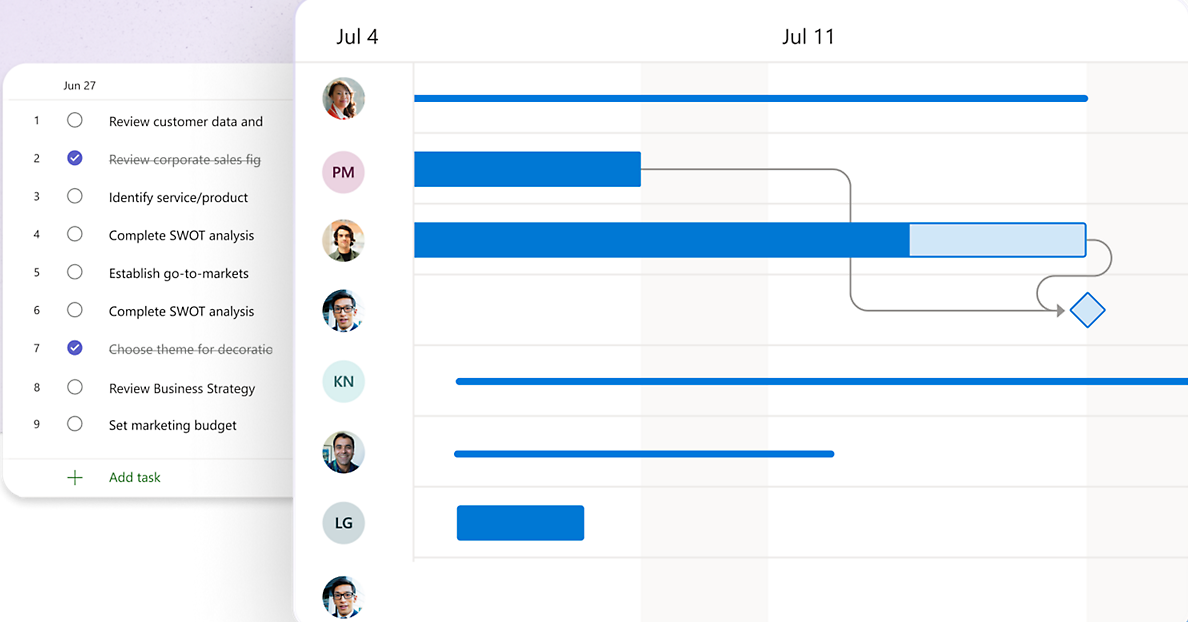
Microsoft sells planning in two places. Planner, in the browser and in Teams, has a scheduling engine that updates dates when dependencies change. The Project desktop client adds the heavy features.
The scheduling engine is only in Planner's premium plans. Plan 1 adds the Timeline (Gantt) view, the People view and basic dependencies. Planner and Project Plan 3 adds advanced dependencies with lead and lag, baselines, critical path and an Assignments view for defining effort per resource. Basic Planner, the version included in Microsoft 365, has Grid, Board, Schedule and Charts views and no Timeline.
Plan 3 also includes the Project desktop client, which has resource leveling, a resource pool across projects and timesheets. Portfolios follow the same split: Plan 3 and Plan 5 users can create and edit them, Plan 1 and basic Planner users only view them, and portfolios can't include Azure DevOps or Project Online projects.
- your company already runs on Microsoft 365 and Teams, so plans sit next to the files and chats they depend on
- you need baselines, critical path and lead and lag and can budget Plan 3 or the desktop client
- you need baselines or critical path on the $10 plan, because they start at Plan 3
- your teams live in Jira: we couldn't find a Jira integration on Microsoft's pages, and portfolios can't connect Azure DevOps projects
- you rely on .mpp files, because Planner can't import them and only the Planner Power App can
- Users like
- resource management across projects and the Gantt and critical-path view
- Users dislike
- a steep learning curve and complicated configuration
- Source: TrustRadius, 738 ratings
How it works in practice
Change a date and the engine updates the dates of dependent tasks. Custom work calendars work the same way: it schedules work only on the working days you set.
One inconsistency to test in the trial: Microsoft's pricing card says Plan 1 has finish-to-start dependencies, while its support article lists all four types without naming a plan. Treat Plan 1 as basic dependencies and check the other types before you rely on them.
- Starting price
- $10 per user per month (Planner Plan 1), $30 (Planner and Project Plan 3), paid yearly
- Program tier
- Planner and Project Plan 3, $30 per user per month
- Portfolio status
- Set by hand per plan; % complete and dates are read-only
- Not connectable
- Azure DevOps and Project Online projects
- Gantt chart
- Timeline (Gantt) view from Plan 1
- Moves dependents
- Yes, Planner scheduling engine (premium plans)
- Dependencies
- Basic from Plan 1; lead and lag on Plan 3
- Baselines
- Plan 3
- Critical path
- Plan 3
- Resources
- People view from Plan 1; leveling in the desktop client
Celoxis
Project portfolio management tool with a published price ladder: portfolio dashboards from Core, executive reporting from Essentials, scored intake and risk management from Professional.
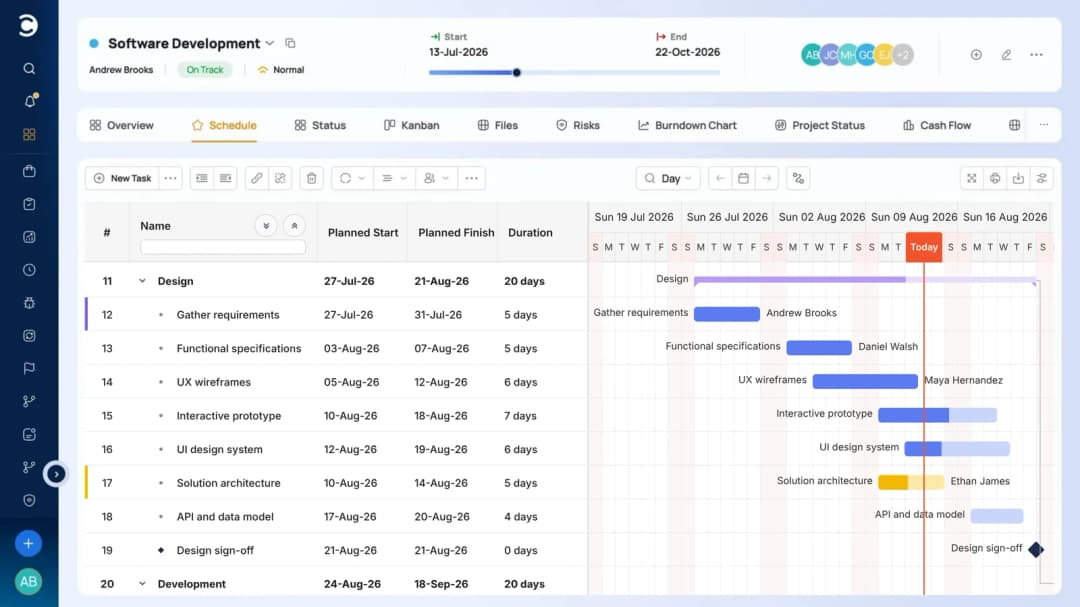
Celoxis gives the scheduling engine the most room on its cheapest plan. Gantt, all four dependency types with lead and lag, and six baselines are included from Core.
Celoxis has two scheduling modes. Easy scheduling covers simple plans, and advanced scheduling gives what its documentation calls full MS Project style control, with fixed work, fixed duration and fixed units. Each task is either manual or automatic. Automatic tasks update their dates when predecessors, calendars or constraints change, so rescheduling one task reschedules the tasks that depend on it.
The six baselines store planned start, finish, effort, cost and budget, and earned value figures such as CPI and SPI appear in reports once a project is baselined. The critical path is calculated automatically and switched on from the Gantt toolbar. You can't mark tasks critical by hand, although the toggle takes one click.
Core includes workload tracking and capacity planning. Essentials ($25) adds work calendars, job roles and instant resource conflicts. Celoxis imports MS Project files (XML or MPP) with dependencies, lead and lag, constraints and the default baseline, but not calendars or custom fields.
- you want MS Project-style scheduling with baselines and earned value without paying for an enterprise suite
- you plan to import existing MS Project schedules and keep their dependencies
- you need automatic resource leveling, because Celoxis's knowledge base says it doesn't provide it
- you are a team of fewer than five, since Core needs at least five full-access users, which is $50 a month on annual billing
- you want Jira in the same plan: the Jira and Azure DevOps sync is an add-on on every plan except Enterprise
- Users like
- scheduling, resources, budgets and reporting in one place, with workload visible across projects
- Users dislike
- a steep learning curve, a dated-feeling interface and a weak mobile app
- Source: Capterra, 568 reviews
How it works in practice
The dependency help page we read is from the older 11.X documentation, and the current scheduling and features pages confirm the same behavior. We couldn't find a limit on the number of dependencies, and there's no scenario or what-if planning in the documentation we read. Celoxis's own pages mention a Requests project state as a manual workaround for seeing how a new project would load existing resources.
- Starting price
- $10 per user per month (Core, 5 full-access users minimum), billed annually
- Program tier
- Essentials, $25 per user per month (executive portfolio reporting)
- Dependencies
- All four types, lead and lag
- Portfolio reports
- 8 built in
- Gantt chart
- Interactive Gantt on every plan
- Moves dependents
- Yes, for automatic tasks
- Baselines
- Six, on every plan
- Critical path
- Automatic, from the Gantt toolbar
- Resources
- Workload and capacity on every plan; roles and conflicts from Essentials
Smartsheet
Spreadsheet-style work management that adds a portfolio layer, with a project list, template-based project setup and rollup dashboards, on its custom-priced Enterprise plan.
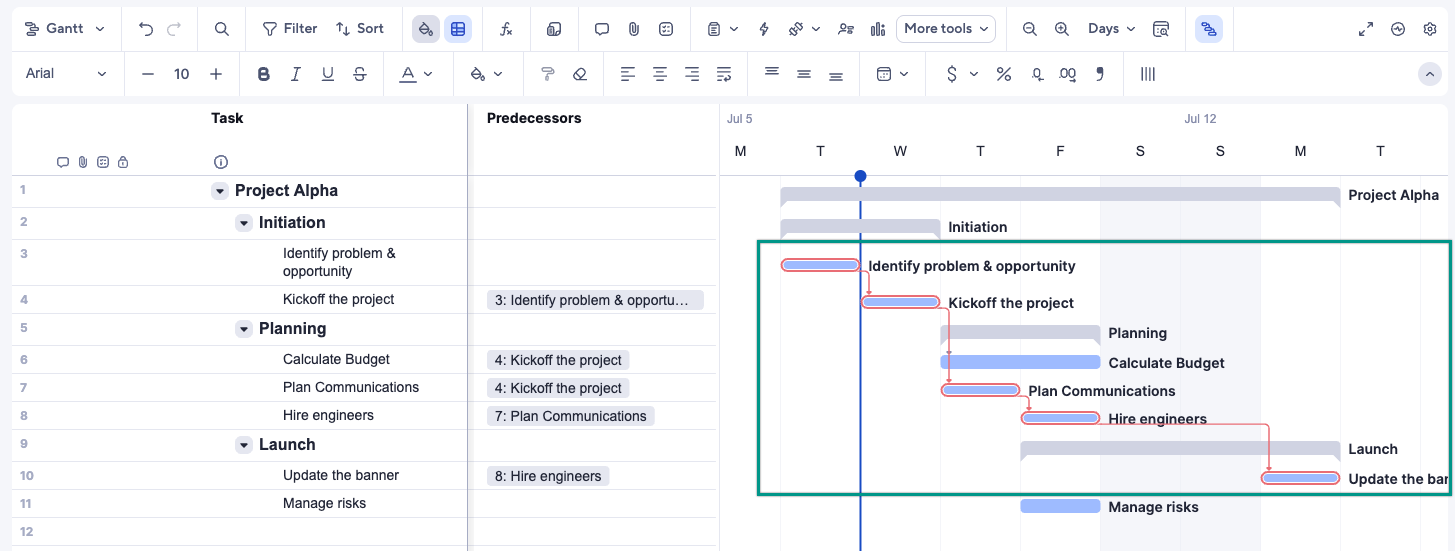
Smartsheet plans in a sheet. Rows are tasks, and the Gantt chart is drawn from the dates in the rows, so people who think in spreadsheets can plan without learning a new model.
Dependencies work once you enable them in Project Settings, which needs a Predecessor column and a Duration column. After that, the dates of dependent tasks adjust automatically when a predecessor changes. All four types are supported, finish-to-start is the default, and a negative lag creates lead time. The catch is that if you type over a date that a predecessor drives, Smartsheet removes the predecessor link from that row.
The critical path is automatic and highlighted in red in the Gantt view, but only while dependencies are on. A project sheet holds one baseline, and only sheet owners or admins can set it. Workload tracking starts at Business. Resource Management for capacity and demand forecasting is a paid add-on whose price isn't on the pricing page, and Scenario Planning, which models what-if schedules for up to five sheets, is Enterprise only.
Smartsheet imports .mpp, .mpx, .mspdi and .xml files up to 50 MB, but constraints aren't supported and rows can land out of order. Export to MS Project covers the Gantt chart only, as XML.
- your planners already build schedules in Excel and want formulas, rows and Gantt in one place
- you need what-if scenarios and can buy Enterprise
- you need more than one baseline per project
- you need capacity planning at a published price, since the Resource Management add-on isn't priced on the page
- you need a clean round trip with MS Project, because only the Gantt exports, as XML
- Users like
- ease of use (2,831 mentions in G2's pros summary)
- Users dislike
- a steep learning curve (1,183 mentions), tied to limited formulas and unintuitive features
- Source: G2, 22,794 reviews
How it works in practice
Smartsheet's own help article lists baselines on Pro while the pricing table starts them at Business. We followed the pricing page. Business also needs at least three members.
- Starting price
- $9 per member per month (Pro, billed yearly; $12 billed monthly), Business $19 yearly
- Portfolios from
- Enterprise (custom pricing, 10+ members)
- Portfolio size
- Up to 100 projects and 5 templates recommended
- Capacity
- Resource Management add-on, price not published
- Gantt chart
- Gantt view on every plan
- Moves dependents
- Yes, once dependencies are enabled
- Dependencies
- All four types, lag and lead
- Baselines
- One per sheet; Business and up on the pricing page
- Critical path
- Automatic, shown in red
- Resources
- Workload from Business; Resource Management add-on
Wrike
Work management platform with project-to-project dependencies on the Gantt chart, workload charts from Business and a program timeline across projects on Pinnacle.
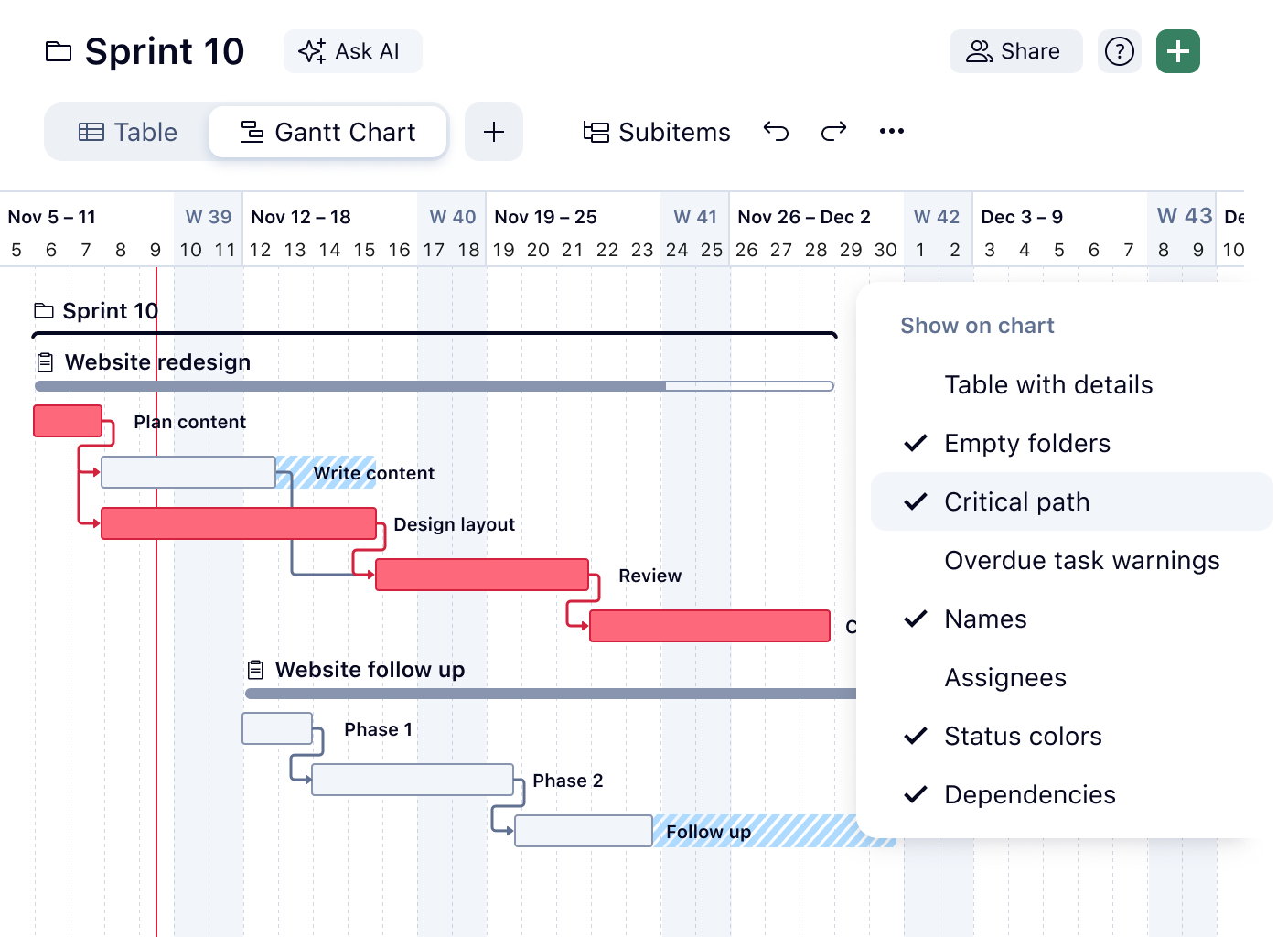
Wrike splits planning across its tiers more sharply than most. Team gets the Gantt chart, and Business gets what turns a Gantt chart into a plan you can defend: a baseline, the critical path, workload charts and MS Project import.
The Gantt chart is available from Team. When you reschedule a task with dependencies, all dependent active tasks reschedule with it. Completed, canceled and deferred tasks stay where they are. Dependencies are typed into the Gantt grid with a short syntax such as 9SS+2d, which means start-to-start with a two-day lag on row 9. All four types are supported, and a plain row number creates finish-to-start.
Business adds a single baseline per folder, project or task. Setting it again overwrites the old values and can't be undone. The critical path view highlights the tasks that could push the finish date, and the New Gantt Chart shows total float and free float. MS Project files import on Business, but Wrike can't export back to MS Project. Pinnacle and Apex, which are quote-only, add advanced resource and capacity planning and a program timeline with project dependencies.
- you want baseline, critical path and workload in the same plan at a published price and can live with a single baseline
- you need a program timeline with dependencies between projects and can buy Pinnacle
- you need more than one baseline per project, or a baseline you can safely reset
- you need to round-trip schedules with MS Project, because there is no export
- your team is larger than 15 and wants the Team plan, which is capped at 15 users
- Users like
- project tracking (477 mentions in G2's pros summary)
- Users dislike
- a steep learning curve (305 mentions), followed by not intuitive (239)
- Source: G2, 4,546 reviews
How it works in practice
Jira sync is a paid add-on powered by Unito. We didn't find scenario or what-if planning in Wrike's documentation.
- Starting price
- $10 per user per month (Team, 2 to 15 users), Business $25 (5 to 200 users), billed yearly
- Program timeline
- Pinnacle and Apex (quote)
- Workload charts
- Business and up
- Dependency types
- FS, SS, FF, SF between projects
- Gantt chart
- Team and up
- Moves dependents
- Yes, for active tasks
- Dependencies
- All four types, with lag
- Baselines
- One, Business and up
- Critical path
- Business and up
- Resources
- Workload charts from Business; advanced capacity planning on Pinnacle
TeamGantt
Browser-based Gantt planner with drag-and-drop scheduling, dependencies, critical path and a workload view, priced per account instead of per seat.
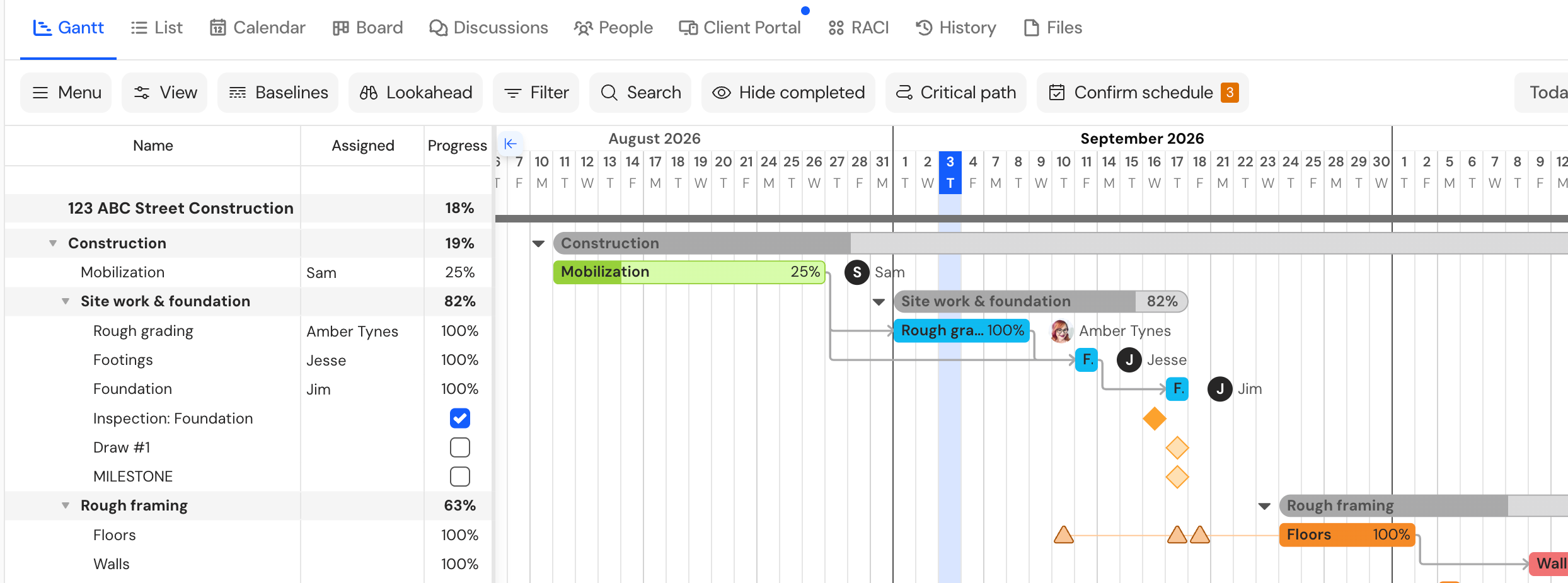
TeamGantt is built around one chart, and reviewers most often praise how easy it is to use. The drag-and-drop Gantt is on every plan, including the free one.
The free Personal plan covers one user, one project and 40 tasks, with dependencies and drag-and-drop scheduling. Paid plans are priced per account instead of per seat. Base includes five projects and one manager with ten collaborators, and Business includes unlimited managers and collaborators, with 500 tasks per project and a 20-project limit.
All four dependency types are supported. Positive values are lag and negative values are lead. A red dependency line means a task starts before its predecessor ends. Moving a predecessor moves its dependents only if you switch on the option called remove float when dragging predecessor tasks, so automatic rescheduling is a setting, not the default. Critical path is on every paid plan: it highlights the critical tasks and dims the rest. Baselines (as many sets as you need), the workload view and advanced dependencies are Business and Builder features.
TeamGantt imports MS Project files (tasks, dependencies, dates and percent complete, but not resources) and exports to MS Project, CSV and PDF.
- you want a Gantt chart that clients and non-project managers can read without training
- you prefer one flat account price to a per-seat bill
- you need more than 5 projects or 150 tasks per project on Base
- collaborators must edit dates, because collaborators can't change dates or edit tasks
- you need what-if planning or a Jira sync: we couldn't find either
- Users like
- ease of use: drag-and-drop Gantt charts that take minutes to set up
- Users dislike
- price once you need the higher plans, plus mobile and app limitations
- Source: Capterra, 204 reviews
How it works in practice
Calendar sync is a one-way feed that refreshes every few hours. CSV import can only create a new project. Annual billing saves 20%, and every paid plan has a 14-day trial that asks for a credit card.
- Starting price
- Free (Personal: 1 user, 1 project); paid plans from $59 per month (Base), flat per account, not per user
- Free plan
- Personal: 1 user, 1 project, 40 tasks
- Critical path
- Every paid plan
- Baselines
- Business and Builder
- Gantt chart
- Every plan, including free
- Moves dependents
- Only with the remove float option on
- Dependencies
- All four types, lead and lag
- Resources
- Workload view from Business
Teamwork.com
Client-work project management with list, board, table and Gantt views, dependencies, built-in time tracking and free client users on paid plans, plus workload and invoicing on higher tiers.
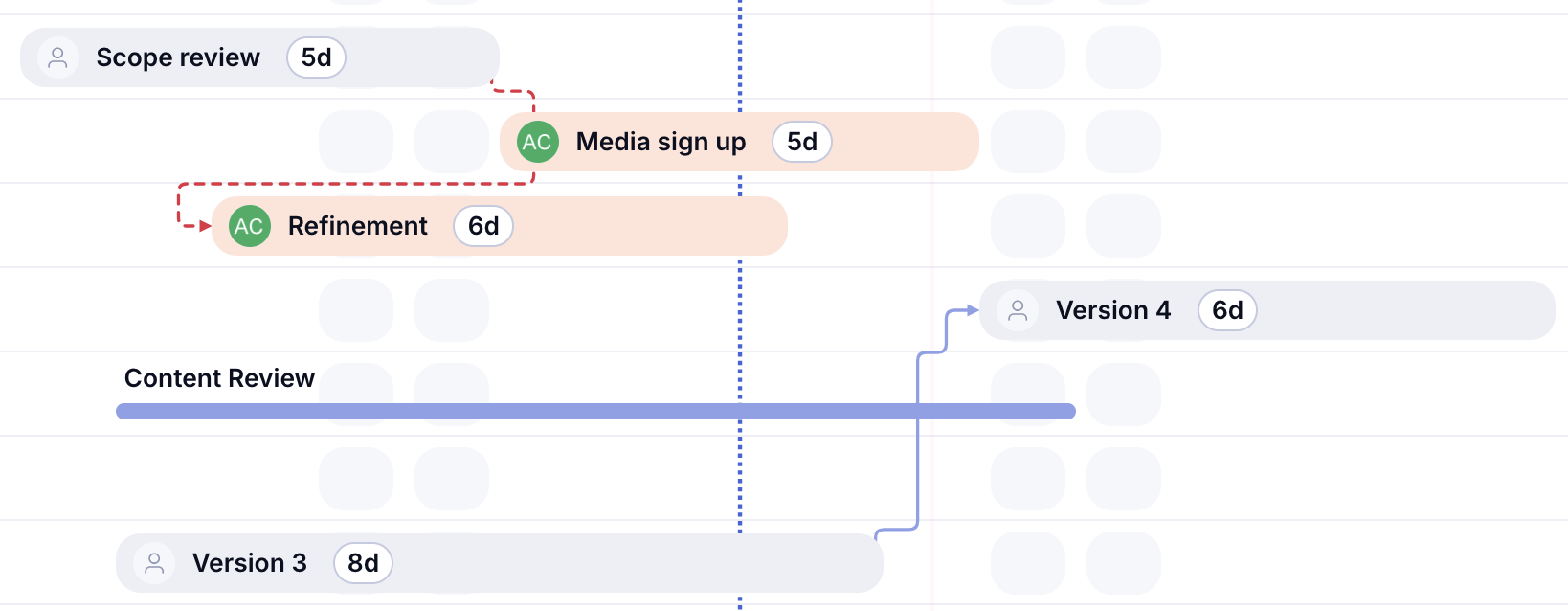
Teamwork is a client-work platform with a Gantt chart on every plan, even the free one. The planning gates sit higher up: critical path and the workload planner start at Accelerate.
Dependencies are available on all five plans. Teamwork's help center documents finish-to-start and finish-to-finish, and we couldn't find documentation for start-to-start, start-to-finish, lead and lag, or Gantt baselines. The new Timeline view, in early release, shifts connected tasks automatically when you drag one that breaches a dependency. In the task date picker you choose whether to adjust the task alone, with its subtasks or with its dependents.
Accelerate adds the Gantt critical path and the workload planner. Resource scheduling by project and person, placeholders, skills-based planning and tentative projects start at Optimize, which is quote-only. Basics and up include planned-versus-actual reports and portfolio health views. A Microsoft Project integration, with import and export through an Office add-in, is part of Accelerate and up.
The free plan allows five users and five projects, with 100 MB of storage. Basics needs at least three users and Accelerate at least five.
- you deliver client work and want planned-versus-actual reports and invoicing in the same tool as the plan
- you want a free Gantt chart for a small team of up to five
- you need formal baselines or start-to-start dependencies, which we couldn't find in the help center
- you need critical path or workload on a small budget, since both start at the plan with a five-user minimum
- Users like
- a clean interface that is easy to navigate, plus invoicing through QuickBooks
- Users dislike
- a cluttered interface on large projects and many features that not every team needs
- Source: Capterra, 942 reviews
How it works in practice
Teamwork's pricing-page code still lists older plan names, so we used the visible plans and the support site's plan comparison, last edited on October 9, 2026. The dedicated Gantt help articles we looked for returned 404 errors, so what dragging a Gantt bar does to dependents isn't documented there.
- Starting price
- $9.99 per user per month (Basics, billed yearly, min 3 users); Free for up to 5 users
- Free plan
- 5 users, 5 projects, 100 MB, 100 automations
- Dependencies
- Finish-to-start and finish-to-finish documented
- Client users
- Free but Basics and up, max five active projects
- Automations
- Basics 5,000, Accelerate 20,000 per month
- Seat minimum
- Basics 3, Accelerate 5
- Gantt chart
- Every plan, including free
- Moves dependents
- Yes in the Timeline view; optional in the date picker
- Baselines
- None documented
- Critical path
- Accelerate and up
- Resources
- Workload planner from Accelerate; scheduling by role and skill from Optimize
monday.com
Board-based work management whose Enterprise portfolio solution connects up to 200 project boards to one portfolio board with health, progress and AI risk lists.
monday.com plans on boards, and the Gantt chart is a view of a board. The dependency toolset, baselines and critical path arrive one tier later, at Pro.
Basic has no Gantt chart. Standard adds the Timeline and Gantt views. Pro adds the dependency column, which shifts dependent items when you drag a bar, along with baselines, the critical path and the Workload view. monday.com's help center labels the critical path a trial feature that may require payment in the future, so check its status when you buy.
Dependency behavior depends on a mode you choose. Flexible mode keeps items from overlapping, Strict mode moves dependents by exactly the same amount, and No action moves nothing. Four dependency types are documented, and lead and lag work in Strict mode only. A board can have one dependency column, and dependencies only move dates that already exist. Baselines are snapshots that can be compared and can't be edited. Enterprise adds the resource planner, the capacity manager and a portfolio solution for up to 200 boards. Cross-project dependencies are being released gradually to Enterprise customers.
Excel import and export are documented, along with a two-way Jira Cloud sync and an Outlook calendar sync. We couldn't find an MS Project import in the documented import list.
- your teams already run work on monday.com boards and the plan should sit beside them
- you want a visual Gantt chart with automatic shifting and a choice of how strictly dependents follow
- you want a Gantt chart on the $9 Basic plan, because the Gantt starts at Standard
- you need resource planning across projects, which is Enterprise only
- you work from MS Project files: they aren't in the documented import list
- Users like
- Ease of use
- Users dislike
- Missing features
- Source: G2, 17,262 reviews

How it works in practice
monday.com's own help pages disagree on the plan: the Dependencies article says Pro and Enterprise, while the Gantt article says the Gantt view is Standard and up. We followed the pricing page. Seats are sold in packages that start at three. Capterra reviewers praise how boards, columns and views can be tailored, and one calls the minimum seat packages annoying when only a single person needs to be added.
- Starting price
- $9 per seat per month (Basic, billed yearly); Gantt from Standard at $12
- Program tier
- Enterprise (quote)
- Portfolio size
- Up to 200 projects, 20,000 items in total
- Dashboards
- 5 boards (Standard), 20 (Pro), 50 (Enterprise)
- Gantt chart
- Standard and up
- Moves dependents
- Yes, in Flexible or Strict mode (Pro)
- Dependencies
- Four types; lead and lag in Strict mode
- Baselines
- Pro and Enterprise
- Critical path
- Pro and Enterprise (labeled a trial feature)
- Resources
- Workload from Pro; resource planner on Enterprise
ClickUp
All-in-one work tool where a dashboard Portfolio card turns Lists into a program table with progress, overdue tasks, milestones and summed number fields.
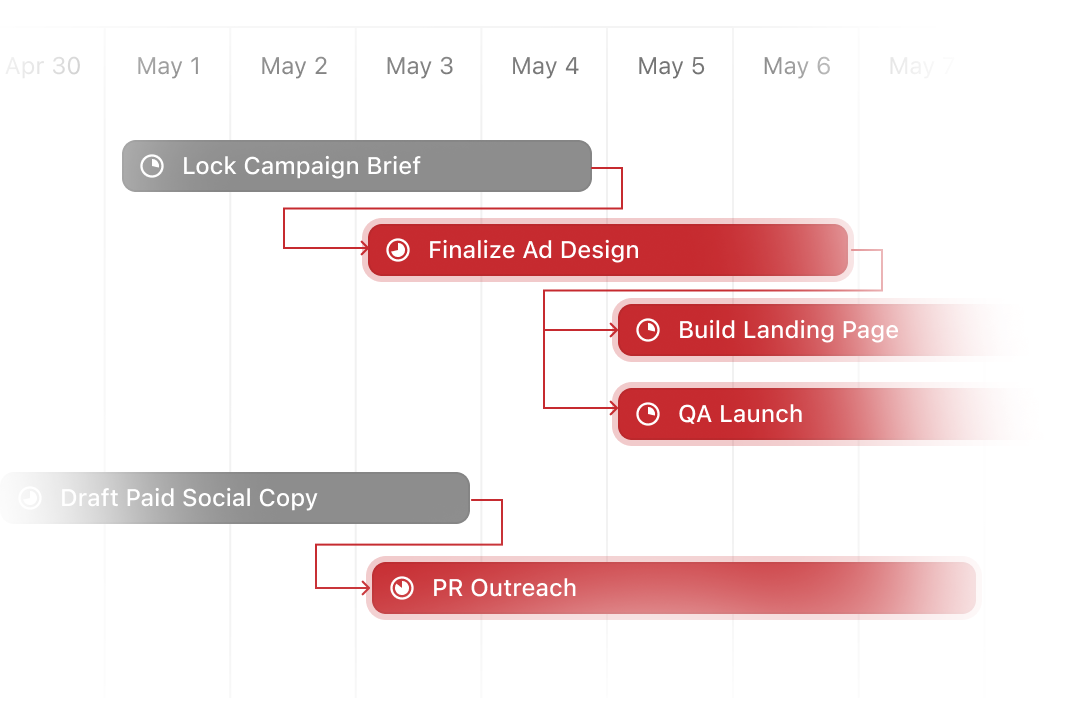
ClickUp's planning features are easy to get and hard to size. Dependencies and automatic rescheduling are on every plan, while baselines and unlimited critical path start at Business.
The Reschedule dependencies setting shifts waiting tasks by the same number of days when a blocking task moves. It needs a due date on the blocking task and a start date on the blocked task. It can update up to 1,000 dependent tasks at a time. Above that, the changed task keeps its new date and none of its dependents move. In the Gantt chart only visible tasks reschedule, and bulk edits don't trigger it.
ClickUp's help pages describe two relationship wordings, blocks and waiting on. They don't name finish-to-start, start-to-start, finish-to-finish or start-to-finish, and they don't document lead or lag. Baselines in the Gantt view are Business and up, with 10 per location (20 on Enterprise). Critical path and slack time are unlimited on Business, limited to 100 uses on Unlimited and not available on Free. The Free plan caps the Gantt chart at 60 uses. The Workload view is unlimited on Business, while custom capacity per day needs Business Plus or Enterprise.
ClickUp imports from Jira, Asana, Trello, Wrike and others. We couldn't find an MS Project import.
- you want automatic rescheduling on every plan, including Free
- your team already uses ClickUp for tasks and docs and the plan should live in the same space
- you need documented finish-to-start, start-to-start or lag settings, which ClickUp's help center doesn't name
- your reorganizations touch more than 1,000 dependent tasks at once
- you need detailed capacity profiles without buying Business Plus
- Users like
- ease of use (4,221 mentions in G2's pros summary)
- Users dislike
- missing features (2,040 mentions), followed by the learning curve
- Source: G2, 14,956 reviews
How it works in practice
ClickUp's pricing page contains two plan lineups. One shows Unlimited at $7 and Business at $12 billed yearly, the other Core at $9 and Business at $17. The page contradicts itself, so confirm the price you see before you budget. We couldn't tell which lineup a US visitor sees.
- Starting price
- From $7 per user per month billed yearly (the pricing page also shows a Core $9 / Business $17 lineup)
- Program tier
- Business, $17 per user per month billed yearly
- Baselines
- Business and up, 10 per location
- Dependency cascade
- Up to 1,000 dependent tasks at a time
- Gantt chart
- Unlimited on paid plans; 60 uses on Free
- Moves dependents
- Yes, up to 1,000 tasks at a time
- Dependencies
- Blocks and waiting on; types and lag not documented
- Critical path
- Business and up; 100 uses on Unlimited
- Resources
- Workload view from Business
OpenProject
Open-source project management with a free self-hosted edition, a multi-project Gantt for everyone and portfolios, programs and resource planners in the Premium edition.
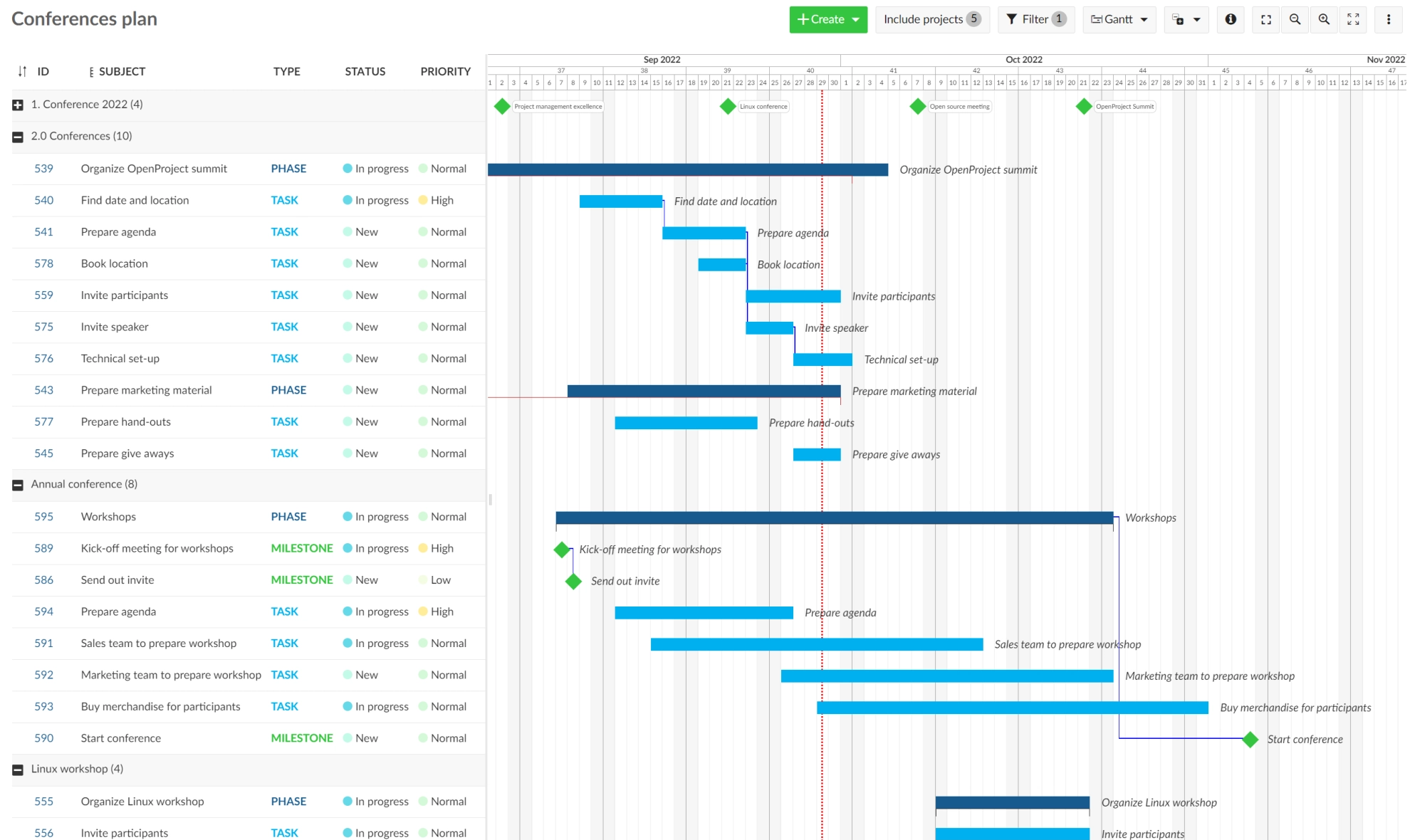
OpenProject is the only open-source planner here. Its free Community edition includes the Gantt chart and multi-project timelines, and you host it yourself.
Automatic scheduling exists but is opt-in: the default is manual, and a work package can only be automatic if it has predecessors or children. In automatic mode, moving a predecessor moves the successor so that it starts the day after the new finish date. Lag is counted in working days and can be negative. Only predecessor and successor relations affect dates, which makes the model finish-to-start. Other relations such as relates to or blocks aren't shown in the Gantt chart.
OpenProject's Gantt FAQ says the critical path isn't available yet. Baseline comparison shows changes since a past date: any date from the Basic plan, and only since yesterday in Community. Resource management and portfolios are Premium features with a 100-user minimum, and the team planner starts at Basic.
Paid editions are Basic at $7.25 per user per month (5 users minimum in the cloud, 25 on-premises), Professional at $13.50 (25 minimum) and Premium at $19.50 (100 minimum), billed yearly. Monthly billing adds $1.25 per user on Basic. MS Project files go through an Excel detour, and the Jira Migrator is in beta.
- you want a free Gantt planner and can run the server or buy a hosted edition
- your plans are mostly finish-to-start and you don't need a critical path
- you need the critical path, which the official FAQ says isn't available
- you need start-to-start, finish-to-finish or start-to-finish logic, which the documentation doesn't list
- you want resource planning for a small team, since Premium needs 100 users
- Users like
- free and open source, plus Gantt scheduling and planning
- Users dislike
- no single recurring complaint; a steep learning curve and a rough interface appear in a few reviews
- Source: Capterra, 189 reviews
How it works in practice
Reviewers on Capterra most often cite the free, open-source licence and the planning features, and the few complaints mention a learning curve and a rough interface. The Gantt FAQ page may be older than the product, so ask OpenProject whether critical path has shipped.
- Starting price
- Free (Community, self-hosted); Enterprise from $7.25 per user per month (Basic), billed yearly
- Program tier
- Premium, $19.50 per user per month, 100-user minimum
- Free edition
- Community: multi-project Gantt, budgets, self-hosted
- Baselines
- Compare to any date from Basic; Community since yesterday
- Gantt chart
- Community edition (free)
- Moves dependents
- Yes, in optional automatic mode
- Dependencies
- Predecessor and successor, with lag and lead
- Critical path
- Not available
- Resources
- Resource management on Premium
Oracle Primavera P6
Oracle's critical-path scheduling suite for large construction and engineering programs, sold as P6 EPPM or the newer Primavera Cloud, with pricing through Oracle sales only.
Primavera is the reference tool for critical-path scheduling on very large projects, and the only one here you can't price without talking to a salesperson.
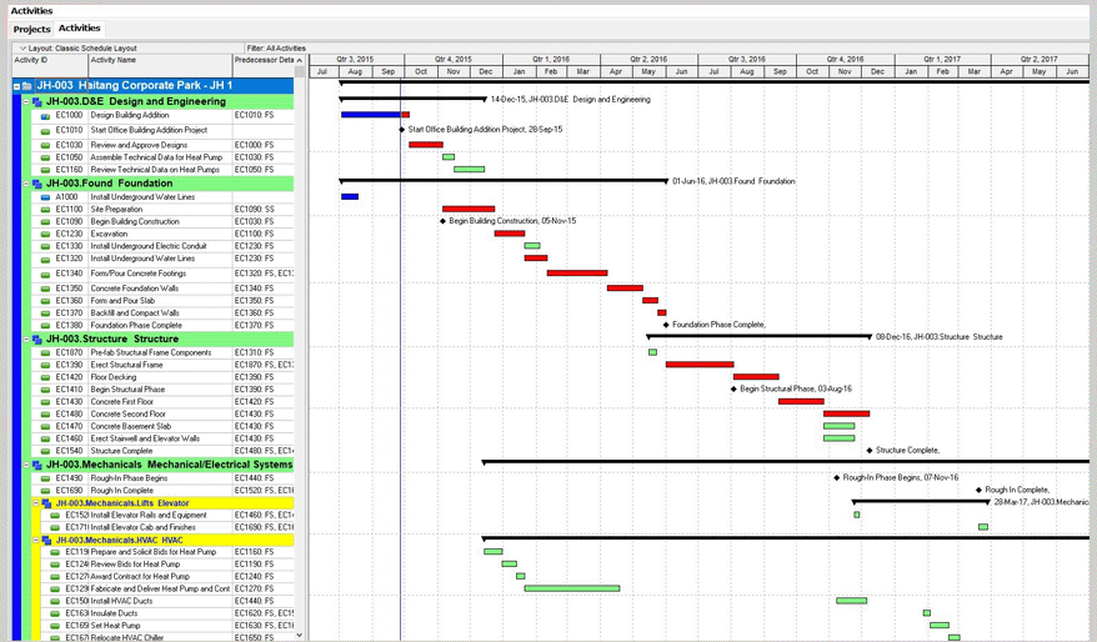
Oracle sells two separate products: P6 EPPM and Oracle Primavera Cloud. Oracle states plainly that Primavera Cloud isn't Primavera P6, so ask a reseller which one a quote covers. Both schedule with the critical path method. Relationships can be finish-to-start, start-to-start, finish-to-finish or start-to-finish, with a lag field, and cross-project relationships are limited to projects in the same program. In Primavera Cloud the schedule lives on the Activities page, with the grid on the left and the Gantt chart on the right.
Oracle's documentation says Primavera Cloud can keep up to five project baselines, while its migration guide lists three user-assigned ones, so we don't give a number. Primavera Cloud adds Monte Carlo risk analysis with no add-on, and it runs only on the current schedule. P6 EPPM has a resource leveler, but Oracle's feature matrix leaves automatic leveling blank for Primavera Cloud, so don't assume parity. Both read and write MS Project XML, and Primavera Cloud exports XER files for P6.
Primavera Cloud is licensed per hosted named user by module. Oracle publishes no current USD price, and direct orders require an administrator enablement service.
- you run large construction, engineering or infrastructure programs, or your contracts require P6 schedule files
- you need critical-path scheduling, baselines, resource planning and schedule risk analysis from one vendor
- you want a published per-user price or a self-serve start
- your team is small or new to scheduling tools, because reviewers call it hard to learn
- you expect automatic resource leveling in Primavera Cloud
- Users like
- scheduling depth for very large projects
- Users dislike
- hard to learn and a dated interface
- Source: Capterra, 182 reviews
How it works in practice
Capterra's listing for Oracle Primavera Cloud rates ease of use 3.7 against 4.4 overall, and mixes in some reviews from the P6 era. A reviewer there says licensing fees make it uneconomical for smaller projects.
- Starting price
- USD price not published (quote from Oracle or a reseller)
- Products
- P6 EPPM and Primavera Cloud are separate Oracle products
- Licensing
- Primavera Cloud is sold per hosted named user, by module
- Gantt chart
- Activities page (Primavera Cloud)
- Moves dependents
- The scheduler calculates dates from relationships
- Dependencies
- All four types, with lag
- Baselines
- Several (Oracle's own pages differ on the count)
- Critical path
- Core of the CPM engine
- Resources
- Roles, demand and capacity planning
Project management software with dependencies: what to check
Every tool above links tasks, so the useful differences are in four details that each change what happens to your dates.
- Dependency types. Finish-to-start covers most plans, while start-to-start and finish-to-finish matter for overlapping work, and start-to-finish is rare.
- Lead and lag. A two-day lag or a one-day lead needs a field of its own, and without one people fake it with extra tasks.
- Automatic rescheduling. Ask whether the tool moves dependents when you drag a bar, only when you ask, or only inside a limit.
- Reach across projects. A dependency between two projects only works if the tool can look outside one plan.
| Tool | Dependency types documented | Lag support | Reschedules when you move a task |
|---|---|---|---|
| Microsoft Planner and Project | Finish-to-start on Plan 1; all four documented in premium plans | Plan 3 | Yes, through the scheduling engine |
| Celoxis | All four | Yes, in hours to years | Yes, for automatic tasks |
| Smartsheet | All four | Lag and lead | Yes, once dependencies are on |
| Wrike | All four | Yes, such as 9SS+2d | Yes, for active tasks |
| TeamGantt | All four | Yes | Only with the remove float option |
| Teamwork | Finish-to-start and finish-to-finish | Not documented | Timeline view; optional in the date picker |
| monday.com | All four (rolling out) | Strict mode only | Yes, depending on mode |
| ClickUp | Blocks and waiting on | Not documented | Yes, up to 1,000 tasks |
| OpenProject | Predecessor and successor | Yes, in working days | Yes, in automatic mode |
| Oracle Primavera P6 | All four | Lag field | The scheduler calculates dates |
Reach across projects is where the field thins out. Wrike's program timeline with project dependencies is limited to Pinnacle and Apex. monday.com is releasing cross-project dependencies gradually to Enterprise. Celoxis lists inter-project dependencies across the portfolio on its features page. In Primavera, relationships between projects work only inside the same program.
Free project planning software: what the free plans really include
The question isn't whether a tool has a free plan. It's whether the free plan includes a Gantt chart and dependencies, because several do not.
| Tool | Free plan | Gantt chart on the free plan | Dependencies on the free plan |
|---|---|---|---|
| OpenProject | Community edition, self-hosted | Yes | Yes, with automatic scheduling as an option |
| TeamGantt | Personal: 1 user, 1 project, 40 tasks | Yes | Yes |
| Teamwork | 5 users, 5 projects, 100 MB, 100 automations | Yes | Yes |
| ClickUp | Free Forever: unlimited tasks and members, 5 Spaces | Capped at 60 uses | Yes |
| monday.com | Up to 2 seats and 3 boards | No | No (dependencies start at Pro) |
| Wrike | Free plan with board and table views | No | Not listed on the pricing page |
| Microsoft Planner | Included in Microsoft 365 at no extra cost | No Timeline view | Not listed (Plan 1 adds dependencies) |
| Smartsheet | None, 30-day trial | n/a | n/a |
For a small team that needs a real schedule at no cost, the answer is OpenProject if you can host it, Teamwork if you want a hosted tool with up to five users, and TeamGantt if one person is planning one project. None of the free plans includes a real baseline or a critical path.
How to test a planning tool in a trial
A demo shows a tidy plan, but a trial should break one. Build a small real plan and run the same test in each tool on your shortlist.
- Build a plan of about 20 tasks with one chain of five dependent tasks
- Link two tasks with start-to-start and a two-day lag, and check the tool accepts it
- Move the first task of the chain by a week and note which tasks move
- Drag a task in the middle and check whether the tool warns, blocks or moves its dependents
- Switch on the critical path, move something and confirm the path changes
- Set a baseline, slip one date and check that the variance shows
- Book two tasks on the same person on the same days and see whether workload shows the conflict
- Import a small MS Project or Excel schedule and check the dependencies survived
- Share the plan with a client or collaborator and check what they can change
Write down the plan tier you were on when each step worked. Trials often open on the top plan, so a step that works in the trial may be missing from the plan you can afford.
Planning across several projects
A project plan ends at the edge of the project. A program has dependencies between projects, often owned by different teams in different tools, and that's the part most schedulers handle worst. The tools above either need an enterprise plan for it or stop at the program boundary.
The Program Manager isn't a scheduler and doesn't replace any tool in this list. It maps dependencies across Jira and Asana, watches every milestone for risk and keeps blockers, decisions and approvals in one graph. Its live connectors are Jira Cloud, Asana and Slack, and every external write needs a person's approval. It works alongside the scheduler you choose. For how this differs from running a single project, see program manager vs project manager, and for portfolio-level tools, our guide to program management software. If a RACI chart would help clarify who owns each handoff, we have a RACI chart template.
FAQ
What is the best project planning software?
The best project planning software depends on the schedule you have to keep. Microsoft Planner and Project fits Microsoft 365 teams, Celoxis gives the most scheduling depth on its cheapest plan, TeamGantt gives a Gantt chart clients can read, and OpenProject is the free option for teams that can host it. Check which plan carries baselines and critical path before you shortlist.
Does Microsoft have a project planning tool?
Yes, Microsoft has two project planning tools. Planner, in Microsoft 365 and Teams, has a Timeline (Gantt) view and a scheduling engine from Planner Plan 1 at $10 per user per month, and baselines and critical path from Planner and Project Plan 3 at $30. The Project desktop client is sold separately as Standard 2024 at $679.99 or Professional 2024 at $1,129.99 as a one-time purchase, and is included with Plan 3.
What is the best free project planning software?
OpenProject Community is the free option with the fullest planning, including Gantt charts and optional automatic scheduling, but you host it yourself. TeamGantt's free Personal plan covers one user, one project and 40 tasks, and Teamwork's free plan covers five users and five projects. None of the free plans includes a real baseline or a critical path.
What is the difference between project planning software and project management software?
Planning software centers on the schedule: tasks, dependencies, baselines, critical path and resource capacity. Project management software also covers daily execution such as task tracking, communication, time tracking and reporting. Many tools do both, but their planning depth varies widely.
Is Oracle Primavera P6 worth it?
It's worth considering for large construction, engineering and infrastructure programs that need critical-path scheduling, several baselines, resource planning and risk analysis from one vendor. It's quote-only, and reviewers on Capterra rate its ease of use 3.7 out of 5 against 4.4 overall. For smaller teams a tool with a published price is usually the better fit.
Leave a Reply