Jira is a strong choice for software delivery teams that need configurable issue tracking, sprint planning and a dependable record of technical work. For program managers, its biggest advantage is that engineering execution and cross-team planning can share the same underlying work items. Its biggest limitation is that useful portfolio coordination requires consistent configuration and, for advanced planning, a higher subscription tier. You won't get reliable portfolio governance from a default board alone.
Jira isn't a plug-and-play replacement for a portfolio management office. Teams can build useful views of milestones, dependencies and capacity, but executives still need decision ownership, a common definition of risk and a process for work that lives outside Jira. This Jira review evaluates those tradeoffs using current product documentation, published US prices and identifiable user feedback rather than a product test we ran ourselves.
- Best fit: engineering-led organizations already managing delivery in Jira.
- Free supports up to 10 users; Standard adds permissions and paid support.
- Premium is the meaningful tier for cross-team Plans, dependency views and capacity planning.
- A Jira plan is a planning sandbox, not an automatically approved executive portfolio.
- Choose Jira for technical execution; test cross-tool governance separately before calling it your PMO system.
Our verdict: is Jira worth it for program managers?
Jira is worth considering when your program's delivery evidence already lives in engineering tickets. Program managers can follow work from backlog through sprint execution, then use Premium Plans to coordinate dependencies and staffing assumptions across teams. The case weakens when most contributors work in other systems or the portfolio office needs financial approval, investment prioritization and benefits tracking as native controls. You shouldn't pay for a delivery tool expecting a complete investment ledger.
That's the distinction between a work system and a decision system. Jira can record who owns an issue, its status and its links to other issues. A program office must also decide whether a dependency threatens a committed milestone, who accepts the risk and whether leadership will change scope or funding. Software can't make those governance decisions trustworthy without agreed operating rules. It won't settle a disputed priority for the sponsor.
Choose Jira when teams need issue history, configurable workflows, agile reporting and a shared engineering delivery model. Be cautious when the buying brief is mainly executive portfolio reporting or cross-functional task management for teams that won't use developer-oriented work items.
What Jira does especially well
Jira's core strengths are work-item traceability, agile delivery routines and configurable process control. Those strengths matter to a PMO when project status can be traced to evidence rather than reconstructed from weekly slides. They also introduce a maintenance burden if teams disagree about work types, workflow states or ownership.
Agile boards, backlogs and release work
Jira supports Scrum and Kanban work management, with backlogs and board views built around the same underlying work items. Scrum teams can prioritize a backlog, commit to a sprint and review delivery against the sprint goal. Kanban teams can watch flow through workflow columns and manage work in progress without pretending every request belongs in a sprint.
A program manager benefits when the same engineering work item appears in a team view and a program discussion. A late API change doesn't need a second spreadsheet record just to be visible at the steering meeting. The challenge is granularity: a program milestone isn't automatically equivalent to one story, and a finished story doesn't prove a customer-facing release is accepted. You can't skip acceptance evidence just because tickets are closed.
Start with an agreed hierarchy. Identify the release or initiative that leadership cares about, the epics that support it and the work items teams actually maintain. Decide which completion evidence is required before an epic or milestone can be called done. Otherwise Jira may display an accurate count of closed tickets while the business outcome remains unfinished.
Workflows, ownership and permissions
Jira workflows consist of statuses and transitions. Company-managed spaces use workflow schemes, while team-managed spaces let space administrators manage their own workflows. That flexibility can represent engineering review, security sign-off or release acceptance, but it can also produce incompatible definitions of Done across projects. You don't want an executive rollup to treat those differences as noise.
A PMO should define a small set of portfolio-level states and map local workflow states to them. One team might use Ready for QA while another uses Verification. A common rollup must say whether both mean work is still in progress. If it can't, the summary isn't decision-ready. Don't assume a dashboard will reconcile different semantics just because it can display both projects.
Permissions are also a buying issue. Jira's Free plan doesn't allow teams to edit space permissions or roles in the same way paid plans do. Standard introduces user roles and permissions. If your pilot includes sensitive delivery work or external collaborators, test who can see, change and approve each item rather than relying on the default project setup. Don't infer access rights from a screenshot.
Agile reports are useful, but they aren't portfolio forecasts
Jira includes reporting and dashboards for work tracked in spaces and boards. Team-managed software spaces offer reports such as velocity, burnup, cumulative flow and sprint burndown when their required data or features are enabled. These are good signals for how a team is delivering, not direct measures of program benefits or financial performance. They won't answer whether a sponsor accepted the outcome.
For example, a velocity chart can show how much estimated work a Scrum team completed in previous sprints. It can't establish that the same throughput will continue after a major staffing change or that a third-party vendor will meet a milestone. A cumulative flow chart can expose a growing queue, but it doesn't tell leadership which contractual dependency to renegotiate.
A useful PMO report combines a delivery metric with a decision record. That's non-negotiable when the steering group must authorize a recovery plan. Show the affected milestone, source work item, accountable owner, recovery option and decision deadline. That is more actionable than a green dashboard with no traceable evidence.
Where Jira Premium changes the program management case
Jira Premium is the tier to evaluate when you need cross-team Plans, advanced dependencies and capacity planning. Free and Standard provide a basic timeline for project work. Plans on Premium and Enterprise combine work from boards, spaces and filters into a larger planning view, with scenario modeling and cross-team coordination.
The plan-tier distinction matters because a buyer can mistake an attractive single-project timeline for a portfolio dependency system. Don't treat the two views as interchangeable. In a real program, one team may be blocked by another team's security review or release train. That relationship must be represented in the plan, not merely mentioned in a status comment.
- FreeValidate work-item tracking, Scrum or Kanban and basic project reporting with a small team.
- StandardAdd paid permissions, regional support and more room for a governed delivery workflow.
- PremiumEvaluate cross-team Plans, dependency views, scenario planning and capacity controls.
- EnterpriseAssess cross-product analytics, multi-site administration and advanced identity requirements.
- PMO governance layerKeep an explicit owner, evidence and approval process for commitments across systems and budgets.
Cross-team Plans and dependency risk
Atlassian describes Jira Plans as a sandbox: proposed changes don't modify live Jira work items until the planner reviews and commits them. That's useful for testing schedule options without silently changing the team's delivery commitments. It also means a program leader must know which view is a proposal and which dates have been accepted as the current baseline.
The Dependencies view shows work items linked by incoming or outgoing dependencies. Off-track relationships are highlighted when the preceding work puts the following item at risk. A planner can group or filter the view and inspect the affected work. You can't assume every missing relationship was entered in the first place. This gives a concrete starting point for escalation, but a red link isn't itself a resolved blocker.
Atlassian's documentation says the Program board emphasizes epic-level and story-level work. It doesn't show hierarchy levels above or below those in that view. For an executive initiative hierarchy, validate how a dependency is rolled up and whether the program board is the right view before promising leadership a complete initiative map. You don't want a board-level omission to become a portfolio surprise.
Capacity planning needs disciplined inputs
Jira's advanced capacity planning requires estimates in story points or time units and board-based work sources. Atlassian says work drawn from spaces and filters won't show capacity information in the same way. That is a meaningful setup constraint for a PMO trying to aggregate projects with different planning conventions.
For capacity to be useful, teams must maintain estimates, sprint assignments and team ownership. A plan can display overloaded iterations, but it can't make an unreliable estimate reliable. Scrum teams can use story points or time, while Kanban teams use time-based estimates. A program that compares those figures as though they were one interchangeable unit will produce misleading rollups. That isn't a reporting problem you can fix with color coding.
A sensible pilot deliberately includes an overallocated team and an unestimated dependency. Ask whether the plan makes both problems visible, who can correct them and whether the corrected scenario can be reviewed before being saved to live work. That's a test of a management process rather than a screenshot.
Scenario planning and executive review
Plans can support alternate planning scenarios and parent-level rollups. A program manager can model a delayed dependency or shifted team capacity, then review the effect on downstream dates. The useful question isn't whether the scenario looks attractive. It's whether the approver can see the tradeoff and which assumptions changed before authorizing a new commitment.
Keep a small decision log next to the plan: scenario name, source baseline, affected milestone, tradeoff, approver and date. If a program uses Jira for execution but stores its financial forecasts elsewhere, reconcile the approved dates and funding assumptions at the same meeting. Jira's planning depth doesn't automatically replace that governance work.
Jira pricing and plan limits in the US
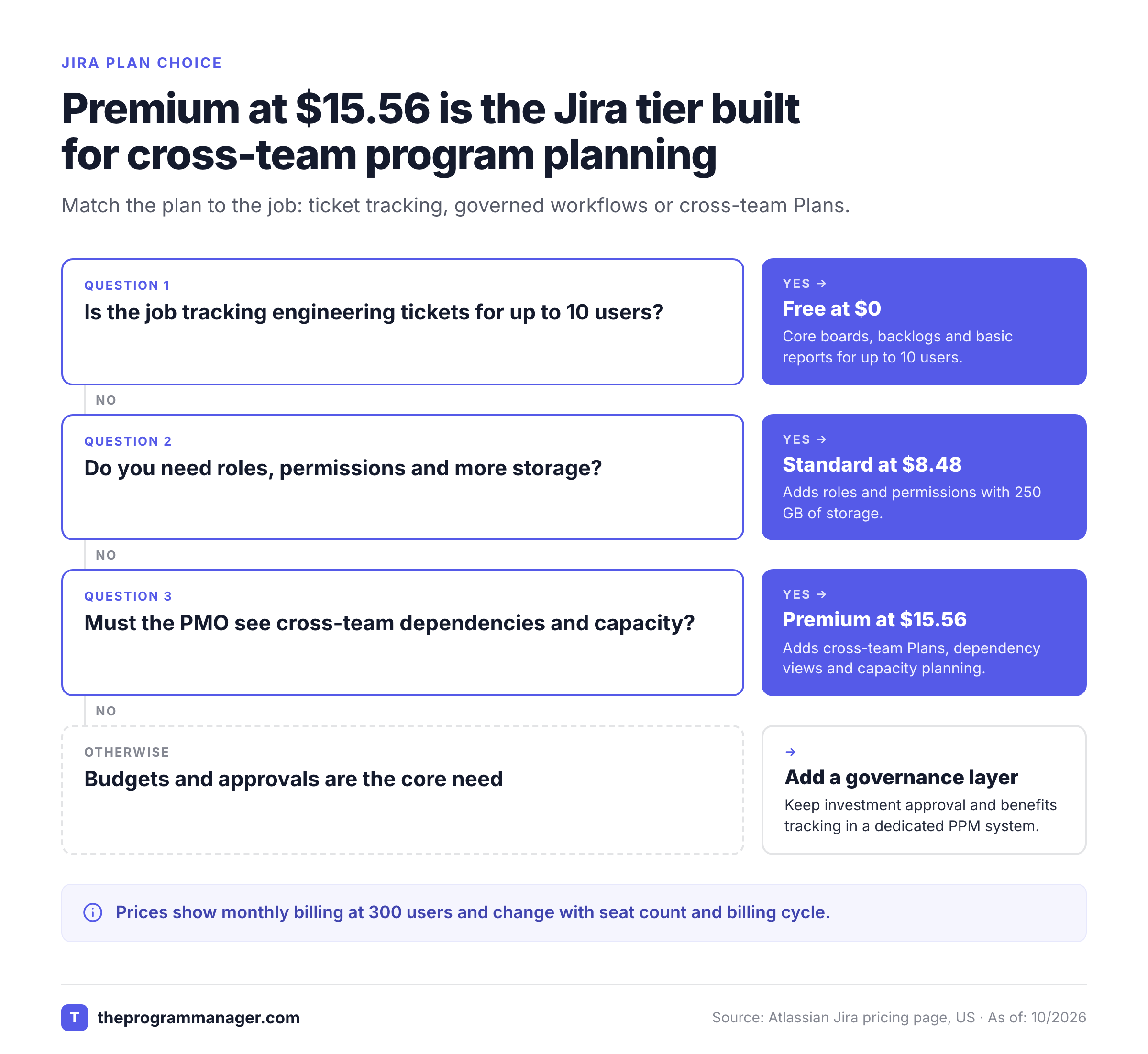
Jira's US pricing page displays Free at $0 for up to 10 users, Standard at $8.48 per user per month and Premium at $15.56 per user per month with monthly billing at the calculator's default of 300 users, checked October 27, 2026. Enterprise requires a sales conversation and annual billing. Atlassian says annual billing saves up to 17%, and the price per user changes with the selected user count, so those displayed prices aren't a guaranteed quote for every team size or billing cycle.
- Free$0 up to 10 users
- Core boards, backlogs and timeline
- Community support
- Basic reports
- Standard$8.48 per user per month, billed monthly, 300 users
- Roles and permissions
- 250 GB storage
- Regional support
- Premium$15.56 per user per month, billed monthly, 300 usersProgram planning tier
- Cross-team planning and dependencies
- Capacity planning in Plans
- Unlimited storage
- EnterpriseContact sales annual billing
- Cross-product analytics
- Advanced identity and security
- Multiple sites
Monthly-billing values at 300 users on Atlassian's US calculator, checked October 27, 2026. Actual price depends on user count, billing cycle and any contract terms. Recheck at checkout.
A team's purchasing decision should start with feature eligibility, not a theoretical seat total. If the job is tracking engineering tickets, Standard may be enough. If the PMO must see cross-team dependencies and plan capacity, Premium is the relevant trial. Enterprise should be driven by documented administration, analytics and security needs rather than a vague expectation of more dashboards.
What happens to automation limits?
Jira's current cloud pricing describes automation in steps. Free includes 150 steps per subscription per month. Standard includes 400 per user per month, Premium 750 and Enterprise 1,000. Atlassian pools eligible allowances at the organization level, so the actual usage question spans the subscribed Atlassian apps.
A step can be a trigger, condition, action, branch or loop. A rule that executes several components consumes more than one step. The practical implication is that an apparently simple cross-project escalation rule can have a different usage footprint from a one-action notification. Ask the administrator to inspect current usage and the exact execution path before treating the allowance as unlimited.
What other costs and contract issues matter?
The invoice is only part of Jira's cost. You can't price the change without estimating administration and adoption work. Administration time, workflow redesign, migration of custom fields, marketplace apps and user training can dominate the first implementation. These are evaluation cost categories, not claimed average dollar amounts. Assign an internal owner to each cost before approving the business case.
Atlassian also states that new Jira Data Center license sales ended March 30, 2026 and Data Center reaches end of life March 28, 2029. Organizations still using self-managed deployments should treat that lifecycle as a separate migration decision rather than assume a cloud plan can be compared on seat price alone. If a move away from Jira is on the table, our list of Jira alternatives shows what each tool imports and which plan unlocks dependencies.
Jira's biggest weaknesses for a PMO
Jira's biggest weaknesses are configuration overhead, inconsistent cross-team data and the boundary between delivery planning and portfolio governance. They don't make Jira unsuitable for program management, but they change the operating model and the cost of getting reliable information.
Too many workflows can make rollups meaningless
Customization is useful inside a delivery team. Across a portfolio, excessive variation can make identical statuses mean different things. One team may close work after code merge while another waits for production verification. A program dashboard that treats both as finished is a data definition problem, not a visualization problem. It won't be solved by another chart.
Before scaling, publish a small common field dictionary for milestone, owner, blocked reason, forecast date and acceptance evidence. Decide who can change the definition and how exceptions are recorded. That's less glamorous than a new dashboard, but it's the prerequisite for trustworthy reporting.
Cross-tool dependencies remain a separate problem
Jira can show dependencies among Jira work items, but many programs also rely on Asana tasks, vendor deliverables and decisions held outside engineering. A synchronized status field isn't necessarily a governed dependency. It can't prove that another team accepted the obligation. The PMO still needs to know who confirmed the link, what evidence supports it and who is authorized to accept the risk.
Don't infer that every third-party integration provides bidirectional dependency semantics. Test the exact connector, supported objects, field mappings and failure behavior. A PMO that doesn't control these details may discover that its apparently complete plan has silent gaps.
Reviewers report complexity alongside flexibility
G2's Jira profile shows a 4.3 out of 5 rating from nearly 8,000 reviews as of October 27, 2026. Its published summary highlights workflow flexibility and integrations as strengths while naming learning curve, interface complexity and setup effort as complaints.
Treat that feedback as a reason to run a representative pilot, not as proof that every Jira installation performs the same way. You shouldn't assume the average review describes your team's configuration. A short pilot with only expert Jira administrators may hide the cost of onboarding executives, product managers and external stakeholders. Include those roles in the acceptance test.
Jira compared with Asana, Smartsheet and specialist PPM tools
Jira is strongest when engineering execution is the center of the program. Asana and Smartsheet are worth considering when coordination spans many nontechnical teams, while a specialist PPM platform may be needed for investment governance and financial portfolio decisions. The right answer depends on where authoritative work records already live. You won't improve governance by copying every record into another tool.
| Option | Strongest job | Program management question to test |
|---|---|---|
| Jira | Engineering issue and sprint execution | Can Premium Plans represent every critical dependency and capacity assumption? |
| Asana | Cross-functional task ownership | Can teams maintain shared milestones without duplicate Jira updates? |
| Smartsheet | Grid-oriented planning and structured reporting | Who reconciles sheet-level forecasts with engineering work? |
| Specialist PPM platform | Investment and portfolio governance | How do approved budgets and priorities flow back to delivery teams? |
If most project teams use Jira, moving them to another tool solely to produce executive slides may create duplicate maintenance. If only engineering uses Jira, forcing every stakeholder into its issue model may create the same problem in reverse. A program manager should choose the authoritative system for each decision and then make the handoffs explicit.
For a detailed comparison of the first two tools, see Asana vs Jira. For commercial detail, see Jira Software pricing.
A practical Jira evaluation for a program office
A useful Jira pilot should use a live-shaped program with multiple teams, a slipping dependency and a contested resource. Don't let a clean demo hide the exceptions that matter. It should prove that the tool makes decisions easier without requiring the PMO to maintain a shadow spreadsheet.
- Create representative Scrum and Kanban work sources and identify the authoritative owners.
- Build a Premium Plan spanning teams and confirm its source filters and hierarchy.
- Link a real predecessor to a downstream milestone and simulate a late completion.
- Check whether the dependency view exposes the risk and names the responsible teams.
- Add estimated and unestimated work to test capacity visibility and its missing-data warnings.
- Change a date in the planning sandbox and verify the review-before-save process.
- Trace an executive status statement to the underlying work item and its evidence.
- Test a Jira-to-Asana or vendor handoff, including an owner and escalation deadline.
- Confirm which plan and permissions every participant needs, then request a live USD quote.
- Ask a nontechnical stakeholder to explain the program risk without an administrator's help.
Score the pilot on evidence, not appearance
A program office should score the pilot against operating outcomes. These are proposed acceptance criteria, not a claim that Jira achieves a specific success rate. Give each criterion a named evaluator and a pass condition before the demo.
| Jira pilot criterion | Evidence to inspect | Practical pass condition |
|---|---|---|
| Ownership | Work item assignee and escalation record | Every critical blocker has a named decision owner |
| Dependency visibility | Link and affected schedule | A slipping predecessor changes the risk conversation |
| Capacity realism | Estimate, team and sprint data | Missing estimates aren't silently treated as spare capacity |
| Scenario control | Draft plan and committed baseline | Proposed changes are reviewed before becoming live |
| Reporting trust | Executive status and source items | Leaders can trace the reported health to actual work |
| Cross-system governance | External task and Jira link | Handoff failure has an accountable owner and response |
A pilot that passes issue tracking but fails dependency ownership isn't necessarily a failed Jira deployment. It's a warning that your governance model still needs work. It means the organization has not solved its program coordination problem. Keep the two assessments separate so the purchase decision is defensible.
Where The Program Manager fits
The Program Manager is our own product. It focuses on mapping dependencies across Jira and Asana, watching milestones for risk and keeping blockers, decisions and approvals together. It doesn't replace Jira's boards, issue history or sprint reporting. It also isn't a full PPM suite with budgets, capacity allocation or intake governance.
That makes it relevant when engineering execution remains in Jira while other teams plan in Asana. The sensible evaluation is whether a separate dependency and decision ledger gives the PMO more reliable escalation evidence without requiring teams to duplicate their work.
Final recommendation on Jira
Jira deserves a place on the shortlist for a program office built around engineering delivery. Its work-item model, agile reporting and Premium planning features can support serious coordination when teams maintain the underlying data. The PMO should still require a common status dictionary, explicit decision owners and a tested cross-system handoff process.
Buy Premium for a demonstrated cross-team planning need, not for a generic promise of better project management. If the core requirement is investment approval, portfolio budgets or benefits realization, assess a dedicated governance layer as well. A Jira dashboard can reveal a delivery problem, but it can't authorize the business decision that resolves it. A green status isn't a signed decision, period.
Frequently asked questions about Jira
Is Jira good for program management?
Jira can support program management when delivery work lives in Jira and the team uses Premium Plans for cross-team coordination. A PMO still needs separate ownership and approval rules for financial and cross-system decisions.
Does Jira have portfolio management features?
Jira Premium and Enterprise include Plans for multi-team planning, dependencies, capacity and scenarios. That isn't the same as a complete investment portfolio system with native budget governance.
Is Jira free for small teams?
Jira's Free plan supports up to 10 users and includes core boards, backlogs and reports. Paid tiers add permissions, support and advanced planning features.
Does Jira Standard include advanced roadmaps?
Jira Standard includes a basic project timeline, but cross-team Plans and advanced dependency management are Premium and Enterprise features.
Can Jira show team capacity?
Jira Premium Plans can show capacity when teams use compatible estimates and board-based work sources. Missing estimates or incompatible sources can make the view incomplete.
What is Jira's main disadvantage?
Jira's flexibility can create configuration and onboarding overhead. Program leaders should test whether consistent workflow states and source evidence survive across teams before relying on executive rollups.
Leave a Reply