monday.com is a strong choice for visual project coordination, but its work management plans don't all solve the same program management problems. Standard is the practical entry point for Gantt views and light automation. Pro adds native dependency scheduling and more automation capacity. The Enterprise tier is where monday.com positions its cross-project dependencies, portfolio management and resource planning. That difference matters more to a PMO than the appearance of its boards.
This monday.com review examines the current work management product, not the separately priced CRM, dev or service products. We're assessing it from the perspective of a program manager who needs to explain delivery risk across projects, not just check whether individual tasks are green. The findings come from published vendor documentation and independently reported user feedback. We didn't run a controlled product trial.
monday.com review: the short verdict
- Best fit: teams that want configurable, visual project boards and can standardize their reporting model.
- Best starting tier: Standard for Gantt and basic automation; Pro when native dependencies and higher action limits matter.
- Enterprise is the relevant evaluation tier for native cross-project dependency, portfolio and resource planning workflows.
- Watch the real bill: paid seats are sold in groups, and AI credits and automation usage can affect the buying decision.
- Pilot with a cross-project blocker, not just a single polished project board.
For an operations team managing campaigns, client deliverables or a small set of coordinated projects, monday.com's flexibility is an advantage. That same flexibility creates a governance problem: unless every project uses consistent status definitions, owners, dates and escalation rules, the executive dashboard can look polished while the underlying evidence remains inconsistent.
For a program office, the decisive question is whether one project moving late reliably changes the view of the other projects that depend on it. A dashboard that merely aggregates colored statuses is plainly not the same thing as a dependency-aware portfolio. The product has documented capabilities for both, but they're at different plan levels.
Where it performs well
- Visual boards and multiple views make status discussions accessible to mixed technical and nontechnical teams.
- Custom columns and templates allow a common reporting model without forcing every team into identical task detail.
- Gantt views, dashboards and automations help project leads move from individual tasks to delivery discussions.
- The Enterprise portfolio and resource tools address the cross-project oversight that ordinary boards can't fully replace.
Where buyers should be cautious
- Seat packages create a gap between headcount and paid capacity.
- The lowest paid tier isn't a Gantt or automation plan.
- Standard's automation allowance is small enough to require deliberate workflow design.
- Native cross-project dependencies and the dedicated resource-planning tools are Enterprise features.
- Complex board relationships need governance and testing before executives rely on the resulting rollups.
What is monday.com, and which product are we reviewing?
monday.com is a configurable work platform with boards, items, columns, views, dashboards and workflow automation. The work management product can serve individual projects and repeatable operating processes. Its other products cover separate use cases, so a CRM or software development feature shouldn't be assumed to be part of a work management subscription.
The practical unit of design is the board. A project lead can track deliverables, owners, target dates, risks and decisions in columns. Different views expose that data as a table, calendar, timeline or Gantt. Teams can connect boards, build dashboards and automate routine changes where their plan permits. That's useful for a program only if the organization agrees on which columns mean the same thing across projects.
Let's take a launch program with three streams: website, billing and customer onboarding. A marketing board may mark its launch page as ready, while billing has an unresolved dependency on a pricing decision. If the program manager only rolls up each board's overall status, the launch could appear green. The governance problem isn't the lack of a dashboard. It's the absence of a shared definition of readiness and an explicit dependency owner.
monday.com pricing: what each plan actually buys
The following figures are US dollar list prices per seat per month when billed annually, displayed on the official work management pricing page on November 1, 2026. They exclude tax and aren't a final checkout quote. The vendor's pricing selector currently includes AI-credit and promotional elements, so the checkout total can differ from a simple seat multiplication.
- Free$0 up to 2 seats
- Up to 3 boards
- Up to 3 docs
- Basic task organization
- Basic$9 per seat/mo, annual billing
- Unlimited items
- Unlimited free viewers
- Basic AI options
- Standard$12 per seat/mo, annual billing
- Timeline and Gantt views
- Calendar and guest access
- 250 automation actions/month
- 250 integration actions/month
- Pro$19 per seat/mo, annual billing
- Private boards and docs
- Time tracking
- Advanced columns for dependencies
- 25,000 automation actions/month
- EnterpriseCustom quote
- Portfolio management
- Resource management
- Cross-project dependencies
- Enterprise governance and permissions
Work management list pricing checked November 1, 2026; promotional AI-credit offsets and taxes can change checkout totals. Do not treat this table as a quote.
 monday.com
- FreeValidate a simple board with a small group; not a program reporting deployment.
- BasicTrack items and let viewers read, but do not expect Gantt or included automation quotas.
- StandardUse Gantt, guest collaboration and a modest automation allowance.
- ProUse native dependency columns, time tracking and higher automation allowances.
- EnterpriseEvaluate cross-project dependencies, portfolio health, resource planning and governance.
The seat-bucket effect
The official support guide says paid plans start at three seats and then increase in multiples of five. A four-person team therefore buys five seats; a six-person team buys ten. That's a pricing rule, not an estimate of how many people will actively use the system. The same guide says account activity can constrain the seat count available at checkout.
A six-person program team on Standard would therefore budget 10 paid seats x $12 x 12 months = $1,440 per year at the listed annual rate, before any extra charges. A team with six people doesn't automatically pay for six seats. The corresponding Pro seat-only calculation is 10 x $19 x 12 = $2,280 per year. They're illustrations, not live quotes. They also assume the same plan and seat bucket for the entire year. It's an easy line to miss in a budget.
The automation difference is substantial
The official pricing page lists 250 automation actions per month on Standard and 25,000 on Pro. They're action allowances, not a promise that every automation design is included. For a project office, a rule that fires on every status change can consume capacity much faster than a rule that fires only when a milestone becomes blocked.
As a hypothetical design exercise, imagine a program with 12 active boards and frequent item edits. Instead of notifying executives about every edit, create a deliberate escalation event: owner changes a dependency status to blocked, the responsible project lead verifies the impact, and only then a program-level exception is created. That workflow's easier to audit and less noisy. Measure actual action consumption during the pilot before selecting the plan. Don't guess it from the feature list.
What about AI credits?
The current pricing page shows AI features and credit bundles alongside plan prices, including promotional discounts in its selected seat example. Because the display depends on seat count and offer state, we don't convert that example into a universal surcharge. Ask the vendor to separate the base subscription, included credits, any required credit bundle and recurring discount terms on the quote. The correct comparison is the net recurring invoice, not an unqualified AI-credit figure from a different selector state.
Can monday.com handle dependencies and critical paths?
Yes, but plan and dependency scope matter. monday.com's official dependency documentation identifies the Dependency Column as a Pro and Enterprise feature. It supports relationships between items and three scheduling modes: Flexible, Strict and No action. Flexible avoids date overlap; Strict moves dependent dates with their predecessors; No action displays relationships without automatically changing dates.
The documentation also describes finish-to-start, start-to-start, finish-to-finish and start-to-finish relationships, plus lead and lag behavior. However, it says dependency types are being rolled out gradually. A buyer shouldn't assume every advanced option is enabled in every workspace. Verify the specific controls in the account you'll use for the pilot. Don't skip that step, because a feature list can't tell you what's switched on in your workspace.
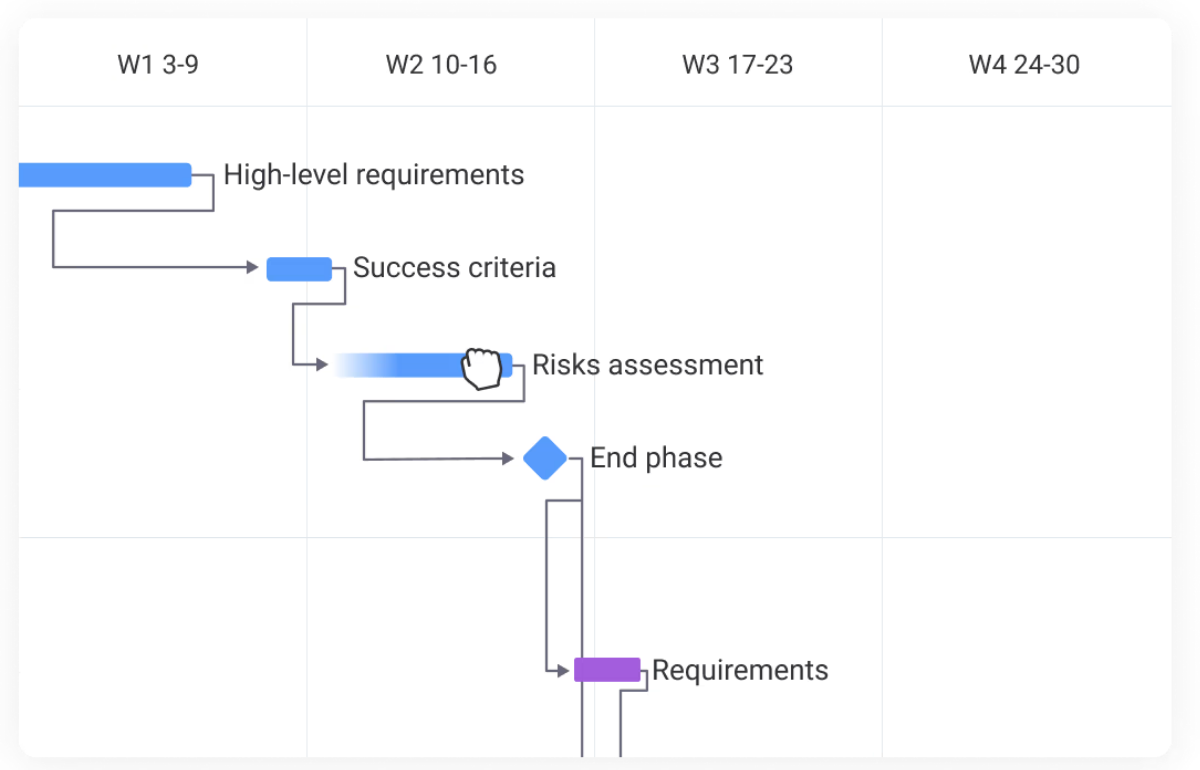
For a project manager, the distinction between a visible dependency and an enforced scheduling rule is essential. A line between tasks tells a reviewer that work is connected. A scheduling mode determines whether a changed date causes downstream dates to move. That's why neither, by itself, guarantees that the responsible person will acknowledge the business impact.
An example of the scheduling problem
Suppose a billing integration must finish before a release candidate can be approved. The release candidate in turn must be approved before a customer rollout starts. A Gantt view can show the sequence, but a PMO also needs to know whether the billing owner has accepted the new date, whether the approval is still valid and whether the customer commitment has changed.
Use a dependency register alongside the schedule, because a chart alone doesn't record who agreed to what. For each cross-team link, record the predecessor, successor, named owner, required handoff evidence, latest acceptable date and escalation path. A schedule move without an acknowledged handoff is an unresolved risk, even if the chart recalculates cleanly.
Cross-project dependencies are a different tier
The official Cross-Project Dependencies guide labels the feature Enterprise. It describes selecting tasks from multiple project boards, viewing relationships on a Gantt and identifying schedule conflicts. The same guide says the feature doesn't currently support private or shareable projects or projects in closed workspaces. That's a material limitation for organizations that isolate sensitive programs.
If your portfolio relies on confidential project boards, test the actual permission design before you buy. It may be possible to report selected summary information through dashboards, but that isn't the same as having the Enterprise cross-project dependency feature work across every private project.
Critical path: useful, with an entitlement caveat
monday.com's Gantt support documentation describes a critical path view that highlights tasks affecting completion. Its dedicated critical-path article also calls the feature a trial capability whose future packaging may change. Treat critical-path availability as something you'll confirm during procurement, rather than assuming it's permanently included in a specific tier.
How good are dashboards for a PMO?
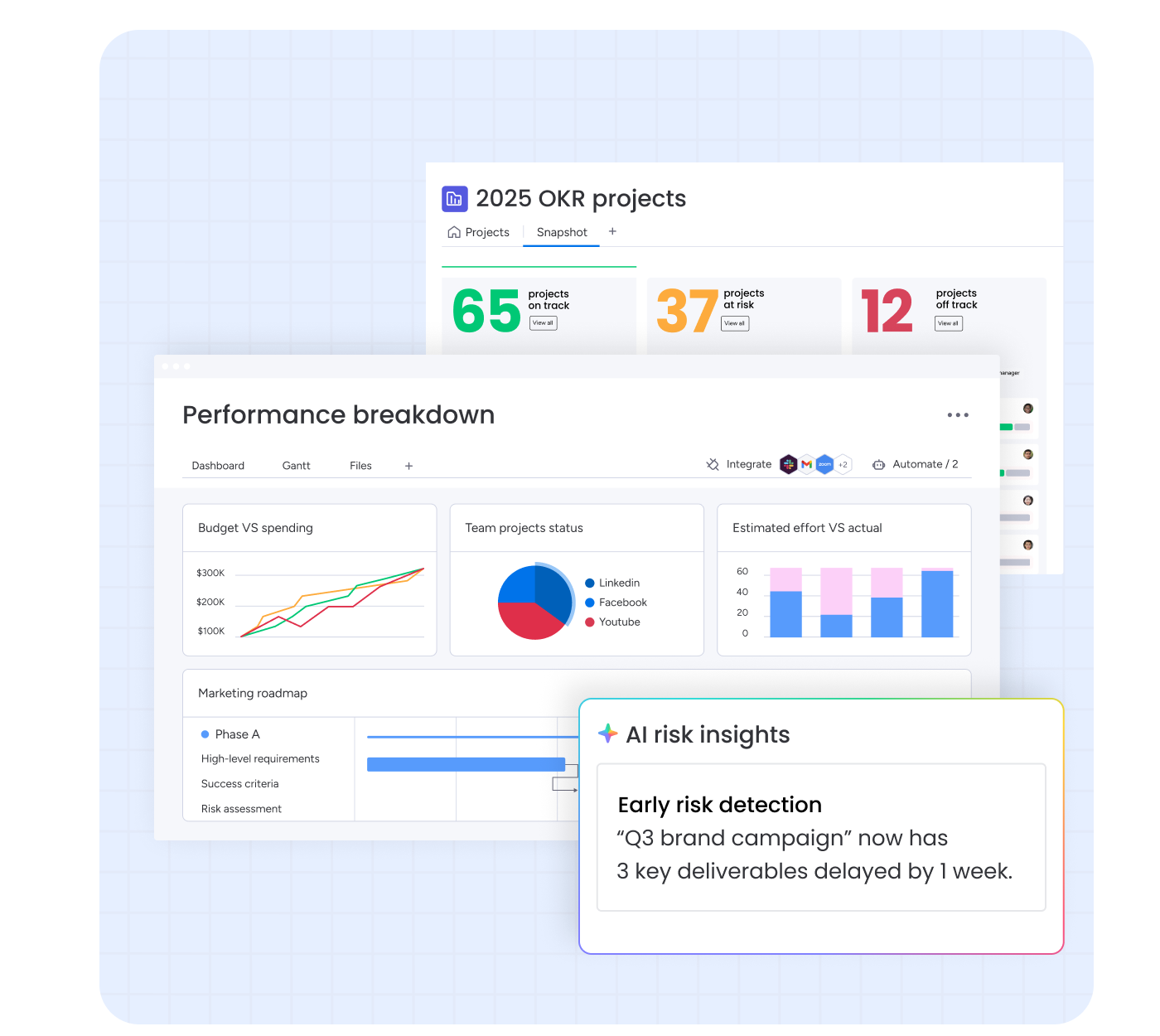
A dashboard is useful when it answers a decision question. It's less useful when it simply reproduces task lists in a different shape. For a program manager, the most important widgets are often exceptions: milestones at risk, decisions overdue, dependencies awaiting acceptance and resources with conflicting assignments.
The official dashboard support page currently lists five connected boards on Standard, 20 on Pro and 50 on Enterprise. It also describes a maximum of 20,000 total items, subitems and linked items across connected boards and a limit of 30 widgets, excluding text widgets. Those are dashboard limits, and they aren't general limits on how many projects a business may have.
The dashboard design that survives executive scrutiny
Start with a small common data model that covers the project name, the accountable owner, the next critical milestone, the confidence status, any dependency exception, the decision needed and the date of last verification. Require project leads to update the underlying evidence before the weekly portfolio review, otherwise you're reviewing stale data. Then design the dashboard around four questions the review has to answer. Each one should be answerable at a glance.
- It shows which committed outcomes are now at risk, and why.
- It names the dependency that is blocking another team's work.
- It lists who must decide or approve something before the next milestone.
- It records what changed since the previous review, with the evidence for the change.
Avoid a single calculated health score unless everyone can explain its inputs. If people can't, they won't trust it. A red project with a clearly owned recovery plan may be better controlled than a green project whose underlying dates were never refreshed.
What the dashboard doesn't automatically solve
monday.com's support page notes that dashboards aggregate connected boards, while portfolio-level automations, rollups and project overview fields are scoped to portfolios. Those portfolio functions aren't automatically reproduced inside a generic dashboard. That distinction matters when a PMO expects a central dashboard to behave like a portfolio management engine.
Here's a practical test: add a new project to the program and watch what you've got to configure. Check whether it inherits the standard template and whether the dashboard includes it. Confirm that dependency exceptions are visible without manual copy-and-paste, and that the executive can see the owner and evidence behind a status. Those questions expose maintenance cost better than a demo with perfectly prepared sample boards, and they're cheap to ask.
Is monday.com suitable for portfolio and resource management?
For basic visibility, teams can assemble project boards and dashboards on lower paid plans. For native portfolio management and dedicated resource planning, monday.com positions its Enterprise offering as the relevant product. Its Enterprise documentation describes AI-generated portfolio risk insights, an All Projects dashboard, cross-project dependencies, a Resource Directory, Resource planners and a Capacity manager.
The distinction between a task assignment and a resource plan is important. Assigning a person to a task tells you who owns that work; it doesn't tell you who's overloaded. Capacity planning asks whether the same person is already allocated elsewhere, whether the required skill is available and whether a proposed timeline is feasible across the portfolio.
The official resource management guide describes placeholders for unfilled roles, allocations over project timelines and a Capacity manager that consolidates multiple resource plans. It also says tasks from the project board don't appear in the Resource planner. That means a buyer shouldn't assume task-level workload and higher-level resource allocation are the same dataset, or that they'll reconcile automatically in every report.
A realistic Enterprise pilot
Build a small portfolio with several projects competing for the same specialist. Give one project an urgent milestone and another a dependency that can move. Ask the resource manager to show both planned allocation and the effect of moving the milestone. Then ask the PMO to identify the decision required: defer work, change scope, add capacity or accept a revised commitment.
Document where each action happens, since you won't remember it a month later. A tool can offer a resource planner and still require a human governance process to approve the tradeoff. The important outcome is whether the decision, owner and revised date can be traced after the meeting.
What do independent monday.com reviews say?
Independent coverage is generally positive about visual organization and customization, while noting pricing complexity and limits for more demanding use cases. That coverage is reported assessment, not findings from our own testing.
TechRadar's review highlights the interface, visualizations and integrations, but cautions about large-team cost and advanced task tracking. PCMag's 2026 work management comparison similarly praises boards, views and templates while criticizing confusing pricing. These reviews help explain the appeal of the product, but they shouldn't substitute for a tier-specific proof of concept.
On Capterra, the monday AI Work Platform listing showed 4.6 out of 5 from 6,129 reviews on November 1, 2026. That count keeps changing, and it blends reviewers and use cases, so it isn't a program management score. Individual published reviews praise configurable boards and cross-project visibility, while others describe setup complexity, limitations in reporting and frustration with seat packages. Capterra labels the source of each review, so weigh the detail of each account more heavily than its star rating.
For example, a project controls reviewer describes limitations around specialized financial and earned-value work. That's consistent with a sensible buyer boundary: monday.com can coordinate the delivery process without automatically replacing a dedicated project cost-control system. A different reviewer praises the ability to connect boards and track projects in one dashboard. Both can be true, depending on the reporting requirement and plan.
How to read review sites without being misled
Filter reviews by organization size and the kind of work being managed. It's the fastest way to find the ones that resemble your setup. A small creative agency's enthusiasm for a visual board doesn't establish that the same setup handles enterprise portfolio governance. Look for detailed comments about permission boundaries, dependency maintenance, action limits and the cost of adding occasional collaborators. Ignore claims of universal performance or reliability that aren't supported by repeatable evidence.
monday.com vs Asana, Smartsheet and ClickUp
The right alternative depends on what your program office is trying to control. A tool that's excellent for personal task management may still be weak for portfolio tradeoffs. Conversely, a sophisticated portfolio platform may create too much administration for a small delivery team.
| Decision criterion | monday.com work management | Alternative worth evaluating |
|---|---|---|
| Highly configurable visual boards | Strong fit for teams willing to design a shared model | ClickUp for a different all-in-one workflow style |
| Portfolios and goal alignment on a published midmarket tier | Native portfolio tooling is positioned in Enterprise | Asana Advanced, which lists portfolios and goals |
| Spreadsheet-style project controls and reports | Flexible boards and dashboards | Smartsheet for a sheet-oriented planning model |
| Cross-project dependency conflicts | Evaluate monday.com Enterprise | Compare against your existing Jira or Asana process before migrating |
| Resource planning and staffing tradeoffs | Evaluate monday.com Enterprise tools | Asana Advanced workload or Smartsheet resource options, subject to fit |
Asana's official pricing page lists portfolios, goals and resource management on Advanced. Smartsheet's pricing page positions portfolio capabilities in Enterprise and advanced work management offerings, with some resource products sold as add-ons. They're different packaging choices, not proof that one product has superior scheduling algorithms. Compare the exact workflows and quote, not category labels. That's the only comparison that survives a procurement review.
When Asana is a better shortlist candidate
If the PMO already thinks in goals, portfolios and standardized cross-functional projects, Asana deserves a close comparison. Its Advanced tier explicitly lists portfolios and workload features. Evaluate how it represents dependency owners, executive rollups and approval evidence. Don't choose it solely because the plan name appears to unlock portfolio management at a lower tier. The data model and real operating cost still matter.
When Smartsheet is a better shortlist candidate
If teams already manage plans in spreadsheet-like grids and need formulas, reporting and repeatable project controls, Smartsheet is a natural candidate. Confirm the cost of any premium resource or control features rather than assuming they are included in a base license. Also test whether project owners can maintain the underlying sheets consistently. Familiar rows and columns don't remove governance work, and they won't fix stale data either.
When ClickUp is a better shortlist candidate
If the buyer prioritizes broad task, document and collaboration functionality, ClickUp is worth piloting. Compare the number of setup decisions, not only the length of each feature list. A program office needs stable conventions, easy escalation and auditable status changes. A large feature set can help, but it can also increase training and maintenance work.
A buyer's implementation plan for monday.com
A polished demonstration is easy to appreciate, and it's certainly difficult to audit. Use a staged evaluation with real data, a small number of stakeholders and explicit success criteria. The aim isn't to reproduce every current project. It's to find out whether the system preserves the information your program decisions depend on.
Define the decision record
Agree on the fields executives need: milestone, owner, dependency, evidence, risk, decision and last verified date.
Build representative project boards
Use a few different workflows with one shared status vocabulary. Include a late task and a disputed handoff.
Connect the dependency chain
Test the scheduling mode, ownership and escalation behavior. Include a cross-project link if evaluating Enterprise.
Run the weekly review
Ask an executive to identify the top blocker, its owner and the next decision without opening every project.
Test the seat and action budget
Record the actual seats required, the action consumption and any AI-credit charges shown in checkout.
Document the operational handoff
Assign responsibility for templates, new project onboarding, dashboard maintenance and access reviews.
Score the pilot on outcomes
Use a simple pass, conditional pass or fail scale for each scenario. It's quick, and it forces a verdict on every scenario. A program lead should be able to find the predecessor behind a slipping milestone, contact the owner and identify which commitment is affected. A project manager should be able to update a schedule without silently overwriting the agreed baseline. An executive should be able to tell a missing update from a verified green status.
A useful procurement artifact is a one-page exception log: test scenario, expected result, actual result, evidence link, workaround, owner and decision. If a feature requires Enterprise or a separate integration, record that next to the result. This prevents the team from buying a lower tier based on a demo of higher-tier functionality.
Common failure modes and fixes
Board sprawl. Different teams invent similar columns with incompatible meanings. Fix it with a governed template and a short data dictionary. Automation noise. Too many status changes create alerts that nobody owns. Fix it with explicit exception thresholds and an escalation owner. Green dashboard, red reality. Statuses are manually optimistic or stale. Fix it with verification dates and evidence fields. Hidden licensing cost. Seat buckets and credits are omitted from the business case. Fix it with a quote tied to the real headcount and workflow volume.
They're operating design risks, not proof of defects in the software. The buyer's task is to determine how much administration the organization can sustain, which the vendor can't answer for you.
Who should choose monday.com?
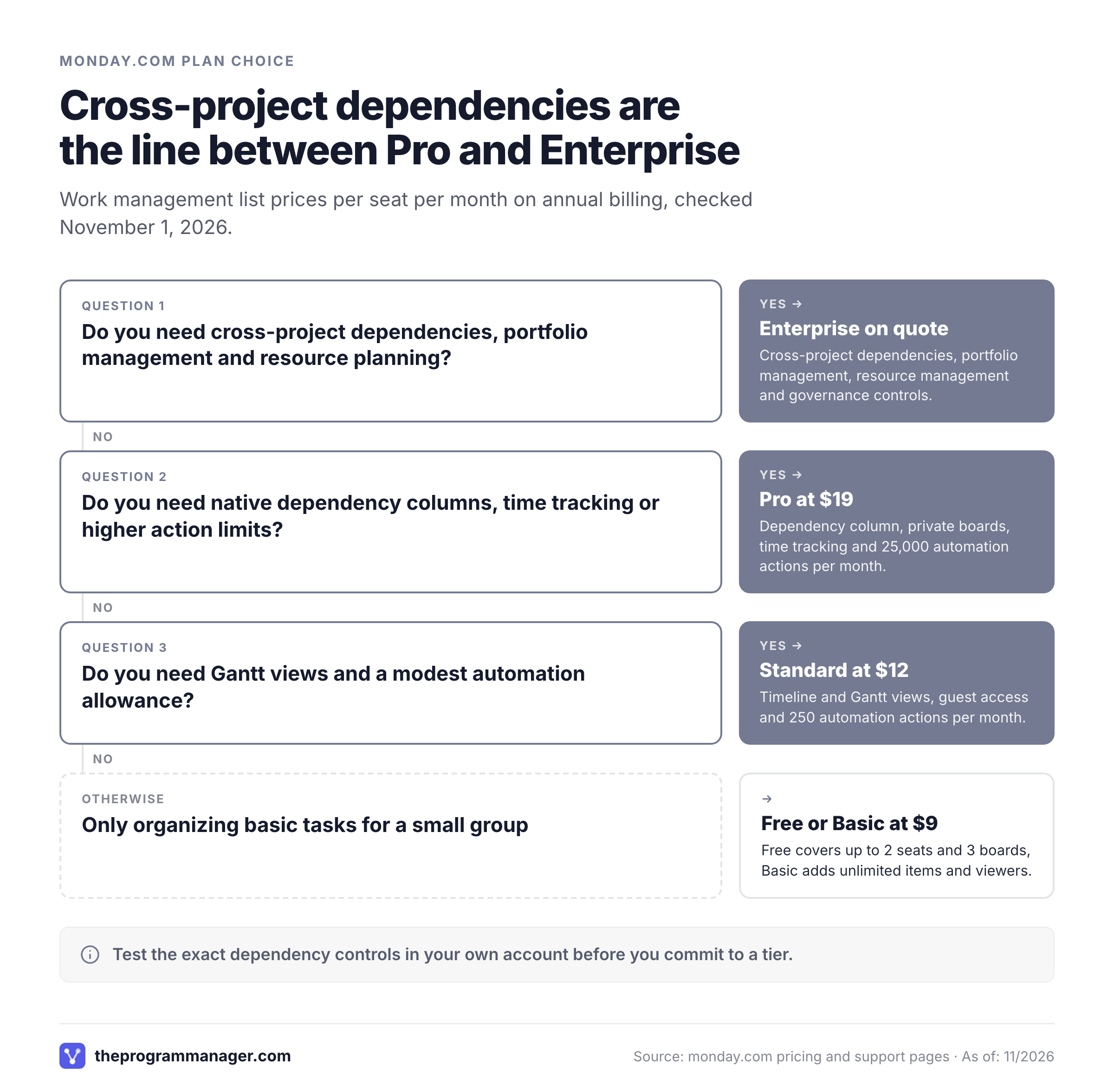
- A small team organizing basic tasksTest Free or Basic; confirm whether the seat model makes sense.
- Gantt planning and a few repeatable automationsEvaluate Standard and measure the action allowance.
- Native dependency scheduling and time trackingEvaluate Pro; test the exact dependency controls in your account.
- Cross-project dependency conflicts and portfolio resource tradeoffsRequest an Enterprise demonstration and quote.
- Goal-centric portfolios without an Enterprise quoteCompare Asana Advanced against the same scenarios.
- Spreadsheet-first planning and reportingInclude Smartsheet in the pilot.
Choose monday.com when the teams doing the work value flexible visual boards, leadership wants consistent status reporting, and someone's accountable for the operating model. Be cautious when the program depends on advanced cross-project scheduling, confidential boards or detailed resource optimization but the budget only covers Standard. In that case, the required capability may be in a different tier or may need a separate process.
For organizations already coordinating work in Jira and Asana, a complementary dependency-monitoring workflow may be less disruptive than replacing the tools used by delivery teams. The key requirement is an accountable record of blockers, decisions and approvals. If your program office needs that oversight across existing systems and doesn't want a migration, compare the cost of a focused layer with the cost of a full work management migration. Don't assume a new dashboard automatically repairs weak handoffs.
Frequently asked questions
Is monday.com good for program management?
Yes, monday.com can work for program management, especially when teams standardize boards and reporting. Native cross-project dependency and portfolio resource tools are positioned in Enterprise, so verify the required plan before buying.
Is monday.com free?
Its work management Free plan supports up to two seats and up to three boards. Paid plans add the features most teams need for coordinated project work.
Does monday.com have Gantt charts?
Yes. The official work management pricing page lists Timeline and Gantt views from Standard. Check whether your scheduling needs also require Pro dependency features.
Can monday.com manage dependencies between projects?
The official cross-project dependency guide identifies this as an Enterprise feature and notes restrictions involving private, shareable and closed-workspace projects.
How much does monday.com cost for a small team?
Annual-billing list rates shown on November 1, 2026 were $9 Basic, $12 Standard and $19 Pro per seat per month. Paid seat buckets and checkout-specific AI charges can change the total.
Is monday.com better than Asana?
Neither is universally better. monday.com emphasizes configurable boards and an Enterprise portfolio offering; Asana Advanced lists portfolios and goals. Test the same cross-project decision workflow in both.
Final assessment
monday.com is easy to shortlist for its visual flexibility. The harder question is whether its plan boundaries, dependency model and resource controls match the way your organization makes program decisions. For single-project visibility, Standard or Pro may be enough. For genuine cross-project dependency and resource governance, evaluate Enterprise against an explicit pilot. Buy the smallest tier that passes the real workflow test, and don't skip the pilot, with the full seat-bucket and usage costs documented.
Leave a Reply