A RACI template is a ready-made grid that gives every task or decision one of four roles for each person involved: responsible, accountable, consulted or informed. The one below is built for programs. The rows are deliverables and decisions, and the columns are the sponsor, program manager, PMO, workstream lead, finance partner and steering committee.
Copy it into a spreadsheet or download it as an Excel or Word file, whichever you'll actually use. It includes a filled-in example, a role key and the checks that catch a broken grid before anyone relies on it. If you need the theory first, our RACI chart guide explains the roles and the variants. This page is for the moment you've got to produce the grid. It's free, and there's no sign-up.
- Copy or download the matrix below, replace the example rows and role columns and delete what you don't use.
- Fill in the A first: every row gets exactly one accountable person. Then add the Rs, then only the Cs and Is that change the result.
- Run three checks before you share it: one A per row, at least one R per row and no column carrying too many letters.
- For a program, put decisions in the rows and governance roles in the columns, not only tasks.
Free RACI template: copy it or download it as Excel or Word
The template has three tabs. Tab 1 is the matrix, filled in for a fictional billing system migration so you'll see how the letters land. Tab 2 is the role key. Tab 3 lists the checks and the formulas that run them, which are plain COUNTIF formulas. Everything in it is an example, so you'll want to replace the tasks, roles and names with your own.
RACI template for a program
Three linked tabs: a RACI matrix filled in for a fictional billing system migration, a role key and a set of checks. Every name, role and task is an example. Replace them with your own and delete the columns you don't use.
| Task or decision | Sponsor | Program manager | PMO | Workstream lead | Finance partner | Steering committee |
|---|---|---|---|---|---|---|
| Approve charter and funding | A | R | C | I | C | I |
| Baseline the integrated schedule | I | A | R | C | I | I |
| Deliver the cutover plan | I | A | C | R | I | I |
| Resolve conflicts between workstreams | I | A | R | R | - | I |
| Approve a change request above tolerance | C | R | C | C | C | A |
| Forecast and report spend | I | A | C | C | R | I |
| Publish the monthly status report | I | A | R | C | C | I |
| Make the go or no-go call for cutover | A | R | C | R | I | C |
| Confirm benefits at program close | A | R | C | C | C | I |
| Letter | Role | Meaning in this template | Rule |
|---|---|---|---|
| R | Responsible | Does the work or prepares the decision | At least one per row |
| A | Accountable | Owns the outcome, signs it off and answers for it | Exactly one per row |
| C | Consulted | Gives input before the work is final | Only people whose input can change the result |
| I | Informed | Is told about progress or the result | Include the leaders who need updates |
| A/R | Accountable and responsible | One person does the work and owns the result | Counts as both A and R in the checks |
| S | Supportive (optional, RASCI) | Helps the responsible person without owning the outcome | Add only if shared teams do real work |
| Check | Where | Pass condition | Formula (task names in column A, roles in B to G) |
|---|---|---|---|
| One accountable person | Each row | Exactly 1 | =COUNTIF(B2:G2,"A*") |
| At least one responsible person | Each row | 1 or more | =COUNTIF(B2:G2,"*R") |
| Responsible load | Each column | Realistic for that person | =COUNTIF(B2:B13,"*R") |
| Accountable load | Each column | No single person holds nearly all of the As | =COUNTIF(B2:B13,"A*") |
| Everyone has a role | Each column | At least 1 letter | =COUNTA(B2:B13) |
How to read the example: the sponsor is accountable for funding and for the go or no-go call, and the steering committee is accountable for scope changes above tolerance. The program manager is accountable for everything that keeps the program moving. The PMO is responsible for the schedule baseline and the status report but isn't accountable for either, since the program manager answers for both. That's deliberate, and it's worth keeping.
That's the split worth copying. The person who does the work and the person who answers for it are often different people, and that's fine. Writing them down separately is the point of the grid. A hyphen or an empty cell isn't an omission, though, and it shouldn't be filled just because there's space. It means the role has nothing to do with that row, which is why the Finance partner cell in the conflicts row carries a hyphen.
What do R, A, C and I mean in a RACI template?
Who's who matters more than the wording. Responsible people do the work, the accountable person owns the outcome and signs it off, consulted people give input before the work is final and informed people are told about progress or the result. Atlassian's RACI guide says to assign exactly one accountable individual per task, and that a task may have more than one responsible individual. That's the rule the checks enforce, and Tab 2 turns the definitions into a key.
When one person does the work and owns the result, write A/R in the cell. That's especially common on small teams, and the formulas in Tab 3 count A/R as both an A and an R, so a row with a single A/R still passes. For a longer explanation of the difference between responsible and accountable, and of how the sources disagree on the number of Rs, see the RACI chart guide.
How do you fill in a RACI template?
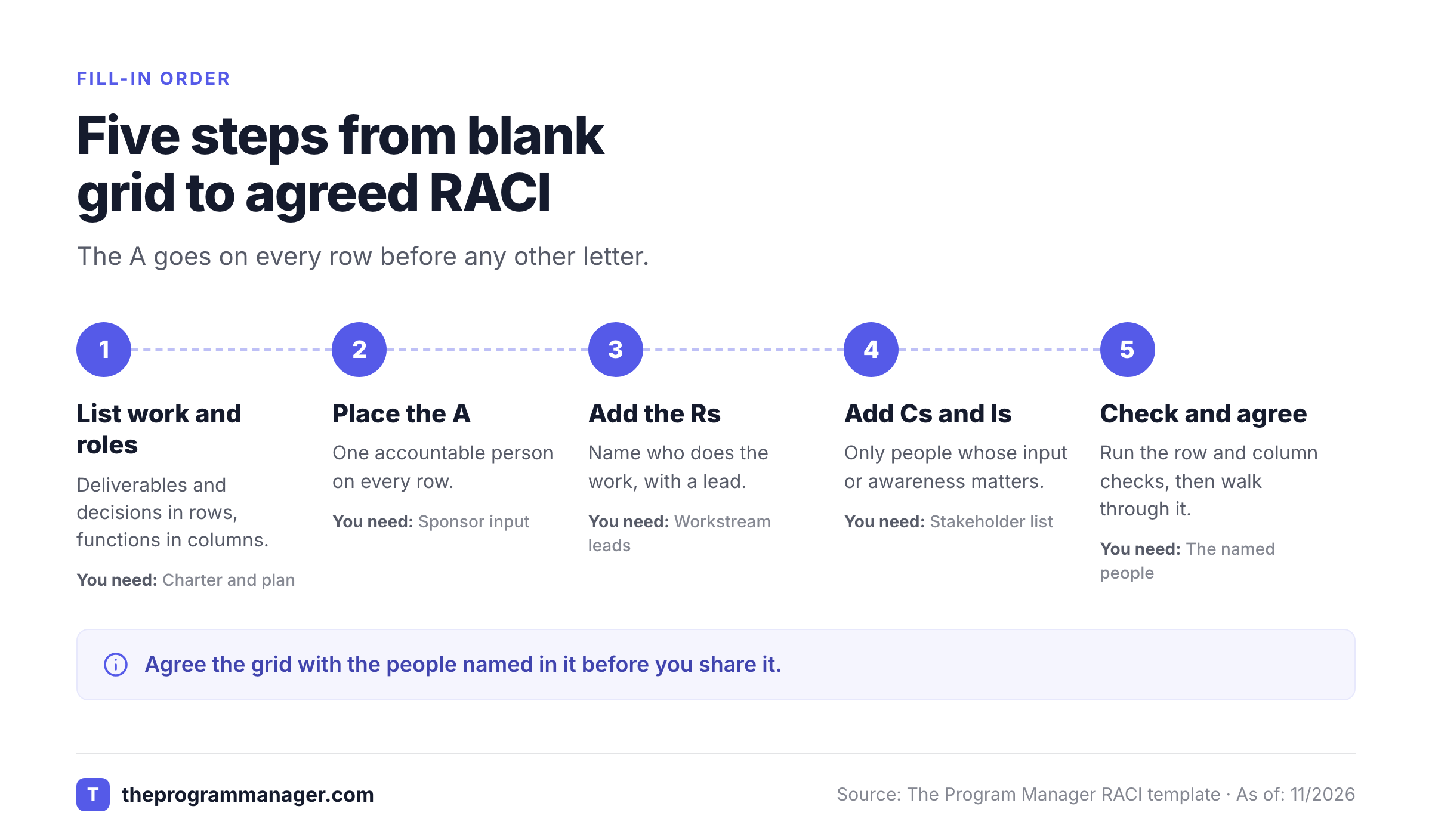
Fill in a RACI template by listing the work and the roles, placing the A on every row first, adding the Rs, adding only the Cs and Is that matter and then checking the grid with the people named in it. Atlassian's version of the process has four steps. The five below add the agreement step, because a grid nobody has agreed to is, of course, just a guess.
List the tasks, decisions and roles
Pull deliverables, milestones and decisions from the charter and the program plan, and include the decisions people argue about, because that's where ownership usually goes missing. Keep every row at the same level of detail, and don't list every task. The grid's for ownership, not scheduling. Across the top, use functions rather than names when several people do the same job: the sponsor, program manager, PMO, workstream leads, finance and any governance body.
Put the A on every row first
If you can't choose one accountable person for a row, the row isn't ready. That conversation is the most useful part of the exercise, and it's quicker with the sponsor in the room.
Add the Rs
Name who does the work, and who's really on the hook for it. Atlassian notes that too many Rs create confusion and neglected tasks, so name a lead where you can and make the others C.
Add Cs and Is sparingly
Atlassian warns that too many Cs produce conflicting opinions and too few Is suggest a lack of upward communication. Consult the people whose input can change the result, and inform the leaders who need to know.
Run the checks and agree the grid
Run the checks in the next section, walk through the grid with everyone named in it and set a review date. Document changes with the date and the reason.
How do you check a RACI template before you share it?
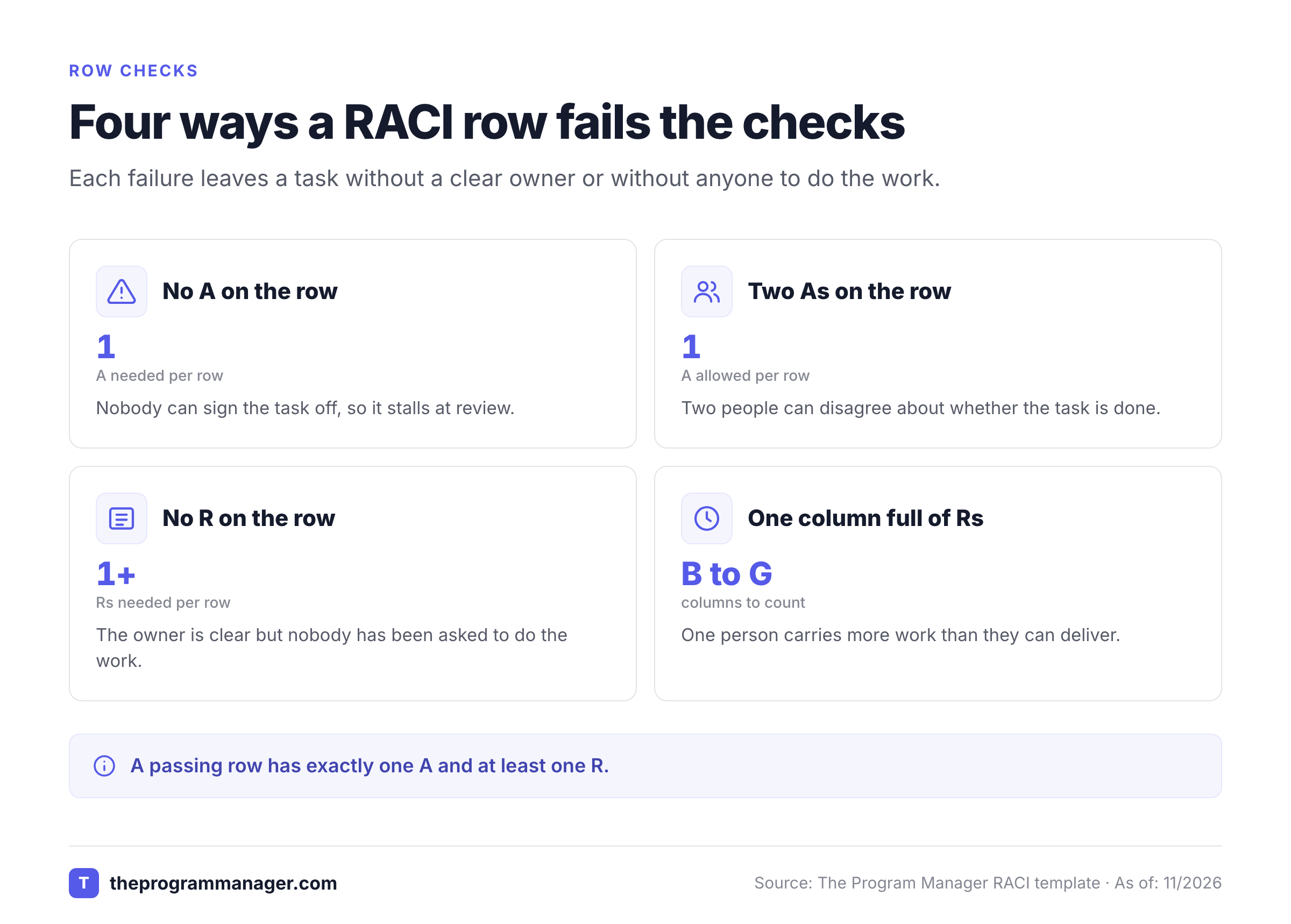
Check a RACI template by reading across each row and then down each column. The rows tell you whether the work gets done, and the columns tell you whether one person is carrying too much. TeamGantt lists the same rules: every task has at least one R, exactly one A and everyone gets a role.
Tab 3 puts those checks into formulas. In the example, task names sit in column A and the roles sit in columns B to G, so the first row is checked with these two formulas:
- One A per row:
=COUNTIF(B2:G2,"A*")should return 1. The asterisk lets A/R count as an A. - At least one R per row:
=COUNTIF(B2:G2,"*R")should return 1 or more, and it counts a plain R and an A/R. Every row in the example returns 1 for the A check and at least 1 for the R check.
The Excel file already has both formulas in columns H and I, marks failing rows in red and counts the Rs and As per person under the grid. Compare those totals with what each person can deliver. A person with a long list of Rs probably can't finish all of it, and a person holding nearly all of the As can't oversee that much work. Don't skip the column check. It's easy to forget, and it's where overloaded people show up.
To make your own grid catch errors, add a conditional formatting rule to the task rows with the custom formula =COUNTIF($B2:$G2,"A*")<>1. Any row that doesn't have exactly one A then turns a warning color. The Excel download already limits the cells to the allowed letters. To add the same dropdown to your own sheet in Excel, select the cells, open Data, then Data Validation, set Allow to List and enter the values. In Google Sheets, select the cells and choose Insert, then Dropdown.
- Every row has exactly one A
- Every row has at least one R
- No column carries almost all of the As or Rs
- Decisions are on the grid, not only tasks
- Everyone named has seen their column
- A review date is set
Which RACI template format should you use?
The best RACI template format depends on the job: Excel when the grid will be edited and checked, Word when it goes into a charter or plan, Google Sheets when several people edit at once and a PowerPoint slide when you present the result. The download above covers Excel and Word, and the other two don't take more than one extra step. You don't need all four.
| Format | Best when | How to get it from this page |
|---|---|---|
| Excel (.xlsx) | The grid will be edited and checked with formulas | Download the Excel file, which has the dropdowns and check formulas built in |
| Word (.docx) | The grid sits inside a charter, plan or kickoff document | Download the Word file |
| Google Sheets | Several people edit the grid at the same time | In Sheets, choose File, then Import, then upload the Excel file |
| PowerPoint | You present the finished grid to a steering committee | Copy the Tab 1 table from the Excel file and paste it onto a slide |
Google's help page for importing files describes the import path: open Sheets, choose File and Import, select the Excel file and pick whether to create a new spreadsheet or insert the tab as a new sheet. If you only need one tab, use Copy as text on the template card and paste it straight into a sheet. It's the quickest route.
Other publishers offer free files too. HubSpot's RACI matrix template comes in Excel, Google Sheets, PowerPoint and Google Slides, and Vertex42 offers Excel and Google Sheets versions with dropdowns and color coding. That said, check the license before you redistribute any of them. Vertex42 states that its template is for private use and not for distribution or resale, as of November 1, 2026.
How is a program RACI template different from a project one?
A program RACI puts decisions and cross-workstream work in the rows and governance roles in the columns, and that's why the A moves between levels depending on the row. A project RACI usually lists tasks and the people who do them. The template above is the program version, because cross-team decisions are where ownership gets blurry.
| Dimension | Project RACI template | Program RACI template |
|---|---|---|
| Rows | Tasks and deliverables | Decisions, stage gates and work that crosses workstreams |
| Columns | Team members and their functions | Sponsor, program manager, PMO, workstream leads, finance, steering committee |
| Where the A sits | Usually the project lead | Moves between the sponsor, program manager and steering committee by row |
| Detail | Individual tasks | One level above the project grids, which each workstream keeps itself |
The workstream lead column is the bridge. In the example, the workstream lead is responsible for the cutover plan but isn't accountable for it, because the program manager answers for the program as a whole. Inside the workstream, the lead would keep a more detailed project grid with the same letters.
If you're still sorting out where the program manager's role ends and a project manager's begins, our guide on program manager vs project manager walks through the split.
The version you need depends on the team. A small project team can use the simple version: delete the PMO, finance and steering committee columns and keep only the people who do or approve the work. A team that spans several workstreams, a change program or a PMO-run portfolio needs the full program grid, because that's where sponsors, finance and governance bodies hold the decisions.
When should you add an S for a RASCI template?
Add an S to a RASCI template when shared teams do real supporting work and you'd like it visible. TeamGantt describes RASCI as RACI with a Supportive role for people who help the responsible person without being responsible for the outcome. Tab 2 already lists the S, so adding it means inserting the letter in the cells that need it. The checks don't change, because an S isn't an A or an R.
Don't add it by default. A larger set of letters makes the grid harder to read, and many teams treat support as part of the R or the C. However, if the real problem is who makes one decision, Atlassian's DACI play fits better than a bigger RACI: one Approver makes the decision, contributors have a voice but not a vote, and the driver gets it made. Our RACI chart guide compares the variants in a table.
What does a RACI template not tell you?
A RACI grid says who owns each row, but it doesn't say when the work is due, what it depends on or whether it's at risk. You'll want to pair it with a program roadmap template for the dates and a project dependency matrix template for the handoffs between teams, and track risks and decisions in a RAID log. For the weekly update that sits on top of the grid, use the project status report template. Our collection of program management templates links the rest.
The A on a decision row is only useful if the decision gets recorded, admittedly a step many grids skip. If your program runs in Jira and Asana, The Program Manager keeps a decision log with the options, rationale, approver and follow-up deadline for each decision, linked to the milestones it affects. That's where an accountable person's call turns into something the next steering meeting can check, and a spreadsheet can't do that on its own.
RACI template FAQs
These answers cover the questions that come up when a team moves a RACI template from a workshop into everyday use.
Is there a free RACI template I can download?
Yes, there's a free RACI template on this page, and it downloads as an Excel or Word file with no sign-up. It includes a filled-in program example, a role key and a tab of checks.
Can I use this RACI template in Google Sheets?
Yes, you can use this RACI template in Google Sheets. Choose File, then Import, and upload the Excel file. You can also use Copy as text on the template card and paste a tab straight into a sheet.
How many people can be accountable for one task in a RACI template?
One person can be accountable for a task in a RACI template. Atlassian's guide says to ensure exactly one accountable individual per task. A task can have several responsible people, but the A stays with a single person.
Can the same person be responsible and accountable?
Yes, the same person can be responsible and accountable. When one person does the work and owns the result, write A/R in the cell. The checks in this template count A/R as both an A and an R.
What is the difference between a RACI template and a RACI chart?
A RACI template is the reusable file with the structure and rules. A RACI chart is the version you've filled in for your own project or program, with your tasks, roles and names.
How often should you update a RACI template?
Update it whenever scope, roles or sponsors change, and review it on a fixed date. Atlassian recommends reviewing and updating the chart regularly and documenting each change.
Leave a Reply