A program roadmap template connects related projects to shared outcomes, milestones, dependencies and decisions. Download or copy the four-tab template below, then replace the fictional example with your program's real work. The useful difference from a project timeline is the visible chain from one project's output to another team's readiness and, eventually, a business benefit.
A roadmap shouldn't be a second task tracker. If you're planning a single project rather than a program, use the project roadmap template instead. It should let a sponsor see which outcomes are at risk, which cross-project handoff is blocking progress and what decision would change the forecast. Keep detailed tasks in their source systems and bring only decision-grade information into the roadmap.
- Download the template or copy it into a spreadsheet and create a row for each meaningful program milestone.
- Track dependencies by ID, with an owner, evidence of readiness and a decision deadline.
- Separate delivery milestones from adoption and benefits checkpoints.
- Publish a short sponsor view while maintaining a more detailed working view.
- Rebaseline dates only with a documented decision; retain the original baseline for comparison.
What does a program roadmap template include?
A program roadmap template includes the program objective, component projects, major milestones, dates, dependencies, owners, benefits and governance decisions. The fields below also record acceptance evidence and a decision deadline, so a green status can't hide an unconfirmed handoff. Use the same IDs in the working roadmap and executive summary.
The template's deliberately tool-neutral. Download the Excel or Word file, or copy a tab as text and paste it into a blank spreadsheet. Replace the fictional example values and don't touch the header rows, because they define the contract between project leads and the program manager.
Program roadmap template
Four linked tabs: roadmap, dependency register, benefit tracker and sponsor decision log. All dates and names are fictional examples; replace them with your program's real data.
| Milestone ID | Workstream | Milestone or decision | Outcome supported | Owner | Baseline date | Forecast date | Status | Depends on | Dependency owner | Acceptance evidence | Benefit checkpoint | Decision needed by | Next action |
|---|---|---|---|---|---|---|---|---|---|---|---|---|---|
| M01 | Data | Data contract approved | Trusted customer records | Data lead | Jan 15, 2027 | Jan 15, 2027 | On track | None | None | Approved schema link | No | Jan 8, 2027 | Confirm field owners |
| M02 | Integration | Integrated test passed | Trusted customer records | Integration lead | Feb 12, 2027 | Feb 19, 2027 | At risk | M01 | Data lead | Test results and defect threshold | Yes | Feb 5, 2027 | Book integrated test |
| M03 | Operations | Pilot training signed off | Faster customer onboarding | Operations lead | Feb 26, 2027 | Mar 5, 2027 | Planned | M02 | Integration lead | Attendance and scenario sign-off | No | Feb 19, 2027 | Confirm pilot cohort |
| M04 | Program | Launch approval | Faster customer onboarding | Program sponsor | Mar 5, 2027 | Mar 12, 2027 | Planned | M02; M03 | Integration and Operations leads | Decision record with conditions | No | Mar 1, 2027 | Set steering agenda |
| M05 | Benefits | Adoption review | Faster customer onboarding | Benefit owner | Apr 16, 2027 | Apr 23, 2027 | Planned | M04 | Program sponsor | Adoption dashboard and baseline comparison | Yes | Apr 9, 2027 | Agree measurement window |
| Dependency ID | Provider milestone | Receiver milestone | Provider | Receiver | Required evidence | Latest safe handoff | Escalation trigger |
|---|---|---|---|---|---|---|---|
| D01 | M01 | M02 | Data team | Integration team | Signed schema and sample payload | Before integrated testing | Schema owner not confirmed |
| D02 | M02 | M03 | Integration team | Operations team | Accepted test results | Before pilot training | Open blocking defects |
| D03 | M02 | M04 | Integration team | Sponsor | Accepted test results and open-defect list | Before launch decision | Blocking defects above threshold |
| D04 | M03 | M04 | Operations team | Sponsor | Pilot readiness sign-off | Before launch decision | Training or support gap |
| Benefit ID | Milestone | Measure | Baseline | Benefit owner | Review cadence |
|---|---|---|---|---|---|
| B01 | M02 | Share of customer records with errors | 6% of records with errors (fictional) | Integration lead | Monthly |
| B02 | M05 | Median days from signed contract to completed setup | 9 days (fictional) | Benefit owner | Weekly for 8 weeks after launch |
| Decision ID | Decision needed | Decision maker | Needed by | Status | Baseline note |
|---|---|---|---|---|---|
| DL01 | Accept revised launch date or approve scoped recovery plan | Program sponsor | Mar 1, 2027 | Open | Original baseline stays on file |
Field rules: Milestone ID never changes when dates change. Baseline date is the last approved plan, not the latest guess. Forecast date is the current expected finish. Depends on contains predecessor IDs, not vague phrases such as "waiting for IT." Acceptance evidence identifies the artifact or observable test that proves completion. Decision needed by is the last useful date for a sponsor action, which can precede the milestone itself.
If pasted text lands in a single column, use your spreadsheet's split-text-to-columns function with a tab delimiter. The second tab holds the dependency register, the third the benefit measures and the fourth the sponsor decisions. The roadmap tab remains the single summary view of timing.
How does a completed program roadmap look?
A completed program roadmap shows the timing and consequences of work across related projects, not just their separate delivery dates. The fictional customer-onboarding modernization example below shows a data workstream, an integration workstream and an operations workstream converging on a launch decision. Its dates are illustrative, and they're not industry benchmarks.
| Program roadmap milestone | Planned date | Current forecast | Dependency | Owner | Decision signal |
|---|---|---|---|---|---|
| M01: Data contract approved | Jan 15, 2027 | Jan 15, 2027 | None | Data lead | Schema accepted |
| M02: Integrated test passed | Feb 12, 2027 | Feb 19, 2027 | M01 | Integration lead | Test evidence pending |
| M03: Pilot training signed off | Feb 26, 2027 | Mar 5, 2027 | M02 | Operations lead | Training can't close yet |
| M04: Launch approval | Mar 5, 2027 | Mar 12, 2027 | M02 and M03 | Sponsor | Reconfirm launch window |
| M05: Adoption review | Apr 16, 2027 | Apr 23, 2027 | M04 | Benefit owner | Check realized usage |
The program manager should clearly flag M02 as the upstream constraint, not label all affected rows as independent delays. A shift in integration testing pushes training, the launch decision and the first adoption checkpoint. The sponsor needs to know whether the organization can recover the launch window by changing scope, adding test capacity or accepting a later date.
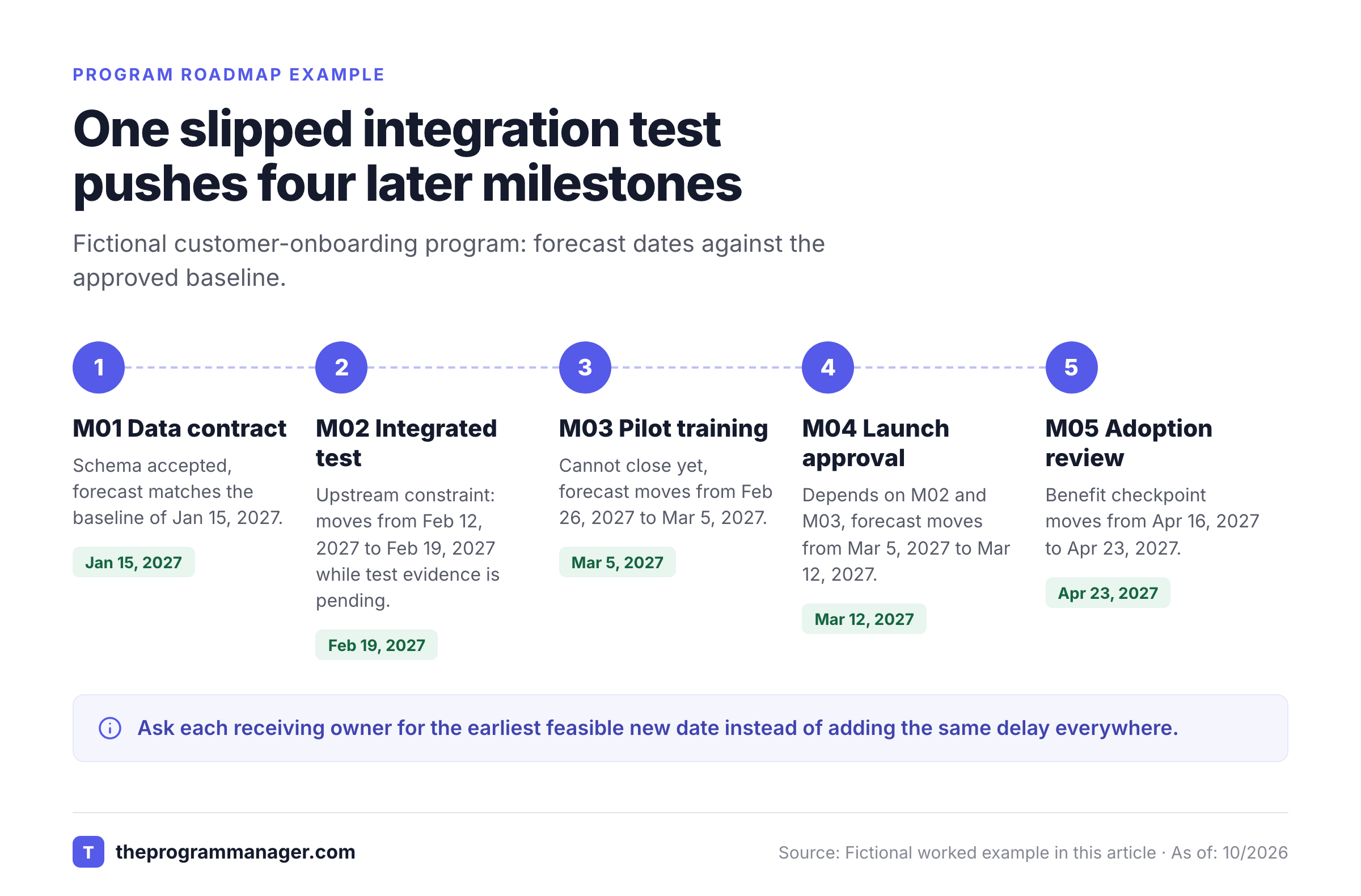
The table intentionally distinguishes the launch milestone from the adoption checkpoint. Shipping a new workflow isn't the same as proving that staff use it, and the two events need separate rows. For this fictional program, a useful benefit measure could be the median time from signed contract to completed customer setup, compared against a documented prelaunch baseline. Name the person who owns the measure after the project teams leave.
What should the executive see on one page?
An executive program roadmap should show the objective, the next major decisions, the milestones whose forecasts changed and the benefits at stake. It shouldn't include every work item, team meeting or minor task. Use one page for decisions and an underlying working register for the supporting detail.
For the example, the sponsor view could read: Objective: reduce onboarding friction. Next gate: integrated testing acceptance. Current risk: a test delay moves pilot readiness. Decision: accept a revised launch date or approve a scoped recovery plan. Benefit evidence: compare the postlaunch onboarding-time measure with its baseline.
Keep the forecast change visible even after the sponsor approves it; you'll thank yourself at the next audit. If the program rebaselines, preserve the previous baseline in a change log. Otherwise every monthly report can look green while the delivery date keeps moving.
How do you build a program roadmap step by step?
Build a program roadmap by starting with the intended benefit, identifying component workstreams, sequencing cross-project milestones and assigning decision rights. Then validate the plan with the teams that must deliver or accept each handoff. The sequence matters because dates set before dependency validation create false precision.
Define the program outcome
Write a measurable outcome and name the operational benefit owner. Record the baseline measure and how it will be observed after delivery.
Group related work into workstreams
List the projects and business-change activities that contribute to the same outcome. Exclude unrelated portfolio items even when they share a department.
Choose program-level milestones
Select acceptance gates, integration events, major releases and adoption checkpoints. Leave ordinary project tasks in their source trackers.
Map the cross-project dependencies
For each milestone, record the predecessor ID, delivering owner, receiving owner, required evidence and latest safe handoff date.
Validate dates and constraints
Ask workstream leads to challenge assumptions, scarce roles, environment availability and sequencing. Mark uncertain dates as forecasts rather than commitments, because they're not commitments yet.
Approve the baseline and decision rules
Have the sponsor approve the initial roadmap, escalation thresholds and review cadence. Store the decision record with the baseline.
Review changes and benefits
Refresh forecasts from the source systems, inspect downstream impacts and keep adoption measures visible after the release.
The Project Management Institute's PgMP examination content outline calls for a high-level roadmap with milestones and preliminary estimates for sponsor validation. It also describes developing a roadmap from program objectives, scope information and the benefits realization plan. Those are useful anchors for a practical roadmap, even if your team doesn't use a formal certification framework. See PMI's PgMP examination content outline.
How much detail belongs in the roadmap?
The roadmap needs just enough detail to expose a decision, a dependency or a benefit. It doesn't need every sprint ticket or implementation task, and it'd be harder to read if it had them. A useful test is whether the sponsor could still understand the program's direction and its material risks if you removed the row.
A project plan can contain granular tasks and assignments. The program roadmap instead records major outcomes, handoffs and decision points across projects. Link a roadmap milestone to the detailed source record rather than copying its entire backlog into the program view.
How should program dependencies be tracked?
Program dependencies should be tracked as explicit handoffs between named owners with acceptance criteria and dates. Clearly, a dependency is actionable only when the receiving team can say what it needs, who'll provide it and how completion will be verified. A colored arrow without those fields won't support escalation.
Use a small dependency register next to the roadmap. The following fictional entries show why the relationship matters more than the status color.
| Dependency ID | Provider | Receiver | Required evidence | Latest safe handoff | Escalation trigger |
|---|---|---|---|---|---|
| D01 | Data team | Integration team | Signed schema and sample payload | Before integrated testing | Schema owner not confirmed |
| D02 | Integration team | Operations team | Accepted test results | Before pilot training | Open blocking defects |
| D03 | Integration team | Sponsor | Accepted test results and open-defect list | Before launch decision | Blocking defects above threshold |
| D04 | Operations team | Sponsor | Pilot readiness sign-off | Before launch decision | Training or support gap |
When D01 slips, you'll want to inspect both the integration milestone and every later milestone that depends on it. Don't blindly add the same number of days to each forecast. Teams might've built in contingency time, overlapping work or a legitimate recovery option. Ask the receiving owner for the earliest feasible new date, then record the assumption behind it so the forecast doesn't rest on a guess.
A PMI Global Congress 2014 conference paper on program risk identification describes using a roadmap to identify key milestones and inter-project dependencies. It also recommends documenting high-level constraints, assumptions and risks. That's the reason to keep the dependency register connected to the roadmap rather than burying it in individual project notes. See PMI's discussion of hidden program risks.
How do you show a critical dependency without inventing a critical path?
You'll show a critical dependency by naming the downstream milestone it threatens and the latest safe acceptance date. A full critical-path calculation needs a maintained schedule and valid task relationships. The program roadmap can flag a high-consequence dependency without claiming that its simplified view is a mathematically calculated critical path.
Use a Risk to outcome note when a dependency affects a benefit rather than a date. For example, a new customer workflow could launch on time but miss its adoption target if support staff haven't been trained. The roadmap should expose that outcome risk even when the release itself remains green.
How do you connect milestones to program benefits?
Connect program milestones to benefits by naming the capability delivered, the operational change required and the measure that will confirm the outcome. Delivery dates are leading signals; realized benefits often need observation after launch, so you'll want a measurement window. Assign a business owner who'll still be accountable when the project closes.
| Program milestone | Capability delivered | Adoption evidence | Benefit measure | Accountable owner |
|---|---|---|---|---|
| M02: Integration accepted | Reliable data handoff | Pilot scenarios pass | Error rate versus baseline | Integration lead |
| M04: Launch approved | New onboarding workflow | Teams begin using it | Share of eligible cases using workflow | Operations lead |
| M05: Adoption reviewed | Workflow in normal operation | Usage records reviewed | Median onboarding time versus baseline | Benefit owner |
The measures above are design examples. They're not claims about achieved performance. Record the measurement method, population and baseline before rollout. A percentage that improves only because the denominator changed isn't evidence of program value. Use the same definitions before and after launch, because they're what makes the comparison fair.
Program benefits may depend on several projects and a change in day-to-day behavior, so they're rarely the work of one team. PMI's discussion of program benefits management distinguishes delivering a capability from realizing and sustaining its benefit. A roadmap that ends at go-live can therefore miss the result the sponsor funded.
What happens when a benefit slips but the project finishes on time?
When a benefit slips despite an on-time delivery, keep the delivery milestone complete and open a separate benefit recovery action. The program manager should work with the operational owner to find out whether training, adoption, data quality or an incorrect assumption explains the gap. Don't rewrite history by changing a completed project milestone to red. It's done; the benefit is what's late.
Record the decision: extend observation, change the rollout, adjust the benefit forecast or stop further investment. Each choice should have an owner and a review date. That decision belongs on the sponsor view when the expected outcome materially changes.
How do program and project roadmaps differ?
A program roadmap coordinates related projects toward shared benefits, while a project roadmap communicates one project's goals, milestones and delivery sequence. A portfolio roadmap compares investments across programs and projects, including work that may not depend on each other. Mixing these levels can hide the very handoffs a program manager needs to control.
| Roadmap level | Primary question | Typical row | Main owner |
|---|---|---|---|
| Program roadmap | Will related work deliver the intended benefit? | Cross-project acceptance or adoption gate | Program manager |
| Project roadmap | Will this project's outcome arrive as planned? | Major deliverable or release | Project manager |
| Portfolio roadmap | Are we investing in the right mix of work? | Program or investment initiative | Portfolio leader |
For a single project with no meaningful cross-project dependencies, a project roadmap may be enough. Don't create a program structure just because several teams attend the same meeting; that's overhead, not coordination. Use a program view when you've got coordination and benefit realization require decisions across component projects or business functions.
Which format works best for a program roadmap?
The best program roadmap format depends on who'll make decisions from it. A spreadsheet is practical for a small or newly formed program; a timeline works for sequencing; a presentation works for executive decisions. The underlying IDs, owners and evidence should remain consistent across views.
Spreadsheet: Start here when the team's after a transparent, editable dependency register and a quick way to establish field definitions. It's easy to inspect formulas and comments, but manual updates can drift when workstreams use separate systems.
Timeline or Gantt-style view: Use it when overlapping workstreams and timing are the main question. Keep milestone labels short and show dependency relationships explicitly. A long bar isn't proof of progress, and visual precision can exceed the quality of the estimates behind it.
Board view: Use it when the program is in discovery or the sequence changes frequently. Group work by decision state or horizon, then add dates only where a commitment exists. A board can communicate priorities but may obscure date-sensitive dependencies.
Executive slide: It's the right choice for sponsor meetings, but don't maintain a separate set of facts in a deck. Pull the current milestone forecasts, decisions and benefit signals from the working register. A static slide should show its reporting date and owner, otherwise nobody knows when it's from.
Asana's published program roadmap template describes dependencies, assignee changes, shared access, Kanban and Gantt-style views. Those are format options. They're not evidence that a particular plan tier or integration will meet your program's needs. Confirm tool-specific functionality before you commit to a workflow, because vendor pages change.
How often should a program roadmap be updated?
Update a program roadmap whenever a material dependency, decision or benefit forecast changes, then review it on a predictable cadence. Don't wait for the monthly meeting. A weekly working review and a periodic sponsor decision review are practical starting points, and they aren't universal standards. The right rhythm depends on how quickly the program's assumptions change, so it's worth revisiting.
A useful working review starts with changed forecasts, not a tour of every green milestone. Ask each owner to confirm the next acceptance event, the evidence they'd expect and the impact of any slip. Escalate decisions while recovery options still exist, not after a missed deadline becomes obvious.
The sponsor review shouldn't walk through every row; it should focus on exceptions: material baseline movement, unresolved dependencies, changed benefits, resource constraints and approvals required. Keep a change log with the old forecast, new forecast, reason, decision maker and decision date. It's what makes the roadmap auditable without turning it into a second project-management system.
- Every upcoming milestone has a named accountable owner.
- Each dependency has a provider, receiver and acceptance evidence.
- Forecast changes are visible beside the approved baseline.
- The next sponsor decision has a clear deadline and options.
- Adoption and benefits checkpoints remain visible after launch.
- Project trackers remain the detailed execution source.
- The executive view and working register use the same milestone IDs.
- The change log records who approved material rebaselines.
What mistakes make a program roadmap misleading?
Program roadmaps become misleading when they confuse activity with outcomes, hide dependencies or overwrite missed commitments. The most damaging errors are easy to prevent with field definitions and review discipline; they're process failures, not tool failures. A clean-looking chart isn't enough if its underlying evidence is weak, and you shouldn't trust it.
Too many tasks: A roadmap crowded with sprint tickets forces executives to search for the actual program decision. Promote only milestones that change readiness, benefits or governance; that's the filter. Leave task ownership and subtasks in the delivery system.
Unowned dependencies: A note saying "waiting on security" doesn't identify who must act or what constitutes acceptance. Replace it with the approving owner, evidence required and latest safe date. That's what makes escalation possible.
Green without proof: A milestone may be marked complete even though its receiver hasn't accepted the output. Use evidence links or explicit acceptance notes; they're cheap to add. A completed upstream task and a usable downstream handoff aren't always the same event.
Dates that silently move: Replacing the baseline with the latest forecast makes schedule drift disappear, and that's exactly the trap. Preserve both dates and record the sponsor decision when a new baseline is approved.
Benefits that end at launch: A program can deliver every component and still fail to change the business. Keep the adoption owner and measurement checkpoints in the roadmap after the release milestone closes.
A second version of the facts: A slide that doesn't match the working register creates conflicting narratives. Publish views from the same milestone and dependency records, then date the snapshot. It's a small habit that avoids big arguments.
Can the roadmap work across Jira and Asana projects?
A program roadmap can coordinate work tracked in Jira and Asana, provided each cross-project milestone has a stable ID, a source reference and a named acceptance owner. The program manager shouldn't copy every ticket into a new tracker. Use the source systems for execution and the roadmap for cross-project commitments.
For example, a Jira integration epic may produce the test evidence that an Asana operations milestone needs before training can close. Record that relationship as a dependency with the providing and receiving owners. When the source task moves, the program manager checks whether the receiving team can still meet its date rather than assuming an automatic schedule change.
A dependency-focused program tool can help maintain those relationships, but it isn't a substitute for portfolio budgeting, resource-capacity planning or the underlying delivery systems. Choose tooling according to the gaps your teams actually face, and check what its Jira and Asana integrations really do before you rely on them.
Frequently asked questions about program roadmap templates
A program roadmap template is most useful when its fields stay stable and the plan can change without losing its history. These answers address practical setup, ownership and governance decisions that arise after the first draft.
What is a program roadmap template?
A program roadmap template is a reusable structure for showing related projects, program milestones, dependencies, owners and expected benefits in one view.
Can I create a program roadmap in Excel or Google Sheets?
Yes, a program roadmap can be maintained in a spreadsheet. Keep stable milestone IDs, a separate dependency register and an approved baseline so changes remain traceable.
Who owns the program roadmap?
The program manager normally maintains the integrated roadmap, while workstream leads own their forecasts and the sponsor owns major approvals. A business benefit owner should validate outcomes after delivery.
How is a program roadmap different from a Gantt chart?
A program roadmap explains cross-project direction, outcomes and decisions. A Gantt chart is a timeline format that can display part of that roadmap, but a timeline alone doesn't capture benefit ownership or acceptance evidence.
Should a program roadmap show every task?
No, a program roadmap should show decision-grade milestones, dependencies and benefits. Detailed task lists belong in the component project plans.
How do you show a delayed dependency on a roadmap?
Show the upstream dependency ID, affected milestones, revised forecasts and the decision needed. Preserve the original baseline and document any approved recovery plan.
Related program management resources
The program roadmap works alongside a program management plan and a dependency register. Use the plan for governance and scope, the roadmap for timing and outcomes and the dependency register for actionable handoffs. These related guides can help you build the surrounding operating model.
Leave a Reply