A project roadmap template is a one-page layout that shows a single project's phases, milestones, owners and dependencies on one timeline, so sponsors and the team can see the whole project without opening the detailed plan. The one below has five tabs and is filled in for a fictional help center migration, so you can see what a finished roadmap looks like before you write your own. It's the kind of page you'd send a sponsor on Monday.
You can copy it into a spreadsheet or download it as an Excel or Word file. It's free, with no sign-up. It covers one project, but if you need several projects on one timeline, jump to the last section. For a full program-level version, use our program roadmap template.
- A project roadmap is the one-page view of a project: phases, milestones, owners and the dependencies that can move them. The project plan holds the detail.
- Start from the goal and the end date, then work back: five or six phases, one milestone per phase, one owner per line.
- Keep it to a page, and leave off task lists, hour estimates and long risk descriptions. If a line needs a paragraph, it belongs in the project plan or the risk log.
- Update it on a fixed day, and move the forecast date instead of rewriting the baseline, so everyone can see what's slipped.
Free project roadmap template: copy it or download it as Excel or Word
The template has five tabs. Tab 1's the header with the goal, dates and scope. Tab 2 lays out the phases and milestones on a timeline. Tab 3 lists the deliverables with an owner and an acceptance step. Tab 4 tracks the dependencies and risks that can move a date. Tab 5 is a now, next, later view for the weekly conversation. Everything in it is an example, so you'll replace the project, dates and names with your own. Don't keep any tab you won't use.
Project roadmap template for one project
Five tabs: header and scope, phases and milestones, deliverables, dependencies and risks, and a now, next, later view. Everything is filled in for a fictional help center migration with example dates. Replace the example values with your own and delete the tabs you don't use.
- Project
- Help center migrationName of the project
- Sponsor
- VP Customer Support
- Project manager
- Program manager
- Goal
- All 640 help articles live on the new platform, with redirects, before the old contract endsOne sentence: what is different when the project is done
- Start and end date
- Jan 11, 2027 to May 28, 2027The baseline dates you committed to
- In scope
- Article migration, search, redirects, agent training
- Out of scope
- Rewriting article content, chatbot, new languages
- Last updated
- MondaysUpdate on a fixed day each week
- Overall status
- Green: all phase 1 work is on the baselineGreen, Amber or Red, with a one-line reason
| Phase | Start | End | Owner | Milestone | Milestone date | Status | Complete |
|---|---|---|---|---|---|---|---|
| 1. Discover | Jan 11 | Feb 5 | Product lead | Requirements signed off | Feb 5 | Done | 100% |
| 2. Design | Feb 8 | Mar 12 | UX lead | Design approved | Mar 12 | On track | 60% |
| 3. Build | Mar 15 | Apr 23 | Engineering lead | Articles migrated | Apr 23 | Not started | 0% |
| 4. Test | Apr 26 | May 7 | QA lead | UAT passed | May 7 | Not started | 0% |
| 5. Launch | May 10 | May 28 | Program manager | Go-live | May 17 | Not started | 0% |
| Deliverable | Phase | Owner | Due | Accepted by | Status |
|---|---|---|---|---|---|
| Requirements document | 1. Discover | Product lead | Feb 5 | Sponsor | Accepted |
| Information architecture and templates | 2. Design | UX lead | Feb 26 | Support director | In review |
| Visual design for article pages | 2. Design | UX lead | Mar 12 | Sponsor | In progress |
| Migrated articles with redirects | 3. Build | Engineering lead | Apr 23 | Support director | Not started |
| Agent training pack | 4. Test | Support operations | May 7 | Support director | Not started |
| ID | Type | Description | Needed by | Owner | If it slips |
|---|---|---|---|---|---|
| D1 | Dependency | Legal approves the new cookie and privacy text | Mar 5 | Legal counsel | Design approval moves past Mar 12 |
| D2 | Dependency | IT provides single sign-on for agent accounts | Apr 9 | IT lead | Build and UAT both lose a week |
| R1 | Risk | Article owners don't review their migrated content in time | Apr 30 | Support director | UAT starts without full coverage |
| R2 | Risk | Old platform contract ends before go-live | Jun 30 | Sponsor | Customers lose access to help articles |
| Horizon | What | Owner | Confidence |
|---|---|---|---|
| Now | Finish page templates and the search design | UX lead | High |
| Now | Get legal approval for cookie text | Legal counsel | Medium |
| Next | Migrate the first 200 articles and test redirects | Engineering lead | Medium |
| Next | Agree UAT script with support leads | QA lead | High |
| Later | Agent training and go-live rehearsal | Support operations | Low |
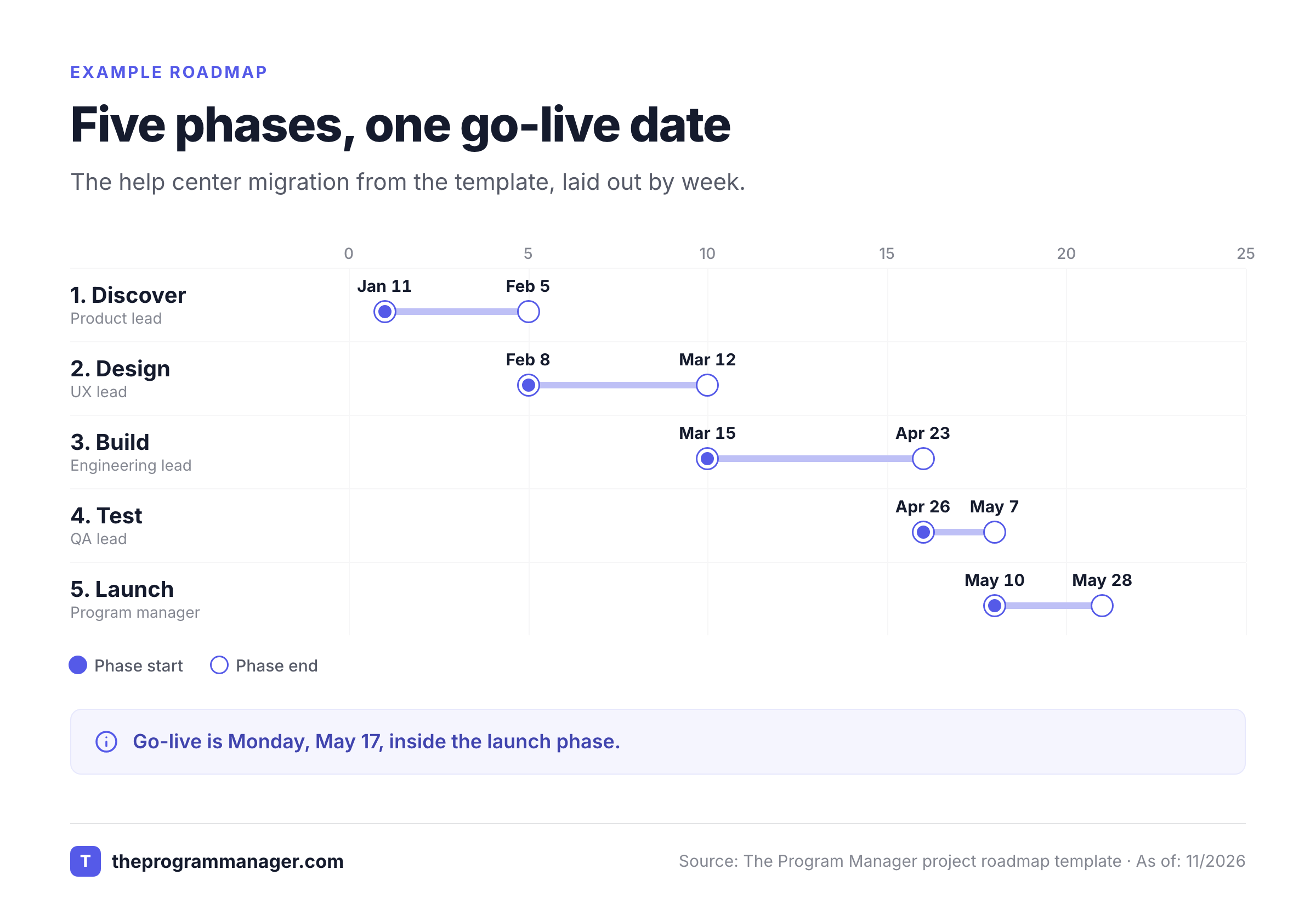
How to read the example: the project is green overall because phase 1 closed on its baseline date and phase 2 is 60% done. The roadmap's honest about what's next, though. Two dependencies in Tab 4 could move the design approval and the build, and each names an owner and a date. A sponsor can see in ten seconds which phase is running, which milestone is next and what could move it, and that's without opening the plan.
That's the point of a one-page roadmap. It doesn't list tasks, but it does tell people where the project is, where it ends and what's got to be true to get there.
What should a project roadmap include?
A project roadmap should include the goal, the phases and their dates, the milestones, the deliverables, the owners, the dependencies and the main risks, and that's about all. Nifty's guide lists seven key elements in the same spirit: objectives, deliverables, milestones and timeline, resources, budget, dependencies and risks. GanttPRO describes its template as a high-level overview of objectives, initiatives and deliverables. The table below shows how those elements map to the tabs in the template above, and why each one earns its place, though you'll rarely need every row.
| Element | Where it lives in the template | Why it's there |
|---|---|---|
| Goal and scope | Tab 1 | Everyone reads the same one-sentence definition of done, and the out-of-scope list stops quiet scope growth |
| Phases and dates | Tab 2 | Shows the shape of the project and where you are in it |
| Milestones | Tab 2 | Gives sponsors a date they can hold you to, instead of a task list |
| Deliverables | Tab 3 | Names what the project hands over and who accepts it |
| Owners | Tabs 2, 3, 4 | One name per line, because a shared owner is no owner |
| Dependencies | Tab 4 | Lists what other teams must deliver and by when |
| Risks | Tab 4 | Keeps the two or three that could move a date, with the cost of a slip |
| Budget and resources | Tab 1 or your project plan | Add a cost line to Tab 1 if your sponsor expects one, and keep the detail in the plan |
Notice what isn't on the list: task lists, hour estimates and daily detail, because they don't help a sponsor decide anything. Those belong in the project plan or in your task tool, while a roadmap that tries to carry them stops being readable at a glance. Nobody opens a roadmap they can't scan.
Two additions are worth making if your project needs them. Add a cost line to Tab 1 if the sponsor tracks money, and of course keep the cost detail in the plan. Add a column for the approver on Tab 3 if deliverables need sign-off from more than one person, as the example does. The detail for risks and decisions lives in your RAID log or risk register, and the roadmap only carries the few items that could move a milestone.
How do you build a project roadmap step by step?
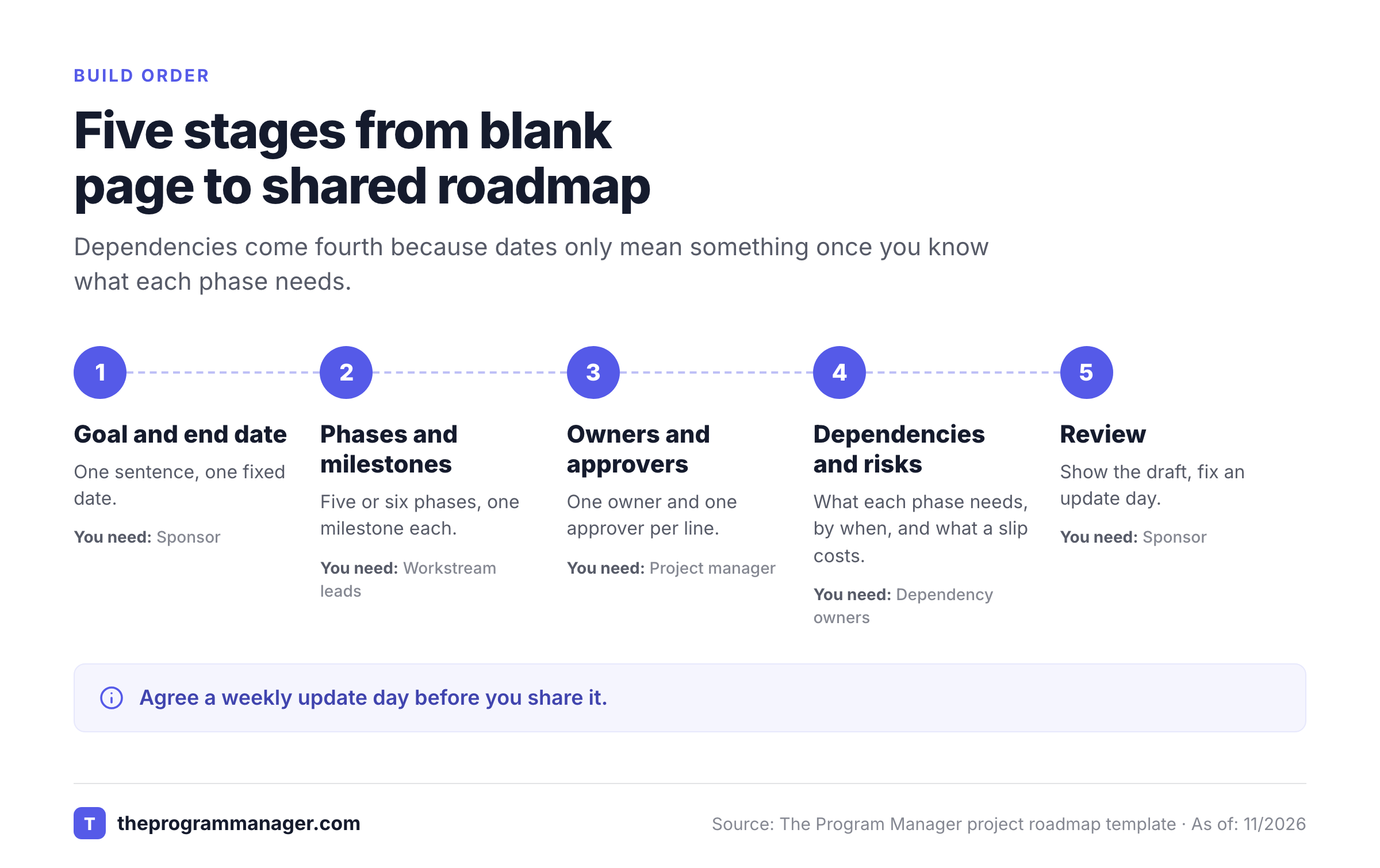
Build a project roadmap by writing the goal and end date first, splitting the work into five or six phases, setting one milestone per phase, naming an owner for each line, listing the dependencies and then reviewing the draft with your sponsor. The six steps below take about an hour for a project you already understand, and the order matters because dates depend on dependencies.
Write the goal and the end date
One sentence for the goal and one fixed date, or a date range if the project's got one. Everything else works back from these two lines. List what's out of scope in the same step, so the roadmap doesn't grow by accident.
Split the work into five or six phases
Name phases by what gets finished, not by who works on them: discover, design, build, test, launch. More than six phases usually means you're listing tasks, and that's the signal to stop.
Set one milestone per phase
A milestone is a decision or a handover you can point to, such as design approved or UAT passed. If you can't say who confirms it, it isn't a milestone yet, however clear the date looks.
Name an owner and an approver
One owner per phase and per deliverable. Add the person who accepts the deliverable where sign-off matters. Shared ownership is the quickest way to lose a date.
List dependencies and the risks that could move a date
Ask every lead what they need from another team and by when. Write each need down with an owner and what happens if it slips, because nobody else will. Keep only the risks that change a milestone, since the rest don't belong here. They go into the RAID log.
Review the draft and fix a review day
Show the first draft to your sponsor and the people who own a dependency, and don't wait for it to look polished. Ask whether the order is realistic, then agree a weekly update day. Nifty's advice is to take the draft to the primary decision-makers and refine it as the work moves, which is the right habit.
- The goal fits in one sentence and the end date is fixed
- Every phase has one milestone and one owner
- Each deliverable names who accepts it
- Each dependency has an owner, a date and a cost of slipping
- The out-of-scope list is written down
- There's a fixed update day and a named person who updates it
How do you keep a project roadmap to one page?
Keep a project roadmap to one page by cutting everything that isn't a phase, a milestone, a deliverable, an owner, a dependency or a decision. Obviously, a roadmap with forty task lines doesn't fit on one page anymore, and it isn't a roadmap by then. If an item needs a paragraph of explanation, it belongs in the project plan, the RAID log or the status report, and the roadmap can link to it. The table gives four examples of where detail should go instead.
| If you want to add | Put it here instead | Why |
|---|---|---|
| A task list for each phase | Your task tool or project plan | Tasks change daily, and milestones shouldn't |
| A long risk description | The RAID log or risk register | The roadmap only needs the risks that move a date |
| Weekly progress notes | The project status report | The report carries colors and decisions, and the roadmap shows the shape |
| A list of who does what in a meeting | A RACI template | Roles belong in one place that everyone can check |
What is the difference between a project roadmap, a project plan and a Gantt chart?
A project roadmap is a high-level view of one project, a project plan is the detailed document that says how the work gets done, and a Gantt chart is a task-level schedule that shows durations and dependencies. Nifty describes the roadmap as a visual summary of the plan, and the plan as the document that holds the charter, scope, schedule and cost detail. A Gantt chart can feed a roadmap, but it isn't one, because it's too detailed for a sponsor to read at a glance.
| Project roadmap | Project plan | Gantt chart | |
|---|---|---|---|
| What it is | One-page view of phases, milestones and dependencies | Detailed document: scope, schedule, cost, quality, communication | Task-level schedule drawn as bars on a calendar |
| Level of detail | High | Full | Task |
| Main reader | Sponsor, stakeholders, the whole team | Project manager and workstream leads | Project manager and the people doing the work |
| Changes how often | When a milestone or dependency moves | When scope, budget or approach changes | Daily to weekly as tasks move |
| Use it to | Agree direction and show where the project stands | Control how the work is done | Schedule tasks and see the critical path |
In practice you'll use all three, but they don't do the same job. Build the roadmap first, as Nifty suggests, so the plan and the schedule hang off a shared picture that everyone's agreed. Then keep the Gantt chart in your scheduling tool and pull only the milestone dates back into the roadmap, since a roadmap that copies every bar is just a smaller Gantt chart. If you're choosing a scheduler, our project scheduling software guide compares nine of them.
A roadmap also isn't a project charter. The charter authorizes the project, sets the objectives and names the sponsor, while the roadmap doesn't try to justify anything. The roadmap shows the route once the project's approved, and our project charter template covers the first of the two.
How is a project roadmap different from a product roadmap?
A project roadmap has an end date and a defined deliverable, while a product roadmap shows the direction of a product over time and has no end. A project roadmap answers "when does this finish and what has to happen first?", and a product roadmap answers "what are we building next and why?". If you're delivering a one-off result such as a migration, a launch or a construction build, you want the project version, and the template above fits.
The phases change with the kind of project, but the structure doesn't. A construction project might run design, permits, build, inspection and handover. A marketing launch might run strategy, creative, production, launch and review. Rename the phases in Tab 2, keep one milestone and one owner per phase, and the rest of the template works as it is.
Which roadmap layout and file format should you use?
Use a timeline layout for most projects, a swimlane layout when several teams run in parallel, and a now, next, later layout when dates aren't certain. For the file, use Excel for a roadmap you'll update weekly, Word when it travels in a document, Google Sheets when several leads edit it and PowerPoint when you present it. SlideUpLift's guide names eleven roadmap layouts, such as swimlane for parallel workstreams, now, next, later for lean prioritization, Gantt hybrid for dependency management and subway map for milestones. You won't need more than the three below for most projects.
| Layout | Best when | Watch out for |
|---|---|---|
| Timeline (phases left to right) | One project with a clear end date | Looks precise even when the dates aren't |
| Swimlane (one row per team) | Several teams hand work to each other | Too many lanes make it unreadable, so keep it to four or five |
| Now, next, later | Dates aren't fixed or scope may change | Sponsors may still ask for dates, so show the confidence level as Tab 5 does |
| File format | Best when | How to get it from this page |
|---|---|---|
| Excel (.xlsx) | You update the roadmap weekly and share a file | Download the Excel file |
| Word (.docx) | The roadmap goes into a charter or a project plan | Download the Word file |
| Google Sheets | Several leads edit their own rows | In Sheets choose File, then Import, and upload the Excel file |
| PowerPoint | You present to a steering committee | Copy Tab 2 from the Excel file onto a slide and color the phases |
| A short weekly note | Paste the Tab 5 table into the body |
If you only need one tab in Sheets, use Copy as text on the template card and paste it straight in. The Excel file's got drop-downs on the status columns, so the roadmap reads at a glance.
How do you combine several project roadmaps into one program view?
Combine several project roadmaps into a program view by keeping one roadmap per project and lifting only the shared milestones and the cross-project dependencies into a single timeline. Don't merge the task detail, because you'll never keep it current. A program roadmap that copies every project's phases becomes unreadable by the third project, and it's out of date by the following week, while one that carries only shared milestones stays readable.
Take three projects that feed one launch. The table shows what moves up into the program view and what stays behind, so you'll see how little actually needs to move.
| Project | Lifted into the program view | Stays in the project roadmap |
|---|---|---|
| Help center migration | Go-live May 17; UAT passed May 7 | Phase dates, deliverables, owners |
| Single sign-on rollout | SSO live Apr 9, because the help center needs it | Vendor setup, test accounts |
| Agent training | Training complete May 7 | Course content, schedule per team |
The program view then has three lines and one arrow you'll want to watch: the help center build needs SSO live by April 9. That arrow is the reason a program roadmap exists, and it's the part individual project roadmaps can't show, even when each one is accurate. Our program roadmap template builds the full program-level version, and the project dependency matrix template tracks who needs what from whom.
Dependencies between projects are also the part that moves silently, and they still decide most program dates. If your teams plan in Jira and Asana, the milestone dates in two roadmaps can drift apart without anyone noticing until a handoff misses. The Program Manager maps dependencies across Jira and Asana and watches milestones for risk. It reads dates and dependencies from those tools, so it doesn't replace a scheduler or build your roadmap for you. It can still flag a Tab 4 dependency that's slipping before the status meeting.
Project roadmap template FAQs
These answers cover what comes up when you're setting up a project roadmap for the first time.
Is there a free project roadmap template I can download?
Yes. There's a free project roadmap template on this page, and it downloads as an Excel or Word file with no sign-up. It's got a header, a phases and milestones tab, deliverables, dependencies and risks, and a now, next, later view.
What should a project roadmap include?
A project roadmap should include the goal, the phases and their dates, one milestone per phase, the deliverables, an owner for each line, and the dependencies and risks that could move a date. Keep task lists and daily detail in your project plan.
How do you create a project roadmap?
Write the goal and end date, split the work into five or six phases, set one milestone per phase, name an owner for each line, list dependencies and risks, then review the draft with your sponsor and agree a weekly update day.
What is the difference between a roadmap and a project plan?
A roadmap is a one-page, high-level view of phases, milestones and dependencies. A project plan is the detailed document covering scope, schedule, cost, quality and communication. The roadmap summarizes the plan, and the plan carries the detail.
Is a Gantt chart the same as a roadmap?
No. A Gantt chart is a task-level schedule with durations and dependencies, and it's too detailed for most sponsors to read at a glance. A roadmap shows phases and milestones. You can feed milestone dates from a Gantt chart into the roadmap.
Can I use this project roadmap template in Google Sheets or PowerPoint?
Yes. In Google Sheets choose File, then Import, and upload the Excel file. For PowerPoint, copy the phases and milestones tab onto a slide and color the phases. You can also use Copy as text on the template card.
Leave a Reply