A project plan that can't say what moves when one task runs late is a picture, not a schedule. Project scheduling software fixes that: it links tasks with dependencies, finds the critical path and keeps a baseline to compare against.
We compared nine tools. For each one we read the pricing page, a feature page, a help-center article on dependencies or rescheduling, and a review site, and we noted which plan unlocks critical path, baselines and automatic rescheduling. Where a detail couldn't be confirmed, the entry says so. If you're choosing a planning tool for one team and not a scheduler for dated work, start with our guide to project planning software or project management software.
- project scheduling tools compared
- 9
- cheapest paid plan with critical path and baselines on the vendor page (GanttPRO, billed annually)
- $7
- price at which Wrike unlocks critical path (Business, per user per month)
- $25
- tools with no published price or a quote-only enterprise tier (Primavera P6 and Celoxis Enterprise)
- 2
Which project scheduling software is best?
No single tool wins, because scheduling needs range from a ten-task Gantt to a contract schedule with five baselines. A Gantt-first tool such as GanttPRO or TeamGantt is quick to learn. A work management suite such as Smartsheet or Wrike adds scheduling to work you already track, usually on a higher plan. A scheduling engine such as Celoxis or Primavera P6 recalculates dates from calendars and logic. Here are our picks by situation, and each tag names the plan or price model, because that decides what you actually get.
 Best for critical path and baselines on the cheapest paid planGanttPRODependencies, critical path, baselines and auto-scheduling come on every paid plan. Core is $7 per user per month billed annually; workload needs Business at $17.
 Best for a readable Gantt with flat account pricingTeamGanttFree for one user and one project. Paid plans are flat per account from $59 per month, with task caps per project.
 Best if your plan already lives in sheetsSmartsheetDependent rows adjust when a predecessor moves. Pro is $9 and Business $19 per member per month billed yearly; no permanent free plan.
 Best for Microsoft 365 organizationsMicrosoft Planner and ProjectCritical path and baselines sit on Planner and Project Plan 3 at $30 per user per month; Plan 1 at $10 covers the basics.
 Best for critical path inside a work management suiteWrikeGantt dependencies start on Team at $10; critical path needs Business at $25 per user per month, billed yearly.
 Best for a PMO that wants scheduling tied to work calendarsCeloxisAuto-scheduled tasks follow predecessors and each assignee's calendar. Core is $10 per user per month with a 5-user minimum.
 Best for client work where you decide whether dependents moveTeamwork.comGantt and dependencies on every plan, including Free; critical path starts on Accelerate at $24.99 per user per month.
 Best for contract schedules that must be in P6 formatOracle Primavera P6Critical path method scheduling with up to five baselines. Priced by quote through Oracle.
 Best free, self-hosted Gantt with automatic schedulingOpenProjectCommunity edition is free. Paid editions start at $7.25 per user per month in the USD view.
What is project scheduling software?
Project scheduling software is a tool that sets start and finish dates for tasks based on their order, duration, working calendars and the people assigned, and recalculates those dates when something changes. The core features are a Gantt chart, task dependencies, a critical path view and baselines. Project management software is the broader category: it covers tasks, files, approvals and reporting, and scheduling is one part of it.
The difference shows up when work slips. In a task list, a late task is a red date. In a scheduling tool, the late task pushes the tasks that depend on it, and the critical path tells you whether the finish date moves. We looked for that behavior in every entry, because it separates a scheduler from a pretty chart and not a good tool from a bad one.
Scheduling also comes at different levels of detail. Planners often talk about level 1 to level 4 schedules, from an executive milestone view down to a detailed activity schedule. Which level you maintain affects the tool: a milestone plan fits a Gantt tool, while a detailed activity schedule with logic ties fits a scheduling engine. This is common planning practice and not a rule set by any vendor above.
The features that matter
These are the six checks we used, in the order they matter when a schedule starts to slip.
- Dependencies: finish-to-start is the basic link. Start-to-start, finish-to-finish and start-to-finish links, plus lead and lag, matter for overlapping work.
- Critical path: the chain of tasks that sets the finish date. Many tools hide it on a higher plan.
- Baselines: a saved copy of the original plan, so you can see variance. Tools differ on how many they keep.
- Rescheduling: whether dependent tasks move automatically, move after you confirm, or don't move at all.
- Working calendars: weekends, holidays and leave, so a five-day task doesn't land on a Saturday.
- Workload view: whether the schedule shows who's overbooked. Many Gantt tools put this on a higher plan.
Project scheduling software compared
| Tool | Type | Where the scheduling features start | Starting price (USD) | Rating |
|---|---|---|---|---|
| GanttPRO | Gantt-first tool | Critical path, baselines, auto-scheduling: every paid plan. Workload: Business | $7, $10, $17 per user per month billed annually | 4.8 (Capterra, 543) |
| TeamGantt | Gantt-first tool | Dependencies on every plan; critical path on Base per the pricing page; baselines on Business | Free; Base $59, Business $120 per month per account | 4.6 (Capterra, 204) |
| Smartsheet | Work management suite | Dependencies and critical path: Pro and up. Baselines: Business per our read, Pro per a help page | Pro $9, Business $19 per member per month billed yearly | 4.4 (22,872) |
| Microsoft Planner and Project | Microsoft 365 planning | Critical path, baselines, lead and lag: Plan 3 | Plan 1 $10, Plan 3 $30 per user per month | 7.7/10 (TrustRadius, 738) |
| Wrike | Work management suite | Dependencies: Team. Critical path: Business | Team $10, Business $25 per user per month billed yearly | 4.2 (4,553) |
| Celoxis | Portfolio suite | Baselines and advanced scheduling: every plan. Work calendars: Essentials | Core $10, Essentials $25 per user per month, 5 users minimum | 4.5 (Capterra, 568) |
| Teamwork.com | Client work management | Gantt and dependencies: Free. Critical path and workload: Accelerate | Free; Basics $9.99, Accelerate $24.99 per user per month billed yearly | 4.5 (Capterra, 942) |
| Oracle Primavera P6 | Enterprise CPM scheduling | Critical path, up to five baselines, resource leveling; no public tiers | Quote only | 4.4 (Capterra (Oracle Primavera Cloud listing), 182) |
| OpenProject | Open-source project tool | Gantt and automatic scheduling in Community; baseline comparison beyond yesterday from Basic | Free; paid from $7.25 per user per month | 4.6 (Capterra, 189) |
 The Program Manager Our product | Cross-tool dependencies and milestone risk | Maps dependencies across Jira and Asana and watches milestones for risk | Team from $59 per workspace per month; card required at checkout | No reviews yet |
Prices checked October 2026 on vendor pages. Where a plan feature couldn't be confirmed, the entry says so.
The 9 best project scheduling software tools
Each entry follows the same pattern: what the tool is for, a slip test that describes what happens when a predecessor task moves, the plan that unlocks the scheduling features, and who should skip it.
GanttPRO
GanttPRO
Cloud Gantt chart tool with critical path, baselines and auto-scheduling on every paid plan.
GanttPRO fits teams that want a Gantt chart with dependencies, critical path and baselines from the cheapest paid plan, without a portfolio suite around it.
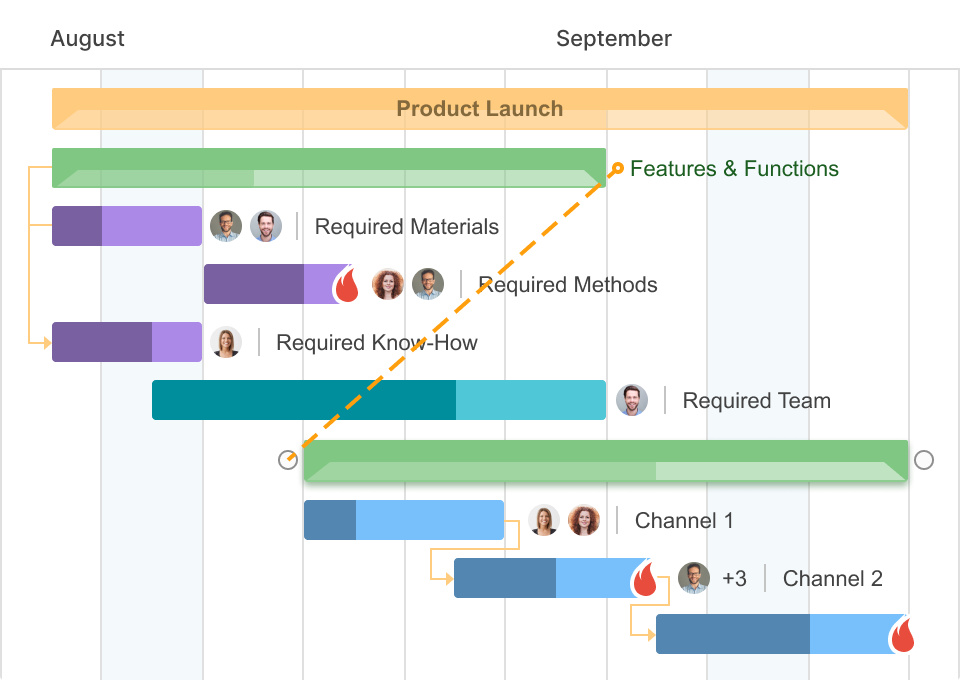
Slip test: you draw a dependency by dragging between tasks on the timeline or in task settings. Auto-scheduling is a switch in the project settings. With it on, GanttPRO recalculates the dates of dependent tasks when a linked task changes, and lead and lag let tasks keep a gap or overlap. The vendor pages don't say how far a change cascades or whether you get a prompt, so test a long chain in the trial.
Unlocked on: the pricing page lists Gantt, dependencies, critical path, baselines and auto-scheduling on every paid plan. Holiday exceptions in the calendar start at Advanced ($10), and workload, resource calendars and the portfolio view start at Business ($17).
- you want critical path, baselines and auto-scheduling from $7 per user per month billed annually
- you want a Gantt-first tool that reviewers describe as easy to learn, not a portfolio suite
- you need a workload view or resource calendars below the $17 Business plan
- you need a permanent free plan: there's only a 14-day trial
- Users like
- ease of use, workload and multi-project features, easy import from other planning tools
- Users dislike
- cost, a limited trial and a learning curve for the full feature set
- Source: Capterra, 543 reviews
How it works in practice
Capterra's listing shows GanttPRO at about 4.8 out of 5 from roughly 540 reviews. The figures come from the listing, not the review pages themselves. Reviewer themes in the listing summaries are ease of use, workload and multi-project features, and easy import from other planning tools. The recurring complaints are cost, a limited trial and a learning curve for the full feature set.
We couldn't confirm Slack, Teams or calendar sync, or how deep the Microsoft Project import goes. Ask both in the trial.
- Starting price
- Core $7, Advanced $10, Business $17 per user per month billed annually
- Auto-scheduling
- Project setting, every paid plan
- Critical path and baselines
- Every paid plan
- Workload and resource calendars
- Business
- Calendar exceptions (holidays)
- Advanced and up
- Export
- PDF, PNG, XLSX, XML
- Trial
- 14 days, no credit card
TeamGantt
TeamGantt
Browser-based Gantt planner priced per account, with dependencies on the free plan.
TeamGantt fits teams that want a Gantt that clients and non-project-managers can read without training, and prefer flat account pricing to a per-seat bill.
Slip test: you draw a dependency by dragging from the dot at the end of a task to the task that depends on it. When you drag a predecessor later, its successors follow only if the preference "Remove float when dragging predecessor tasks" is on; otherwise the gap between the tasks stays. A second preference fixes invalid dependencies when an edit breaks the order, and invalid links show in red until you drag the successor right or use the fix option. TeamGantt doesn't state the defaults.
Unlocked on: dependencies, including start-to-start, finish-to-finish and start-to-finish with lead and lag, work on the Free plan. The pricing page text places critical path under Base. The plan for baselines isn't shown on the pricing page. Our October read had baselines and workload at Business, so confirm before you buy.
- you want a free plan for one user to learn on, then flat account pricing instead of per-seat billing
- you need to import a Microsoft Project, Excel or Primavera P6 file into a readable Gantt
- you run more than five projects or 150 tasks per project on Base: the caps are 5 projects and 150 tasks, and extra projects cost $24 per month each
- you need baselines or workload on a single manager's budget: they start at Business, $120 per month
- Users like
- ease of use: drag-and-drop Gantt charts that take minutes to set up
- Users dislike
- price once you need the higher plans, plus mobile and app limitations
- Source: Capterra, 204 reviews
How it works in practice
Capterra shows TeamGantt at 4.6 out of 5 from about 204 reviews. Reviewers praise drag-and-drop Gantt charts that take minutes to set up. The recurring complaints are the price once you need the higher plans, and mobile and app limits.
The pricing page shows two numbers per plan without labels, so the monthly versus annual split is our inference. We couldn't confirm the plan for workload or portfolio views.
- Starting price
- Free; Base $59, Business $120, Builder $199 per month per account
- Free plan
- 1 user, 1 project, 40 tasks
- Critical path
- All paid plans
- Baselines
- Business and Builder
- Task caps
- 150 per project on Base, 500 on Business
- Project caps
- 5 on Base and Business, extra projects $24 per month each
- Moving a predecessor
- Successors follow only if 'Remove float when dragging predecessor tasks' is on
- Import
- MS Project .mpp, CSV/Excel, Primavera P6
- Dependencies
- All plans, with lead and lag
- Trial
- 14 days, card required
Smartsheet
Smartsheet
Sheet-based work management where dependent rows adjust when a predecessor's date changes.
Smartsheet fits organizations that already track work in sheets and want dates that follow predecessors without moving to a separate scheduling tool.
Slip test: an owner or admin ticks Dependencies enabled in the sheet's project settings. Users then type a predecessor row number into the Predecessor column, and Edit Predecessors sets the link type and lag. From then on, when a predecessor's start or end date changes, the dependent row's dates adjust automatically, and Smartsheet's help documents no prompt. Critical path is a toolbar button in the Gantt view that turns the critical tasks red. Community users report that re-linking predecessors after rows move is manual.
Unlocked on: the help pages list dependencies and critical path from Pro. They also list baselines on Pro, but the pricing page read in October showed baselines from Business, so treat that as unconfirmed. A sheet holds one baseline, and baseline bars don't show in reports, dashboards or printed Gantt views. Resource Management is an add-on, and the add-on has no public price.
- you already run projects in Smartsheet and want dependencies, critical path and a Gantt on the same sheet
- your stakeholders work in spreadsheet-style views and you want free external contributors
- you need more than one baseline per plan: a sheet holds one
- you want a free plan or a public price for resource planning: there's a 30-day trial, and the add-on has no public price
- Users like
- ease of use (2,831 mentions) and collaboration plus automation (2,212)
- Users dislike
- the learning curve (1,183 mentions, tied to limited formulas), an unintuitive interface (954) and limited features that raise cost (929)
- Source: G2, 22,872 reviews
How it works in practice
G2 shows Smartsheet at 4.4 out of 5 from 22,872 reviews (checked October 25), for the whole product. Reviewers praise ease of use, collaboration and automation. The most common complaints are the learning curve, an interface that isn't intuitive and limited features that raise cost.
Smartsheet's help center and pricing page disagree on the plan that includes baselines. Ask for it in writing.
- Starting price
- Pro $9, Business $19 per member per month billed yearly ($12 and $24 monthly)
- Free tier
- None; 30-day trial, no credit card
- Trello import
- Direct importer from File > Import on Pro, Business, Enterprise; 5,000 cards or 50 lists, archived cards skipped
- Board view
- Pro, Business, Enterprise; groups by one dropdown, contact or symbol column; legacy Card View replaced by board view in September 2026
- Dependencies and critical path
- Pro and up; critical path shows in red in Gantt view, baselines and timeline view need Business
- Guests
- Pro: unlimited free Contributors; Business and up: unlimited free Guests
- SAML SSO
- Enterprise (directory integrations too); SCIM through Okta or Entra ID, activated by support
- Portfolios
- Enterprise; Smartsheet recommends up to 100 projects and 5 templates per portfolio; resource management is not supported inside portfolios
- Event reporting, data egress controls, customer-managed keys
- Enterprise or Advanced Work Management
- Regions
- US, EU, Australia; Gov in AWS GovCloud
- Sheet limits
- 20,000 rows, 400 columns, 500,000 cells
- Trust page
- SOC 2, ISO 27001, ISO 27701, FedRAMP; HIPAA through a BAA on Enterprise
- Baselines
- One per sheet
- Dependency types
- FS, SS, FF, SF with lag and lead
- Baselines plan
- Smartsheet help lists Pro, Business and Enterprise; the pricing page summary read in October lists Business and up
- Setup
- Owner or admin enables dependencies per sheet
- Pro availability
- New customers only, 1 to 10 members
Microsoft Planner and Project
Microsoft Planner and Project
Planner premium plans in Microsoft 365, where Plan 3 adds baselines, critical path and portfolios.
Microsoft's planning plans fit organizations that already run on Microsoft 365 and Teams and want dependencies, critical path and baselines for project leads in the same account.
Slip test: dependencies are a premium-plan feature in Planner. Microsoft's Planner team has said that when a task's dates change, the dates of dependent tasks are recalculated, but we couldn't confirm from a help article whether that happens silently or after a prompt, and a user request for bulk cascading of a whole timeline was open in 2024.
Unlocked on: Planner and Project Plan 3 at $30 per user per month is the tier that adds baselines, critical path and lead and lag dependencies, and it's the plan that can create portfolios with a roadmap of key dates. Plan 1 at $10 is the entry premium plan, and plan comparison published pages list dependencies there. Microsoft's own pricing pages are not cited, so the Plan 1 details rest on third-party summaries and Microsoft Learn as of October 17.
- your organization already runs on Microsoft 365 and Teams and project leads plan in Planner premium plans
- sponsors need a roadmap of key dates across plans
- you need cross-project resource management or demand intake: that lives in Project desktop or the on-premises Project Server, not in Planner portfolios
- your work also runs in Azure DevOps: those projects can't be connected to a portfolio
- Users like
- resource management across projects and the Gantt and critical-path view
- Users dislike
- a steep learning curve and complicated configuration
- Source: TrustRadius, 738 ratings
How it works in practice
TrustRadius shows Microsoft Project at 7.7 out of 10 from 738 reviews (checked October 17). Reviewers praise resource management across projects and the Gantt and critical-path view. The recurring complaints are a steep learning curve and complicated configuration.
Project Online retired on September 30, 2026, and a plan page lists a cap of 3,000 tasks per premium plan. Confirm both with Microsoft before you commit.
- Starting price
- Plan 1 $10, Plan 3 $30 per user per month, paid yearly
- Program tier
- Planner and Project Plan 3, $30 per user per month
- Portfolio status
- Set by hand per plan; % complete and dates are read-only
- Not connectable
- Azure DevOps and Project Online projects
- Portfolios
- Create on Plan 3 or Plan 5; Plan 1 read-only
- Project Online
- Microsoft Learn: retired on September 30, 2026
- Not connectable to portfolios
- Basic plans, Project Online, Azure DevOps
- Dependencies
- Plan 1 (second-hand), lead and lag on Plan 3
- Planner dependents
- Microsoft's Planner team said dependent task dates are recalculated when a date changes (Tech Community AMA)
- Critical path and baselines
- Plan 3
- Lead and lag
- Plan 3
Wrike
Wrike
Work management platform where Gantt dependencies start on Team and critical path on Business.
Wrike fits teams that want Gantt scheduling inside a work management platform and can pay for the Business plan to get critical path.
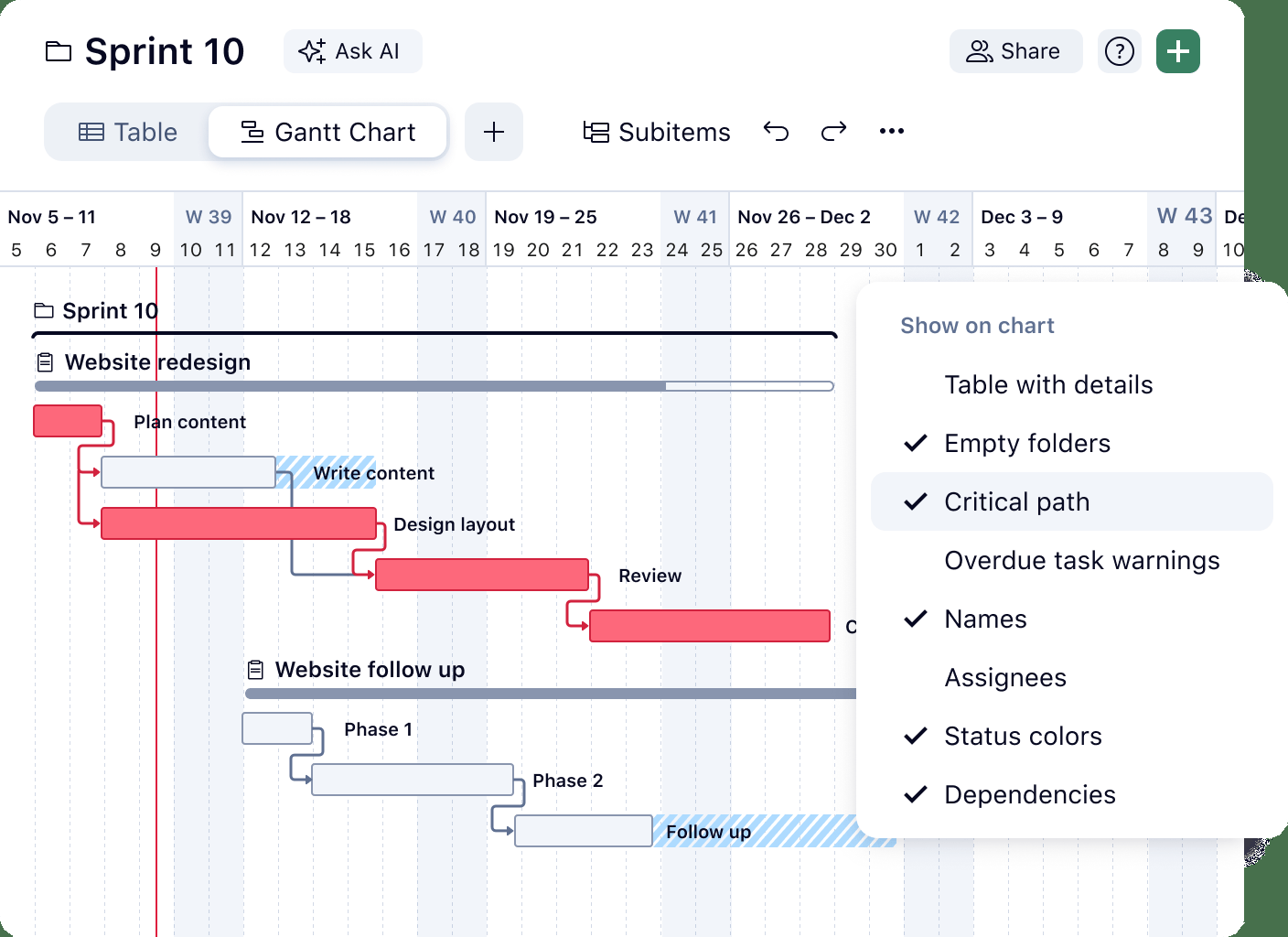
Slip test: Wrike's Gantt page says that when you move a task that has dependencies, every dependent active task is rescheduled with it, and tasks that are completed or canceled stay where they are. All four dependency types are supported with lead and lag, and date constraints limit when a dependent task can start. Critical path is a toggle in the three-dot menu of the Gantt view. Wrike's own help article on dependencies is not cited, so whether any prompt appears is not confirmed.
Unlocked on: Gantt charts start on Team at $10 per user per month. Critical path is on Business at $25, billed yearly with 5 to 200 users, and not on Free or Team. Wrike's help says baselines record the original plan into reportable fields, but we couldn't confirm the plan. Workload charts start at Business, and capacity planning sits on the quote-based Pinnacle and Apex plans.
- you need Gantt dependencies that reschedule dependent tasks starting at $10 per user, and critical path at $25
- a PMO wants workload charts and request forms from Business, with a quote-based programme timeline above that
- you need critical path on a small or monthly purchase: Business is annual only and starts at 5 users
- you need capacity planning without a quote: it sits on Pinnacle and Apex
- Users like
- project tracking (477 mentions in G2's pros summary)
- Users dislike
- a steep learning curve (305 mentions), not intuitive (239) and a lack of built-in templates (203)
- Source: G2, 4,553 reviews
How it works in practice
G2 shows Wrike at 4.2 out of 5 from 4,553 reviews (checked October 26), praising project tracking, and Capterra shows about 4.4 from roughly 3,000 reviews. The most common complaints are a steep learning curve, an interface that isn't intuitive and a lack of built-in templates. Both scores are for the whole product.
We couldn't confirm Microsoft Project file support. The Gantt page names CSV, Excel and XML for import and export.
- Starting price
- Team $10, Business $25 per user per month billed yearly; Pinnacle and Apex by quote
- Free plan limit
- 200 active tasks and one shared space, no Gantt
- Board view
- All plans including Free
- Task dependencies
- Team and up, FS, SS, FF, SF
- Workload charts and request forms
- Business and up
- Programme timeline
- Pinnacle and Apex (quote)
- Automation actions per month
- 50 per seat Team, 200 Business
- SAML SSO
- Pinnacle and Apex only; SCIM also Pinnacle and Apex
- Audit reports
- Pinnacle and Apex: logins, role changes, SSO and 2FA changes, exports, sharing; export cap 65,000 events as XLS
- Portfolios
- Team and up
- Resource management
- Workload and time tracking from Business; job roles, bookings, budgeting and utilization dashboard on Pinnacle and Apex
- Trust Center
- SOC 2 Type II, ISO 27001, ISO 27018, HIPAA, GDPR
- Regions
- US and EU data centers; plan tier not stated
- Critical path
- Business, Pinnacle, Apex
- Gantt dependencies
- All four types with lead and lag; dependents move with a moved task, completed tasks stay put (Wrike Gantt page)
- Free plan
- 200 active tasks, no Gantt
- Dependency types
- FS, SS, FF, SF with lead and lag
- Seat packs
- Sold in groups of 5, 10 or 25
- Import and export
- CSV, Excel, XML
Celoxis
Celoxis
Portfolio tool with an auto-scheduling engine that follows predecessors and work calendars.
Celoxis fits a PMO that wants each task scheduled against the assignee's work calendar, with baselines and workload on every plan and portfolio reports on top.
Slip test: each task is either auto-scheduled or manually scheduled. For an auto-scheduled task, Celoxis checks that the predecessors have valid dates, takes the earliest date the dependencies allow, then applies the effort and the assignee's work calendar, including weekends, holidays and leave. When a predecessor moves, the auto-scheduled successor moves with it. A manually scheduled task keeps its dates and its predecessors become information only. Constraints such as Start No Earlier Than can hold a task back.
Unlocked on: Celoxis's pricing table lists Gantt, baselines, advanced scheduling, workload tracking and capacity planning on every plan from Core at $10. Work calendars start at Essentials at $25. Dependency types and critical path exist in the product, but we couldn't confirm the plan that includes them.
- a PMO wants dates calculated from dependencies and each person's work calendar, with workload on the cheapest plan
- you test new projects against current resource load before you approve them
- you have fewer than five people who need full access: every plan has a 5 full-access user minimum
- you want a tool people adopt within days: reviewers mention a steep learning curve, a dated interface and a weak mobile app
- Users like
- scheduling, resources, budgets and reporting in one place, with workload visible across projects
- Users dislike
- a steep learning curve, a dated-feeling interface and a weak mobile app
- Source: Capterra, 568 reviews
How it works in practice
Capterra shows Celoxis at about 4.5 out of 5 from roughly 500 reviews, and the exact count differs between snapshots. Reviewers praise scheduling, resources, budgets and reporting in one place. The recurring complaints are a steep learning curve, a dated-feeling interface and a weak mobile app.
The pricing page doesn't name the currency, so the dollar figures are our reading as USD. We couldn't confirm Microsoft Project import or a what-if feature.
- Starting price
- Core $10, Essentials $25, Professional $35, Business $45 per user per month, billed annually
- Program tier
- Essentials, $25 per user per month (executive portfolio reporting)
- Dependencies
- All four types across projects, with lead and lag
- Portfolio reports
- 8 built in
- Resource workload and capacity
- Workload tracking and capacity planning listed on every plan from Core; job roles, work calendars, timesheets and instant conflicts from Essentials
- Optimal load
- Admin sets a range (for example 80 to 90 percent); blue under, green optimal, red over-allocated
- Auto vs manual scheduling
- Each task is auto-scheduled or manually scheduled; auto tasks follow predecessors and the assignee's work calendar
- Baselines
- Every plan
- Work calendars
- Essentials and up
- Minimum
- 5 full-access users on every plan
- Scheduling modes
- Auto or manual per task
- Enterprise
- Quote only, cloud or on-premise
Teamwork.com
Teamwork.com
Client-work project tool with Gantt and dependencies on every plan and a per-change choice about moving dependents.
Teamwork fits client-work teams that want a Gantt with dependencies on the free plan and control over whether dependent tasks move.
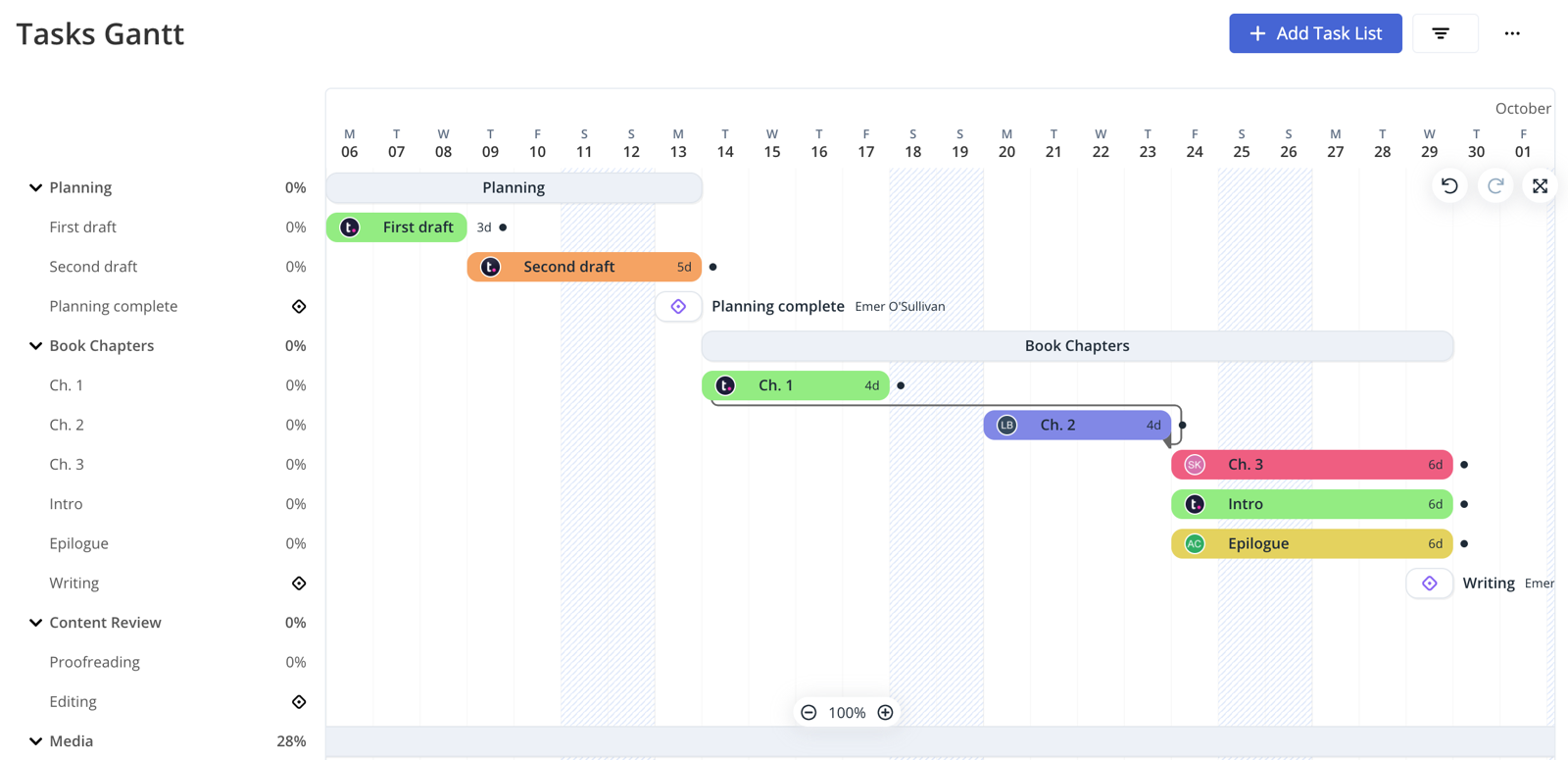
Slip test: when you change a task's date, its dependents don't shift automatically by default. The date picker shows a link at the bottom where you choose an adjustment: this task only, including subtasks, including dependents, or subtasks and dependents. Choosing including dependents moves the successors by the same amount, and you can do the same by dragging in the Gantt. Until the predecessor is complete, the dependent task shows a blocked icon in list and table views.
Unlocked on: Gantt and dependencies are on every plan, including Free for up to five users. Critical path needs Accelerate at $24.99 per user per month, billed yearly with a 5-user minimum, and so does workload planning. The help article shows finish-to-start and finish-to-finish links, and we couldn't confirm start-to-start, start-to-finish or lag. We also couldn't confirm baselines as a Gantt feature.
- you run client projects and want a Gantt with dependencies and time logging already on the Free plan for up to five users
- you want to decide, date by date, whether dependent tasks move with a change
- you need critical path on Basics: it starts on Accelerate
- you want automatic cascading of successors: the default is a manual choice per date change
- Users like
- a clean interface that is easy to navigate, plus invoicing through QuickBooks
- Users dislike
- a cluttered interface on large projects and many features that not every team needs
- Source: Capterra, 942 reviews
How it works in practice
Capterra shows Teamwork at 4.5 out of 5 from 942 reviews (read October 31). Reviewers praise a clean interface and having task information in one place. The recurring complaints are a cluttered interface on large projects with many dependencies and a feature overload that confuses new users.
The pricing page uses euro signs in the rendered view and dollar signs in its static HTML. Monthly USD prices aren't confirmed. The Microsoft Project import article is old and uses legacy plan names.
- Starting price
- Free; Basics $9.99, Accelerate $24.99 per user per month billed yearly
- Free plan
- 5 users, 5 projects, 100 MB
- Dependencies
- All plans; critical path from Accelerate
- Client users
- Free but Basics and up, max five active projects
- Automations
- Basics 5,000, Accelerate 20,000 per month
- Seat minimum
- Basics 3, Accelerate 5
- Critical path
- Accelerate and up ($24.99), not Free or Basics
- Date changes
- Dependents move only if you pick 'including dependents' in the date picker
- Dependency types
- Finish-to-start and finish-to-finish shown in help; others not confirmed
- Microsoft Project
- Accelerate and up
- Critical path and workload
- Accelerate and up
- Seat minimums
- Basics 3, Accelerate 5
Oracle Primavera P6
Oracle Primavera P6
Enterprise critical path method scheduling suite sold through Oracle sales.
Primavera P6 fits large construction, engineering and infrastructure programs where the contract requires critical path method schedules, several baselines and P6 files.
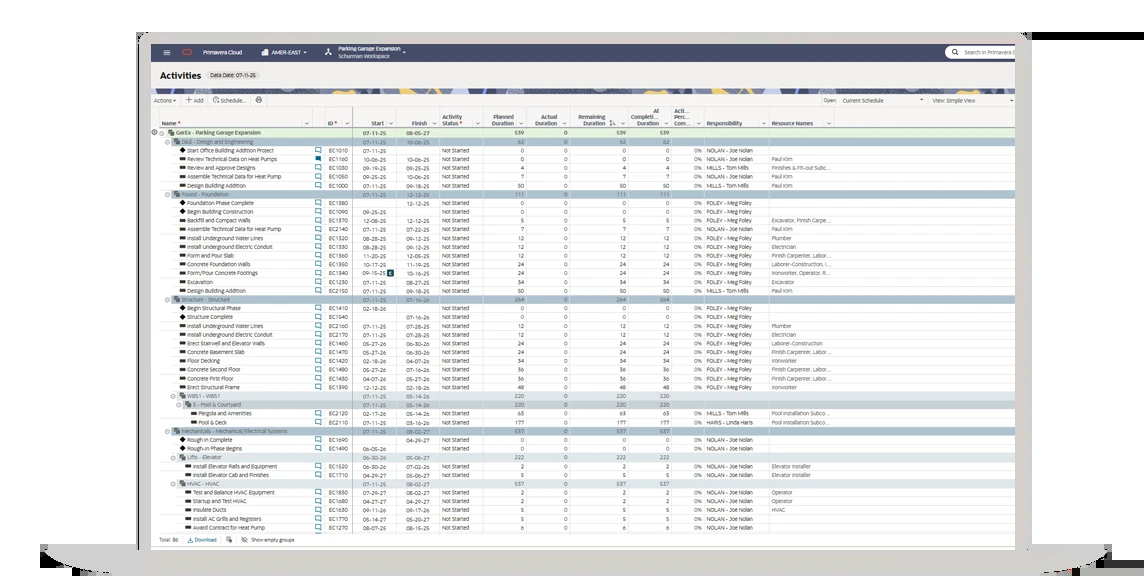
Slip test: dates don't cascade as you drag. You open the Activities page, pick the project and run the scheduler with options such as retained logic and progress override. The scheduler recalculates every activity date from the relationships, determines the critical path and float, and writes a log. It considers activity logic only, so overallocations can appear; you then run the leveler, which schedules first and adjusts dates by resource availability.
Unlocked on: Oracle publishes no plan tiers or USD prices. The documentation lists up to five project baselines, and says the scheduler can calculate up to 1,000 sub-critical float paths. Relationships support positive or negative lag. P6 EPPM and Primavera Cloud are separate Oracle products, and Primavera Cloud accepts XER files and Microsoft Project files.
- you run large construction, engineering or infrastructure programs, or your contracts require P6 schedule files
- you need critical path scheduling, several baselines and resource leveling from one vendor
- you want a published per-user price or a self-serve start: Oracle offers a demo or a quote
- your team is small or new to scheduling tools: reviewers call it hard to learn and a poor fit for small projects
- Users like
- scheduling depth for very large projects
- Users dislike
- hard to learn and a dated interface
- Source: Capterra (Oracle Primavera Cloud listing), 182 reviews
How it works in practice
Capterra lists Oracle Primavera Cloud, not P6, at 4.4 out of 5 from 182 reviews, and many of the reviews are dated 2017 to 2023. Reviewers praise deep critical path scheduling and the ability to handle schedules with tens of thousands of activities. The recurring complaints are a steep learning curve, a dated layout and license cost on small projects.
The only Oracle price we found was a 2016 price list, which we don't treat as current. We couldn't confirm the four dependency type names on a page, although they're standard in P6.
- Starting price
- Quote only, no published prices
- Products
- P6 EPPM and Primavera Cloud are separate Oracle products
- Licensing
- Primavera Cloud is sold per hosted named user, by module
- SAML
- P6 EPPM supports SAML 2.0 SSO
- Resource analysis
- Utilization analysis across all programs and projects, forecasted
- Baselines
- Up to five
- Critical path
- Scheduler determines the critical path and can calculate up to 1,000 sub-critical float paths
- Scheduling
- You run the scheduler to recalculate dates
- Import
- XER and Microsoft Project files in Primavera Cloud
- Resource leveling
- Separate step after scheduling
OpenProject
OpenProject
Open-source work package tool with a Gantt and automatic scheduling in the free edition.
OpenProject fits teams that want a free, self-hostable Gantt where a successor moves when its predecessor does.
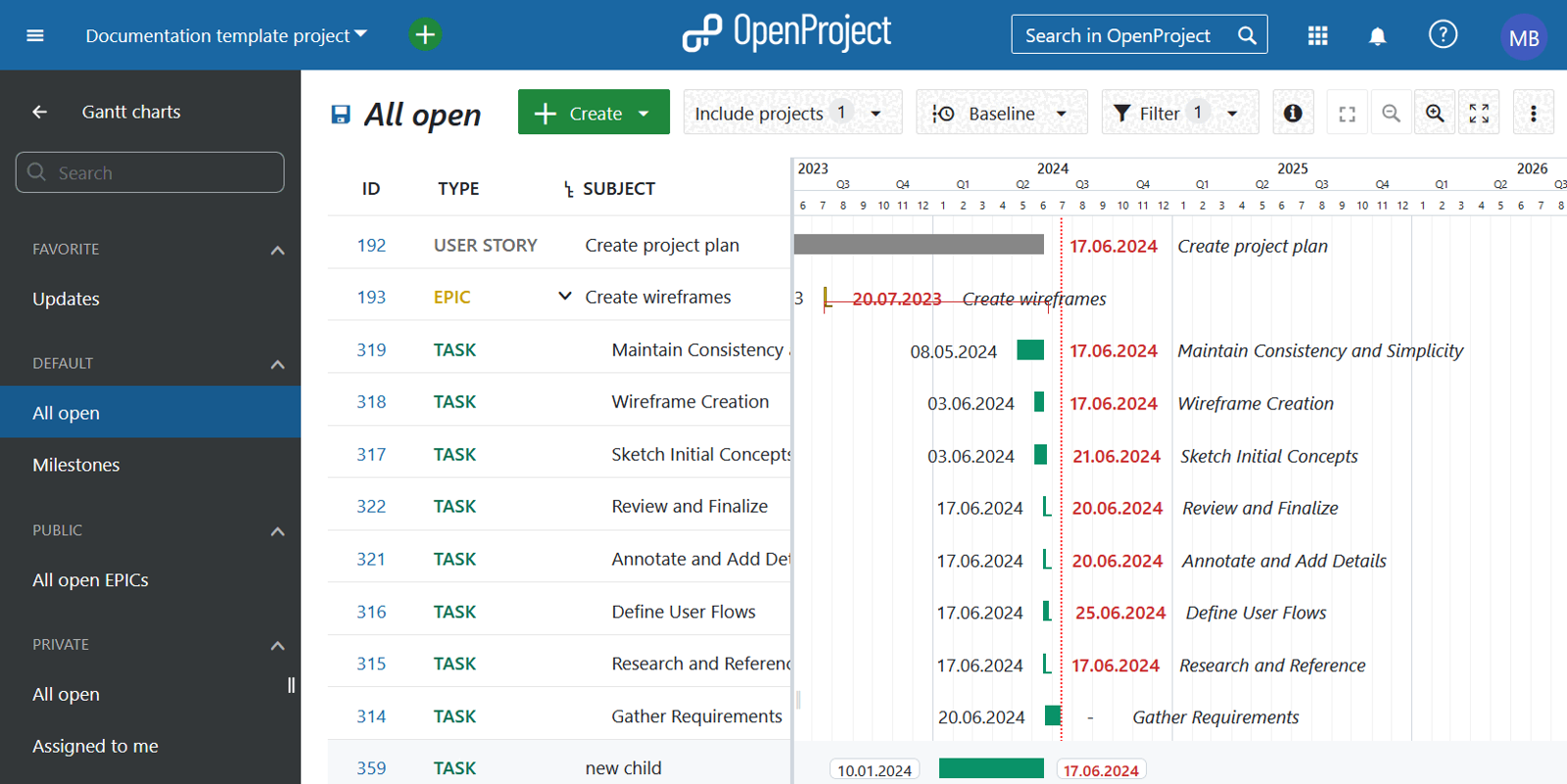
Slip test: in automatic scheduling mode, a successor starts on the next working day after its predecessor finishes, plus any lag. If you move or delay the predecessor past the successor's start, the successor is pushed later, and a follower can't be dragged before its predecessor's finish. If there's a gap, either item can move until they overlap. In manual mode the relation remains but each item schedules on its own, and the successor can sit before the predecessor. You set the link in the Relations tab of a work package.
Unlocked on: Gantt is part of the free Community edition. Baseline comparison against yesterday is free, and any date or period needs a paid edition from Basic. Resource management is a Premium add-on. The docs don't cover critical path, and say Microsoft Project files aren't supported directly.
- you want a free, self-hostable Gantt with dependencies and automatic scheduling
- you want working-day aware scheduling where bars can't start on non-working days
- you need critical path or Microsoft Project file import: neither is confirmed in the docs
- you need resource management: it's a Premium add-on, and paid editions have user minimums
- Users like
- Gantt and planning tools, a free core and self-hosting, configurability
- Users dislike
- no offline access or mobile app in older reviews, and some features behind paid editions
- Source: Capterra, 189 reviews
How it works in practice
Capterra shows OpenProject at 4.6 out of 5 from 189 reviews (read October 31). Reviewers praise the Gantt and planning tools, the free core with self-hosting, and how configurable it is. The complaints in older reviews are no offline access or mobile app, and some features locked behind paid editions.
Prices show in euros by default (Basic 5.95, Professional 10.95, Premium 15.95); we quote the USD view. Basic has a 5-user minimum in cloud mode and 25 on-premises, and Premium 100. We couldn't confirm integrations.
- Starting price
- Free; Basic $7.25, Professional $13.50, Premium $19.50 per user per month on a one-year term
- Editions
- Community free; Basic €5.95, Professional €10.95, Premium €15.95 per user per month; Corporate on request
- User minimums
- 25 for Basic and Professional, 100 for Premium, 250 for Corporate; none for Community
- Portfolios
- Portfolios and programs sit in Premium; portfolios always exist at the top level and can hold programs, projects or both
- Baselines
- Full baseline comparison from Basic; Community compares to yesterday only
- Gantt dependencies
- A follower cannot start earlier than its predecessor finishes; moving the predecessor pushes the follower later
- Nextcloud
- Link Nextcloud files to work packages; automatically managed project folders need the Nextcloud Team folders app
- Boards
- Basic, status, assignee, version, subproject and parent-child boards; status board moves change the work package status; the pricing page lists board types in the Community column
- Trello import
- NOT VERIFIED as native; vendor blog suggests Trello Enterprise Excel export then Excel import
- Automatic scheduling
- Automatic mode pushes a successor when its predecessor moves; manual mode leaves dates alone
- Baseline comparison
- Yesterday free, any period from Basic
- Resource management
- Premium add-on
- MS Project files
- Not supported directly per the Gantt docs
- Community
- Free, self-hosted
- Scheduling modes
- Automatic or manual per work package
- Trial
- 14 days
What happens when a task slips? The slip test side by side
Most listicles skip what happens to dependent tasks when a predecessor moves. Tools do one of four things: they move the successors for you, move them only if you ask, recalculate on demand, or leave the dates alone. The table shows what each vendor's own pages say.
| Tool | When a predecessor moves | What you do |
|---|---|---|
| GanttPRO | Dependent dates recalculate with auto-scheduling on | Turn the project setting on; cascade limits unconfirmed |
| TeamGantt | Successors follow if the float preference is on | Set the preference; fix red invalid links |
| Smartsheet | Dependent rows adjust automatically | An admin enables dependencies per sheet |
| Microsoft Planner and Project | Dependent dates are recalculated per Microsoft's Planner team | Prompt versus silent not confirmed |
| Wrike | Dependent active tasks move with the task | Nothing; completed tasks stay put |
| Celoxis | Auto-scheduled successors move, manual ones don't | Choose auto or manual per task |
| Teamwork.com | Dependents don't move by default | Pick including dependents in the date picker |
| Primavera P6 | Nothing until you run the scheduler | Run Schedule, then level resources |
| OpenProject | Successor is pushed in automatic mode | Choose automatic or manual mode |
Automatic rescheduling isn't always better, and the vendors that skip it aren't being lazy. A scheduler who owns a contract baseline may want to see the impact before dates change, which is the model P6 and Teamwork use. A team with a hundred small tasks usually wants the dates to follow without a click.
Which plan unlocks critical path and baselines?
The listed starting price rarely buys the scheduling features, and the plan name tells you little about what's inside. Wrike is a good example, because the plan ladder splits Gantt, critical path and capacity planning across three tiers.
Wrike- FreeBoard view and 200 active tasks; no Gantt
- Team, $10Gantt charts with all four dependency types and lead and lag
- Business, $25Critical path, workload charts and request forms
- Pinnacle and Apex, quoteAdvanced resource and capacity planning and the programme timeline
Across the other tools, the pattern is similar.
| Tool | Dependencies | Critical path | Baselines |
|---|---|---|---|
| GanttPRO | Every paid plan | Every paid plan | Every paid plan |
| TeamGantt | Free and up | Base, per the pricing page | Business per our October read; not on the pricing page |
| Smartsheet | Pro and up | Pro and up | Business per the pricing page; Pro per a help page |
| Microsoft Planner and Project | Plan 1, per a third-party summary | Plan 3 | Plan 3 |
| Wrike | Team and up | Business and up | Plan not confirmed |
| Celoxis | Plan not confirmed | Plan not confirmed | Every plan |
| Teamwork.com | Free and up | Accelerate and up | Not confirmed |
| Primavera P6 | No public tiers | Yes, no public tiers | Up to five |
| OpenProject | Community, plan not stated | Not confirmed | Yesterday free, any period from Basic |
Free project scheduling software and Excel
Several tools let you schedule without paying, but each free plan has a cap that matters for scheduling.
- OpenProject Community: free and self-hosted, with a Gantt, automatic scheduling and working days. Baseline comparison is limited to yesterday, and critical path isn't confirmed.
- TeamGantt Personal: free for one user and one project, up to 40 tasks, with dependencies and drag and drop.
- Teamwork Free: up to five users and five projects, with Gantt and dependencies. Critical path needs Accelerate.
- Wrike Free: 200 active tasks and a board view. We found no Gantt on it.
- GanttPRO and Smartsheet: no permanent free plan, only trials of 14 and 30 days.
Excel is enough when one person owns a schedule of a few dozen tasks and nobody needs dependencies to recalculate. It stops working once you need a critical path, because every date is typed by hand. If your schedule is mostly a risk and issue log, a RAID log in a spreadsheet is a better fit than a Gantt.
How to choose project scheduling software
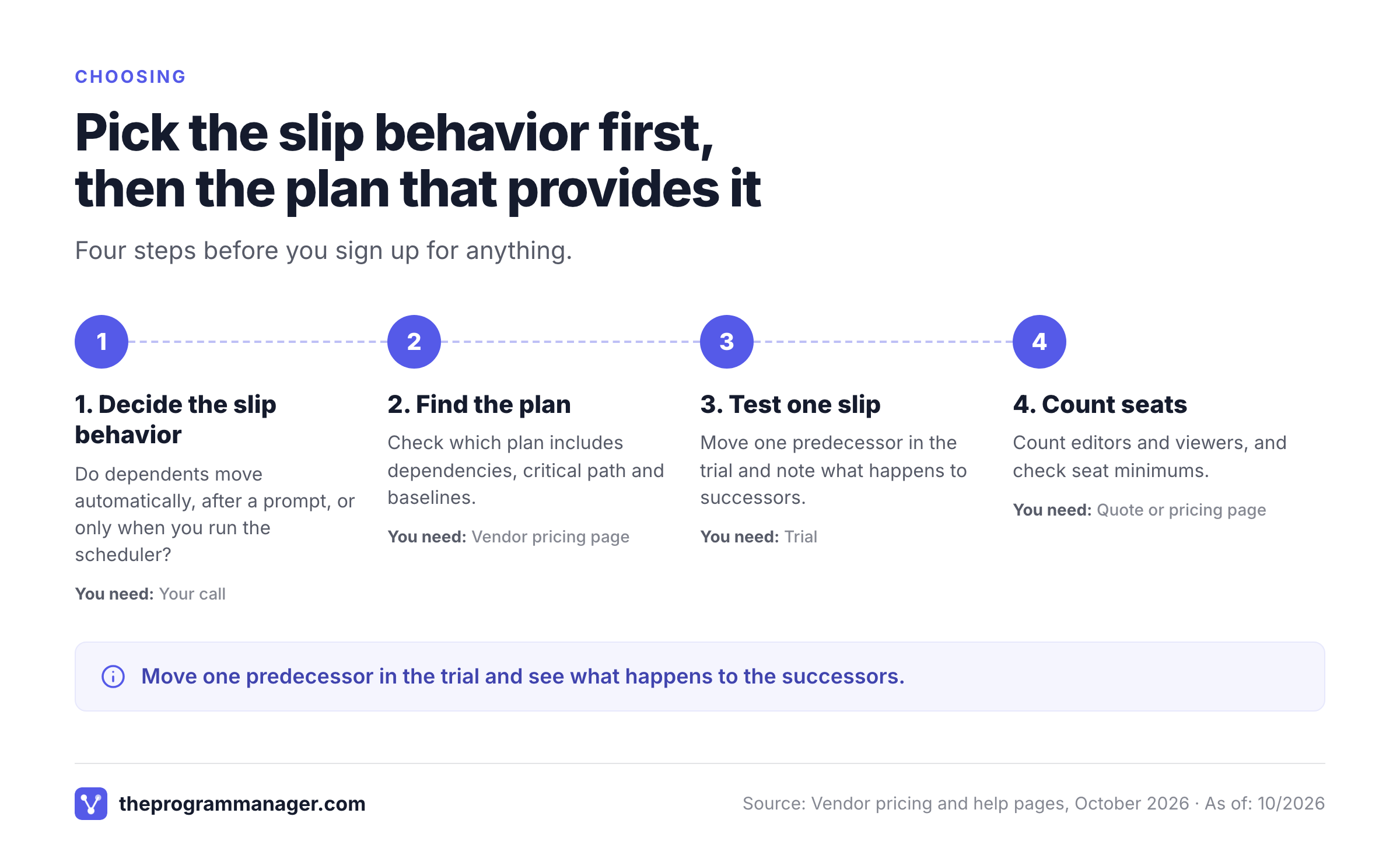
Choosing project scheduling software starts with the behavior you need when a task slips, then the plan that provides it. These situations cover most buyers.
| If you | Start with | Why |
|---|---|---|
| Need a readable Gantt for a small team | TeamGantt or GanttPRO | Low price, quick setup |
| Already track work in spreadsheets | Smartsheet | Dates follow predecessors in the same sheet |
| Live in Microsoft 365 | Planner and Project Plan 3 | Critical path and baselines in your tenant |
| Want critical path inside a work platform | Wrike Business | Gantt, critical path and workload in one account |
| Run a PMO and schedule by work calendar | Celoxis | Tasks follow each assignee's calendar |
| Run client projects and want control over moves | Teamwork | You choose whether dependents shift |
| Have contracts that require P6 files | Primavera P6 | CPM scheduling with up to five baselines |
| Want a free, self-hosted option | OpenProject | Gantt and automatic scheduling in Community |
- Move one predecessor in the trial and note whether dependents move, ask or stay
- Check which plan includes critical path and baselines, and get it in writing
- Import one real schedule, such as a Microsoft Project or Excel file
- Check how holidays and leave are handled in the working calendar
- Count editors, viewers and seat minimums before you compare prices
- Ask whether the workload view is part of the plan you're buying
If you're comparing tools more broadly, see our guides to enterprise project management software, resource management software and construction project management software.
Where The Program Manager fits
The Program Manager isn't a project scheduler. It doesn't build Gantt charts or calculate a critical path for your plan, and it doesn't replace any tool above. It sits next to them and covers a different gap: when a program spans Jira and Asana, nobody sees the dependencies between the two until a milestone slips. It maps those dependencies and compares baseline with forecast for each milestone. Keep your scheduler for task-level dates and use The Program Manager for the cross-tool view.
FAQ
What is the best project scheduling software?
The best project scheduling software depends on the schedule you run. Small teams get the most from GanttPRO or TeamGantt, sheet users from Smartsheet, and contract schedules from Primavera P6. Whichever you pick, compare the plan that includes critical path and baselines instead of the starting price.
Which type of software is used for project planning and scheduling?
Gantt-based project management tools handle most planning and scheduling work. They link tasks with dependencies, calculate the critical path and compare progress with a baseline. Large construction and engineering schedules often use critical path method tools such as Primavera P6.
What are L1, L2, L3 and L4 schedules?
They're levels of schedule detail used in planning practice. Level 1 is an executive milestone view, and level 4 is a detailed activity schedule. The exact definitions vary by organization and contract, so confirm the definitions in your project's scheduling specification.
Is there free project scheduling software?
Free project scheduling software exists. OpenProject Community is free and self-hosted. TeamGantt, Teamwork and Wrike have free plans with caps, and GanttPRO and Smartsheet offer trials only. Check the caps on projects, tasks and users, and check whether critical path is included.
What is the difference between project scheduling and project management software?
Project management software covers tasks, files, approvals and reporting. Project scheduling software focuses on dates: dependencies, durations, working calendars, critical path and baselines. Many project management tools include scheduling, often on a higher plan.
Does moving one task change the dates of the tasks that depend on it?
Whether dependent dates change depends on the tool. Smartsheet, Wrike, GanttPRO with auto-scheduling and OpenProject in automatic mode move dependent tasks for you. Teamwork asks you to choose, and Primavera P6 recalculates only when you run the scheduler. Test it with a real schedule in the trial.
Leave a Reply