Resource management software shows a program or a PMO who's available for which work in which weeks. That sounds simple until leave, part-time schedules, unconfirmed projects and three programs competing for the same designers get involved. A good tool shows the clash before the work starts, not after a milestone slips.
We compared nine tools. For each one we read the pricing or plan page, a feature page, a help-center article that shows how booking or capacity works in practice, and a review site. Where a detail couldn't be confirmed, the entry says so, so you know what to ask in the demo. If you're choosing for one team and not for a portfolio, our guide to project management software is the better place to start.
Scheduling people is one half of the problem and scheduling the work is the other. Our guide to project scheduling software covers dependencies, critical path and baselines.
- resource management tools compared
- 9
- list a per-person or per-seat price for the planning plan (Float, Resource Guru, Runn, Productive, Celoxis)
- 5
- sell resource planning by quote or as an add-on with no public price (Kantata, Smartsheet)
- 2
- resource seats Runn requires as a minimum
- 20
Which resource management software is best?
Resource management software has no single winner, because the tools solve different versions of the problem. A dedicated planner such as Float or Resource Guru is quick to adopt and cheap per person. A services platform such as Productive or Kantata ties bookings to budgets and billing. A project suite such as Smartsheet, monday.com or Wrike adds a resource layer to work you already track, usually on a higher plan. Here are our picks by situation, and the tag names the plan or price model because that decides the real cost.
 Best for a visual schedule that adds time tracking and ratesFloatHours, percent or set times per booking. Starter is $7 per scheduled person per month; time tracking, rate cards and SSO need Pro at $12.
 Best for simple booking of people, rooms and equipmentResource GuruClash warnings, a waiting list and leave on every plan. From $5 per person per month; reports, budgets and timesheets start at $8.
 Best for planning work you haven't won yetRunnTentative projects and a scenario toggle show the effect on utilization. $7 or $11 per resource seat per month, 20 seats minimum.
 Best for agencies that tie bookings to budgets and forecast revenueProductiveResource planning, budgets and time in one platform. Rate cards arrive on Professional, scenario planning on Ultimate.
 Best for professional services firms with formal staffing requestsKantataRequests with named approvers and a Resource Center timeline. Pricing is quote only.
 Best for a PMO that wants resource load inside portfolio reportsCeloxisUtilization and capacity reports with an optimal-load range. Core is $10 per user per month, roles and timesheets from $25.
 Best if your projects already run in SmartsheetSmartsheetPlaceholders and utilization reports sit in an add-on for Business and above, with no public price.
 Best for a quick workload check on boards you already usemonday.comA workload view with capacity bubbles on boards; the Resource Planner and Capacity Manager are Enterprise.
 Best for a path from workload charts to job roles and bookingsWrikeWorkload charts from Business at $25 per user per month; job roles and the utilization dashboard on quote-based Pinnacle.
What is resource management software?
Resource management software plans and tracks the people (and sometimes equipment or rooms) that projects need. It records who's available once leave, public holidays and working hours are taken out, books those people onto projects, and then compares the plan with what happened. The output is a view of capacity, demand and utilization that a manager can act on, such as moving a booking, hiring for a placeholder role or saying no to a new project.
In a program context the useful questions sit above any single project: which projects compete for the same skills next quarter, what happens to utilization if a pipeline project is approved, and who approves a staffing request and how long that takes. A task board answers none of these, and a spreadsheet answers them only until the second person goes on leave.
Resource scheduling, resource tracking and capacity planning
People use these terms interchangeably, and tools use them differently, so it helps to separate the three jobs.
- Resource scheduling is the forward-looking part: booking a person for hours or a share of their capacity on a project, with clashes flagged. Float, Resource Guru and Runn start here.
- Resource tracking is the backward-looking part: timesheets or logged time compared with what was booked, so utilization and budget burn are real numbers. Resource Guru does this on Blackbelt and above, Runn and Celoxis offer timesheets, and Productive suggests scheduled events in each person's timesheet.
- Capacity planning combines both over a longer horizon: supply (available hours, planned hires) against demand (booked and tentative work). Runn's scenario toggle and Productive's forecast views are examples.
A tool that only schedules can't tell you whether the plan was right. A tool that only tracks can't prevent the overload. Most buyers need both, but the real question is which plan each one arrives on.
Dedicated resource planner or work management suite?
The choice between a dedicated planner and a suite is the decision most lists skip. A dedicated planner starts from people and their time, then attaches projects. A suite starts from tasks and projects, then adds a resource view on top. The first gives better answers about capacity, while the second keeps tasks, dependencies and resources in one place, which matters when the plan changes weekly.
| Model | Tools in this list | Strong at | Usually missing |
|---|---|---|---|
| Dedicated planner | Float, Resource Guru, Runn | Fast booking, clash warnings, capacity and utilization views | Task management, dependencies |
| Services platform | Productive, Kantata | Bookings tied to budgets, rates and revenue | Lightweight start; Kantata has no public price |
| Project portfolio suite | Celoxis | Resource load next to portfolio dashboards and timesheets | Quick adoption; reviewers mention a learning curve |
| Work management suite | Smartsheet, monday.com, Wrike | Resource view on work you already track | Capacity planning on the base plan; most of it sits on a higher tier |
The scheduling unit matters too. Float lets you book in hours per day, a percentage of capacity or a specific time. Runn displays assignments as hours per day, hours per week, FTE or capacity percent. Resource Guru books in hours per day or total hours. Celoxis allocates in hours or percent. Percent works well for stable teams, hours for part-time and contract work. If your people split their week across many projects, check that the tool lets you switch the unit without re-entering bookings.
Resource management software compared
| Tool | Type | How you book work | Starting price (USD) | Rating |
|---|---|---|---|---|
| Float | Dedicated planner | Hours, percent or set times | Starter $7, Pro $12 per scheduled person per month | 4.5 (Capterra, 1,621) |
| Resource Guru | Dedicated planner | Hours per day or total hours | $5, $8 or $12 per person per month | 4.7 (Capterra, 542) |
| Runn | Dedicated planner | Hours, FTE or capacity percent | Lite $7, Standard $11 per resource seat per month, 20 seats minimum | 4.8 (Capterra, 33) |
| Productive | Services platform | Bookings to a service, budget or deal; hours or percent not confirmed | About $10 to $12 (Essential), $25 to $29 (Professional) per user per month | 4.6 (Capterra, 109) |
| Kantata | Services platform | Allocated hours versus scheduled hours | Quote only | 4.2 (Capterra, 629) |
| Celoxis | Portfolio suite | Hours and percent | Core $10, Essentials $25 per user per month, 5 users minimum | 4.5 (Capterra, 568) |
| Smartsheet | Work management suite | Placeholders by role or discipline; unit not confirmed | Business $19 per member per month; resource add-on has no public price | 4.4 (22,872) |
| monday.com | Work management suite | Task time estimates against weekly capacity | Pro $19 per seat per month for the workload view; Enterprise by quote | 4.7 (17,292) |
| Wrike | Work management suite | Task effort and bookings | Business $25 per user per month; Pinnacle by quote | 4.2 (4,553) |
 The Program Manager Our product | Cross-tool dependencies and milestone risk | The Program Manager maps dependencies across Jira and Asana, watches every milestone for risk, and keeps blockers, decisions and approvals in one graph. | Invite-only | No reviews yet |
Prices in USD from vendor pages checked on October 30, 2026 (Smartsheet, monday.com and Wrike plan prices checked October 26). Ratings come from Capterra, except Smartsheet, monday.com and Wrike, which come from G2 (checked October 25 and 26); No later G2 rating is cited. Suite ratings are for the whole product, not the resource features.
The 9 best resource management software tools
Each entry starts with what the tool is for, then walks through how one resourcing task works in it, then lists what the plan includes, what reviewers report and who should skip it. The price appears once in the entry and again in the table.
Float
Float
Visual scheduler for project teams: hours, percent or set times per booking, with time off and capacity built in.
Float fits agencies and project teams that want a fast visual schedule first, with time tracking and rate cards as a second step.
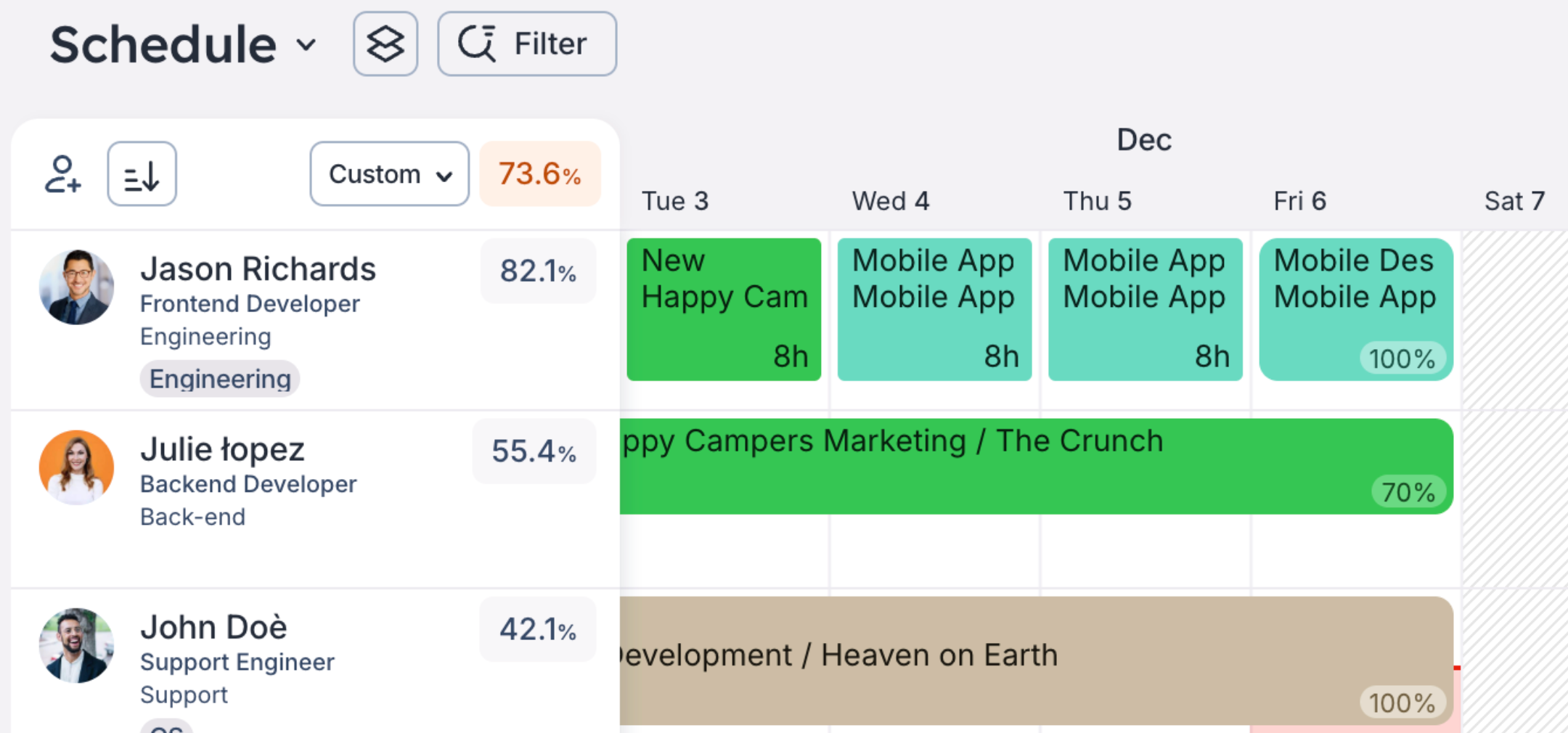
In practice, a scheduler clicks a date on the schedule, picks hours per day, a percentage of capacity or a specific time, chooses the project (and optionally a phase and task) and assigns one or several people. By default Float keeps the hours per day with a flexible end date, or you can spread a total number of hours across workdays with a fixed end date. New allocations on confirmed projects are confirmed, and you can mark any of them tentative.
Capacity comes from working hours, public holidays and approved time off, so an allocation beyond a person's capacity turns red and shows as overtime in the people report. Time off booked after a fixed-end-date allocation reduces the hours and notifies the creator and the project owner. Work for roles you haven't hired goes to placeholders, which you later replace with a real person.
The plans split by depth. Starter covers scheduling, capacity and time off. Pro adds time tracking, multi-currency rate cards, project cost estimation, advanced reporting and SSO.
- you run many concurrent projects and want a live shared schedule with hours or percent allocations, tentative status and placeholders for planned hires
- you want scheduling, time tracking and project cost estimates in one tool and can pay for Pro
- you need granular analytics: reviewers describe the built-in reporting as limited, and Starter has no advanced reporting
- you need time tracking, multi-currency rate cards or SSO on the cheapest tier: they're Pro only
- Users like
- a clean, easy interface and a real-time view of who's working on what
- Users dislike
- limited reporting and customization, plus some mobile and calendar sync problems
- Source: Capterra, 1,621 reviews
How it works in practice
Capterra reviewers rate Float 4.5 out of 5 from 1,621 reviews. They praise the clean interface and the real-time view of who's working on what. The recurring complaints are limited reporting and customization, and some mobile and calendar sync problems.
Swapping a placeholder for a real person deletes the time already logged on the placeholder, so swap before people start tracking. We couldn't confirm the SOC 2 report or how the Jira and Asana connections work, because Float's own pages disagree on direct versus Zapier-based connections. Ask about both.
- Starting price
- Starter $7, Pro $12 per scheduled person per month
- Trial
- 30 days, no credit card
- Scheduling unit
- Hours per day, percent of capacity or specific times
- Placeholders
- 1 on Starter, 5 on Pro; extra placeholders count as paid seats
- Time tracking and SSO
- Pro
- Rate cards
- 1 currency on Starter, 5 on Pro
Resource Guru
Resource Guru
Booking calendar for people, rooms and equipment, with clash warnings, a waiting list and leave on every plan.
Resource Guru fits teams that want a simple booking calendar for people and for things like rooms, equipment and vehicles, without a portfolio suite around it.
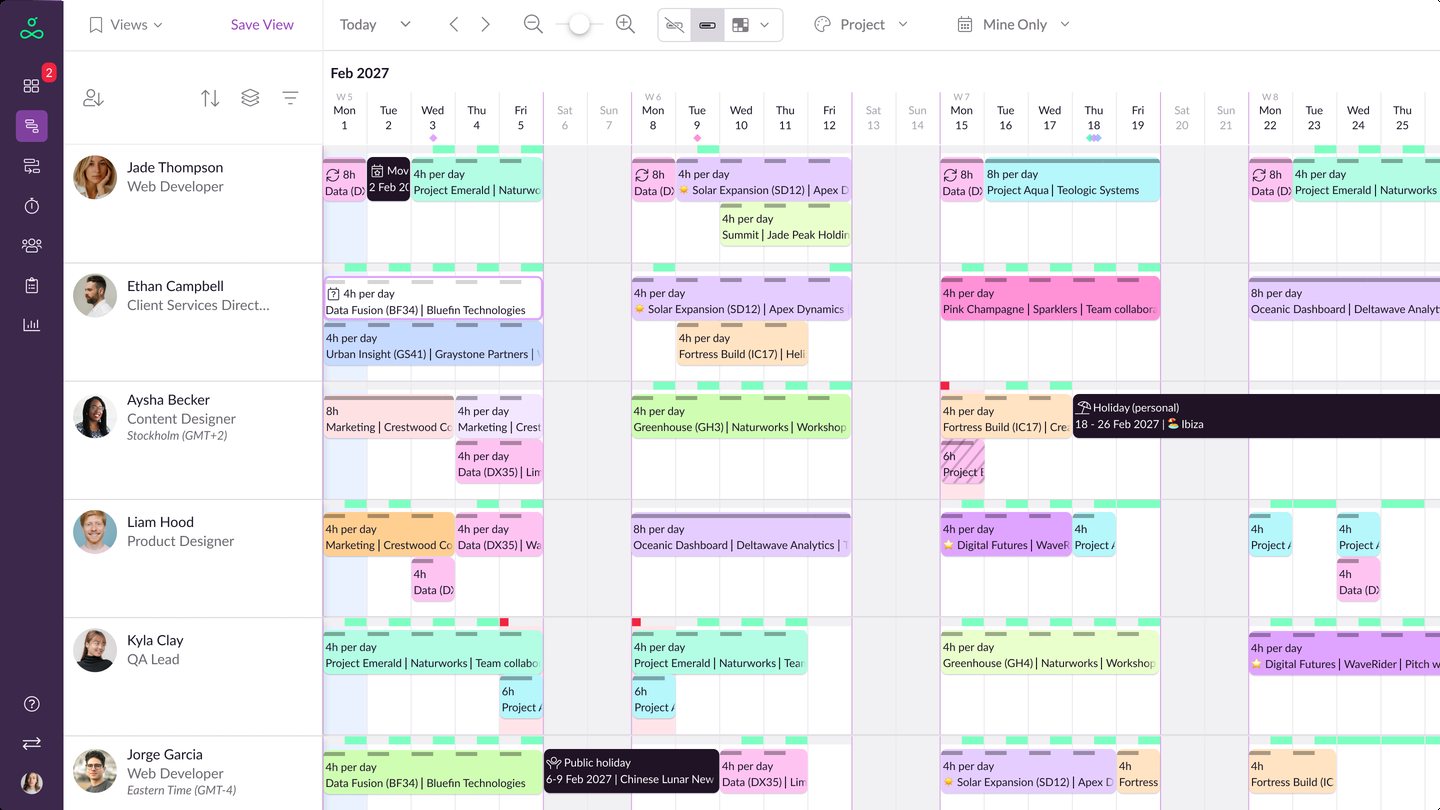
In practice, a scheduler drags across days to book a person or another resource against a project and client, in hours per day or a total number of hours. Bookings can be tentative or repeating. If a booking overlaps leave, Resource Guru skips those days and tells you. If it exceeds availability or overlaps another booking, clash management flags it, and unresolved items can wait on a Waiting List.
Leave is added on the schedule too and subtracts from availability. Adding leave over an existing booking prompts you to move the booking to the Waiting List or delete it. Work for unfilled roles goes to placeholders and turns into real plans later.
The plans are named Grasshopper, Blackbelt and Master. Leave management and clash handling come with every plan, while the heatmap, reports, project budgets and timesheets start at Blackbelt. SSO and approval workflows are Master only.
- you want a lightweight scheduler for people plus rooms, equipment or vehicles, with clash management and a low per-seat price
- you want a free, fully featured trial and SOC 2 Type II before you pay
- you need reports, timesheets, budgets or Gantt charts but want to stay on the cheapest plan: they need Blackbelt
- you need SSO or approval workflows: both are Master only, and you pay for every person you add, whether they log in or not
- Users like
- fast drag-and-drop scheduling and a calendar that makes capacity gaps and clashes obvious
- Users dislike
- limited customizable reporting, no quick way to shift a whole schedule, and Outlook calendar sync and mobile browser problems
- Source: Capterra, 542 reviews
How it works in practice
Capterra reviewers rate Resource Guru 4.7 out of 5 from 542 reviews. They praise fast drag-and-drop scheduling and a calendar that makes capacity gaps and clashes obvious. The recurring complaints are limited customizable reporting, no quick way to shift a person's whole schedule, and Outlook calendar sync and mobile browser problems.
We read the plan-to-feature mapping from the pricing page, and parts of it were hard to confirm, so check it during the trial. We also couldn't confirm percent-based booking or a native Slack integration.
- Starting price
- Grasshopper $5, Blackbelt $8, Master $12 per person per month
- Trial
- Free, all features, no credit card
- Scheduling unit
- Hours per day or total hours; percent not confirmed
- Leave
- All plans
- Heatmap, reports, budgets, timesheets
- Blackbelt and up
- SSO and approval workflows
- Master
Runn
Runn
Resource planner built around tentative projects and a scenario toggle that shows utilization with and without pipeline work.
Runn fits teams that plan for work they haven't won yet and want to see the effect of hiring or pipeline on utilization before they commit.
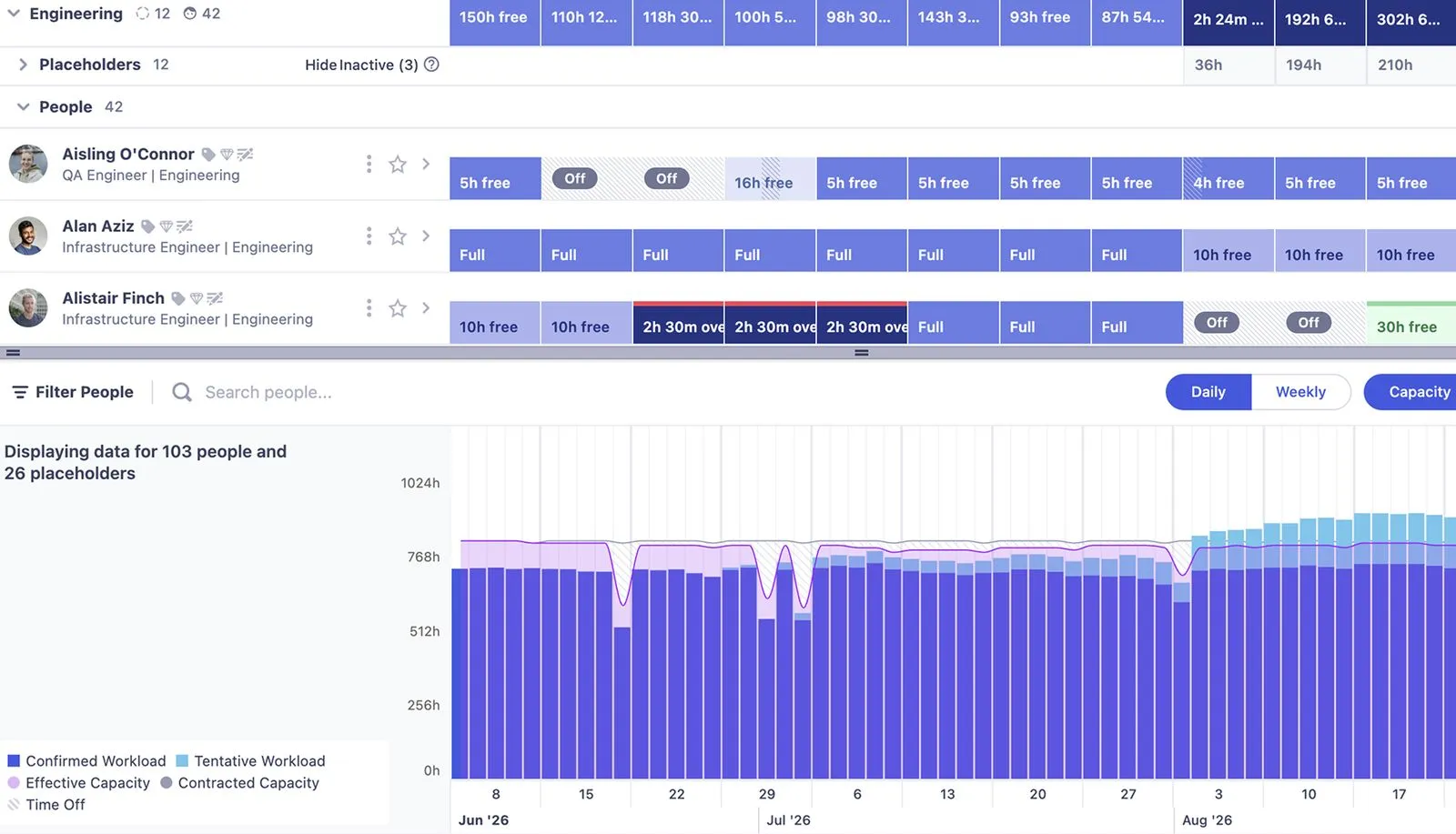
In practice, a project manager creates a project in the Project Planner and assigns people or role-based placeholders, choosing a display unit such as hours per day, FTE or capacity percent. Work that isn't confirmed is a tentative project. The scenario toggle decides whether tentative work counts toward availability and utilization in the planner, the charts and the reports, so you can look at the plan with and without the pipeline.
Resource managers then read the availability, utilization and capacity charts to spot overbooking or gaps. On the Advanced plan, a project manager can raise a request on a placeholder, a resource manager can transfer an existing person or propose a hire, and a hiring manager acts on the proposal. Placeholders with future hours count in project totals but add no cost until a real person is added.
Lite includes scheduling, tentative projects, capacity and utilization charts, skills and tags, and project financials. Standard adds timesheets, five custom fields, integrations, the API and a 30-day audit log. Advanced adds SAML SSO and unlimited custom fields and reports.
- you need to model hiring and pipeline demand with placeholders and tentative projects before work is confirmed
- you want published per-seat pricing and can commit to at least 20 resource seats
- you need SAML SSO or the placeholder resourcing-request workflow: both are Advanced only and priced by quote
- you have fewer than 20 people to plan: plans start at 20 resource seats
- Users like
- a clear planner interface and responsive support
- Users dislike
- limited export options, an API call limit and limited reports and permission levels
- Source: Capterra, 33 reviews
How it works in practice
On Capterra Runn scores 4.8 out of 5, but from only 33 reviews, many dated 2021 to 2024, so treat the number as a signal and not a verdict. Reviewers praise the clear planner and responsive support, and mention limited export options, an API call limit and limited reports and permission levels.
We couldn't confirm how Runn handles leave or time off, or which project tools it connects to, so put both on your demo list.
- Starting price
- Lite $7, Standard $11 per resource seat per month, 20 seats minimum
- Minimum
- 20 resource seats
- Trial
- 30 days, no credit card
- Scheduling unit
- Hours per day, hours per week, FTE or capacity percent
- Timesheets
- Standard and up
- SAML SSO
- Advanced
- Security
- SOC 2 Type II
Productive
Productive
Agency and services platform where bookings connect to budgets, billing rates and forecast revenue.
Productive fits agencies and services PMOs that want bookings tied to budgets, billing rates and forecast revenue in one system.
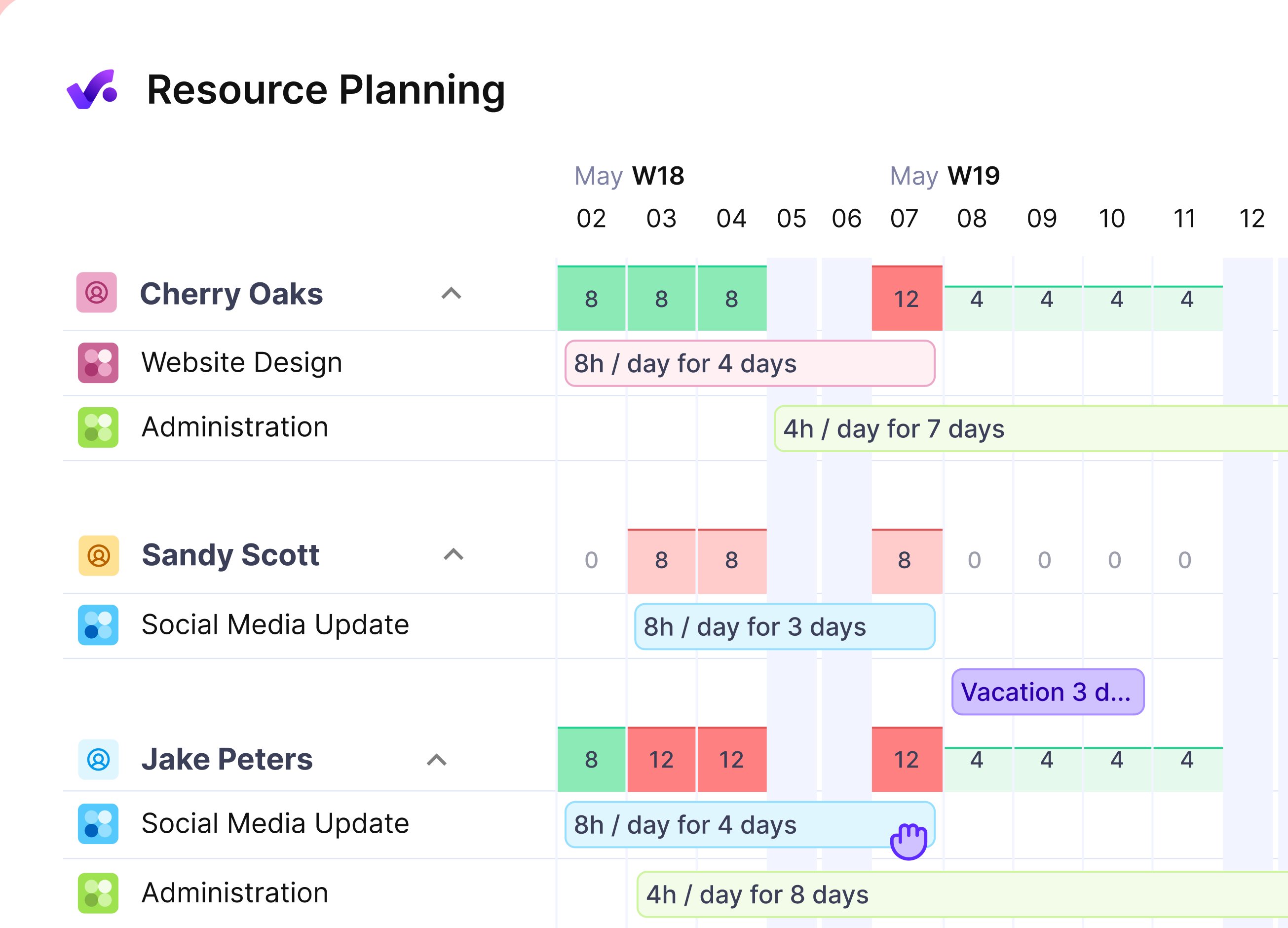
In practice, a resource manager or project manager creates bookings in the Resource Planner, or from a task in a project, assigning a person or a placeholder to a service for a set duration. The service connects the booking to a budget or a deal, and a task linked to a service passes on its budget, billing rates and cost calculations. Layouts are by person, by project, by budget or deal, and by absence, and time off is booked in the absence view.
Capacity indicators compare booked hours with each person's expected hours and flag overbooking in red. Tentative bookings are shown as grey stripes and don't count toward scheduled hours until someone confirms them. Scheduled events appear as suggestions in each person's timesheet, and forward bookings feed revenue and profit forecasts.
Resource planning, budgeting, time tracking, time off and reporting are in Essential. Professional adds rate cards, recurring budgets, a time-off approval flow and advanced reports. Scenario Builder, revenue forecasting and enforced SSO are listed on Ultimate.
- you run an agency or services PMO and need bookings tied to budgets, rates and forecast revenue
- you plan pipeline work with tentative bookings and placeholders before deals close
- you only need a lightweight scheduler: you pay per user for budgeting, CRM and time tracking you may not use
- you need Scenario Builder, revenue forecasting or enforced SSO: they're listed on Ultimate only, which has no public price
- Users like
- resourcing, time, budgeting and CRM in one place, and strong support
- Users dislike
- occasional resourcing bugs, clunky reporting and budget calculations that are tricky to follow
- Source: Capterra, 109 reviews
How it works in practice
Capterra reviewers rate Productive 4.6 out of 5 from 109 reviews. They praise having tasks, resourcing, time, budgeting and CRM in one place, and the support. They report occasional bugs in resourcing, clunky reporting and budget calculations that are tricky to follow.
We couldn't confirm whether bookings are entered in hours or percent, SOC 2, or the Jira, Asana and Slack integrations. The pricing page also shows inconsistent annual figures, so get a written quote for your seat count.
- Starting price
- Essential about $10 to $12, Professional about $25 to $29 per user per month
- Trial
- 14 days, no credit card
- Rate cards
- Professional
- Scenario Builder and revenue forecasting
- Ultimate
- Tentative bookings
- Excluded from scheduled hours until confirmed
- API
- From Essential
Kantata
Kantata
Professional services platform with a Resource Center timeline and a formal request-and-approve staffing flow.
Kantata fits professional services firms that want resourcing, financials and delivery in one system and that staff projects through formal requests.
In practice, an account administrator turns on resource requests in the settings and names the approvers. A project manager adds an unnamed resource with a role to a project, adds the skills and any required custom fields, picks an approver and submits the request. The approver gets an email, picks a team member and approves, or rejects the request, in which case the requester has to submit a new one. On approval the named person replaces the unnamed resource and the hours and assignments move to them.
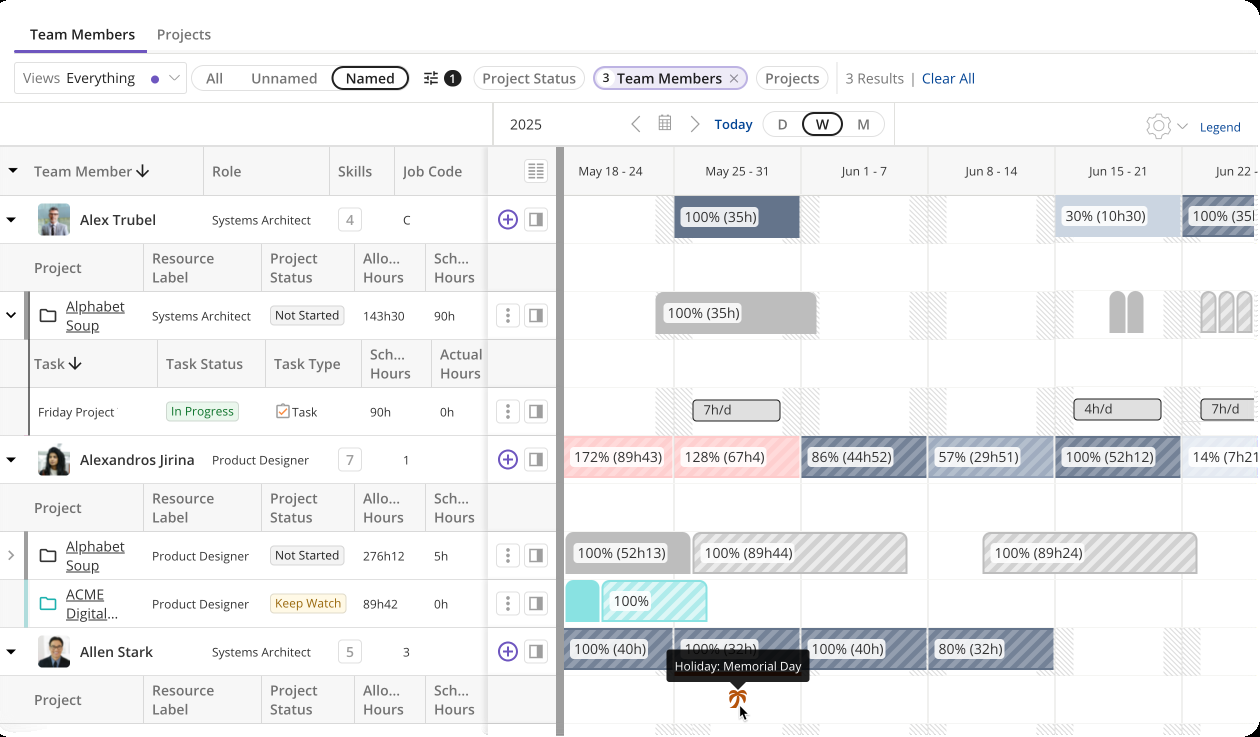
Resource managers then use the Resource Center timeline, which can show allocated hours, scheduled hours or a comparison of the two, to catch people who are overallocated or overscheduled. A resourcing dashboard tracks billable utilization goals, and a skills library supports matching and filtering requests.
Kantata lists integrations with Salesforce, NetSuite, Slack, Microsoft 365, QuickBooks, Xero and Jira, among others.
- you run a consulting or services organization and want utilization, margins, burn and billing in one system
- you need formal staffing requests with named approvers, skills and approval history across many projects
- you want published pricing or a self-serve trial: pricing is quote only and a sales contact follows up
- you have a small team with simple workflows: reviewers describe too many moving parts
- Users like
- real-time visibility into utilization, margins, staffing capacity and burn
- Users dislike
- resourcing allocation bugs, too many clicks and a steep learning curve
- Source: Capterra, 629 reviews
How it works in practice
On Capterra Kantata scores 4.2 out of 5 from 629 reviews, a count that includes older Mavenlink-era reviews. Reviewers praise real-time visibility into utilization, margins, staffing capacity and burn. One April 2026 reviewer wrote that the tool frequently bugs on resourcing allocation, where the timeline says one thing and the hours are behind. Others mention too many clicks and a steep learning curve.
We couldn't confirm leave handling, rate card detail or which edition includes resource requests, so ask for those in writing.
- Starting price
- Quote only, no published prices
- Resource requests
- Admin enables them and names approvers; statuses Draft, Submitted, Cancelled, Rejected
- Timeline
- Resource Center: allocated hours, scheduled hours or both
- Skills
- Skills library for matching and filtering requests
- Security
- SSO and SOC 2 not confirmed on the published trust page
Celoxis
Celoxis
Project portfolio tool where resource load, utilization and capacity reports sit next to portfolio dashboards.
Celoxis fits a PMO that wants resource load, timesheets and portfolio dashboards in one tool with published per-user prices.
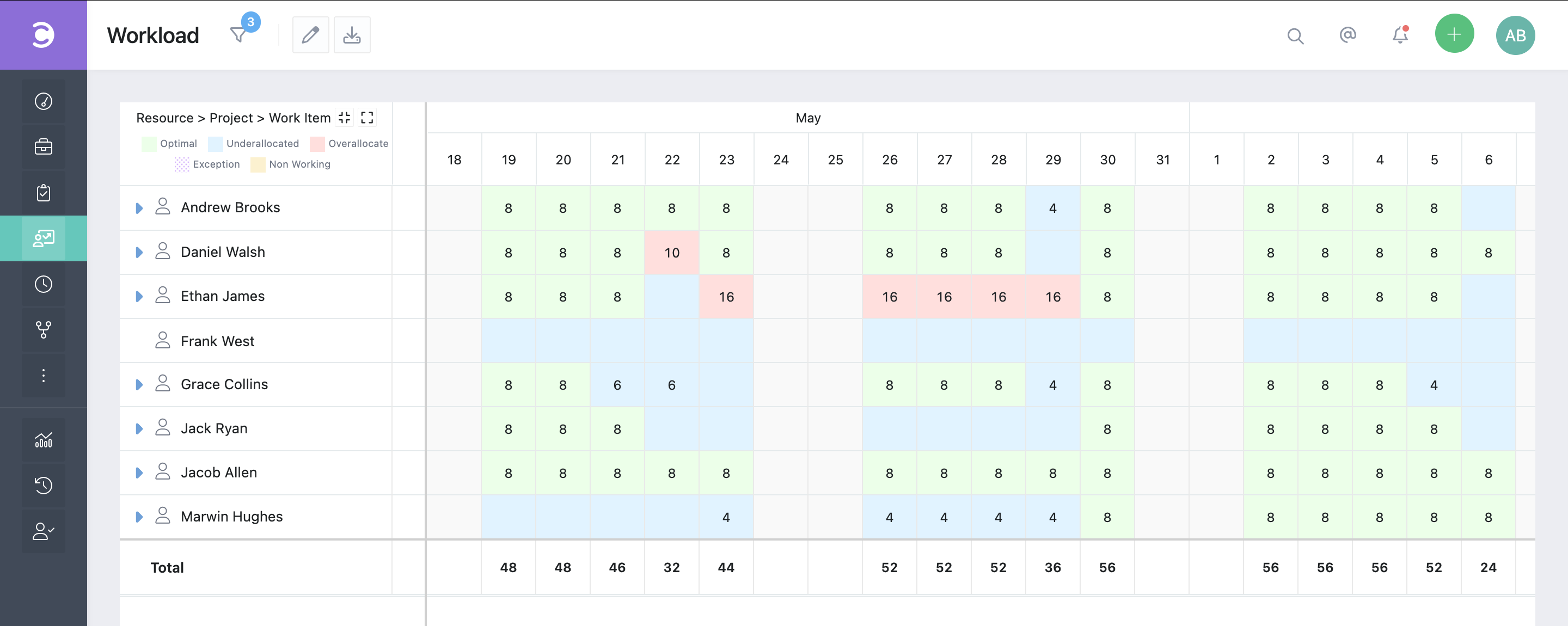
In practice, a project manager allocates people to tasks in hours or percent against each person's work calendar. The resource reports then measure planned utilization as estimated hours divided by available hours, and planned capacity as one minus that utilization. An admin sets an optimal-load range, for example 80 to 90 percent, and the load charts color people blue when they're under it, green when they're inside it and red when they're over-allocated.
The standard resource reports are the load chart, a real-time load chart, planned versus actual utilization, efficiency and capacity. Because Celoxis is a portfolio tool, the same data feeds project and portfolio dashboards.
Core lists workload tracking and capacity planning. Job roles, work calendars, timesheets and instant conflict detection start at Essentials, and costing starts at Professional.
- a PMO wants cross-project resource load, utilization and capacity reports with timesheets and portfolio dashboards at published per-user prices
- you want over- and under-allocation flagged against an optimal-load range across many projects
- you want a tool people adopt within days: reviewers mention a learning curve and time spent setting up tasks and recording progress
- you depend on exact resource loading or a Jira sync: individual reviewers call resource loading not very accurate and the Jira integration not easy
- Users like
- scheduling, resources, budgets and reporting in one place, with workload visible across projects
- Users dislike
- a steep learning curve, a dated-feeling interface and a weak mobile app
- Source: Capterra, 568 reviews
How it works in practice
Capterra shows Celoxis at about 4.5 out of 5 from roughly 500 reviews, and the exact count differs between regional Capterra pages. Reviewers praise the resource load view for daily management and the combination of Gantt planning with resource planning against actuals. The complaints are a learning curve, setup time and, from single reviewers, resource loading accuracy and the Jira integration.
Celoxis's pricing page lists workload and capacity from Core in its comparison table, while the plan text first mentions them under Essentials. Confirm which plan you need before you budget.
- Starting price
- Core $10, Essentials $25, Professional $35, Business $45 per user per month, billed annually
- Optimal load
- Admin-set range with blue, green and red bands
- Timesheets
- Add-on on Core (+$5 per user), included from Essentials
- Job roles, work calendars, instant conflicts
- Essentials and up
- Scheduling unit
- Hours and percent
Smartsheet
Smartsheet
Work management suite where placeholders and utilization reports come from a paid add-on.
Smartsheet fits organizations that already run projects in Smartsheet Business or Enterprise and want placeholders and utilization reports tied to those schedules.
In practice, a Resourcing Administrator sets up placeholders by role or discipline in the account settings, optionally with a custom bill rate, so work can be scheduled before a named person is known. Managers add placeholders from the project schedule or worklist, where their assignments appear semi-opaque, and swap in real people later. Placeholders can also be used to request a team member from a Resource Manager.
For reporting, you create a report, set the view to Utilization, choose a time frame, add group-by options and filters, and run it. The utilization reports show over- and under-utilization, and once placeholder assignments are scheduled they show which disciplines can absorb the work and where hiring may be needed.
Resource Management by Smartsheet is an add-on, not part of a base plan. Business and Enterprise include basic workload tracking, while capacity planning, time tracking, skill-based assignments and reporting need the add-on. Pro can't use it. Scenario planning with placeholders, roles and disciplines is listed under Enterprise.
- you already use Smartsheet Business or Enterprise and want resource data and utilization reports connected to those schedules
- you plan with roles or disciplines before names are known and need utilization and budget-style reports
- you need a published, predictable price: the add-on has no public price and depends on the number of users
- you're on Pro or want resource planning in the base plan: Pro has no access and capacity planning needs the add-on
- Users like
- ease of use (2,831 mentions) and collaboration plus automation (2,212)
- Users dislike
- the learning curve (1,183 mentions, tied to limited formulas), an unintuitive interface (954) and limited features that raise cost (929)
- Source: G2, 22,872 reviews
How it works in practice
Capterra's listing for Resource Management by Smartsheet (formerly 10,000ft) shows 4.2 out of 5 from 74 reviews. One reviewer says it gives greater visibility into who's doing what and how resources are spread. Another calls the cost of the resource feature a bit steep, and an older review notes that the planning interface can be cumbersome as the advanced functions grow. Smartsheet's own pages don't use the term bookings, so don't expect Float-style booking language.
- Starting price
- Business $19 per member per month billed yearly; resource add-on has no public price
- SAML SSO
- Enterprise
- Add-on availability
- Business, Enterprise and Advanced Work Management; not Pro
- Included without add-on
- Basic workload tracking
- Needs the add-on
- Capacity planning, time tracking, skill-based assignments, reporting
monday.com
monday.com
Board-based work management with a workload view on Pro and a separate Resource Planner on Enterprise.
monday.com fits teams that already plan in boards and want a quick workload check, with a separate Enterprise-level planner for allocations.
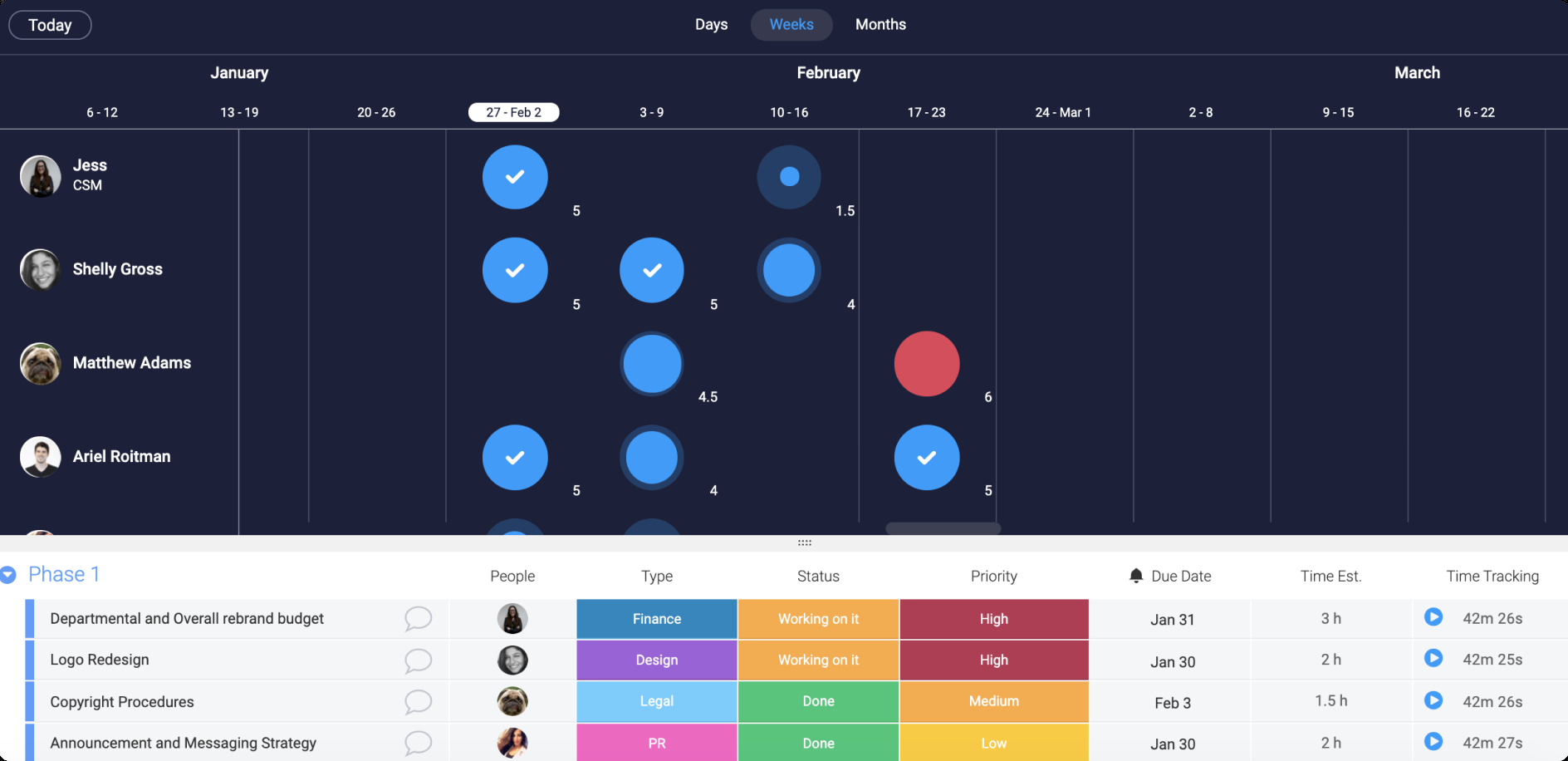
In practice, you give tasks a status, a date, a people column and an hours estimate, then add the Workload view next to the main table. In its settings you pick the people column as the resource type, measure effort by the time estimate and set a weekly capacity per person. Bubbles show who's over capacity in red or under capacity, and clicking a bubble lists that person's tasks so you can reassign them. A Workload widget can combine several boards into one view.
The Resource Planner, which allocates named people or role placeholders to a project, and the Capacity Manager, which consolidates allocations across connected projects, are Enterprise features according to a third-party summary of monday.com's plan table. monday.com's own pricing page lists resource management under Enterprise.
- your teams already live in monday boards and you want a per-board load check with capacity bubbles and drill-down reassignment
- you're an Enterprise buyer who needs role placeholders in a Resource Planner and cross-project capacity
- you need a wide, account-level view: community users report that the workload widget caps at 20 boards
- you want automatic staffing suggestions or conflict resolution: the workload view highlights problems but doesn't reassign work
- Users like
- ease of use and team collaboration; TrustRadius reviewers also praise automation and customization
- Users dislike
- missing features and seat requirements, learning curve, limited features that raise cost; TrustRadius reviewers cite complex automation setup
- Source: G2, 17,292 reviews
How it works in practice
G2 reviewers rate monday.com 4.7 out of 5 from 17,292 reviews (checked October 25), and Capterra shows 4.6 from 6,129. Both are for the whole product, not the resource features. Capterra reviewers praise customizable boards, automations and views, and one says certain views and reports lack depth compared with specialised software. An AWS Marketplace reviewer said the workload view didn't work for their team without central PTO logging.
We found no standalone monday.com resource management product, and we couldn't confirm resource-specific integrations.
- Starting price
- Pro $19 per seat per month billed annually; Enterprise by quote
- Workload view
- Pro and up according to monday.com's blog; the support article doesn't name a plan
- Resource Planner and Capacity Manager
- Enterprise
- Scheduling unit
- Task time estimate against a weekly capacity you set
Wrike
Wrike
Work management platform with workload charts from Business and job roles, bookings and a utilization dashboard on quote-based plans.
Wrike fits teams that want workload charts now and a path to job roles and bookings on a quote-based plan later.
In practice, you add effort estimates to tasks, then create a workload chart per team to schedule tasks on a timeline, reassign them and group by project. Unscheduled tasks wait in a Backlog Box. The Resources view works from a folder, project or space and shows allocated effort per user or job role by day, week or month. Admins create job roles and assign them to people, so unassigned tasks can be tied to a role.
Bookings reserve effort for a user or a job role before tasks exist, and booked effort appears in the Resources view, the workload charts and the Backlog Box. Where task effort and booked effort fall on the same date, the larger value is used in the totals. A team utilization dashboard on Pinnacle compares planned with actual utilization.
Workload charts and the Resources view start at Business. Job roles and the utilization dashboard sit on Pinnacle and Apex, which Wrike sells by quote.
- you want workload charts and a Resources view from the Business plan, then a path to job roles and bookings for demand forecasting by role
- you run professional-services style work where staffing by job role and utilization against billable time matter
- you need bookings and job roles but can't buy a quote-only plan: they sit on Pinnacle and Apex
- you're on Free or Team: neither includes workload charts or the Resources view
- Users like
- project tracking (477 mentions in G2's pros summary)
- Users dislike
- a steep learning curve (305 mentions), not intuitive (239) and a lack of built-in templates (203)
- Source: G2, 4,553 reviews
How it works in practice
G2 reviewers rate Wrike 4.2 out of 5 from 4,553 reviews (checked October 26), praising project tracking. The most common complaints are a steep learning curve, an interface that isn't intuitive and a lack of built-in templates. Capterra shows 4.4 from 3,044 reviews. Both scores are for the whole product, not the resource features.
Wrike's two sources disagree on the plan that includes bookings, so test it on a Business trial before you assume either answer.
- Starting price
- Team $10, Business $25 per user per month billed yearly; Pinnacle and Apex by quote
- Workload charts and Resources view
- Business and up
- Job roles and utilization dashboard
- Pinnacle and Apex
- Bookings
- Pinnacle and Apex in Wrike's comparison table; Wrike's Resources view help article also lists Business
- SAML SSO and SCIM
- Pinnacle and Apex
How a resourcing request moves through each tool
Features matter less than the path a request takes from "we need a designer in March" to a booked, tracked person. This is where tools differ the most, yet it's the part a demo glosses over. Ask each vendor to walk one real request through.
- Step 1Request
- Kantata
- Smartsheet
- Runn
What breaks a request has no named approver, so it sits unanswered - Step 2Book
- Float
- Resource Guru
- Productive
- Wrike
What breaks the booking ignores leave added later - Step 3Track
- Resource Guru
- Celoxis
- Productive
What breaks timesheets live on a plan the team isn't on - Step 4Forecast
- Runn
- Productive
- Float
What breaks tentative work is counted as if it were confirmed
Request. Kantata has the most formal path: an administrator enables resource requests, names approvers, and an approved request swaps a named person in for an unnamed role. Runn offers a similar placeholder request on the Advanced plan, and Smartsheet placeholders can be used to ask a Resource Manager for a team member. In the other tools, a request is a conversation outside the software.
Book. Float, Resource Guru and Productive book in the planner itself, with capacity checked against leave. Resource Guru warns when a booking and a new leave day collide, and Float shrinks fixed-end-date allocations when time off is added. Wrike books effort for a person or job role before tasks exist.
Track. Resource Guru timesheets start at Blackbelt, Celoxis timesheets at Essentials (or as a Core add-on), and Productive suggests scheduled events in each person's timesheet. A planner without tracking tells you what you meant to do.
Forecast. Runn's scenario toggle includes or excludes tentative projects. Productive marks tentative bookings and excludes them from scheduled hours until confirmed, and Float lets you mark an allocation tentative. The risk in all three is the same: someone reads a utilization number without knowing which toggle was on.
Which plan unlocks capacity, utilization and rates?
The plan names differ, but the pattern is the same. The visual schedule is on the entry plan, while rate cards, budgets, timesheets and SSO sit one tier up. In the suites, the resource features sit one or two tiers above the plan most buyers start on. This table lists only what we confirmed on vendor pages. "Not confirmed" is your question for the vendor.
| Tool | Capacity or utilization view | Leave or time off | Rates, budgets or costs | SSO |
|---|---|---|---|---|
| Float | Starter | Starter | Rate cards from Starter (1 currency), cost estimation on Pro | Pro |
| Resource Guru | Heatmap from Blackbelt | All plans | Project budgets from Blackbelt | Master |
| Runn | Lite | Not confirmed | Project financials on Lite | Advanced (SAML) |
| Productive | Essential | Essential; approval flow on Professional | Rate cards on Professional | Enforced SSO on Ultimate |
| Kantata | Resource Center and dashboard; plan not confirmed | Not confirmed | Not confirmed | Not confirmed |
| Celoxis | Core per comparison table; Essentials per plan text | Work calendars from Essentials | Costing from Professional | Not confirmed |
| Smartsheet | Basic workload on Business; capacity planning in the add-on | Not confirmed | Bill rate on placeholders; add-on | Enterprise |
| monday.com | Workload view on Pro; Capacity Manager on Enterprise | Not confirmed | Not confirmed | Not confirmed |
| Wrike | Workload charts from Business; utilization dashboard on Pinnacle | Not confirmed | Not confirmed | Pinnacle |
Which tool fits which team?
Match the tool to the job you're hiring it for. This is a shortlist and doesn't replace a trial.
- An agency or studio wants a fast visual schedule and may add time tracking laterFloat
- A team books people plus rooms, equipment or vehiclesResource Guru
- A consultancy plans hiring and pipeline demand before deals closeRunn
- An agency ties bookings to budgets, rates and forecast revenueProductive
- A services firm staffs projects through formal requests and approvalsKantata
- A PMO wants resource load, timesheets and portfolio dashboards at published pricesCeloxis
- Projects already run in Smartsheet Business or EnterpriseSmartsheet
- Boards in monday.com need a quick workload checkmonday.com
- Teams want workload charts now and job roles and bookings laterWrike
Is there free resource management software?
Free resource management software is rare in the tools we read. None of the dedicated planners lists a permanent free plan on the pages we checked. Float gives a 30-day trial, Resource Guru a free fully featured trial, Runn a 30-day trial and Productive a 14-day trial, all without a credit card. monday.com has a free plan for two seats, and Wrike has a free plan, but the workload and resource features we describe above sit on paid plans (Wrike's Free and Team plans have no workload charts or Resources view).
A spreadsheet works for a while, but it breaks when availability changes: leave, public holidays, part-time schedules and a booking that needs to move for three people at once. That is our view from running programs, not a vendor claim. If you do start in Excel, keep one row per person per week, a separate leave tab and a column for confirmed or tentative, and move to a tool when you catch yourself fixing the same formula twice.
Resource management software for IT teams
Resource management for IT teams splits capacity between project work and run work, and it plans against skills as much as names. The checks differ from an agency's. The tool should hold a placeholder for a role such as network engineer or security analyst, show how much of a person's week is already committed to support, and book equipment, test environments or rooms next to people.
In this list, Resource Guru is the one that books non-human resources such as rooms, equipment and vehicles next to people. Runn includes skills and tags from Lite, Kantata has a skills library for matching and filtering requests, and Smartsheet placeholders work by role or discipline. Celoxis and Wrike carry job roles on their higher plans. Jira-based teams should check the connection first: Resource Guru lists a one-way import of Jira issues on all plans, Kantata lists Jira among its integrations, and for Float and Celoxis we couldn't confirm how the Jira link works. If your tickets live in Jira and your plan lives somewhere else, the sync is where the numbers go wrong.
How to choose resource management software
Three questions come before any recommendation: what kind of team you manage, how many people need scheduling, and whether you need AI forecasting or a simple drag-and-drop calendar. They're a good start, but we'd add four more.
- What kind of team are we: agency, services firm, internal PMO or IT?
- How many people do we schedule, and how many only view the plan? Count them separately for pricing.
- Do we need a drag-and-drop calendar, or scenario planning and revenue forecasts?
- Which plan includes leave, utilization, rate cards and SSO for our seat count?
- Where do tasks live: Jira, Asana, Smartsheet, somewhere else? Is the sync one-way or two-way?
- Who approves a staffing request, and does the tool record that approval?
- Will managers keep bookings current? Ask for a pilot with one live program and one real clash.
Run the trial with a real week of work. Load one program's people, leave and a tentative project, then change something: add leave, move a start date, switch the tentative project to confirmed. The tool that shows the consequence clearly is the one your managers will keep updated. If you want a wider look at tools that roll programs up, our guides to program management software and enterprise project management software cover that layer.
Where The Program Manager fits
The Program Manager isn't a resource planner, and it doesn't replace any tool above. It sits next to them and covers a different gap: when a program spans Jira and Asana, nobody sees the dependencies between the two until a milestone slips. It maps those dependencies and watches milestones for risk. If you need capacity planning, pick one of the tools above and keep The Program Manager for the cross-tool view.
FAQ
What is the best resource management software?
No single tool is best for every team. Float and Resource Guru suit teams that want a fast visual schedule at a low per-person price, Runn suits teams that plan for unconfirmed work, Productive and Kantata suit services firms that tie bookings to budgets or formal requests, Celoxis suits a PMO that wants resource load in portfolio reports, and Smartsheet, monday.com and Wrike suit teams that want a resource layer on work they already track. Compare the plan that includes utilization, leave and rates, not the starting price.
What is resource management in a company?
Resource management is the planning and tracking of the people, equipment and money that projects need. It records who's available after leave and working hours, books them onto projects, and compares the plan with actual time so managers can rebalance work, hire or turn down projects.
What is the difference between resource scheduling and resource tracking?
Resource scheduling books people onto future work and flags clashes. Resource tracking compares logged time or progress with the plan, so utilization and budget burn are real numbers. Most teams need both, and in several tools tracking sits on a higher plan than scheduling.
Is there free resource management software?
On the published vendor pages, none of the dedicated planners has a permanent free plan, but Float, Resource Guru, Runn and Productive offer free trials of 14 to 30 days without a credit card. monday.com and Wrike have free plans, but their workload and resource features sit on paid plans.
Can I use Excel for resource management?
Excel can work for a small team with stable schedules. It stops working when leave, public holidays, part-time schedules and tentative projects change the numbers, because every change has to be made by hand in several places.
Is capacity planning software the same as resource management software?
Capacity planning and resource management overlap. Capacity planning compares supply (available hours and planned hires) with demand (booked and tentative work) over a longer period, and resource management also covers the booking and tracking that feed those numbers. Most tools in this list do both, but the capacity view can sit on a higher plan.
Leave a Reply