Asana vs ClickUp comes down to how a team wants to manage work across projects. Choose Asana when portfolio reporting, consistent project ownership and executive status updates matter most. Choose ClickUp when the team wants configurable task workflows, documentation, native time tracking and lower displayed seat prices in one workspace.
For a program manager, the purchase isn't settled by the longest feature list. The useful test is whether a delayed dependency in one project reaches the right owner, whether a capacity conflict is visible across the portfolio and whether the sponsor can trust the status report without chasing five project managers.
The biggest pricing trap is comparing Asana Starter with ClickUp Business as though they're equivalent program plans. Asana's portfolio rollups sit on Advanced. ClickUp's Business plan is the tier that adds Advanced Dashboards, Resource Management and a full Workload view, at a lower displayed seat price. The platforms still organize that information differently.
 Choose Asana for a governed program portfolio
- Advanced groups projects into portfolios with owners, status and goal alignment.
- Portfolio status updates make executive communication a defined workflow.
- A consistent task and project model reduces the number of local conventions a PMO must police.
 Choose ClickUp for configurable delivery operations
- Core already includes native time tracking, goals, unlimited Gantt charts and unlimited Chat.
- Business adds Advanced Dashboards, Resource Management and a full Workload view.
- Docs, whiteboards and task workflows can live in the same workspace, provided someone maintains the structure.
Asana vs ClickUp: which differences matter to program managers?
Asana emphasizes portfolio status, goals and standardized work ownership. ClickUp emphasizes configurable workspaces, connected tasks and broader collaboration tools. Both can coordinate projects and dependencies, but the PMO's reporting process and required plan tier decide which one fits.
| Tool | Best program fit | Portfolio view | Dependency handling | Capacity lens | Executive updates | Native collaboration breadth |
|---|---|---|---|---|---|---|
| Asana | Structured cross-functional portfolios | Dedicated portfolios on Advanced | Task dependencies and Timeline from Starter | Resource management within one portfolio on Advanced | Portfolio status updates and progress dashboards | Tasks, projects, forms and approvals |
| ClickUp | Configurable multi-team delivery workspace | Advanced Dashboards and Resource Management on Business | Task relationships and dependencies on every plan, Critical Path on Business | Workload view on Business; Core shows it as a trial | Configurable dashboard cards and reporting views | Tasks, Docs, Whiteboards and Chat |
Asana's main advantage is a recognizable portfolio object with project status and ownership. ClickUp's main advantage is the ability to combine task execution, documents and reporting inside a more flexible hierarchy. Neither advantage removes the need for a named program owner or an agreed reporting cadence. Of course, that's true of any tool.
What should a PMO test before choosing?
A PMO should test whether a missed predecessor task changes the next program decision, not merely whether a colored bar moves. Create one realistic cross-team program in each product, then ask project owners to update it without the administrator's help. They shouldn't need a walkthrough.
Use a launch with an engineering release, security sign-off, customer communications and sales training. Make the security review late, move the launch date and ask a sponsor to identify the consequence from the portfolio view. If the sponsor has to open every task, the configuration hasn't solved the reporting problem. Without question, that's a failed test.
Asana vs ClickUp pricing: what does a program team pay?
Asana lists Starter at $10.99 per user per month billed annually and Advanced at $24.99 on the same basis. ClickUp's public US pricing page displays Core at $9 per user per month billed yearly and Business at $17, each shown next to a higher regular price of $12 and $25. Both vendors offer free plans and quote-based enterprise arrangements.
These are displayed base prices, not negotiated quotes or a guarantee about the checkout offered to every account. Many older comparisons still quote ClickUp's former Unlimited and Business plans at $7 and $12, so check the actual plan name, annual term, the displayed versus regular price and the features in your account before using the comparison for procurement approval.
| Plan | Public annual-billing rate | Program-management reason to buy |
|---|---|---|
| Asana Personal | Free | Small-team task tracking; not a portfolio reporting plan |
| Asana Starter | $10.99 per user per month | Gantt, Timeline, dependencies, dashboards and forms |
| Asana Advanced | $24.99 per user per month | Portfolios, goals, resource management and approvals |
| Asana Enterprise | Quote | Organization-wide workload, capacity planning and administrative controls |
| ClickUp Free Forever | Free | Small workspace with Docs and tasks; 60 MB storage and trial access to Gantt and Workload |
| ClickUp Core | $9 per user per month (regular $12) | Unlimited Gantt charts, goals, custom fields, native time tracking and Chat |
| ClickUp Business | $17 per user per month (regular $25) | Advanced Dashboards, Resource Management, Workload view, Timeline and Critical Path |
| ClickUp Enterprise | Quote | Advanced SSO, SAML and SCIM, audit logs and session management |
Asana's seat and tier rules are covered in more detail in our Asana pricing guide.
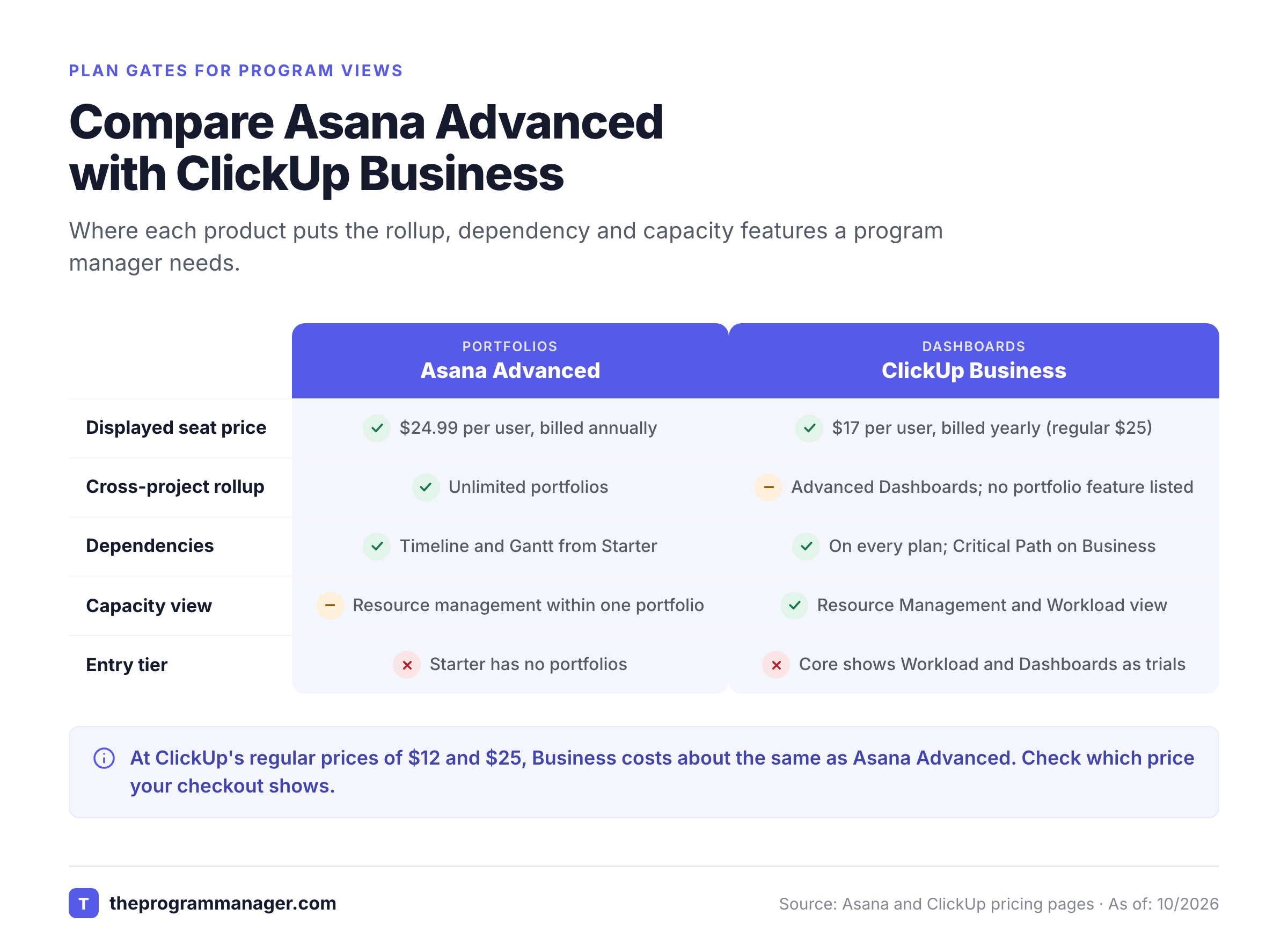
The tier comparison for a PMO is usually Advanced versus Business. Asana Starter has useful project-level controls, but Asana places its dedicated portfolio view in Advanced. On ClickUp, Core covers tasks, Gantt and goals, while Business is the tier that adds Advanced Dashboards, Resource Management and the full Workload view a PMO needs for reporting.
What does the license math look like for six or ten people?
License math changes with the paid seat count, especially on Asana. Its pricing FAQ says that seats are added one at a time up to five users, then in increments of five up to thirty total users. A six-person team may therefore need ten paid Asana seats, rather than six. Confirm the billing quantity in checkout.
| Working team | Asana Starter annualized monthly | Asana Advanced annualized monthly | ClickUp Core annualized monthly | ClickUp Business annualized monthly |
|---|---|---|---|---|
| 5 paid users | $54.95 | $124.95 | $45.00 | $85.00 |
| 6 working users | $109.90 for 10 seats | $249.90 for 10 seats | $54.00 for 6 seats | $102.00 for 6 seats |
| 10 paid users | $109.90 | $249.90 | $90.00 | $170.00 |
All totals are our arithmetic using the displayed annual-billing rates. At ClickUp's regular prices of $12 and $25, Business costs $125, $150 and $250 for the same three teams, which matches Asana Advanced at five and ten seats. The totals exclude tax, add-ons, discounts and any account-specific plan transition. They aren't feature-equivalent quotes: an Asana portfolio and a ClickUp dashboard aren't interchangeable merely because both summarize projects.
Does the cheaper ClickUp plan always win?
ClickUp's lower displayed seat prices don't automatically make it the better purchase. A PMO that spends hours rebuilding reports, fixing workspace conventions or coaching owners can lose the license savings in administration time.
Asana's higher Advanced price buys a more explicit portfolio workflow. That can matter when project managers must submit consistent status updates and executives need a reliable summary. ClickUp can do strong reporting too, but the team must design its folder structure, fields, dashboards and update discipline, and that's real work.
Which tool is better for project dependencies and critical handoffs?
Asana and ClickUp both support task dependencies, and it's worth knowing how. Asana exposes dependencies in Timeline and Gantt, while ClickUp lists relationships and dependencies on every plan, with Critical Path and Slack Time on Business. Neither tool will deliver a complete cross-system dependency graph without a configured operating process, and you shouldn't assume it does.
Asana dependency workflow
Asana's dependency feature lets a task block another task, and its Timeline view shows their sequence. A program manager can assign an owner to each predecessor, set dates and see where planned work overlaps.
For example, a privacy review blocks the release of a customer-facing feature. The program manager links the review task to the release task, assigns separate owners and makes the blocked work visible in the relevant project. When the review slips, the PMO still needs a person who owns the escalation and the decision about the launch date.
The important distinction is between a task link and a portfolio-level decision. Asana Advanced portfolios help roll up project status, but a portfolio status won't write its own explanation of why a dependency matters. Project owners need to report the consequence and the recovery option.
ClickUp dependency workflow
ClickUp's task relationships include blocks and blocked by links, and its pricing page lists Relationships and Dependencies on every plan. A program manager can connect a design approval in one team to implementation work in another, then expose the blocked work through views or dashboards.
ClickUp's flexibility helps when departments already use different task statuses or need distinct lists, and that's common in mixed programs. The catch is that inconsistent status names, custom fields and folder ownership can make a portfolio report harder to interpret. Agree on one common dependency classification before teams create dozens of local versions.
On ClickUp, Critical Path and Slack Time are included on Business, while Core shows them only as a trial. Test the exact editing workflow for the people who will own the handoffs.
Can either product calculate the real program critical path?
A program critical path isn't the same as a set of task links, and it doesn't appear by itself. It includes dependencies across projects, external approvals, resource constraints and decisions that may sit outside either platform. Both tools can represent parts of that model, but you shouldn't buy either on the assumption that it'll discover dependencies in another company's systems automatically.
For an engineering-focused comparison, see our Asana vs Jira guide.
Keep a separate escalation record for external handoffs. Give each dependency an owner, predecessor, successor, promised date, confidence level and next decision. Review it alongside the portfolio rather than relying on a red status badge alone.
Asana vs ClickUp for portfolio reporting and executive visibility
Asana's the more structured option for portfolio status reporting. ClickUp offers configurable dashboards that can summarize work across lists and folders. A PMO should choose based on the report executives will actually consume, not on the number of chart types available.
What Asana Advanced does for portfolio reviews
Asana's pricing page describes portfolios as a way to organize related projects and track overall health from one place, with goals that connect daily tasks to higher-level objectives. Starter and above also include status updates and reporting dashboards.
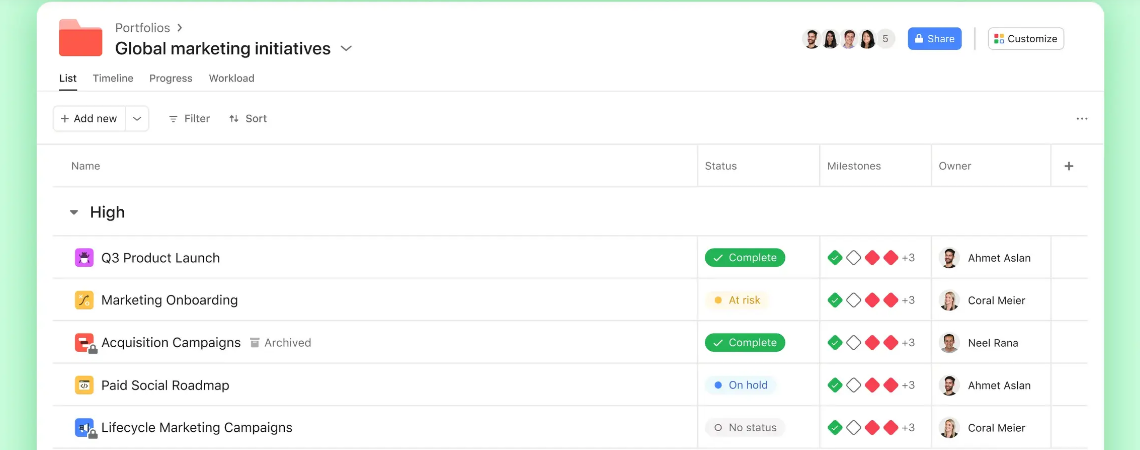
A useful weekly routine is to ask each project owner to post a short status with a changed milestone, a blocked handoff and the decision needed. The program manager then publishes a portfolio update that links those changes to the program objective. The benefit is a consistent reporting object rather than a collection of slide decks.
Advanced lists resource management within one portfolio, which is useful when capacity pressure is concentrated inside the selected portfolio. The Enterprise tier is the relevant discussion when the PMO needs organization-wide workload and capacity planning. Don't buy Advanced assuming it'll cover every capacity-planning scenario in a large enterprise.
What ClickUp Business does for portfolio reviews
ClickUp's pricing page lists no dedicated portfolio feature. Reporting is built from Dashboards that summarize folders, lists and projects. Business adds Advanced Dashboards, Resource Management, Time in Status reports and Advanced Reporting according to the public plan page, while Core and Free show Dashboards only as a trial.
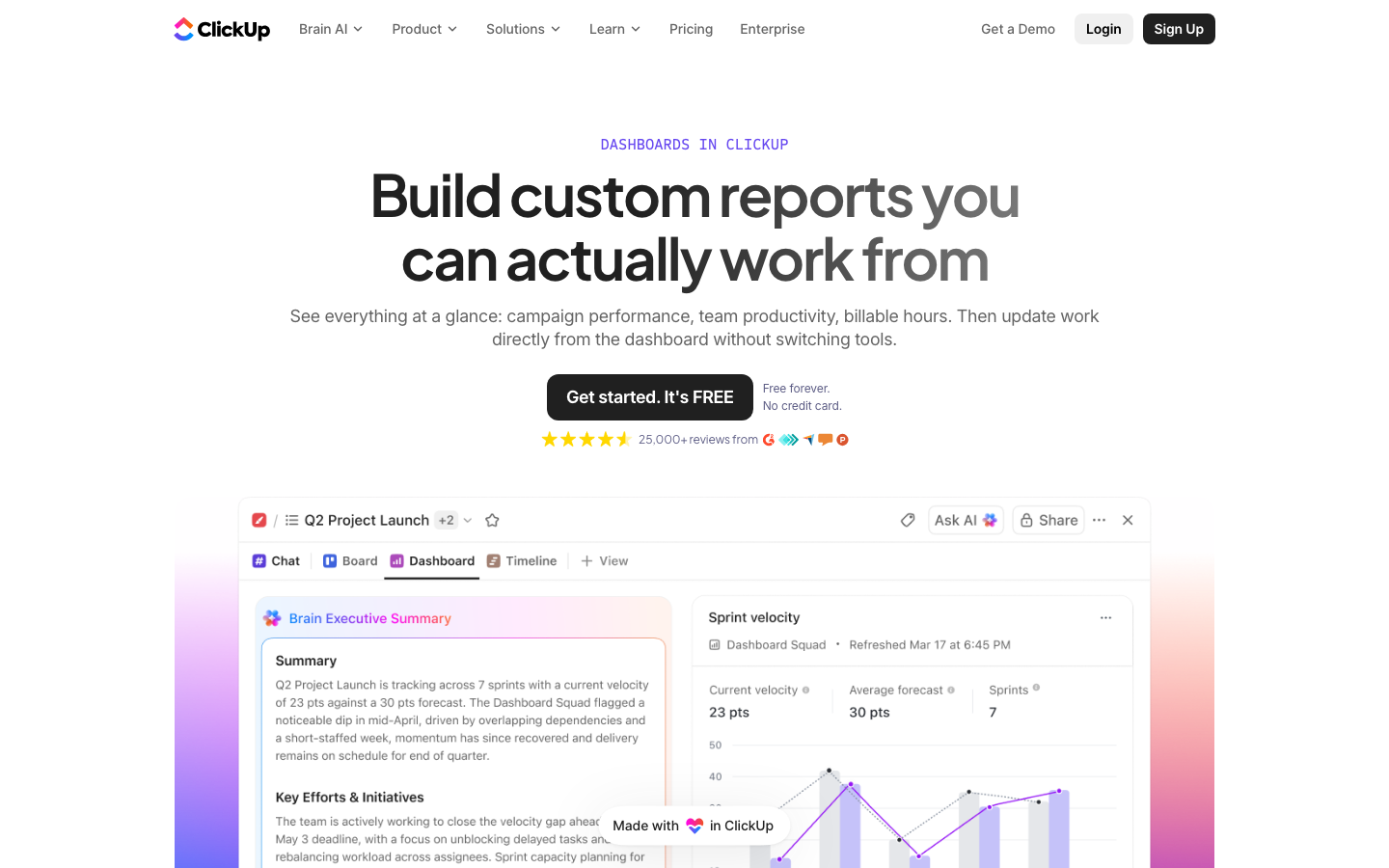
A workable weekly routine is to define one portfolio Dashboard with project owner, milestone confidence, overdue blockers and resource pressure. The PMO can filter views for a program sponsor while keeping detailed delivery tasks in team lists. The dashboard won't be trustworthy unless every project uses compatible definitions for status and dates.
ClickUp's more flexible layout can be an advantage when a program includes engineering, creative and operations work. It's a disadvantage if every team builds a private dashboard and the PMO must reconcile them manually before a steering meeting.
- Executives want consistent portfolio status updates tied to project owners and goalsAsana
- A mixed team wants Docs, tasks, time tracking and dashboards in one configurable workspaceClickUp
- The PMO needs a dedicated portfolio object and a repeatable reporting cadenceAsana
- The PMO needs configurable Advanced Dashboards and Resource Management at a lower displayed seat priceClickUp
Which tool handles resource capacity better?
Asana Advanced includes resource management within a portfolio, while ClickUp Business lists Resource Management and a full Workload view, with custom capacity on Enterprise. The choice depends on whether the PMO plans people within a portfolio, across the entire organization or across tools that neither platform controls.
Asana's portfolio resource management helps a manager see the people and work in a selected group of projects. For broader capacity planning, Asana lists additional enterprise-level capabilities. The PMO should check whether team availability, non-project work and allocation assumptions are represented in the plan it intends to buy.
ClickUp's Workload view shows assigned work over time against capacity. The pricing page lists it as a trial on Free and Core, included on Business and with custom capacity and additional groups on Enterprise, so the same view name doesn't mean identical capacity controls across tiers.
Use the same test data in both tools. Assign one designer to two overlapping launches, then reduce their availability for a vacation. Ask whether the portfolio view identifies the conflict, whether an owner can reassign work and whether the changed dates appear in the sponsor report. If they don't, you've found the gap early. A chart that looks good with a sample workspace may not handle real resource exceptions. Test it with messy data, because that's what you'll have.
How do Asana and ClickUp compare for collaboration, intake and governance?
Asana suits teams that want forms, approvals and consistent project workflows. ClickUp fits teams that want Docs, Chat, Whiteboards and tasks within the same workspace. Governance isn't about how many features exist; it's about which roles can change the records that executives depend on.
Intake and approvals
Asana Starter lists forms, custom fields, dashboards and automations, while Advanced adds approvals and proofing. A PMO can standardize incoming requests before they become committed work. The strongest pattern is a request form that names the business owner, expected benefit, target date and required approver.
ClickUp supports forms and configurable custom fields, with different allowances across plans. A team can route requests into a list and build automation around status changes. Before using that as a PMO intake system, test who can edit priority, who approves new work and how a rejected request is retained for audit or future planning.
Documents and communication
ClickUp's pricing page lists collaborative Docs on Free Forever and ClickUp Chat from Core upward. That makes ClickUp attractive when the team wants meeting notes and working documents close to tasks. A PMO should still define where approved decisions live, since a chat thread isn't an approval record and doesn't replace a decision log.
Asana centers collaboration on projects, tasks and status updates. It's often a better fit when the program manager wants fewer competing places for a decision to appear. For either product, keep the decision log explicit: decision, approver, date, affected milestone and evidence link.
Enterprise controls and access
Asana lists SAML authentication and SCIM provisioning on Enterprise. ClickUp lists advanced SSO with SAML, SCIM provisioning and audit logs on Enterprise. The right choice depends on the organization's identity, retention and review requirements rather than a generic claim that one tool is more secure.
Before a security review, request the exact contract terms, administrative control matrix and data-handling documents. Test what a guest can see in a private portfolio, what happens when an employee leaves and how an auditor can reconstruct a changed deadline. If you can't answer those, you haven't finished the evaluation. A vendor checklist isn't proof that the configured workspace meets policy, and you'll want evidence from your own tenant.
What should a migration from Asana to ClickUp or ClickUp to Asana include?
An Asana to ClickUp migration, or the reverse, needs more than a task export. The program manager must preserve owners, due dates, dependencies, project status and decision history. A small pilot is safer than moving the entire portfolio before the reporting model is agreed. Our program roadmap template can provide a consistent baseline for the pilot.
- Define the source of truth. Identify which system owns each project, task, dependency and approval during the transition. Don't allow both systems to accept independent edits to the same milestone without a reconciliation rule.
- Map the hierarchy. Translate Asana projects and portfolios into ClickUp Spaces, Folders and Lists, or the reverse. Document where program-level rollups will live.
- Map custom fields and statuses. Agree on shared definitions for at risk, blocked, complete, approved and deferred. Export a data dictionary before importing tasks.
- Rebuild dependencies deliberately. Sample cross-project predecessor links and check that the successor still points to the correct owner and date. A successful task import doesn't prove dependency fidelity.
- Rebuild reporting. Have project owners produce a status update and have the sponsor answer the same questions in the new tool. If the new report can't explain the largest risk, the migration isn't ready.
- Test access and billing. Invite a sponsor, an external collaborator and a departing team member. Confirm visibility, permissions, paid-seat impact and offboarding behavior.
- Run one reporting cycle in parallel. Compare milestone dates, open blockers and owner assignments. Sign off on discrepancies before retiring the old workspace.
Who should choose Asana and who should choose ClickUp?
Asana is the stronger fit when portfolio discipline and executive reporting are the main purchase drivers. ClickUp's the stronger fit when a team needs a configurable workspace with more collaboration tools and a lower displayed seat price, though its Business plan at regular prices costs about the same as Asana Advanced. The best option is the one whose reporting process survives a busy week without constant PMO intervention, and that's the test you'll want to run.
Choose Asana when multiple business functions need a shared project language, status updates must roll into a portfolio and leadership wants goal alignment. Budget for Advanced if portfolio reporting is essential, and check Enterprise if organization-wide capacity planning is part of the requirement.
Choose ClickUp when teams need flexible lists, native time tracking, Docs and task-based collaboration in one workspace. Budget for Business if Advanced Dashboards and Resource Management matter, and assign a workspace owner who will maintain fields, permissions and reporting conventions.
Choose neither as a complete answer when the program's most dangerous blockers live in systems outside the chosen work manager. A Jira engineering release, a procurement approval and an external vendor milestone won't become trustworthy merely because someone copied their dates into a dashboard. Give those dependencies named owners and an evidence-backed escalation process.
For a PMO buying this quarter, start with a proof-of-process rather than a generic demo. Use your own dependency scenario, capacity conflict and sponsor report. Then compare the cost of keeping that information correct, not only the published subscription price.
Asana vs ClickUp FAQ
Asana and ClickUp cover much of the same task and project management ground, but they differ in how they organize portfolios, price advanced capabilities and support team workflows. The questions below cover the purchasing decisions that matter most to program managers.
Is Asana better than ClickUp for program management?
Asana's often the better fit for a PMO that wants dedicated portfolios, consistent status updates and goal alignment. Those portfolio features are on Advanced. ClickUp is a strong alternative for a team that wants configurable dashboards, task relationships and collaboration tools in one workspace, but its plan page lists no dedicated portfolio feature.
Is ClickUp cheaper than Asana?
On October 31, 2026, ClickUp's public US pricing page displayed Core at $9 and Business at $17 per user per month billed yearly, against regular prices of $12 and $25. Asana displayed Starter at $10.99 and Advanced at $24.99. At ClickUp's regular prices, Business is level with Asana Advanced, so verify the actual plan lineup and Asana paid-seat quantity before comparing quotes.
Does Asana have portfolio management on Starter?
Asana's dedicated portfolio management is listed on Advanced, not Starter. Starter includes project timelines, Gantt views, dashboards and task dependencies, which can support project coordination without the Advanced portfolio rollup.
Can ClickUp manage dependencies between projects?
ClickUp lists relationships and dependencies on every plan, so tasks can block one another. A program manager still needs an escalation process for external dependencies, cross-system approvals and decisions that task links alone don't capture.
Which is better for resource management, Asana or ClickUp?
Asana Advanced provides portfolio resource management, while ClickUp Business offers Resource Management and a full Workload view. Test the same capacity scenario in both products, especially if organization-wide planning or detailed availability rules are required.
Can I migrate from Asana to ClickUp without losing dependencies?
A migration should explicitly validate task ownership, predecessor links, dates, custom fields and project status after import. Don't assume a task export recreates the entire program reporting model; it doesn't. Pilot one program and run a parallel reporting cycle before switching the source of truth.
Leave a Reply