Requirements management software decides whether a change to one requirement shows up in the tests, designs and documents that depend on it, or whether someone finds out at the next audit. Most teams start in Word and Excel, and that's fine for a while. They move to a dedicated tool when they need traceability, formal reviews and baselines they can defend to a customer or a regulator.
We compared ten tools on how they handle that work: how a requirement is written or imported, who has to pay to review it, how a baseline is frozen, how it traces to tests, and how it travels to a supplier via ReqIF or Word. For each one we read the pricing page, a product page and a help article, and we checked a review site for user ratings. We didn't run the products. Most of these vendors don't publish a price at all, so the entries say what you can learn before a sales call and what you can't. If you mainly need to plan and track the work that comes out of requirements, our guide to program management software covers that side.
- requirements management tools compared
- 10
- publish a price (Polarion X, ReqView, RTM for Jira)
- 3
- offer a free trial, free plan or free account
- 9
- include reviewer access without a paid seat (Jama Connect, Modern Requirements)
- 2
What is requirements management software?
Requirements management software is a tool that stores each requirement as its own record with an ID, attributes and a version history, links it to the requirements, designs and tests that depend on it, and controls how it is reviewed, approved and changed over time. A document holds the same text, of course, but it can't tell you which test covers requirement SRS-53 or which ten items need a second look after a stakeholder need changes.
Every tool here handles the same five core jobs.
- Capture: you write requirements in a document-like view or a grid, or import them from Word, Excel or ReqIF without losing structure.
- Trace: you link stakeholder needs to system requirements, to design items and to tests, then show the result as a traceability matrix and flag links that may be out of date after a change (often called suspect links).
- Review and approve: you send a set of requirements to reviewers, collect comments, and record who approved which version, sometimes with an electronic signature.
- Baseline: you freeze an approved set as a read-only snapshot and compare it to the current state or a later baseline.
- Exchange: you send specifications to customers and suppliers in ReqIF, Word or Excel and take their changes back in.
Teams in regulated work (automotive, aerospace, medical devices, defense) need all five, plus evidence for standards such as ISO 26262, DO-178C or IEC 62304. A software team that mostly writes user stories often needs only the first two, though, and that's why some of them keep requirements inside Jira or Azure DevOps.
Which requirements management software is best?
No single requirements management tool is best for every team; the choice depends on three things: the standard you have to prove compliance against, how many people must review requirements without being authors, and where your engineers already work. Jama Connect, IBM DOORS Next, Siemens Polarion and PTC Codebeamer are the established choices for large regulated programs. Visure and Innoslate add their own angles: Visure on standards templates and air-gapped installs, Innoslate on modeling and simulation in the same database. Modern Requirements and RTM keep requirements inside Azure DevOps and Jira. Perforce ALM puts requirements, tests and defects in one tool, and ReqView is the low-cost desktop option. The tag on each pick names the rule that decides the fit.
 Best for live traceability and formal reviewsJama ConnectReview Center with electronic approvals, reviewer licenses and hosting included in the price, a 30-day trial. Quote only.
 Best for large programs that need streams and variantsIBM DOORS NextGlobal configurations, signed baselines and native ReqIF round trips, as single-tenant SaaS or a perpetual on-premise license. Quote only.
 Best for Word and ReqIF exchange with suppliersSiemens PolarionLiveDoc documents with Word round-trip and built-in ReqIF. Polarion X SaaS is listed at $24,000 per year for 10 users on AWS Marketplace.
 Best for automotive teams working to ASPICE and ISO 26262PTC CodebeamerRequirements, risk and test in one ALM with Review Hub approvals, ReqIF round trips and Word round-trip with tracked changes. Quote only.
 Best for standards templates and air-gapped installsVisure Requirements ALMTemplates for DO-178C, IEC 62304, ISO 26262 and ASPICE, perpetual or subscription licenses, named or floating seats, 14-day trial.
 Best for requirements plus MBSE in defense and governmentInnoslateRequirements, SysML and LML models, simulation and test in one database, with GovCloud and Iron Bank deployments. Free Sandbox up to 500 entities; named or floating commercial licenses on request, public GSA Schedule pricing for government.
 Best for teams that live in Azure DevOpsModern Requirements4DevOpsDocuments, trace matrices, reviews and baselines on top of Azure DevOps work items, and approvers don't need a paid seat. Quote only.
 Best for requirements, tests and defects in one toolPerforce ALMAutomatic traceability matrix, in-tool reviews and baselines, ISO 26262 process certification and a 30-day trial. Quote only.
 Best for a small team on a tight budgetReqViewDesktop and web app that versions requirements in Git or SVN. Free plan for one small document, PRO from 440 EUR per user per year.
 Best for requirements inside Jira CloudJira + RTMRequirements, tests and defects as Jira issues with a traceability matrix. $8 per month for up to 10 users on Standard.
Requirements management software compared
The table puts deployment and the review workflow first, because those decide who you're able to involve and where your data lives. Prices are as published by the vendor; most of them sell only by quote.
| Tool | Deployment | Review workflow | Published price (currency as listed) | User rating |
|---|---|---|---|---|
| Jama Connect | Cloud (hosting included) | Review Center with electronic approvals; reviewer licenses included | Quote only; 30-day trial | 3.8 (PeerSpot, 17) |
| IBM DOORS Next | Single-tenant SaaS or on-premise | Formal reviews with approver roles; signed baselines | Quote only | 3.8 (PeerSpot, 16) |
| Siemens Polarion | On-premise or Polarion X SaaS on AWS | Workflow states and e-signatures on documents | Polarion X $24,000 per year for 10 users (AWS Marketplace) | 3.7 (PeerSpot, 15) |
| PTC Codebeamer | PTC-hosted SaaS or customer-hosted | Review Hub review and approval of work items | Quote only | 3.9 (PeerSpot, 17) |
| Visure Requirements ALM | Visure Cloud or on-premise, incl. air-gapped | Comments before changes apply; signed baselines; reviewer add-on | Quote only; 14-day trial | No reviews yet |
| Innoslate | Managed cloud, self-hosted, GovCloud, Iron Bank | Named or floating licenses with Reviewer and Viewer roles; document baselines | Free Sandbox; quote or GSA Schedule | 4.5 (66) |
| Modern Requirements4DevOps | Inside Azure DevOps (SaaS, private tenant, on-premise) | Reviews and approvals with optional credential re-entry; approvers need no paid seat | Quote only; free trial | No reviews yet |
| Perforce ALM | Perforce cloud on Azure or self-hosted | In-tool reviews with pending and completed reviewers | Quote only; 30-day trial | 3.2 (PeerSpot, 7) |
| ReqView | Desktop and web app, files in Git or SVN | Comments and status-based approval, no e-signature | Free plan; PRO 440 EUR, TEAM 600 EUR per user per year | No reviews yet |
| Jira + RTM | Jira Cloud app | Reviews and discussions on Jira issues; no formal sign-off described | $8 per month up to 10 users (Standard) | 4.4 (Atlassian Marketplace, 66) |
The 10 best requirements management software tools
Each entry starts with the team it fits, then follows one requirement through the tool: written or imported, reviewed, baselined and traced to a test. Facts that need a plan or an add-on say so.
Jama Connect
Jama Connect
Live traceability, Review Center approvals and free reviewer licenses for regulated teams.
Jama Connect fits a hardware or software team in a regulated industry that needs live traceability from requirements to tests and risks, with formal reviews that many non-authors take part in.
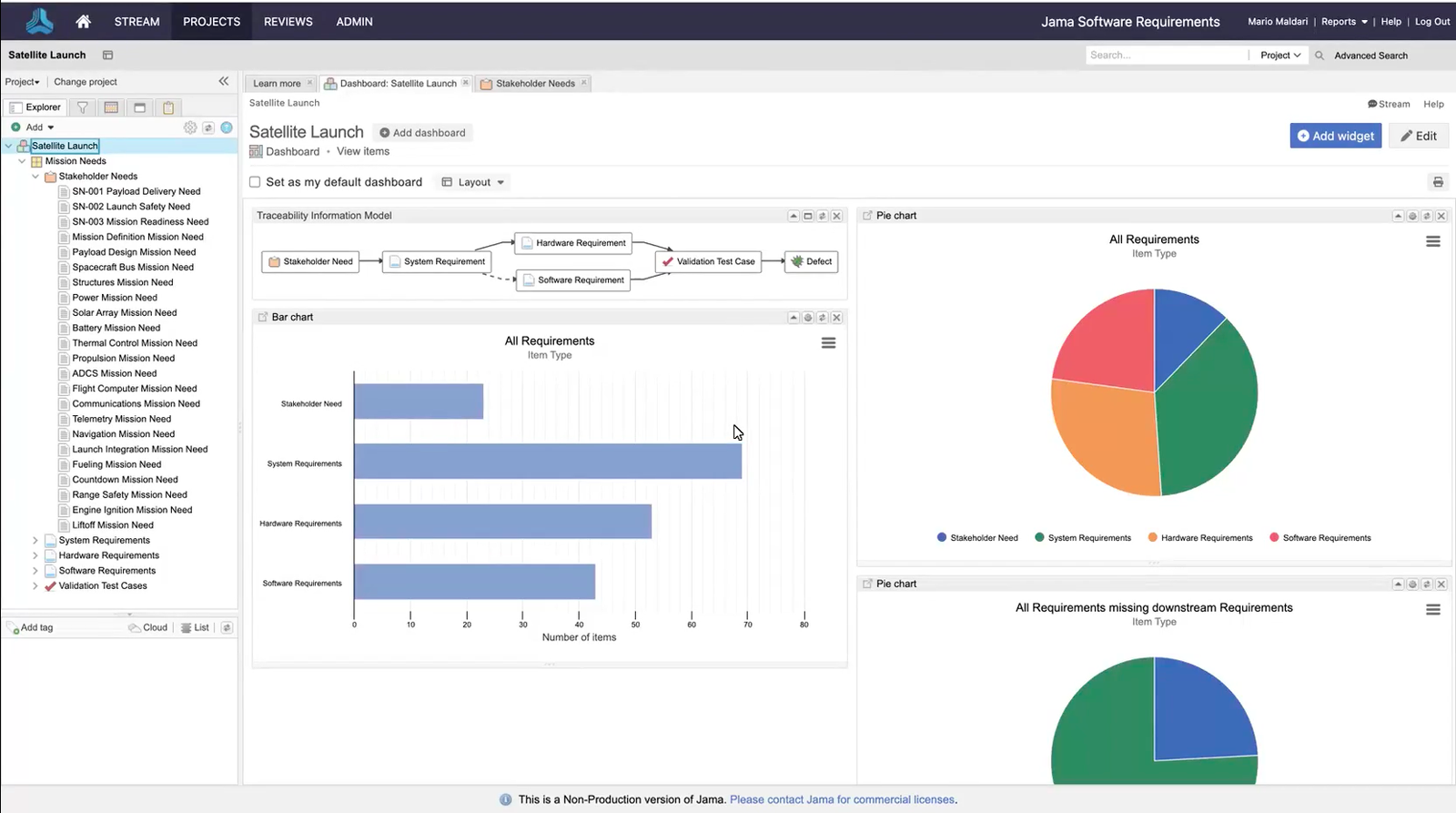
Jama organizes items through a traceability information model, so a stakeholder need, a system requirement, a hardware or software requirement and a verification test case each have a type and an allowed link between them. Live Traceability shows which items are missing a downstream link, and impact analysis shows what a change touches before you make it.
Reviews run in Review Center. You send a set of items for review, reviewers comment and approve, and Jama records electronic approvals. Starting or revising a review creates a baseline automatically, and you can compare baselines with each other or with the current items once versioning is enabled. License types are Creator, Stakeholder (view and comment), Reviewer (formal reviews and digital sign-off) and Test Runner. Jama says reviewer licenses, hosting, file storage and a hosted sandbox are included at no extra charge.
For exchange, Jama Connect Interchange for ReqIF imports, exports and updates requirements and names IBM DOORS, DOORS Next, Codebeamer, Polarion and Simulink as partner tools. The integrations page lists Jira, Azure DevOps, CATIA Magic (Cameo), Xray and TestRail. The industry frameworks Jama lists include DO-178C, ISO 26262, ASPICE, ISO 13485, ISO 14971 and FDA 21 CFR Part 11, and it states TUV SUD validation for safety-related development.
- you need live traceability from requirements to tests and risks in one tool
- you want formal reviews with digital sign-off and free reviewer licenses
- you build to standards such as ISO 26262, DO-178C or FDA design controls
- you need public, per-seat pricing: Jama only quotes on request
- you have a small team that only needs a simple backlog: setup and licensing are geared to larger engineering orgs
- Users like
- traceability, the review module and support
- Users dislike
- a dated interface, license cost that limits wider access, and complex setup
- Source: PeerSpot, 17 reviews
How it works in practice
Jama states SOC 2 Type II and TISAX Level 2 certification and projects of up to 10 million items. AI features cover requirement, test case and traceability suggestions and MCP access for AI agents. Self-hosting isn't described on the product pages, so ask if you need it. It's also worth asking whether Interchange for ReqIF costs extra.
- Starting price
- Quote only; 30-day free trial
- Deployment
- Cloud, hosting included
- Free trial
- 30 days
- Licenses
- Creator, Stakeholder, Reviewer, Test Runner
- Reviews
- Review Center with electronic approvals
- ReqIF
- Via Jama Connect Interchange
- Integrations
- Jira, Azure DevOps, Cameo, Xray, TestRail
- AI
- AI authoring, MCP for agents
- Reviewer seats
- Reviewer licenses included
IBM DOORS Next
IBM DOORS Next
Web requirements tool in IBM ELM with configurations, signed baselines and native ReqIF.
IBM DOORS Next fits a large aerospace, defense or automotive program that needs streams, baselines and variants across many teams, often alongside other IBM Engineering Lifecycle Management tools.
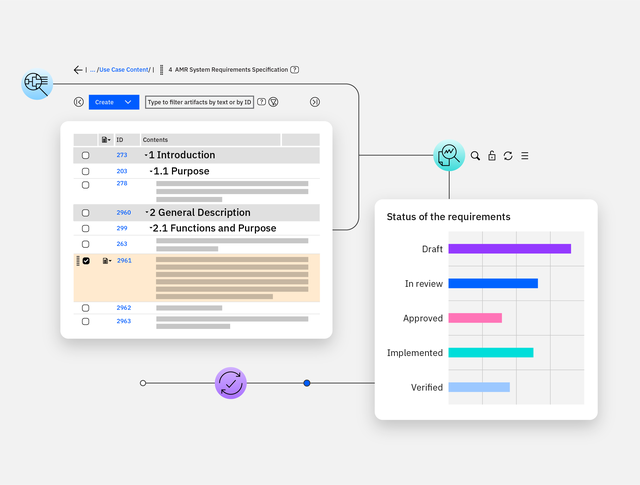
DOORS Next is the web-based requirements tool in IBM's Engineering Lifecycle Management (ELM) suite, next to DOORS classic. Requirements live in modules inside components, and global configurations, streams and component reuse let you manage variants of the same product line without copying modules. A graphical explorer shows how artifacts link to each other.
A review in DOORS Next has approver, reviewer and optional reviewer roles and moves from Draft through In progress and Reviewed to Finalized. You can start a review from a stream or from a fixed baseline, and baselines can be signed electronically. ReqIF files import and export at project or component level, including round trips with a report after each exchange, and Word documents import directly, with CSV and Excel import and export.
IBM sells ELM as single-tenant SaaS (editions up to 100 users and over 100 users, with authorized or concurrent licenses) or as a perpetual on-premise license with authorized or floating users. The SaaS site is hosted by IBM with 200 GB of storage per instance and a 99.9% SLA. Jira connects through IBM Engineering Integration Hub, and ELM itself uses OSLC for links between tools such as Rhapsody and the test management module.
- you run large aerospace, defense or automotive programs that need DO-178C or ISO 26262 evidence
- you need streams, baselines and global configurations for variant management
- you want on-prem perpetual licenses or a single-tenant hosted site
- you want a quick, simple setup: reviewers describe a complex UI and long rollout
- you mainly work in Jira or Azure DevOps: Jira links go through Integration Hub or OSLC connectors
- Users like
- traceability, scalability and baselines
- Users dislike
- a complex interface, performance lag, cumbersome document export and high, rising cost
- Source: PeerSpot, 16 reviews
How it works in practice
IBM lists ASPICE, ISO 26262 and DO-178C, and AI quality scores that check requirement wording against standards. IBM's pages don't name a native Azure DevOps or Cameo integration, so you'll need Integration Hub or OSLC if you need them.
- Starting price
- Quote only; free trial offered for the ELM suite
- Deployment
- Single-tenant SaaS or on-premise perpetual
- Pricing
- Contact IBM
- Licenses
- Authorized, concurrent or floating
- Reviews
- Approver, reviewer, optional roles
- ReqIF
- Native import, export and round trip
- Word/Excel
- Word import, CSV/XLS import-export
- Standards named
- ASPICE, ISO 26262, DO-178C
- AI
- Quality scoring, AI Hub
- Jira
- Through Integration Hub
Siemens Polarion
Siemens Polarion
Document-based requirements with Word round-trip, built-in ReqIF and on-premise or SaaS deployment.
Polarion fits a team that writes specifications as documents, exchanges them with customers and suppliers, and wants to choose between an on-premise install and SaaS.
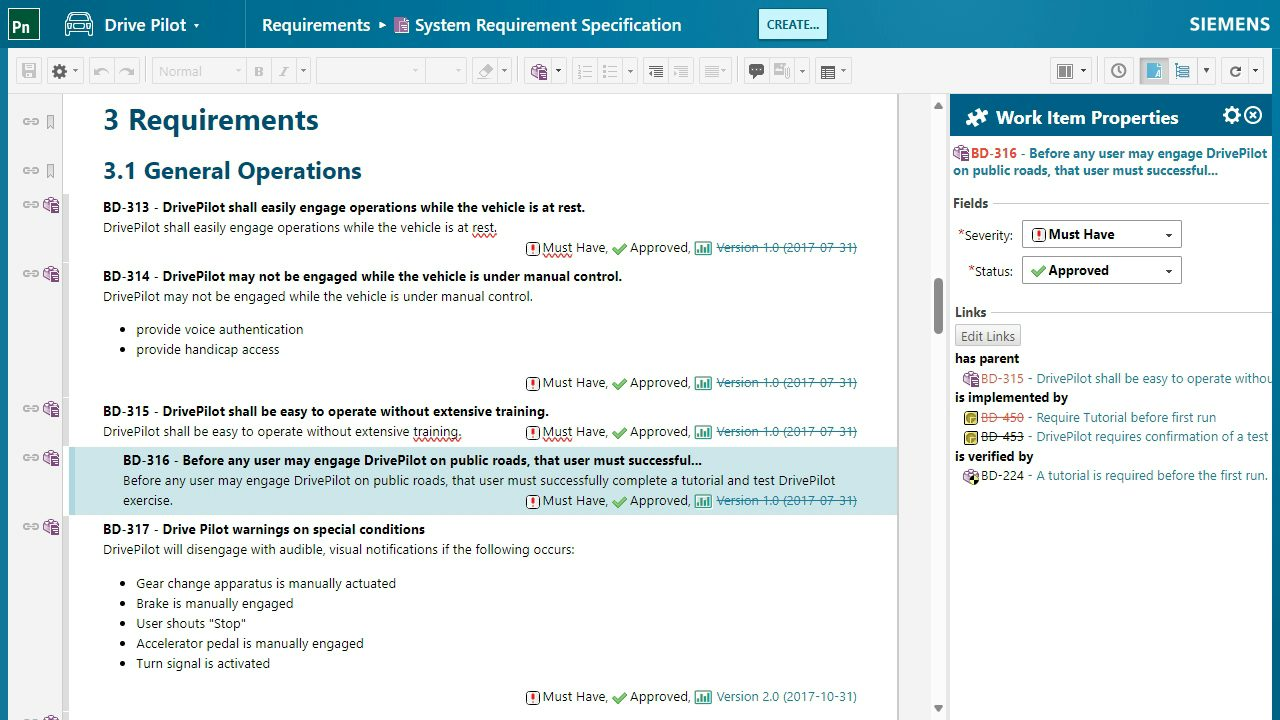
Requirements in Polarion are work items inside LiveDoc documents, so authors write in a document view while every paragraph keeps its own ID, status and links. Every change creates a version record, and a history view lets you report on the project as it stood at any earlier point. Workflows enforce state changes, and stakeholders can be required to sign a specification electronically as reviewed or approved before it's released.
Exchange is the reason many teams pick it, although the interface gets mixed reviews. Word round-trip exports a LiveDoc with a chosen level of allowed change, and the edited file comes back in and updates the document and its history. An import wizard reads requirements and test cases from Word or Excel. ReqIF is built in: an imported specification maps into a project and folder, you edit and baseline it, then export a round-trip file to the sender.
Siemens sells Polarion REQUIREMENTS, Polarion ALM and Polarion QA on-premise and Polarion X as browser-based SaaS on AWS. Polarion's own pages don't show a price, but Siemens' AWS Marketplace listing for Polarion X shows a 12-month contract for a minimum of 10 users including startup services at $24,000, with custom quotes available. Connectors cover Jira, Azure DevOps, HP Quality Center and MATLAB Simulink.
- you exchange specs with suppliers through Word round-trip or ReqIF
- you want a choice between on-premise and SaaS on AWS
- you need connectors to Jira, Azure DevOps and MATLAB Simulink
- you have fewer than 10 users and want SaaS: the AWS listing has a 10-user minimum
- you want a simple interface for occasional users: reviewers call the UI unintuitive
- Users like
- traceability, configurability and e-signatures
- Users dislike
- an unintuitive interface, setup complexity and a complex license policy
- Source: PeerSpot, 15 reviews
How it works in practice
Polarion X also lists IBM DOORS classic, Rhapsody, Jenkins, GitLab, GitHub and SVN integrations. Siemens' current product pages don't name safety certifications, so ask for the tool qualification kit you'll need.
- Starting price
- Polarion X $24,000 per 12 months for 10 users (AWS Marketplace); on-premise by quote
- Deployment
- On-premise or Polarion X SaaS on AWS
- Price
- From $24,000/yr for 10 users (Polarion X, AWS Marketplace)
- Free trial
- Polarion X Try now
- Reviews
- Electronic signatures on documents
- ReqIF
- Built in, with round trip
- Word
- Word round-trip and import wizard
- Integrations
- Jira, Azure DevOps, Simulink
- SaaS minimum
- 10 users
PTC Codebeamer
PTC Codebeamer
ALM for regulated product teams with Review Hub, ReqIF round trips and Word round-trip.
Codebeamer fits an automotive, medical or aviation team that wants requirements, risk and test management in one ALM and works with ASPICE or ISO 26262.
Codebeamer stores requirements as items in trackers, and a Traceability Table View shows upstream and downstream references, including those from trackers in other projects. Version 3.3 raised traceability limits to 5,000 elements per level, though PTC notes that values above 1,000 may affect performance. Review Hub handles review and approval of work items.
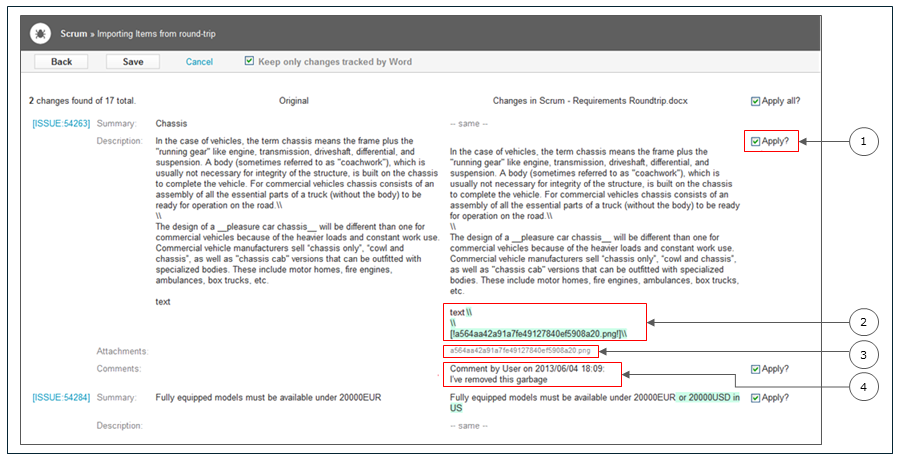
Codebeamer's exchange features are certainly detailed. ReqIF covers initial import, export, re-export to the origin and re-import of changes, with any number of iterations between partners, and you can pick a baseline per tracker for the export. Reviews, test runs and document trackers, however, don't travel via ReqIF. Word round-trip exports items to Word, lets people edit with Track Changes, and on import shows only the changed items so you choose which changes to apply.
Codebeamer AI adds assistants for authoring with industry templates, quality suggestions, impact analysis and support for ASPICE and ISO 26262. Codebeamer+ is a PTC-hosted SaaS edition with the same features, and Codebeamer can also run in a customer-hosted environment. Jira sync works at tracker level for Jira Server 6.3.8 or later and Jira Cloud.
- you build safety-critical products and need ASPICE or ISO 26262 oriented templates and AI-assisted authoring
- you exchange specifications with OEMs or suppliers via ReqIF and need baseline-aware exports
- you already run PTC Windchill and want OSLC traceability between ALM and PLM data
- you want published per-seat pricing: PTC does not list prices
- you need a simple, lightweight tool for a small team: users describe the interface as dated and complex
- your workflow depends on deep Jira sync: reviewers report integration gaps with Jira
- Users like
- ASPICE and ISO 26262 templates and traceability for regulated work
- Users dislike
- a dated, complex interface and gaps in the Jira integration
- Source: PeerSpot, 17 reviews
How it works in practice
PTC doesn't publish a price or trial details. Reviewers on PeerSpot praise the industry templates and traceability and mention a dated, complex interface and gaps in the Jira integration.
- Starting price
- Quote only
- Deployment
- Codebeamer+ SaaS or customer-hosted
- Pricing
- Quote only
- Traceability
- Traceability table, tree, and document views
- Reviews
- Review Hub for review and approval
- ReqIF
- Import, export, re-import round trip
- Word
- Round-trip with tracked changes
- Jira
- Tracker-level sync, Server and Cloud
- AI
- Codebeamer AI authoring and impact analysis
Visure Requirements ALM
Visure Requirements ALM
Requirements ALM with standards templates, signed baselines and on-premise or cloud deployment.
Visure fits a safety-critical team that wants standards templates, FMEA risk and test management in one platform, and may need an on-premise or air-gapped install.
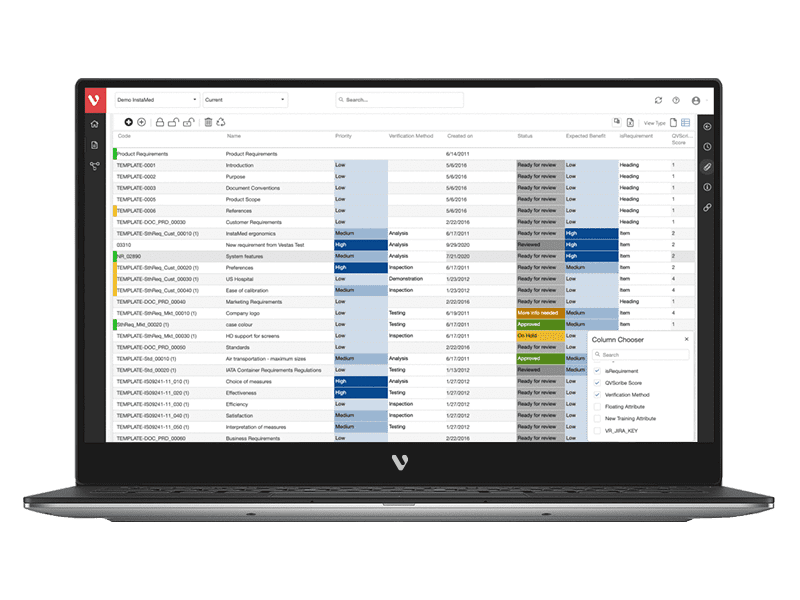
Visure's import wizard reads Word, Excel and (as an add-on) ReqIF and captures items by headings, regular expressions, keywords, paragraph styles or tables, then maps columns to fields, trace links or hierarchy before anything is created. Item codes must be unique, so documents that share numbering won't import without a prefix or suffix.
Stakeholders comment on changes before they're applied, workflows can be adapted, and each new version of an item creates suspect links on the items that trace to it. Baselines can cover single requirements, attribute sets, documents or whole projects, can be signed in the tool and compared across projects, and export to PDF and Office formats. The platform also covers FMEA risk, test management and a requirements quality analyzer.
Licenses are perpetual (support and maintenance cost 20% of the license per year) or, if you'd rather not pay upfront, an annual cloud subscription, with named or floating seats. Visure says features are included and integrations are priced on request; the list names Jira, IBM DOORS, Azure DevOps, MATLAB Simulink and Cameo. Standards named include DO-178C, DO-254, ARP4754A, IEC 62304, ISO 14971, ISO 26262 and ASPICE.
- you need standards templates for DO-178C, IEC 62304, ISO 26262, or ASPICE in one tool
- you want a choice of perpetual or subscription licensing and named or floating seats
- you need an on-premise or air-gapped install
- you want transparent list pricing: prices are quote only and integrations are priced as add-ons
- you only need lightweight backlog tracking: the platform is built around compliance and formal baselines
How it works in practice
Contributors and reviewers use a separate add-on license. AI features are the Vivia AI Assistant and a Quality Analyzer add-on.
- Starting price
- Quote only; 14-day trial
- Deployment
- Visure Cloud or on-premise, air-gapped supported
- Pricing
- Quote only, perpetual or annual cloud
- Trial
- 14 days
- Seats
- Named or floating
- Baselines
- Signed, comparable, PDF/Office export
- Import
- Word, Excel, ReqIF (add-on)
- Integrations
- Jira, DOORS, Azure DevOps, Simulink, Cameo
- AI
- Vivia AI Assistant, Quality Analyzer
- Licenses
- Perpetual or annual; named or floating
- ReqIF
- Import and export, as an add-on
Innoslate
Innoslate
Requirements management, MBSE, simulation and verification in one connected platform, with cloud and government deployment options.
Innoslate fits systems engineering teams in defense, aerospace and government who need requirements, models, tests and documents connected throughout the engineering lifecycle.
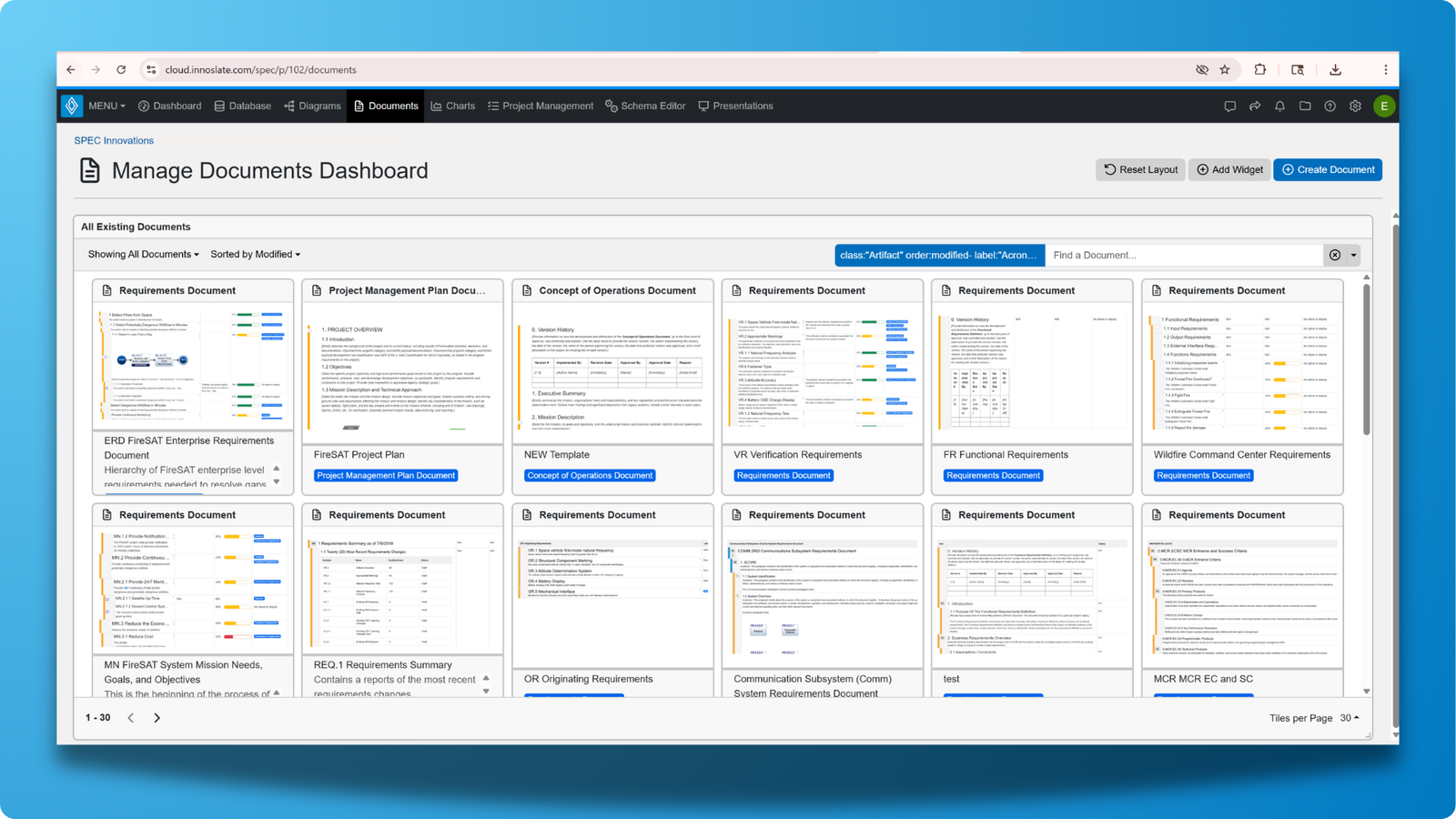
Innoslate is a web-based digital engineering platform from SPEC Innovations that combines requirements management with model-based systems engineering (MBSE). Requirements, functions, risks and test cases are entities in a shared, structured database. Documents, diagrams and traceability matrices are different views of those same records, which cuts down the duplicate information you'd otherwise maintain across a separate requirements tool and modeling tool.
Teams can start by importing existing specifications from Word, Excel, ReqIF and other supported formats. The Quality Checker uses natural language processing to assess requirement quality and flag potential issues in clarity, completeness and verifiability. You establish bidirectional traceability by linking requirements to stakeholder needs, model elements, risks and test cases, and those links support change impact analysis and verification planning. Requirements and engineering documents, including CONOPS and SRS documents, are developed and maintained in the platform: Word and Excel outputs support reviews and deliverables, while document baselines and entity-level version histories track what changed.
On the modeling side, Innoslate supports SysML, LML, DoDAF and UAF, alongside engineering diagrams such as IDEF0 and N-Squared. Its discrete-event and Monte Carlo simulators analyze the cost, time and resources of a modeled process, which is unusual in a requirements tool. Test plans, test cases and results connect to requirements, so verification and validation happen in the same environment. Built-in AI assists with requirements generation, test case generation, risk identification, summaries and traceability. Teams can begin with requirements management and expand into modeling, simulation and testing as their needs develop.
- you need requirements, system models, documents and verification connected in one platform
- you work on defense, aerospace or government programs with specific security and deployment requirements
- you want to analyze cost, time and resources using models connected to your requirements
- you want to begin with requirements management and expand into broader lifecycle engineering
- you need only a basic requirements list and would gain little value from modeling, simulation or integrated verification
- you need immediate, self-service commercial purchasing at a published standard price
- native SysML v2 support or a particular integration is mandatory: confirm compatibility with SPEC Innovations before you choose it
How it works in practice
Innoslate runs as a managed cloud service, as a self-hosted Enterprise edition, or in government environments including AWS GovCloud and Platform One Iron Bank, and it supports deployments aligned with DISA STIG requirements. Commercial licenses for cloud and self-hosted Enterprise are priced on request, while government buyers can use the public pricing on SPEC Innovations' GSA Multiple Award Schedule (confirm the purchasing terms and your eligibility). Licenses come as named seats assigned to one person or floating seats shared on a concurrent basis, both covering User, Collaborator, Reviewer and Viewer roles, so occasional reviewers and viewers can share a floating pool. Self-paced onboarding training, phone and email support and software updates are included; the instructor-led Bootcamp and customized training are sold separately. SPEC Innovations maintains SOC 2 Type 2 compliance and ISO 27001 and ISO 9001 certifications. To try it first, the free Cloud Sandbox holds trial projects with up to 500 entities, and the free Academic edition is open to eligible students and educators: register with a .edu email address, or contact SPEC Innovations if you don't have one. For moving data in and out, Innoslate documents ReqIF import and export and imports requirements from DOORS CSV exports. That's file exchange, not a live synchronization integration, so if you need SysML v2 or a specific native connector, confirm compatibility with SPEC Innovations first.
- Starting price
- Free Cloud Sandbox (up to 500 entities) and free Academic edition; commercial licenses on request; public GSA Schedule pricing for government buyers
- Deployment
- Managed cloud, self-hosted Enterprise, AWS GovCloud, Platform One Iron Bank
- Free options
- Cloud Sandbox with up to 500 entities; Academic edition for eligible students and educators
- Pricing
- Commercial by quote; public GSA Multiple Award Schedule pricing
- Modeling
- SysML, LML, DoDAF, UAF
- Simulation
- Discrete-event and Monte Carlo
- Data exchange
- Word, Excel and ReqIF import, ReqIF export, DOORS CSV import
- Training
- Self-paced onboarding included; Bootcamp and custom training extra
- Certifications
- SOC 2 Type 2, ISO 27001, ISO 9001; DISA STIG-aligned deployments
- API
- REST API and Java SDK, subject to deployment requirements
- Other reviews
- SourceForge 4.5 of 5 from 99 ratings
- Quality check
- NLP checks for clarity, completeness and verifiability
Modern Requirements4DevOps
Modern Requirements4DevOps
Requirements documents, trace matrices, reviews and baselines inside Azure DevOps.
Modern Requirements4DevOps fits a team that already runs delivery in Azure DevOps and wants requirements, reviews and baselines on the same work items instead of in a second tool.
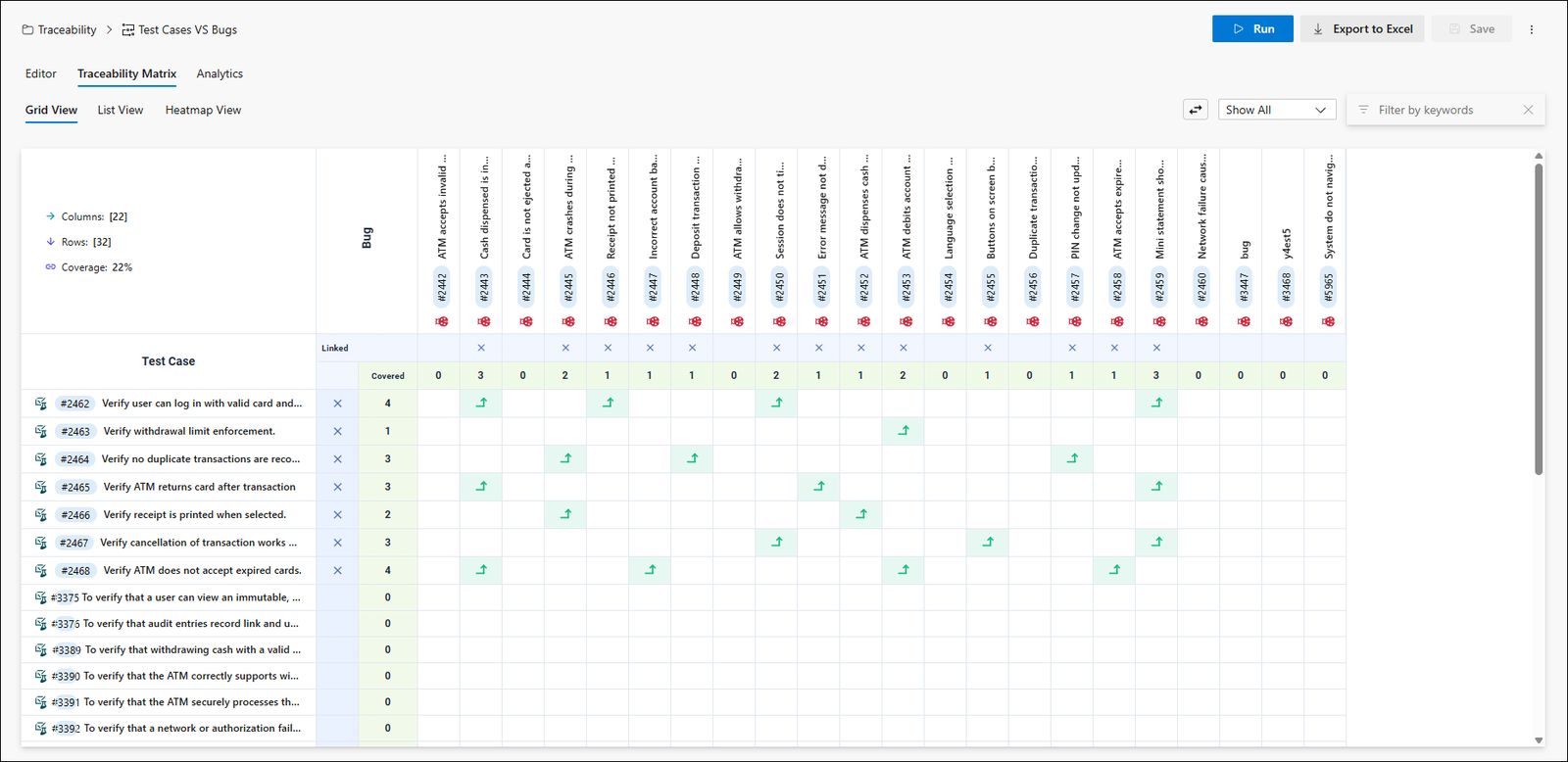
Modern Requirements adds requirements features inside Azure DevOps Services or Server. Smart Docs let you write a requirements document whose sections are Azure DevOps work items, so developers see the same items on their boards. Trace Analysis builds intersection matrices between two work item types or saved queries, and horizontal matrices that follow items through linked children. Views include grid, tree and heatmap, with coverage metrics and gap analysis, and matrices export to Excel.
Reviewers give feedback and approvers give formal sign-off, item by item or as a package, from an email link. An optional rule asks approvers to re-enter their Azure DevOps credentials, which the vendor says supports FDA 21 CFR Part 11 electronic signatures, and an approval audit report exports to Word or PDF. A baseline freezes selected work items at their revisions. It can be created from a completed review, and you can compare it or use it to roll an item back.
The four plans (Frontier, Frontier AI, Engineering and Engineering AI) are licensed per named user, usually on a three-year term billed annually, and stakeholders who only review or approve don't need a paid seat. Smart Import for Word and PDF files comes with the Engineering plans. The AI plans add elicitation, analysis, impact assessment and test script generation.
- you already run your delivery work in Azure DevOps and want requirements in the same work items
- you need formal approvals with credential re-entry and audit reports for regulated work
- you want stakeholders to review and approve without buying them a seat
- you are not on Azure DevOps: the product is built to run inside it
- you want public list prices: all pricing comes through a sales proposal
- you need ReqIF exchange: the import page lists only Word and PDF
How it works in practice
It runs as a service, in a private tenant or on-premise, but it's always inside Azure DevOps. The import page lists Word and PDF only, so ask about ReqIF if you exchange specifications with suppliers.
- Starting price
- Quote only, billed annually per named user; free trial
- Deployment
- SaaS, private tenant, or on premises; inside Azure DevOps
- Pricing
- Quote only, USD, billed annually
- Free trial
- Yes (length not stated)
- Traceability
- Intersection and horizontal matrices, heatmap, gap analysis
- Reviews
- Review and approval with optional password re-entry (21 CFR Part 11)
- Baselines
- Yes, with compare and rollback
- Import
- Word and PDF (Engineering plans)
- AI
- Frontier AI and Engineering AI plans, Copilot4DevOps
- Other reviews
- SourceForge 5.0 of 5 from 4 reviews
- Works in
- Azure DevOps Services and Server
- Reviewer seats
- Reviewers and approvers need no paid seat
- E-signature
- Optional credential re-entry on approval
Perforce ALM
Perforce ALM
Requirements, test and issue management with an automatic traceability matrix and ISO 26262 certification.
Perforce ALM, formerly Helix ALM, fits a team that wants requirements, test cases and defects in one tool with the traceability matrix generated for it.
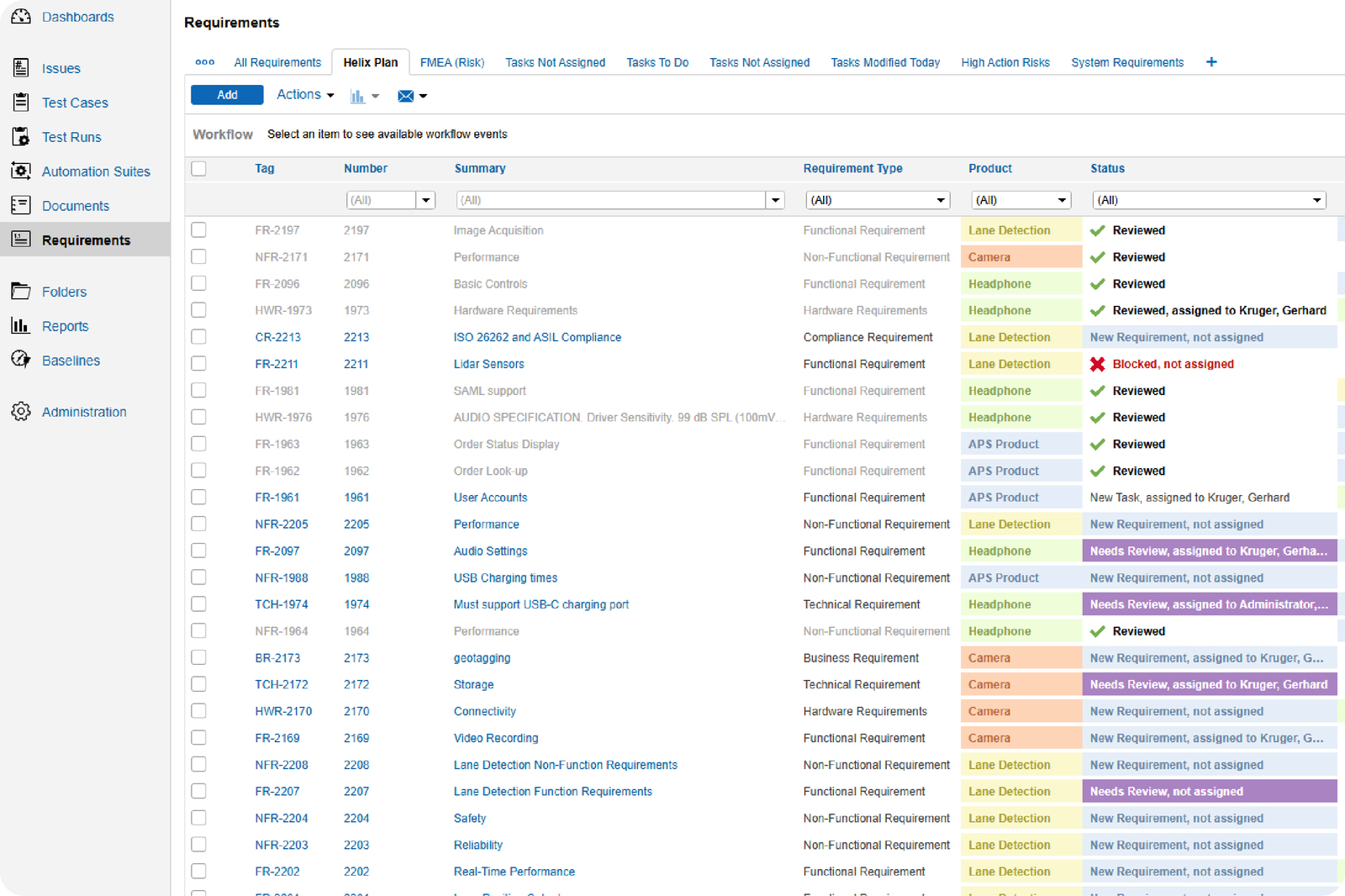
The requirements module lets you centralize and decompose requirements, reuse them across projects and create test cases from them. Requirements link to other requirements, test cases and results, and source code, and the traceability matrix is built automatically. After a change, impact analysis lists the related requirements and tests to review.
Reviews and approvals run inside the tool, with comments in real time and a view of who has reviewed and who's still pending. A baseline is a read-only collection of folders, documents and linked records at a point in time, and you can compare baselines between milestones. However, Perforce notes that baselines across hundreds of thousands of records take time and that deleting a baseline is permanent.
Import covers Word (requirements only, without field mapping), CSV or Excel with column mapping, XML and ReqIF, and documents export to Word for people outside the tool. Integrations include Jira (links in both directions), Jenkins, Perforce P4, Slack and a REST API. Perforce ALM holds ISO 26262 functional safety process certification from TUV SUD.
- you want requirements, test cases, and defects in one tool with an automatic traceability matrix
- you work in automotive and want a tool with ISO 26262 process certification
- you use Jira or Perforce P4 and want built-in links to them
- you rely on Word round-tripping: Word import has no field mapping and reviewers call Word import/export weak
- you want a modern interface: reviewers describe the UI as outdated with a steep learning curve
- you want a cost figure before a sales call: Perforce ALM is sold by custom quote after a 30-day free trial
- Users like
- traceability, configurability and test management
- Users dislike
- an outdated interface, weak Word import and export, and slowness
- Source: PeerSpot, 7 reviews
How it works in practice
The hosted cloud runs on Microsoft Azure with daily backups kept for a week; teams that need third-party software or License Server access host it themselves. PeerSpot reviewers mention an outdated interface and weak Word import and export.
- Starting price
- Quote only; 30-day free trial
- Deployment
- Perforce cloud on Azure or self-hosted
- Pricing
- Quote only
- Trial
- 30 days
- Traceability
- Automatic traceability matrix, impact analysis
- Baselines
- Read-only snapshots, compare milestones
- Import
- Word, Excel/CSV, XML, ReqIF
- Integrations
- Jira, Jenkins, P4, Slack, REST API
- Compliance
- ISO 26262 certified (TUV SUD)
- Certification
- ISO 26262 (TUV SUD)
ReqView
ReqView
Low-cost desktop and web requirements tool with Git or SVN versioning and ReqIF exchange.
ReqView fits a small engineering team or a supplier that needs real traceability and ReqIF exchange at a low price and is happy to share projects through Git, SVN or a shared drive.
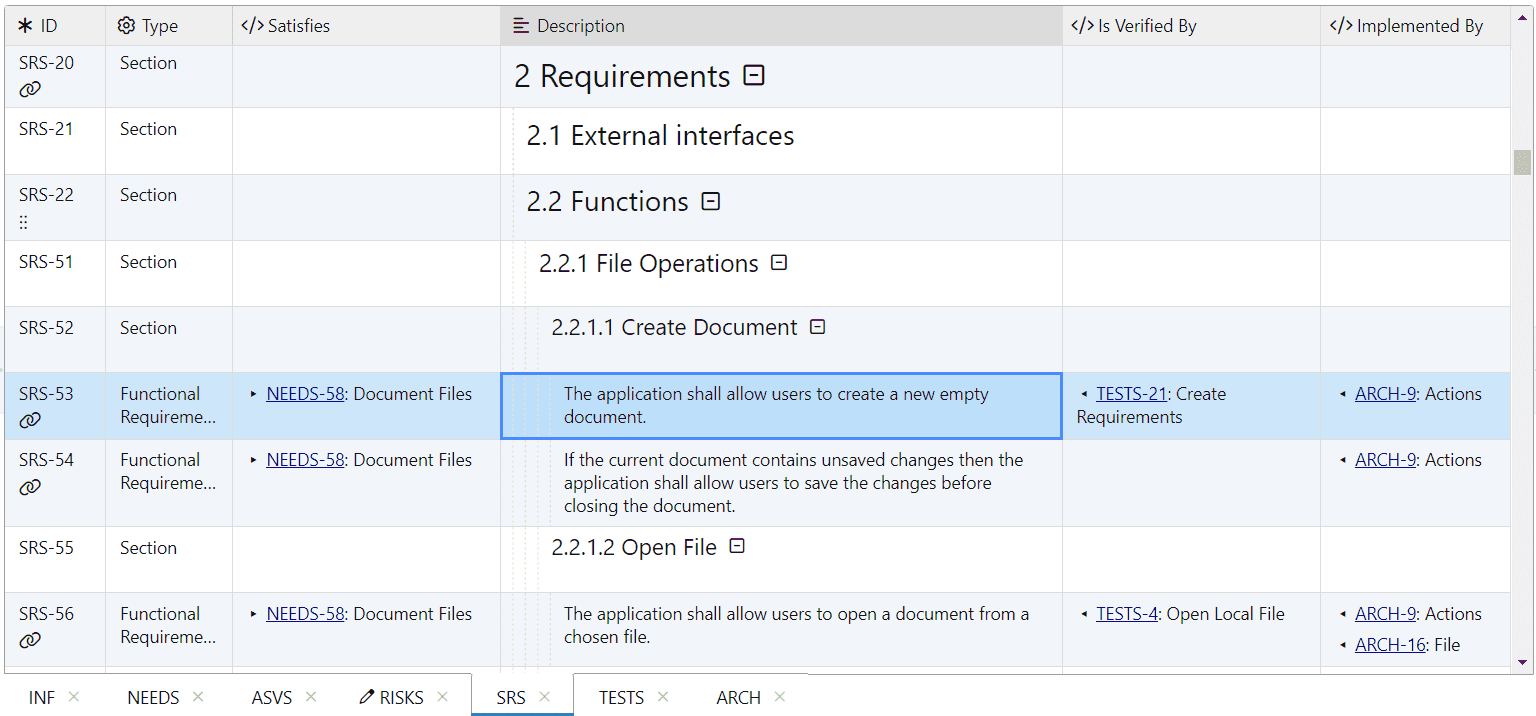
ReqView is a desktop app for Windows, Linux and macOS with a web app for Chrome, Edge and Firefox. A project is a set of documents, and each object has custom attributes and typed links such as Satisfies or Is Verified By. Suspect flags mark links after a change, and a table view builds a traceability matrix up to three levels deep, with filters that find missing links.
There's no central server for authoring. Teams share projects through a network or cloud drive, Git or SVN, while the project and object history, plus the Git or SVN log, act as the change record. You compare the current project with a baseline saved as a project file. Comments live in a discussion pane, and the documented approval process uses a status attribute such as Draft, Reviewed and Approved, not an electronic signature.
The FREE plan covers one document with up to 150 objects, while PRO adds traceability, export to Word, Excel, PDF and HTML and basic Git or SVN versioning. TEAM adds table views, linked projects, ReqIF and the Jira, Azure DevOps and Enterprise Architect integrations, and ENTERPRISE adds a floating license server. Templates follow ISO/IEC/IEEE 29148, and AI features cover import from documents and quality checks against INCOSE and EARS rules.
- you want requirements versioned in Git or SVN next to your code
- you exchange specs with DOORS or Polarion users via ReqIF
- you need a low-cost tool for a small engineering team
- you need a hosted multi-user SaaS with a central server: collaboration runs through shared files, Git, or SVN
- you need Jira, Azure DevOps, or ReqIF on the cheapest paid plan: those integrations start on TEAM
- you budget in USD: ReqView licenses start at 440 EUR per user per year
How it works in practice
Prices are listed in euros only, and there aren't any perpetual licenses. ReqView's ReqIF guide covers import from IBM DOORS, DOORS Next, Polarion, Windchill and Visure, including a DOORS round-trip workflow.
- Starting price
- Free plan (1 document, 150 objects); PRO 440 EUR, TEAM 600 EUR per user per year
- Deployment
- Desktop (Windows, macOS, Linux) and web app
- Free plan
- Yes, 1 document, 150 objects
- Entry price
- PRO 440 EUR/user/year
- Free trial
- 14 days of TEAM
- Versioning
- Git or SVN, project history, baseline compare
- ReqIF
- Import and export on TEAM
- Integrations
- Jira, Azure DevOps, Enterprise Architect (TEAM)
- AI
- AI import, INCOSE/EARS quality checks
Jira + RTM
Jira + RTM
Requirements, tests and defects as Jira Cloud issues with a traceability matrix.
Jira with the Requirements and Test Management (RTM) app fits a software team that already plans in Jira Cloud and wants requirements and tests next to the backlog without buying a separate tool.
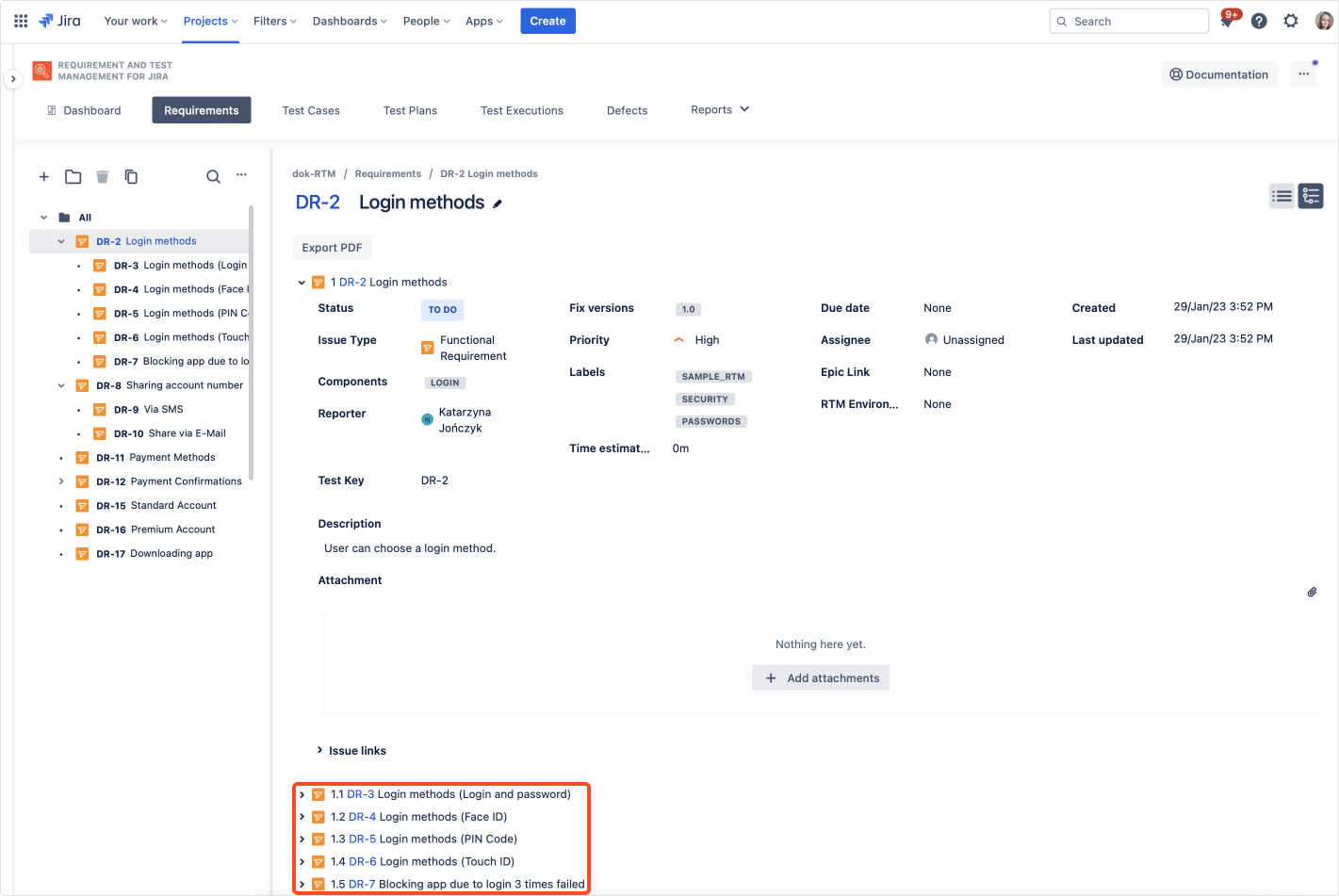
Jira doesn't have a requirement object of its own, so teams that keep requirements there add a Marketplace app. RTM, made by Deviniti, adds Requirement, Test Case, Test Plan, Test Execution and Defect modules as Jira issue types. Requirements sit in a tree with optional hierarchical numbering and a document view, and the traceability matrix runs from requirement to test case, execution, defect and result.
Requirements keep a version history and support reviews and discussions, yet RTM doesn't describe a formal approval or e-signature workflow. Baselines, which snapshot requirements, tests, links and executions at a milestone and compare them in a delta report, need the Advanced edition, as do cross-project links. Test results come in from JUnit or NUnit, and requirement lists can be shown in Confluence.
Pricing is per Jira site and billed through Atlassian: Standard is $8 a month and Advanced $10 a month for up to 10 users, and from 11 to 100 users it's $2.01 or $2.60 per user per month. Deviniti cites SOC 2, ISO 27001 and GDPR compliance for itself, and the app is Cloud Fortified.
- your team already plans work in Jira Cloud and wants requirements and tests there
- you want requirements, tests, and defects in one traceability matrix
- you need a low entry price for a small team
- you are not on Jira: it is a Jira app
- you need a formal approval workflow with e-signatures: none is described
- you need ReqIF or Word import: only CSV and test result imports are documented
- Users like
- fast, responsive support (about 15 of the 40 most recent reviews) and traceability from requirement to defect
- Users dislike
- test items created as Jira issues fill the backlog, plus occasional slow or imperfect functions
- Source: Atlassian Marketplace, 66 reviews
How it works in practice
Atlassian Marketplace reviewers praise fast support and complain that test items created as Jira issues fill the backlog. If your Jira setup is the bigger question, see our Jira review and Jira pricing guides.
- Starting price
- $8 per month up to 10 users (Standard), $10 (Advanced); plus Jira
- Deployment
- Jira Cloud app (Cloud Fortified)
- Entry price
- 8 USD/month flat, up to 10 users
- Editions
- Standard and Advanced
- Free trial
- Yes (length not stated)
- Traceability
- Requirement to test, execution, defect matrix
- Baselines
- Advanced edition
- Installs
- 1,935 on Atlassian Marketplace
- Integrations
- Confluence, JUnit/NUnit, Jira Automation, REST API
- Works in
- Jira Cloud
- Formal sign-off
- Not described
How a requirement moves through each tool
A requirement goes through the same four steps in every tool here. The tools differ in which step they make easy, while the note under each step is where teams most often get stuck.
- Step 1Write or import
- Siemens Polarion
- PTC Codebeamer
- Visure Requirements ALM
- ReqView
Breaks when the Word import keeps the text but loses the structure, so IDs and links have to be rebuilt - Step 2Review and approve
- Jama Connect
- IBM DOORS Next
- Modern Requirements4DevOps
- Perforce ALM
Breaks when reviewers need a paid seat, so approvals happen in email and never reach the audit trail - Step 3Baseline
- IBM DOORS Next
- Visure Requirements ALM
- Jama Connect
- Jira + RTM
Breaks when nobody freezes the approved set, so the version a supplier built against can't be shown - Step 4Trace to tests
- Jama Connect
- Perforce ALM
- Innoslate
- Jira + RTM
Breaks when links exist, but nothing flags them as suspect after a requirement changes
Which tool fits which team?
Match the scenario to the tool, then check the license rule in its entry.
- A medical device team needs formal reviews with many non-author reviewersJama Connect
- A large aerospace program manages product variants across several teamsIBM DOORS Next
- A supplier exchanges specifications with an OEM in Word and ReqIFSiemens Polarion
- An automotive team works to ASPICE and ISO 26262 and wants requirements, risk and test togetherPTC Codebeamer
- A defense contractor needs an air-gapped install with standards templatesVisure Requirements ALM
- A systems engineering team wants requirements, SysML models and simulation in one placeInnoslate
- A team that ships through Azure DevOps needs reviews and baselines on its work itemsModern Requirements4DevOps
- A QA-led team wants requirements, test cases and defects in one toolPerforce ALM
- A five-person team needs ReqIF exchange and Git versioning on a small budgetReqView
- A software team on Jira Cloud wants requirements and tests next to the backlogJira + RTM
Is there free requirements management software?
Yes, but the free options are clearly limited. ReqView's FREE plan covers one document with up to 150 objects. Innoslate offers a free Cloud Sandbox for trial projects with up to 500 entities and a free Academic edition for eligible students and educators (register with a .edu address, or contact SPEC Innovations without one). Everything else here is a trial: 30 days for Jama Connect and Perforce ALM, 14 days for Visure and for ReqView's TEAM features, and an unstated length for Modern Requirements, Polarion X and RTM.
Open source options such as OSRMT exist, and some systems engineers use free modeling tools for parts of the job. This list sticks to commercially supported tools with documented reviews, baselines and exchange formats. For a team that only needs a structured list with links, a free ReqView plan or a trial of RTM on an existing Jira site is the cheapest way to test whether a dedicated tool helps.
Dedicated tool or requirements inside Jira and Azure DevOps?
A dedicated tool is the safer choice when you'll need formal reviews, signed baselines and ReqIF exchange with customers or suppliers, because Jama Connect, DOORS Next, Polarion, Codebeamer and Visure document all three. Keeping requirements in Jira or Azure DevOps makes sense when the people who write requirements are the same people who build the product and the main need is traceability to tests and code.
The add-on route is cheaper and keeps one system. Still, check what's missing. RTM doesn't describe a formal sign-off, and baselines need its Advanced edition. Modern Requirements covers reviews, approvals with credential re-entry and baselines inside Azure DevOps, but lists only Word and PDF for import. Many teams don't pick one and combine both: requirements and reviews in a dedicated tool, and the resulting work in Jira, connected through the integrations each entry lists. Our Jira alternatives guide covers the delivery side.
How to choose requirements management software
Run these checks with your own documents before you sign:
- Import one real specification from Word or ReqIF and check that IDs, hierarchy and attributes survive
- Count reviewers and approvers who don't author and ask whether they need a paid seat
- Run one review to the end and see where the approval and any e-signature are recorded
- Create a baseline, change a requirement and check that linked tests are flagged as suspect
- Export the baseline to the format your customer or supplier expects
- Confirm deployment (SaaS, on-premise, air-gapped) and whether ReqIF, integrations or AI are add-ons
- Ask for the tool qualification evidence for the standard you work to
Where The Program Manager fits
The Program Manager isn't a requirements management tool, and it isn't a ranked entry in this list. It sits after the requirements stage: once requirements turn into epics and tasks in Jira and Asana, it maps the dependencies between those teams and watches milestones for risk. It doesn't store requirements, run reviews or create baselines, so it works alongside the tools above, not instead of them.
FAQ
What is a requirements management tool?
A requirements management tool stores each requirement as a record with an ID and version history, links it to related requirements, designs and tests, and controls how it is reviewed, approved and baselined. Examples are Jama Connect, IBM DOORS Next, Siemens Polarion and ReqView.
Is IBM DOORS still used?
Yes, IBM DOORS is still sold and used. IBM sells DOORS classic and the web-based DOORS Next as part of its Engineering Lifecycle Management suite, as single-tenant SaaS or a perpetual on-premise license. Even so, most other tools here can import DOORS data through ReqIF.
Which requirements management tools publish a price?
Of the ten tools here, three do: ReqView (PRO 440 EUR per user per year, with a free plan), RTM for Jira ($8 per month for up to 10 users) and Polarion X ($24,000 per year for 10 users on AWS Marketplace). The others sell by quote.
Do reviewers need a paid license?
Whether reviewers need a paid license depends on the tool. Jama Connect includes reviewer licenses, and Modern Requirements says reviewers and approvers don't need a paid seat. Visure sells a contributor and reviewer add-on, and Innoslate has a Reviewer license role. Still, ask each vendor how reviewers are counted, because it's often the biggest line in the quote.
What is ReqIF and which tools support it?
ReqIF (Requirements Interchange Format) is an XML standard for exchanging requirements between tools and companies. DOORS Next, Polarion, Codebeamer, Perforce ALM, Innoslate and ReqView (TEAM plan) document ReqIF import and export, Jama Connect uses its Interchange add-on, and Visure sells ReqIF as an add-on.
Can I manage requirements in Jira?
You can manage requirements in Jira with an app. Jira has no requirement object of its own, so apps such as RTM add requirement and test issue types, a traceability matrix and, on the Advanced edition, baselines. Formal sign-off and ReqIF exchange, however, are usually the gaps.