A portfolio decision is a choice between projects: which ones get funded, which wait, and what happens to the people already booked when a new one is added. Project portfolio management software exists to make that choice visible before work starts. Most tools on the market can show a portfolio of running projects, but far fewer can tell you what a new request does to the ones already underway.
We compared nine tools on that point. For each one we read the pricing page where one exists, a product page, a docs or help article that shows how a portfolio feature works, and a review site for the rating. We didn't run the products. Where something isn't documented, the entry says so, because that's the question to put to a vendor in a demo. If you run delivery across several programs and need the wider picture, our guides to program management software and enterprise project management software cover the neighboring categories.
- portfolio tools compared, from Microsoft Planner to Clarity
- 9
- sell by quote only (Planview, Clarity, Planisware, ServiceNow, Adobe Workfront)
- 5
- average implementation on G2 for both ServiceNow SPM and Adobe Workfront
- 4 months
- lowest published seat price with portfolio dashboards (Celoxis Core)
- $10
What is project portfolio management software?
Project portfolio management (PPM) software is a system that collects requests for new work, scores them against strategy, checks them against budget and people, and shows leadership the whole portfolio in one place. Project management software answers "how do we deliver this project?", whereas PPM software answers "should we start it, and what does it displace?". The two overlap in the middle, which is why several work management tools now sell a portfolio tier. Budgets and billing inside each single project sit in another tool category, compared in project accounting software.
In practice a PPM tool supports four decisions, and each one has an owner.
- Intake settles which requests are worth a closer look, and who judges them.
- Prioritization settles how projects are scored and ranked, and where the funding line falls.
- Capacity settles whether the people exist to do the work, by role and by month.
- Tradeoffs show what a delayed start, an extra hire or a cancelled project does to the rest, tested in a scenario before it's committed.
Everything else, such as dashboards, roadmaps and status roll-ups, reports on those decisions after the fact. A related term is strategic portfolio management (SPM), which is the same idea with more weight on funding, goals and the link to company strategy. Vendors such as ServiceNow and Broadcom use SPM for their top packages.
Which project portfolio management software is best?
No tool wins everywhere, because the right one depends on how big the portfolio is, how formal funding is, and what the company already runs. A mid-size PMO usually does well with a tool that publishes its prices, whereas a large enterprise PMO mostly compares quote-only suites. The tag on each pick names the capability or price rule that decides the real cost.
 Best published-price PPM for a mid-size PMOCeloxisCapacity planning is listed from Core at $10, conflict visibility from Essentials at $25 and intake ranking from Professional at $35 per user per month. The ladder is public, billed yearly, with a 5 user minimum.
 Best for what-if capacity scenariosMeisterplanScenarios and priority scoring come with Pro and Premium. Licensing is per resource, and users are free and unlimited.
 Best for a large PMO that funds hundreds of initiativesPlanviewDemand, ranking, scenarios and capacity against budget in one enterprise product, sold by quote.
 Best when creative and marketing work sits in the portfolioAdobe WorkfrontBusiness cases and the Portfolio Optimizer start in Prime. Scenario Planner needs an extra license.
 Best if the company already runs ServiceNowServiceNow Strategic Portfolio ManagementSPM Advanced covers demand, portfolio planning and financials. Prime adds strategic planning and investment funding.
 Best for a funding waterline and a Plan of RecordClarity (Broadcom)Versions of a plan are compared on a waterline, and one becomes the Plan of Record. Expect an implementation measured in months.
 Best for phase-gate governancePlanisware OrchestraCapacity is checked at intake, and gate reviews record the decision. Aimed at regulated and engineering-heavy industries.
 Best for Microsoft 365 shops that need a roadmap, not a modelMicrosoft Planner and ProjectPortfolios with a roadmap, baselines and critical path start on Plan 3 at $30 per user per month.
 Best for teams that already plan in sheetsSmartsheetDependencies and critical path from Pro, baselines on Business, and portfolio rollups on Enterprise.
What should project portfolio management software do?
A portfolio tool earns its price on seven capabilities, and many products show project status without the ones that change a decision. The seven below are the ones to test.
- Intake gives requests one place to arrive, with a standard form, an owner and a status, instead of email threads. Check who can submit and whether the form feeds the score.
- Scoring and ranking lets you rank projects on criteria you choose, such as value, risk and strategic fit, with the line where funding runs out visible to everyone.
- Scenario planning gives you a copy of the plan to change, such as a delayed start or an extra hire, and to compare with the current one before anything is committed.
- Capacity planning sets demand by role and month against the people available, and it flags over-allocation before a project is approved, not after.
- Financials cover budgets, forecasts and actuals at project and portfolio level, so a funding decision and a cost report use the same numbers.
- Dependencies link projects together, so a slip in one shows up in the others.
- Reporting puts portfolio dashboards in front of leadership that they can read without a briefing, with the underlying data open to drill into.
The first four decide whether a tool does PPM or only reports on it. The last three matter in every project tool, but most products here handle them adequately, so we spent less time on them.
Project portfolio management software compared
The table lists tools from the lightest portfolio layer to the heaviest suite. Prices are USD per user per month billed yearly unless stated, and "quote only" means the vendor publishes no figure.
| Tool | Type | What it decides | Starting price (USD) | Rating |
|---|---|---|---|---|
| Microsoft Planner and Project | Work management with portfolios | Roadmap, baselines and critical path in portfolios; no intake or capacity model there | Planner Plan 1 $10; Plan 3 $30 (portfolio editing) | 7.7/10 (TrustRadius, 738) |
| Smartsheet | Work management with portfolios | Approvals on every plan; portfolio rollups on Enterprise only | Pro $9, Business $19; Enterprise by quote | 4.4 (23,139) |
| Celoxis | PPM | Capacity planning from Core, conflict visibility from Essentials, intake ranking from Professional | Core $10, Essentials $25, Professional $35, Business $45 | 4.5 (Capterra, 568) |
| Meisterplan | PPM | What-if scenarios and capacity against demand; scoring on Pro and Premium | Per resource, 30-day trial | No reviews yet |
| Planisware Orchestra | PPM | Intake, scenarios and capacity checks at phase gates | Quote only | 4.2 (Capterra, 19) |
| Planview | PPM | Demand, ranking, scenarios, capacity against budget, 200+ reports | Quote only | 4.1 (Capterra, 19) |
| Adobe Workfront | Enterprise work management with PPM | Business cases and Portfolio Optimizer from Prime; Scenario Planner is an extra license | Quote only | 4.1 (1,268) |
| ServiceNow Strategic Portfolio Management | Strategic portfolio management | Demand and scenario planning on the Now Platform; Prime adds funding | Quote only | 4.1 (316) |
| Clarity (Broadcom) | Strategic portfolio management | Funding waterline, Plan of Record and capacity scenarios | Quote only | 4.0 (PeerSpot, 143) |
 The Program Manager Our product | Cross-tool dependencies and milestone risk | The Program Manager maps dependencies across Jira and Asana, watches every milestone for risk, and keeps blockers, decisions and approvals in one graph. | Team from $59 per workspace per month; card required at checkout | No reviews yet |
The 9 best project portfolio management software tools
Each entry says who the tool fits, then how it handles the funding decision: how a request is captured, ranked and checked against capacity. Prices appear in the entry and once in the table.
Microsoft Planner and Project
Microsoft Planner and Project
Roadmap-first portfolio layer inside Microsoft 365, with no intake or capacity model of its own.
Microsoft Planner and Project fits an organization already on Microsoft 365 and Teams that wants a roadmap of key dates across project plans, and doesn't need a model of people and money.
A project lead builds a plan in Planner, and a portfolio groups several plans on a roadmap tab. Plan 3, at $30 per user per month paid yearly, is where editing portfolios starts. Plan 1 users get read-only access. Status on a portfolio is set by hand, while percent complete and dates come from the plans and can't be edited there.
The decision side is thin. A sponsor sees dates, baselines, critical path and lead and lag dependencies. Cross-project resource management and demand intake, though, live in the Project desktop app or the on-premises Project Server, not in Planner portfolios. Basic plans, Project Online and Azure DevOps projects can't be connected to a portfolio. Microsoft Learn lists Project Online as retired on September 30, 2026, so teams still on it have to move.
- your organization already runs on Microsoft 365 and Teams and project leads plan in Planner premium plans
- sponsors need a roadmap of key dates across plans rather than a resource model
- you need cross-project resource management or demand intake: that lives in Project desktop or the on-premises Project Server, not in Planner portfolios
- work also runs in Azure DevOps: those projects can't be connected to a portfolio
- Users like
- resource management across projects and the Gantt and critical-path view
- Users dislike
- a steep learning curve and complicated configuration
- Source: TrustRadius, 738 ratings
How it works in practice
If you want ranking and a capacity check before approval, plan on a separate tool or a spreadsheet next to it, because Planner portfolios don't hold either.
- Starting price
- Planner Plan 1 $10; Plan 3 $30 per user per month billed yearly
- Not connectable
- Basic plans, Project Online, Azure DevOps
- Project Online
- Retired September 30, 2026
- Portfolio editing
- Planner and Project Plan 3 or 5; Plan 1 is read-only
- Status
- Set by hand per plan
Smartsheet
Smartsheet
Sheet-based planning with a portfolio rollup that starts at Enterprise.
Smartsheet fits a team that already runs plans in sheets and wants rollups across them, and that can buy Enterprise for the portfolio layer.
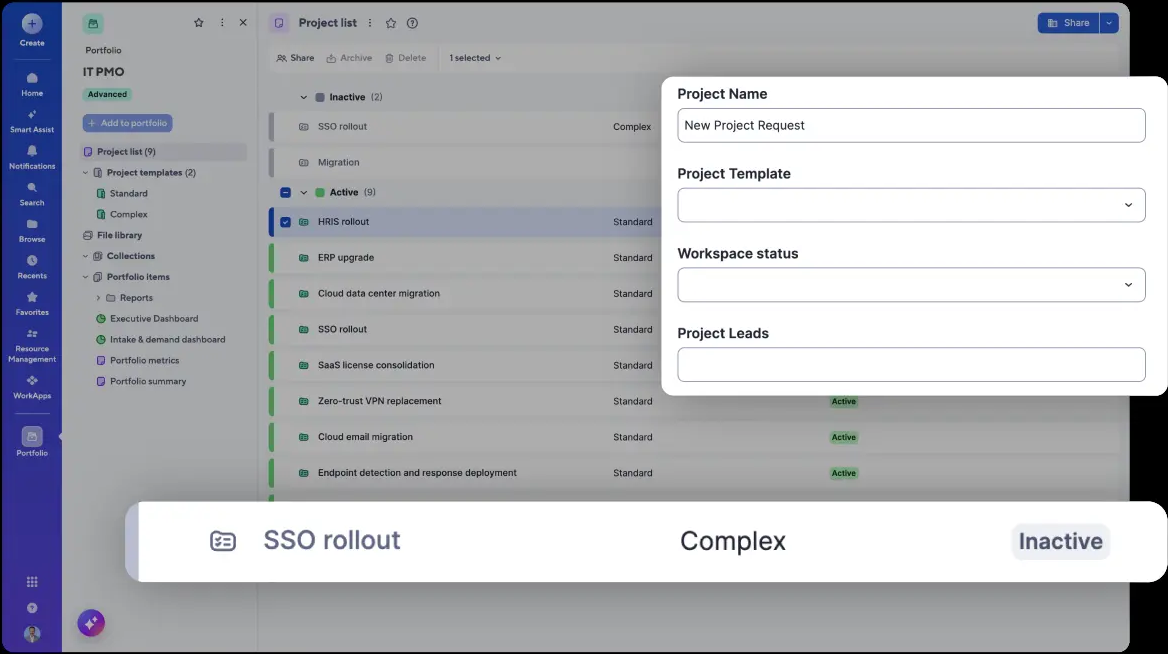
Each project is a sheet. Pro, at $9 per member per month billed yearly, adds predecessor dependencies and critical path in the Gantt view, and Business at $19 adds baselines and the timeline view. The portfolio layer that rolls sheets up for leadership is an Enterprise feature, sold by quote. Smartsheet recommends keeping a portfolio to about 100 projects and 5 templates.
On the decision side, approval requests are available on every plan, so a sponsor can sign off on a request. Scoring, scenario comparison and a funding line aren't documented as part of portfolios. Smartsheet's own help says resource management isn't supported inside portfolios, so capacity has to be checked elsewhere. A sheet holds up to 20,000 rows and 500,000 cells, which matters if one sheet carries every initiative.
- You are outgrowing Trello boards and need schedules with dependencies, critical path and baselines (Business) while still keeping a board view of the same data
- You want to move fast: Trello boards import directly (up to 5,000 cards or 50 lists) and stakeholders outside your org can edit and comment free as Contributors or Guests
- You run strict Kanban: board view groups by one level only and the docs mention no WIP limits or swimlanes
- You want a free tier or portfolio rollups on a budget: there is no permanent free plan, Pro is closed to existing customers, and Portfolios start at Enterprise
- Users like
- ease of use (2,360 mentions)
- Users dislike
- steep learning curve from limited formulas (1,183 mentions)
- Source: G2, 23,139 reviews
- Starting price
- Pro $9, Business $19 per member per month billed yearly; Enterprise by quote
- Dependencies and critical path
- Pro and up
- Portfolios
- Enterprise only
- Baselines and timeline view
- Business and up
- Resource management
- Not supported inside portfolios
Celoxis
Celoxis
PPM tool with a published price ladder: capacity planning from Core, conflict visibility from Essentials, intake from Professional.
Celoxis fits a mid-size PMO that wants intake, capacity and portfolio reporting in one tool at a price it can see before a demo.
Requests from email, web forms and spreadsheets land in one queue and are ranked against your own KPIs with configurable ranking logic. That intake management starts on Professional, at $35 per user per month billed yearly. Before a project is approved, the load check reads workload across every project a person is booked on. Capacity planning is listed on every plan from Core. Essentials, at $25, adds job roles, work calendars, timesheets and resource-conflict visibility, and an admin can set an optimal load range, for example 80 to 90 percent, so people show blue under it, green inside it and red over it. For tools judged on forward-looking capacity and scenarios, see our guide to capacity planning software.
Dependencies cover all four types with lead and lag, including links between projects. Budgets run at project and task level with job-role rates and planned against actual by project and portfolio. Expenses and costing come with Professional, and billing with Business at $45. The features page names what-if analysis under request tracking and gives no detail, so ask for a scenario demo with your own numbers, which is where you'll see how deep it goes. Celoxis connects to Jira, Azure DevOps and QuickBooks Online, imports Microsoft Project plans, and offers a REST API and Zapier. Power BI isn't mentioned. The minimum is five full-access users, and read-only users are free.
- a mid-size PMO wants intake, capacity, dependencies and portfolio reports in one tool with prices it can budget before a demo
- you test new projects against current resource load before you approve them
- you want a light board tool your teams adopt in a week: reviewers mention a steep learning curve and heavy setup
- people update plans mostly on phones: the mobile app is a recurring complaint
- Users like
- scheduling, resources, budgets and reporting in one place, with workload visible across projects
- Users dislike
- a steep learning curve, a dated-feeling interface and a weak mobile app
- Source: Capterra, 568 reviews

- Starting price
- Core $10, Essentials $25, Professional $35, Business $45 per user per month billed yearly; 5 full-access users minimum
- Intake management
- Professional
- Capacity planning
- Every plan from Core; conflict visibility from Essentials
- Portfolio dashboards
- Core
- Free trial
- 14 days, no credit card
Meisterplan
Meisterplan
Visual scenario and capacity planning layer on top of Jira, Asana or Smartsheet.
Meisterplan fits a mid-size PMO or resource manager that wants fast what-if scenarios against real capacity, on top of work that stays in Jira, Asana or Smartsheet.
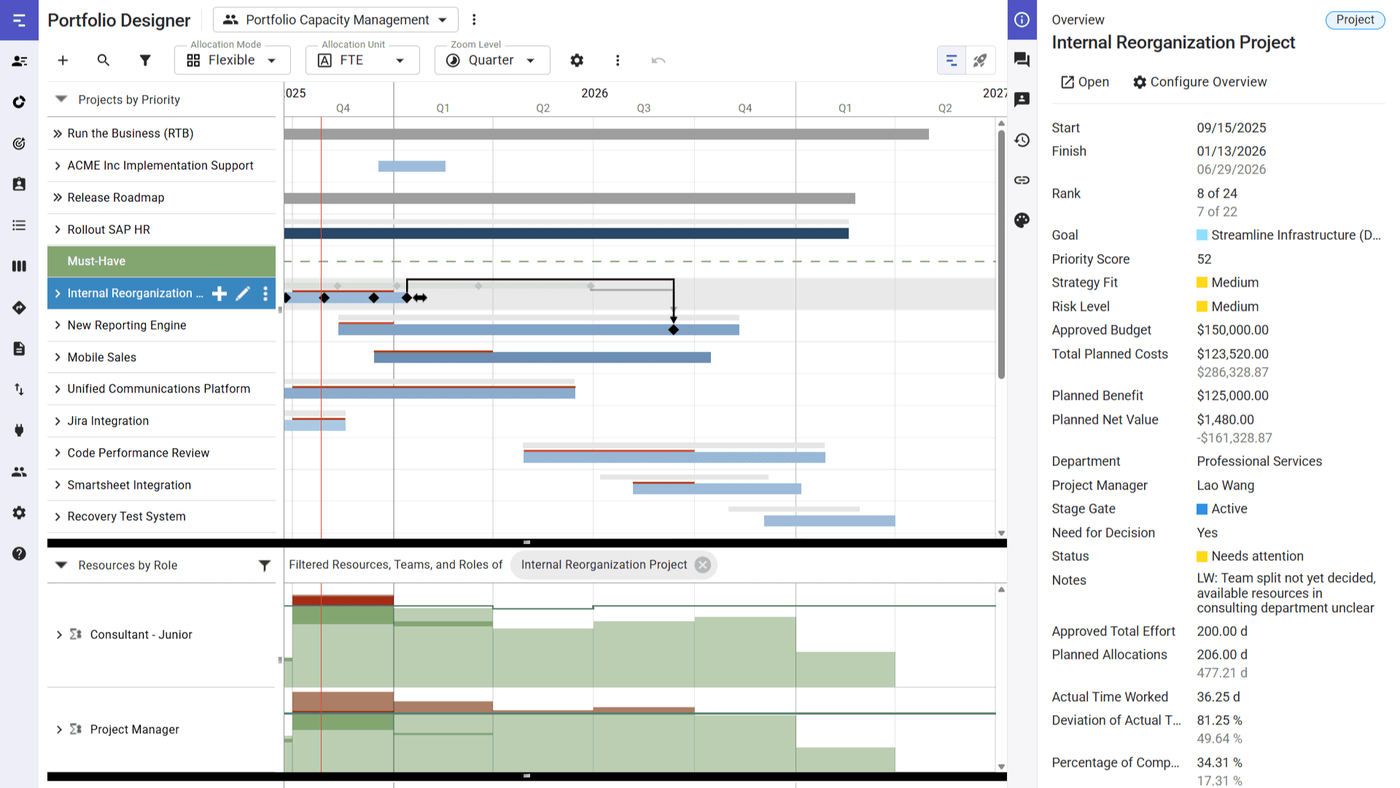
A planner starts from the current plan, called the Plan of Record, copies it into a scenario and changes staffing, timing or priority. Compare it against the Plan of Record on key metrics, then submit the changes back if you approve. Scenarios and priority scoring need Pro or Premium. Typical questions are what happens if you hire two people, delay a project to clear a bottleneck, or find the earliest finish with the current team.
Capacity is a histogram of availability against demand, and roles work as placeholders before named people are assigned. A heatmap marks over-allocated people red and under-allocated people blue. Ranking is by drag and drop with a Must-Have line and a Cut-Off line, and projects below the cut-off stop counting against resources. Financials include estimate at completion, CapEx and plan against actual.
Meisterplan connects to Jira, Asana and Smartsheet and has a REST API. G2 lists Azure Boards, Excel and Power BI too. It's a planning layer, so tasks stay in the tools where teams work. Licensing is per resource, meaning the people you schedule, and the vendor's pricing page shows no figures. G2 lists Basic at $14, Pro at $18 and Premium at $23.20 per user per month, which doesn't map cleanly to per-resource pricing, so treat those numbers as indicative, though they're the only dollar figures we could confirm.
- a mid-size PMO or resource manager wants fast what-if scenarios against real capacity
- work runs in Jira, Asana or Smartsheet and you want a portfolio layer on top without standardizing those tools
- you want task execution in the same tool: it's a portfolio and capacity layer and tasks stay in tools such as Jira
- you need one simple per-user price: licensing is per resource and the vendor page shows no figures
- Starting price
- Per resource, users free; 30-day free trial; quote above 1,000 resources
- Licensing
- Per resource, not per user
- Scenarios and scoring
- Pro and Premium
- Free trial
- 30 days, no credit card
- G2 reviews
- 27
Planisware Orchestra
Planisware Orchestra
Cloud PPM with phase-gate workflows and capacity checks at intake.
Planisware Orchestra fits a growing PMO in a regulated or engineering-heavy industry that wants phase-gate governance with capacity checked at intake.
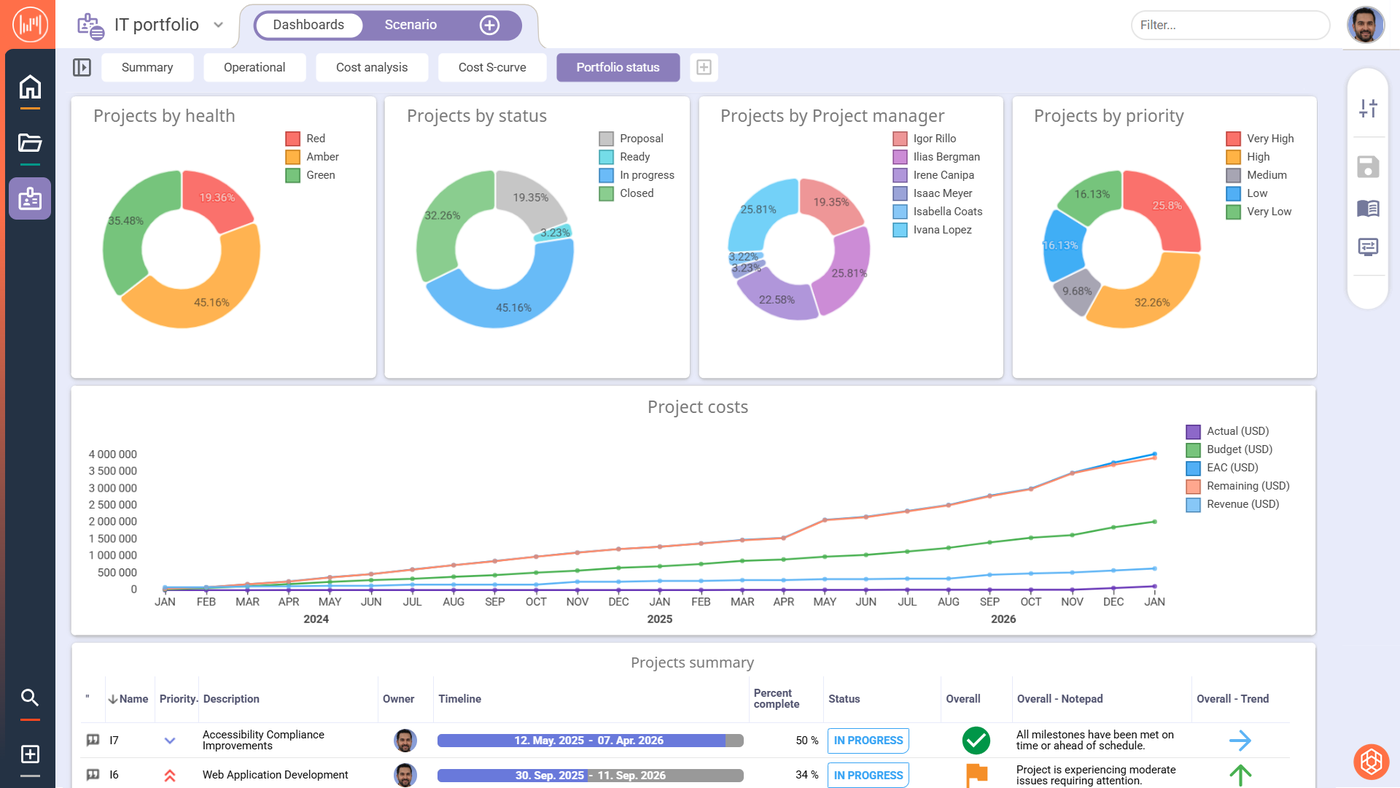
A request goes through one template that captures effort by role, skill and period, and the requests aggregate into a single pipeline. Prioritization compares business cases against financial and capacity plans using scenario analysis and a waterline. Planisware's own guide describes comparing alternative portfolio mixes against a baseline on utilization, skill gaps, budget, strategic score and delivery risk, and the chosen scenario becomes the new baseline. That guide covers the platform in general and doesn't name the product, so confirm it for Orchestra in a demo.
Governance is the focus. Orchestra supports waterfall, agile, hybrid and phase-gate work, with gate definitions, risk metrics and templates for business cases and deliverables, and capacity is checked at the gate. Reporting covers flash reports, shared dashboards and cost and utilization tracking. The vendor names collaboration, financial, people and reporting tools as integrations without listing products. It's sold as a cloud platform with a private cloud option, and Planisware Enterprise is the upgrade path.
- a PMO wants a pre-packaged PPM with intake, scenario prioritization and capacity checks at the gates, with room to move up to Planisware Enterprise
- you work in a regulated or engineering-heavy industry and need configurable phase-gate governance
- you are a small or budget-limited team: Orchestra is sold by quote through a demo request, with no tiers on the product page
- you want a light tool people pick up alone: reviewers say real training and super users are needed
- Users like
- covers the whole project lifecycle with good transparency
- Users dislike
- needs real training, too many clicks and some instability after early updates
- Source: Capterra, 19 reviews
- Starting price
- Quote only
- Governance
- Waterfall, agile, hybrid, phase-gate
- Deployment
- Cloud, private cloud option
- Free trial
- Not confirmed
- Upgrade path
- Planisware Enterprise
Planview
Planview
Enterprise portfolio management with ranking, scenarios and capacity against budget.
Planview fits a large PMO that funds and ranks hundreds of initiatives and needs scenarios tested against capacity or budget.
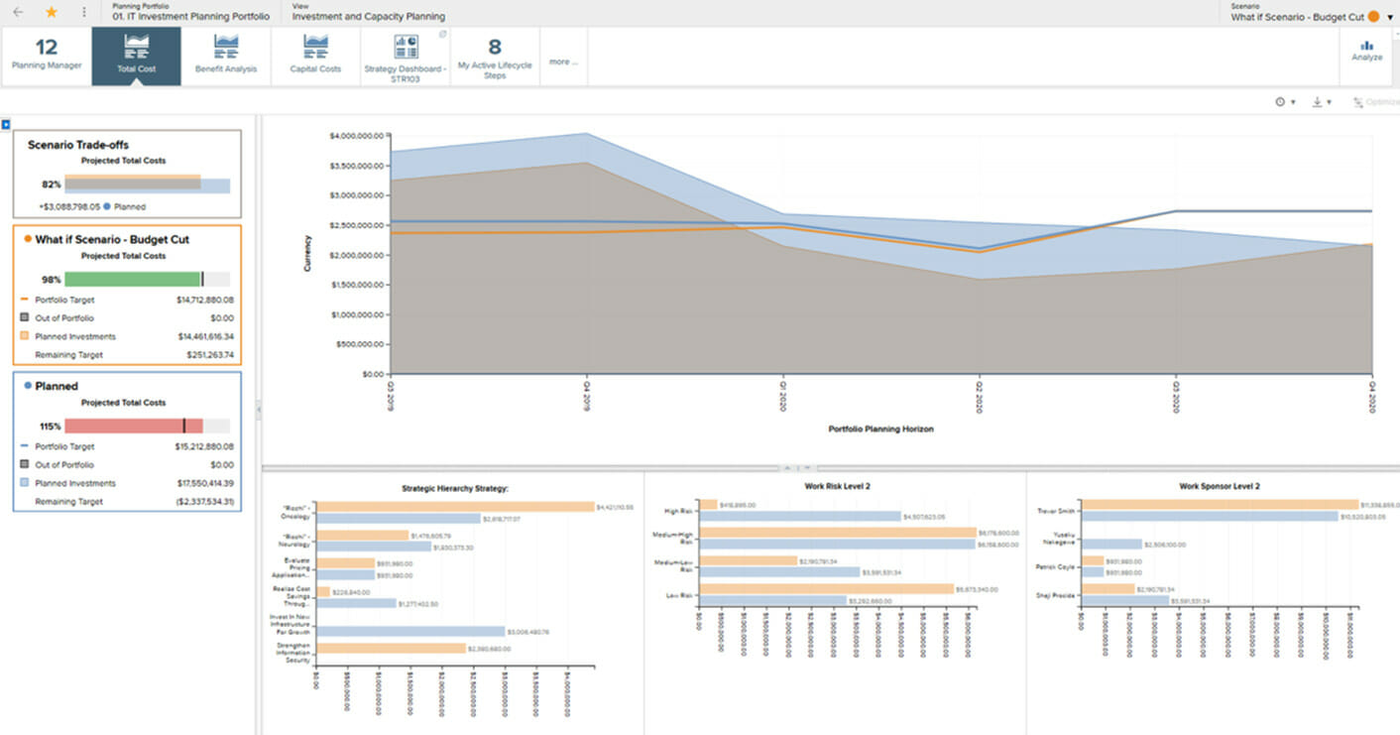
Demand management collects requests from unstructured ideas to formal project requests. In the Rank view, investments are sorted by scoring criteria, and the rankings can apply automatically from the criteria, be set by hand by scenario users, or both. A shared scenario is a what-if environment until it is published as the organization's investment plan. User-defined scenarios model a decision without changing the portfolio's financial plan. Planview's docs don't say how scenarios are compared side by side, so ask for that in a demo.
The capacity check compares available capacity, which can be people or a financial budget, with demand from the portfolio work forecast. Demand with a pending approval status or outside the planning horizon is left out. Financial planning covers budgeting, forecasting and benefits. The product page lists more than 200 out-of-the-box reports, with Power BI embedded. SAP, Oracle ERP, NetSuite, Workday and ServiceNow appear as connected systems, and Jira and Azure DevOps connect through Planview Hub rather than natively in Portfolios. Packages are sold by user band: up to 50, up to 100 and custom.
- a large PMO funds and prioritizes hundreds of initiatives and needs scenario planning against capacity
- agile teams should stay in Jira while leadership plans in a portfolio tool, synced both ways
- you need a published price or a quick rollout: it's sold by quote with a fixed-price implementation package
- you have fewer than a few dozen planners: the packages start at a 50-user band
- Users like
- financial views at enterprise, program and project level, and portfolio prioritization
- Users dislike
- an unintuitive interface that needs heavy training and admin support
- Source: Capterra, 19 reviews
- Starting price
- Quote only; packages by user band
- Packages
- Base up to 50 users, Standard up to 100, Custom above
- Reports
- 200+ out of the box
- Jira and Azure DevOps
- Through Planview Hub
- Price
- Not published
Adobe Workfront
Adobe Workfront
Enterprise work management where portfolio management starts in the Prime package.
Adobe Workfront fits a large organization where marketing and creative work sits inside the portfolio and intake has to be governed.
Requests enter through request queues with custom forms and routing. A project request carries a business case, which the portfolio manager reviews. The approved ones are ranked in the Portfolio Optimizer by value, alignment, financials, scorecard and ROI, and a resource check follows before the project runs with a baseline. Portfolio management is included in Prime and Ultimate and not in Select. Request queues, resource management and reporting are listed in all three packages.
Objects follow a strict hierarchy. A portfolio collects projects with common goals, a program belongs to exactly one portfolio, and a project links to one program at a time. The Optimizer can't compare projects inside a single program, so analysis happens at portfolio level. Portfolio budget is entered by hand. Scenario Planner, the what-if tool for capacity and budget, needs an extra license. Integrations include Adobe Experience Manager Assets, Jira, Salesforce and Creative Cloud, and Workfront Fusion is a separate low-code connector.
- you are a large agency or in-house creative team that needs intake, proofing, resource planning and Adobe Creative Cloud in one governed system
- you need portfolio management with business cases and scorecards (Prime and up)
- you want to see a price before a sales call: Adobe publishes none
- you are a small agency: G2 reviewers name the learning curve and a tool that is not intuitive
- Users like
- project management and ease of use
- Users dislike
- learning curve and not intuitive
- Source: G2, 1,268 reviews
- Starting price
- Quote only: Select, Prime and Ultimate
- Portfolio management
- Prime and Ultimate, not Select
- Scenario Planner
- Extra license
- G2 implementation time
- 4 months on average, 14 months to ROI
- Price
- Not published
ServiceNow Strategic Portfolio Management
ServiceNow Strategic Portfolio Management
Portfolio suite on the Now Platform with demand intake and scenario planning.
ServiceNow Strategic Portfolio Management fits a company that already runs ServiceNow and wants demand, portfolio and resource data on the same platform.
Demand Management captures, scores and prioritizes demand and routes requests through evaluation and approval workflows. For planning, eligible demands and projects are collected into a default scenario. Planners then build more scenarios, compare outcomes against target budget and resource use, confirm one, and can override it later. An item can sit in several scenarios but only one portfolio. Capacity-based planning runs annually or across 3 to 24 months, checks selected items against resource plans and flags over-allocated ones.
Packages are SPM Advanced, which includes portfolio planning, demand, financial and cost management, and SPM Prime, which adds strategic planning, investment funding and enterprise agile planning. The older Portfolio Workbench doesn't support scenarios and is deprecated for new customers. G2 lists Jira, Azure DevOps Server, Power BI, Microsoft Teams and SAP ERP as integrations. The scoring weights for demand come from community posts, not official docs, so we can't confirm them.
- you already run ServiceNow for IT and want demand, portfolio and resource data on the same platform
- you need enterprise-scale intake and scenario planning and have admins to configure it
- you have no ServiceNow admins: reviewers cite a steep learning curve and complex setup, and G2 shows an average implementation time of 4 months
- you need a public price or a fast, cheap start: it's quote only and reviewers call it expensive
- Users like
- tight integration with the rest of ServiceNow and workflow automation
- Users dislike
- a steep learning curve, complex setup and cost
- Source: G2, 316 reviews
- Starting price
- Quote only: SPM Advanced and SPM Prime
- Packages
- SPM Advanced, SPM Prime
- Scenario planning
- Compare against budget and resource use
- G2 implementation time
- 4 months on average
- Price
- Not published
Clarity (Broadcom)
Clarity (Broadcom)
Funding waterline, Plan of Record and capacity scenarios in an enterprise platform.
Clarity from Broadcom, formerly CA PPM, fits a large PMO or IT organization that wants governed intake, a funding waterline and what-if capacity planning on one record.
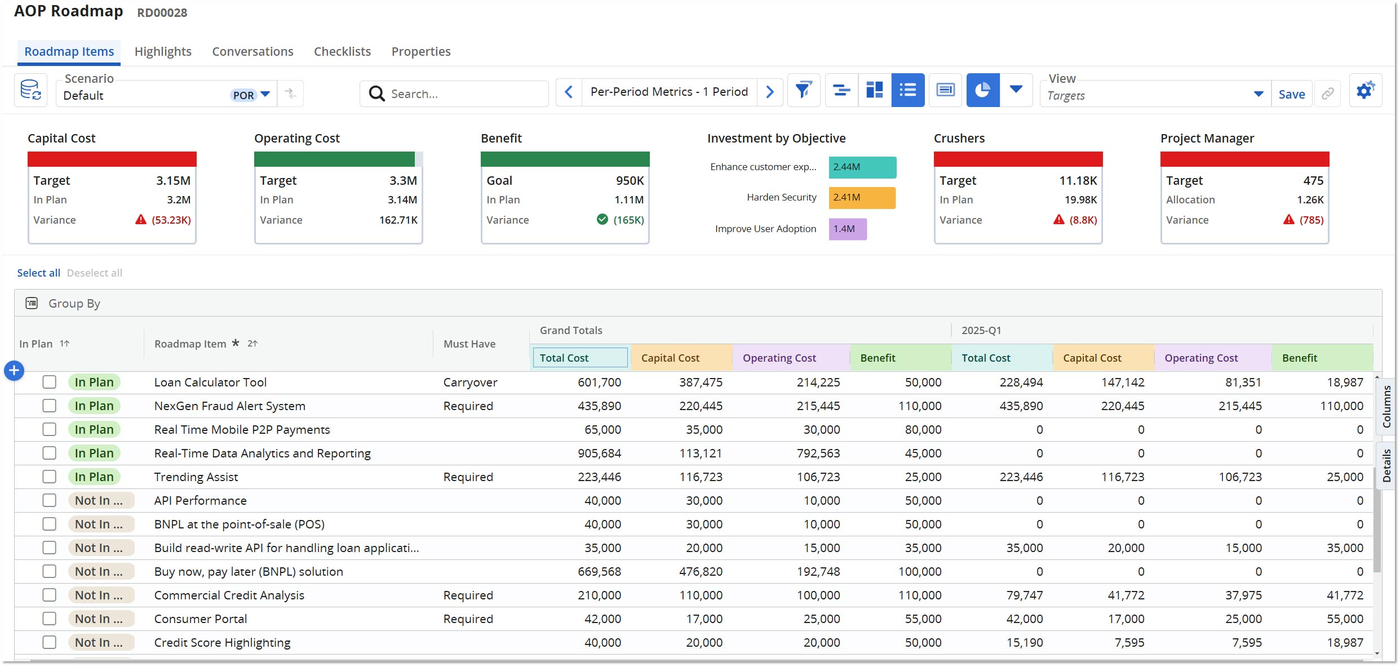
Here's how it runs: planners create a portfolio plan, a what-if copy of portfolio data with start and finish dates and targets for cost, resources and benefits. Copies become versions, versions are compared on a waterline view where projects above the line are funded, and one is marked the Plan of Record. Capacity scenarios work the same way: change team allocations, shift start dates, switch investments between approved and unapproved, and compare against another scenario or the Plan of Record with the differences marked. Docs don't explain how priority scores are calculated.
The vendor page also lists financial planning with cost accounting, forecasting and software capitalization, plus drag-and-drop roadmaps. Reviewers on PeerSpot name resource management and capacity planning as the most common strength. One reviewer calls the intake process very complex, others report Jira and SAP integration as difficult, and implementation is put at 3 to 12 months, often with partners. PeerSpot's reviewers are mostly from large enterprises: 92 of 116 who gave a company size.
- a large PMO or IT organization wants governed intake, funding decisions and what-if capacity planning on one record
- you have configuration partners or admins and can run an implementation measured in months
- you are a small team: reviewers describe heavy setup, a steep learning curve and a quote-only price
- your delivery data lives mostly in Jira or SAP: reviewers on PeerSpot call those integrations difficult
- Users like
- resource management and capacity planning, the most recurring strength in reviews
- Users dislike
- cost, complex licensing and a steep learning curve that leaves new users lost without training
- Source: PeerSpot, 143 reviews
- Starting price
- Quote only
- Deployment
- SaaS and on-premises
- Funding view
- Waterline and Plan of Record
- Implementation (reviewers)
- 3 to 12 months
- Price
- Not published
How a new project request moves through each tool
A portfolio tool proves itself at one moment: a new request arrives while people are already booked. That moment has five steps, and tools differ in which ones they handle, although most handle at least two well. This table shows where each tool takes a step and what usually goes wrong when it doesn't.
- Step 1Request arrives
- Celoxis
- Adobe Workfront
- ServiceNow Strategic Portfolio Management
- Planisware Orchestra
Breaks when requests still come by email because the form isn't owned by anyone, so the queue never holds the full demand - Step 2Score and rank
- Planview
- Adobe Workfront
- Meisterplan
- Celoxis
Breaks when criteria are set once and never revisited, so every project scores about the same - Step 3Check capacity
- Celoxis
- Meisterplan
- Planisware Orchestra
- Planview
Breaks when demand is entered by project and not by role, so the heatmap shows a surplus that doesn't exist - Step 4Compare scenarios
- Clarity (Broadcom)
- Meisterplan
- ServiceNow Strategic Portfolio Management
- Planview
Breaks when scenarios are built but nobody confirms one, so the plan of record drifts - Step 5Approve and track
- Clarity (Broadcom)
- Adobe Workfront
- Smartsheet
- Microsoft Planner and Project
Breaks when approved work starts without a baseline, so later reports compare against nothing
Where portfolio views, scenarios and capacity start in each plan
Work management tools such as  Asana,
 monday.com and
 Wrike sell a portfolio view on a higher plan, and the PPM suites gate their own features by package. The table shows where each capability first appears in the documentation we read. Plan names change, so check the current tier before you sign.
| Tool | Portfolio view | Intake or requests | Capacity | Scenarios |
|---|---|---|---|---|
| Microsoft Planner and Project | Plan 3 for editing | Not in Planner portfolios | Not in Planner portfolios | Not confirmed |
| Smartsheet | Enterprise | Approval requests on every plan | Not supported inside portfolios | Not confirmed |
| Asana | Advanced | Forms from Starter | Workload within a portfolio on Advanced, company-wide on Enterprise | Not confirmed |
| monday.com | Enterprise | Forms view on every plan | Not confirmed | Not confirmed |
| Wrike | Team and up | Request forms from Business | Workload charts on Business, bookings and utilization on Pinnacle | Not confirmed |
| Celoxis | Core | Professional | Core, with conflict visibility from Essentials | What-if analysis named, no detail |
| Adobe Workfront | Prime | All packages | All packages | Scenario Planner, extra license |
Which tool fits which portfolio?
- A 20-person PMO wants intake and a capacity heatmap on a published priceCeloxis
- A resource manager must test a hire or a delayed start before approving a projectMeisterplan
- A company on Microsoft 365 needs a roadmap of dates across project plansMicrosoft Planner and Project
- A team plans in sheets and wants leadership rollups on EnterpriseSmartsheet
- A regulated manufacturer runs every project through gated reviewsPlanisware Orchestra
- A large PMO ranks hundreds of initiatives against a budgetPlanview
- A marketing organization needs business cases and scorecards for creative projectsAdobe Workfront
- An IT organization already runs ServiceNow and wants portfolio data on the same platformServiceNow Strategic Portfolio Management
- A global PMO wants a funding waterline and one approved plan of recordClarity (Broadcom)
How to choose project portfolio management software
Choosing PPM software comes down to seven checks that you run with your own numbers before you sign, and you should ask each vendor to do the third and fourth live.
- List the decisions the tool must support: intake, ranking, capacity, scenarios and funding, and who makes each one
- Take ten real requests from the last quarter and enter them through the intake form to see who can score them
- Load one team's actual capacity by role and approve a new project to see whether the over-allocation is flagged
- Build a scenario with a delayed start and an extra hire, then compare it with the current plan
- Find the plan or package that holds all of the above, and note the minimum seats and extra licenses
- Ask for the implementation timeline in months and who does the configuration
- Check which of your delivery tools (Jira, Azure DevOps, Asana, ERP) connect natively and which need a connector
Where The Program Manager fits
The Program Manager isn't a portfolio suite, and it isn't a ranked entry here. It doesn't do intake, scoring, budgets or capacity planning, so it doesn't replace any tool above. It sits next to them. If your delivery work lives in Jira and Asana, it maps the dependencies between the two and watches milestones for risk. That's the layer most portfolio tools read from but don't maintain.
FAQ
What is project portfolio management software?
Project portfolio management software collects requests for new work, scores them, checks them against budget and capacity, and shows leadership the whole portfolio in one place. It supports the decision of which projects to fund and start, where project management software supports delivering a project once it has started.
What is the difference between PPM software and project management software?
Project management software plans and tracks the work inside one project. PPM software works across projects: it ranks requests, compares scenarios and checks demand against the people available. Several work management tools, such as Asana, monday.com and Wrike, add a portfolio view on a higher plan without a full intake and scenario model.
Is Microsoft Project a PPM tool?
Microsoft Project is partly a PPM tool. Planner and Project Plan 3 adds portfolios with a roadmap, baselines, critical path and dependencies. Cross-project resource management and demand intake live in the Project desktop app or the on-premises Project Server, not in Planner portfolios. Microsoft Learn lists Project Online as retired on September 30, 2026.
How much does project portfolio management software cost?
Project portfolio management software has published prices from $10 per user per month for Celoxis Core to $45 for Celoxis Business, billed yearly with a five user minimum. Microsoft Planner and Project Plan 3 is $30. Smartsheet's portfolio layer is Enterprise and sold by quote. Planview, Clarity, Planisware, ServiceNow SPM and Adobe Workfront publish no price, and Meisterplan charges per resource.
Do I need PPM software or is a work management tool enough?
A work management tool is enough when you only need status rolled up across projects. You'll need PPM software when you must rank requests, test a scenario against capacity or tie projects to a budget before approval. If you plan to move to a portfolio tier later, check which plan unlocks portfolios first.
How long does it take to implement PPM software?
Implementation time varies by tool and company size. G2 lists an average implementation time of 4 months for both ServiceNow SPM and Adobe Workfront. PeerSpot reviewers of Clarity describe 3 to 12 months and often use consultants. Celoxis and Meisterplan offer free trials of 14 and 30 days, which let you test the core steps before committing.
3 responses to “Best Project Portfolio Management Software for PMOs and Program Teams”
[…] The standard resource reports are the load chart, a real-time load chart, planned versus actual utilization, efficiency and capacity. Because Celoxis is a portfolio tool, the same data feeds project and portfolio dashboards. For a portfolio view that ranks requests and tests capacity, see our guide to project portfolio management software. […]
[…] The question that saves the most money Ask every vendor which plan includes each of the seven items above. In this list, portfolios, resource planning, SAML and SCIM often sit on a higher tier than the price on the pricing page suggests, and they're the items that move the bill. For a portfolio view that ranks requests and tests capacity, see our guide to project portfolio management software. […]
[…] the forward-looking part. If you need to rank projects before you check capacity, our guide to project portfolio management software covers that […]