Capacity planning software sets the hours your people can work against the hours your planned projects need, and shows the gap before you commit. For a program team the useful question is rarely who is free on Tuesday. It's whether the next project fits, which role runs out first, and what a hire would change.
We compared eight tools against those three questions. For each one we read the pricing page where one exists, a feature page, a help-center or documentation page showing how capacity, scenarios and overallocation work, and, for the rating, the review-site listing as of November 2026. We read vendor material and did not run these products. Where a mechanism isn't documented, the entry says so, because that's the question to put to the vendor in a demo. If you mainly need to book named people onto this week's work, our guide to resource management software covers that side.
- capacity planning tools compared, from Float to Planview
- 8
- sell by quote only (Workfront, Planview, Clarity)
- 3
- Jira's lowest plan with Plans capacity and scenarios
- Premium
- resource seats Runn requires as a minimum
- 20
What is capacity planning software?
Capacity planning software is a tool that compares the hours your people can work with the hours your planned projects need and shows where demand outruns supply. It works on roles and teams over weeks and months, and it's about people, not servers or production lines.
Three kinds of tools sit under that name, and they answer capacity questions differently.
- Resource schedulers (Float, Runn) put named people and roles onto projects by week and show who is overbooked.
- Portfolio tools with capacity (Meisterplan, Celoxis, Planview, Clarity) check a ranked list of projects against the people you have before anything is approved.
- Work management suites (Jira Plans, Workfront) keep capacity next to the tickets or tasks the teams already use.
Resource management books people onto work that's about to start, while capacity planning asks whether next quarter's work fits the people you'll have then. Most tools do both, so the entries below judge the forward-looking part. If you need to rank projects before you check capacity, our guide to project portfolio management software covers that layer.
Which capacity planning software is best?
No tool answers every question well. Pick by the question that's hardest for your program, then check the plan, because the cheapest tier often lacks scenarios. The plan table further down shows what each tier unlocks.
 Best for pipeline what-ifsRunnA tentative-project toggle and saved scenarios show utilization with and without pipeline work. Plans are $7 and $11 per resource seat per month with a 20-seat minimum.
 Best for a fast visual schedule with role totalsFloatThe People report's Roles tab compares scheduled hours with each role's capacity. No saved scenarios. From $7 per scheduled person per month.
 Best for portfolio scenarios against capacityMeisterplanCopies the Plan of Record into scenarios and adds role capacity to simulate hires. Scenarios start on Pro, priced per resource from 50 resources.
 Best for a published price ladderCeloxisCapacity planning is listed on every plan from $10 per user per month, with a 5-user minimum. The what-if is a manual project state.
 Best when teams already estimate in JiraJiraPlans capacity, scenarios and the new Capacity view need Premium, $15.56 per user per month at 300 users on the monthly toggle.
 Best for role-level hours in a Workfront shopAdobe WorkfrontResource Planner compares available, planned and budgeted hours by role. Adobe's docs say Scenario Planner is closed to new customers.
 Best for enterprise funding decisionsPlanviewRank, Analyze, Shift and Balance views check demand against capacity before investments are approved. Quote only.
 Best for IT portfolios with admin supportClarity (Broadcom)Capacity scenarios compare against the Plan of Record. Quote only, and reviewers describe implementations of months.
Three questions every capacity planning tool has to answer
Every capacity decision comes down to the same three questions. The entries below answer each one from vendor documentation under the headings absorbing a new project, finding where you run out of people and modeling one hire, and write "not documented" where a source is silent.
| Question | What the tool must show | Where tools fall short |
|---|---|---|
| Can we absorb project X? | A tentative project or scenario that adds demand without touching confirmed work | Only confirmed bookings count, or the scenario can't be shared |
| Where do we run out of people? | Demand against capacity by role and by week, with overload flagged | Team totals hide one overbooked person |
| What does one hire change? | A supply-side change shown against the same demand | Placeholders carry demand but no capacity |
Capacity planning software compared
The table lists the tools from resource schedulers to enterprise portfolio platforms. Prices are USD per seat or user per month unless stated. Meisterplan lists its prices in euros, and "quote only" means the vendor publishes no figure.
| Tool | Type | Scenario approach | Starting price (USD unless stated) | Rating |
|---|---|---|---|---|
| Runn | Resource scheduler | Tentative-project toggle, saved scenarios (beta), placeholders carry demand only | Lite $7, Standard $11 per resource seat (20 seats minimum) | 4.8 (Capterra, 33) |
| Float | Resource scheduler | Role totals and overbooking alerts; tentative status and placeholders, no saved scenarios | Starter $7, Pro $12 per scheduled person | 4.5 (Capterra, 1,621) |
| Meisterplan | Portfolio planner | Plan of Record copied into scenarios; role capacity added for hires | Basic EUR 600, Pro EUR 800 per month at 50 resources | 4.7 (27) |
| Celoxis | Portfolio management | Heat map and overload alerts; what-if is a manual project state with no undo | Core $10 to Business $45 per user (5-user minimum) | 4.6 (759) |
| Jira | Work management | Team capacity per sprint in Plans; individual Capacity view since July 2026 | Premium $15.56 per user at 300 users, monthly | 4.3 (7,964) |
| Adobe Workfront | Enterprise work management | Resource Planner by role, user and project; Scenario Planner closed to new customers | Quote only | 4.1 (1,234) |
| Planview | Enterprise portfolio management | Rank, Analyze, Shift and Balance views against capacity targets | Quote only | 3.8 (90) |
| Clarity (Broadcom) | Enterprise portfolio management | Role and resource capacity; scenarios compared with the Plan of Record | Quote only | 3.7 (91) |
 The Program Manager Our product | Cross-tool dependencies and milestone risk | The Program Manager maps dependencies across Jira and Asana, watches every milestone for risk, and keeps blockers, decisions and approvals in one graph. | Team from $59 per workspace per month; card required at checkout | No reviews yet |
The 8 best capacity planning software tools
Each entry answers the three questions, names the plan that unlocks them, and ends with what reviewers report and who should skip the tool. Prices appear in the entry and once in the table.
Runn
Runn
Resource planner built around tentative projects and a scenario toggle, with per-seat prices and a 20-seat floor.
Runn fits a PMO or agency that wants to see utilization with and without pipeline work before it says yes to a project.
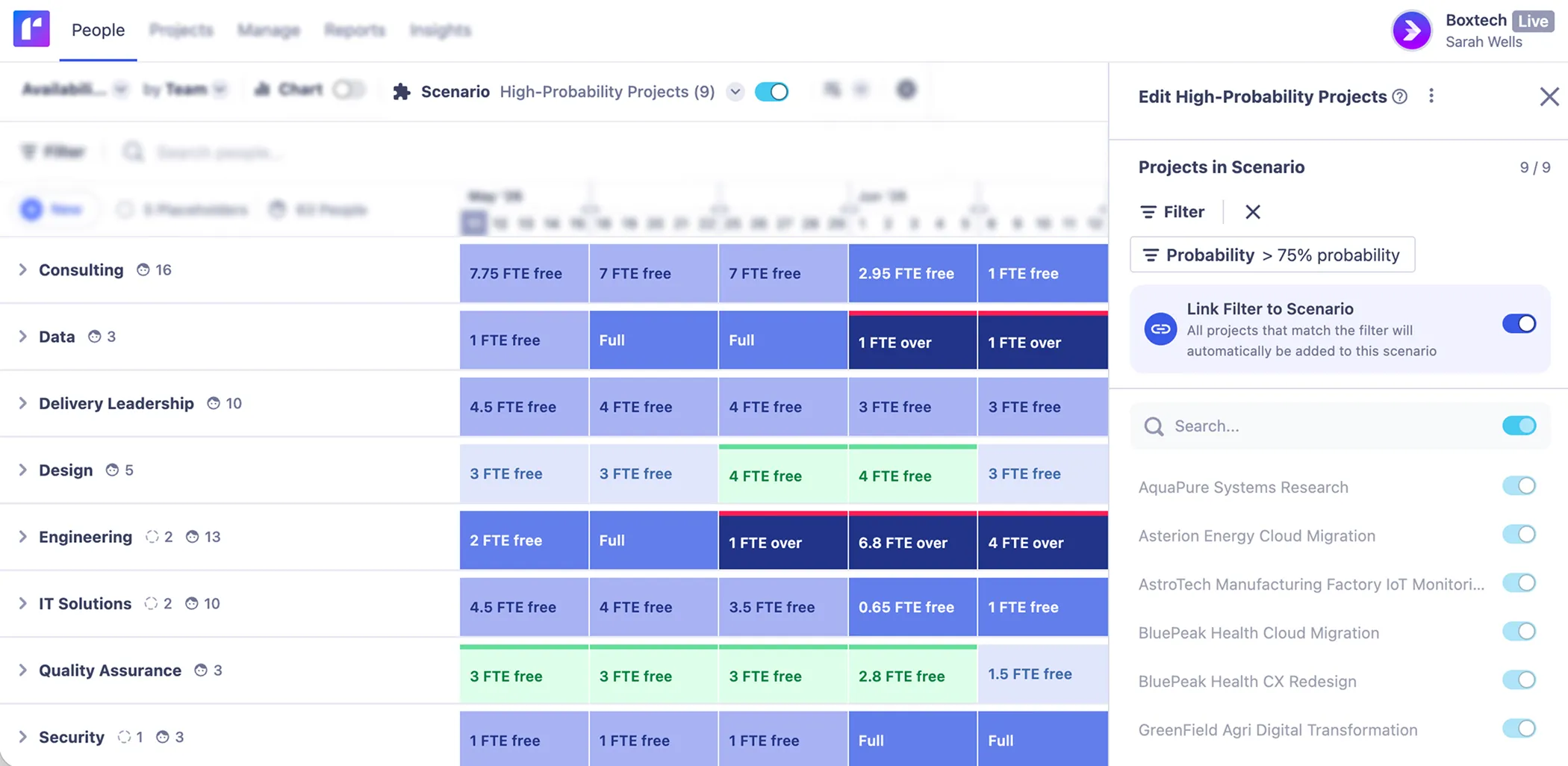
Absorbing a new project. Yes, and that's Runn's strongest answer. Mark a project tentative and a toggle in the charts includes or excludes its workload, so utilization appears with and without the pipeline. Saved scenarios go further: a scenario is a named set of tentative projects, and its capacity impact shows in the People Planner, the charts and the reports while confirmed work stays visible. Scenarios are in beta, private to the person who builds them and limited to project filters, so a PMO can't hand a colleague a scenario to review. Runn's help article lists them on Standard and Advanced, and the pricing page is less clear, so confirm Lite in a demo.
Finding where you run out of people. Capacity Insight can be filtered by role, and bars above the effective capacity line mean over capacity. Effective capacity is contracted hours minus time off, with public holidays handled automatically. The planner zooms from a week to a year and shows assignments in hours, FTE or capacity percent, so you're not locked into one unit.
Modeling one hire. Less than you'd hope. A placeholder carries workload but no capacity, though the help center lists supply-side scenarios as unsupported. The Hiring Proposals report lists placeholders marked Hire Proposed with effort in hours or FTE and exports to CSV, so it's useful for a hiring conversation, which gives you a hiring list, not a modeled gain in capacity. The placeholder resourcing-request workflow is Advanced only.
Runn charges $7 on Lite and $11 on Standard per resource seat per month, with at least 20 seats and a 30-day trial without a card. The BambooHR and Jira integrations and the API start on Standard.
- You need to see utilization with and without pipeline projects before you commit, and the person who builds the scenario is the one who reads it
- You want published per-seat prices and can commit to 20 resource seats
- You need to model a hire as added capacity: placeholders carry workload only and supply-side scenarios aren't supported
- You need SAML SSO or the placeholder resourcing-request workflow: both are Advanced only
- Users like
- a clear planner interface and responsive support
- Users dislike
- limited export options, an API call limit and limited reports and permission levels
- Source: Capterra, 33 reviews
- Starting price
- Lite $7, Standard $11 per resource seat per month, 20 seats minimum; Advanced by quote
- Minimum
- 20 resource seats
- Trial
- 30 days, no credit card
- Scheduling unit
- Hours per day, hours per week, FTE or capacity percent
- Timesheets
- Standard and up
- SAML SSO
- Advanced
- Security
- SOC 2 Type II
- Scenarios
- Beta; Standard and Advanced per the help article
- Placeholders
- Carry workload only, not capacity; unlimited on every plan; the Hiring Proposals report lists placeholders marked Hire Proposed
- Forecast views
- A week to a year, plus custom ranges
- Hiring report
- Hiring Proposals preset report, CSV export
Float
Float
Visual scheduler with role totals and overbooking alerts, but no saved scenarios and placeholders without capacity.
Float fits project teams that want to drag work onto a visual schedule, see overbooking at once and read role totals, without a heavy portfolio layer.
Absorbing a new project. Partly, though. Allocations carry a status of draft, tentative or confirmed, and tentative work shows as outlined tiles, so a team can lay a prospective project onto the schedule beside confirmed work. However, Float documents no saved scenario for comparing two versions of the plan, so each what-if lives on the live schedule and someone has to undo it.
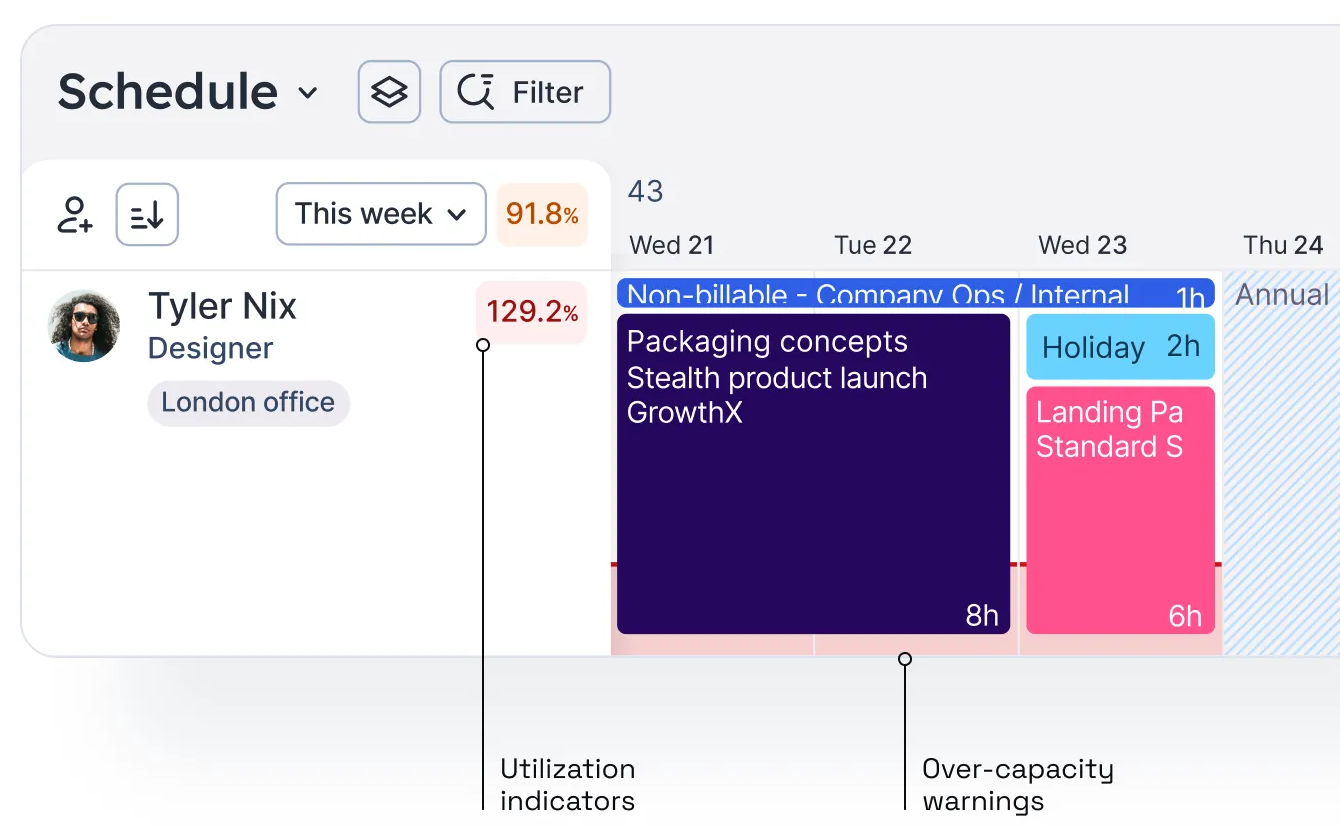
Finding where you run out of people. That's Float's best answer. Capacity is the working hours a person has for project work after standard hours, approved time off and public holidays. Scheduling above a day's capacity turns the allocation red, and the People report counts overtime hours. The Roles tab of that report divides total scheduled hours, assigned and unassigned, by the capacity of the people in a role, and anything above 100 percent is overscheduled. Float's own example shows a copywriter role with 300 hours of capacity and 328 scheduled, or 109 percent.
Modeling one hire. Placeholders stand in for planned hires and can carry a role name, but they have no capacity of their own, so a placeholder adds demand and never supply. Starter allows one placeholder and Pro five; extra ones count as paid seats.
Starter costs $7 and Pro $12 per scheduled person per month. Pro adds time tracking, rate cards, project cost estimates, advanced reporting and SSO. Float connects directly with Asana, Jira, Teamwork and Trello, sends Slack notifications and has an API. No HR system connector is documented.
- Your question is mostly who is overbooked and in which role, across many concurrent projects
- You want scheduling, time tracking and cost estimates in one tool and can pay $12 per scheduled person for Pro
- You need saved scenarios to compare two versions of the portfolio: Float documents tentative status and placeholders only
- You plan a large hiring wave: placeholders carry no capacity and beyond five on Pro they cost seats
- Users like
- a clean, easy interface and a real-time view of who's working on what
- Users dislike
- limited reporting and customization, plus some mobile and calendar sync problems
- Source: Capterra, 1,621 reviews
- Starting price
- Starter $7, Pro $12 per scheduled person per month; Enterprise by quote
- Trial
- 30 days, no credit card; guests are free
- Scheduling unit
- Hours per day, percent of capacity or specific times
- Placeholders
- 1 on Starter, 5 on Pro; extra ones count as paid seats
- Time tracking and SSO
- Pro
- Rate cards
- 1 currency on Starter, 5 on Pro
- Role supply and demand
- People report, Roles tab: scheduled hours (assigned and unassigned) divided by the capacity of people in the role; over 100 percent means overscheduled
- Scenarios
- No saved scenario comparison documented; tentative allocations and placeholders model pipeline demand
- Integrations
- Asana, Jira, Teamwork, Trello, Slack notifications, API
- Capacity unit
- Hours per day, percent of capacity or set times
- Role report
- People report, Roles tab: scheduled hours divided by role capacity
Meisterplan
Meisterplan
Portfolio planner that copies the Plan of Record into scenarios, priced per schedulable person from 50 resources.
Meisterplan fits a PMO that has to decide which projects fit the people it has, and wants to test the answer in a copy of the plan before it changes the real one.
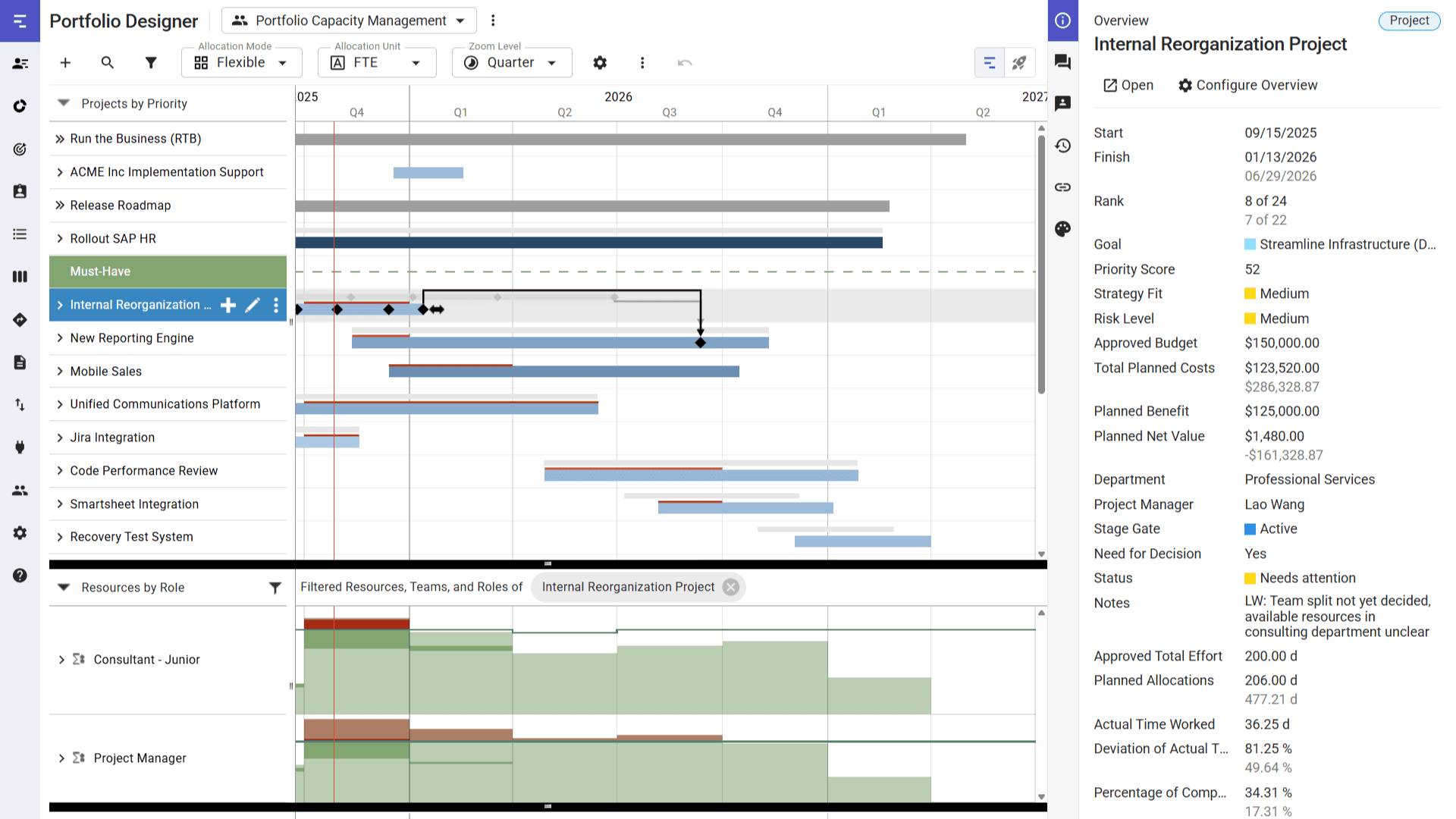
Absorbing a new project. That's what the tool is built around. One click copies the Plan of Record into a scenario, you add or shift projects there, and Meisterplan compares the scenario with the Plan of Record on schedule shifts, cost and effort. Approved projects, or the whole scenario, can be transferred back. Scenarios are unlimited and start on Pro, because Basic has none.
Finding where you run out of people. A resource's capacity comes from its calendar, absences and part-time model. The Team Planner highlights overallocation in its grid mode, and capacity reports, including a heat map, come with every edition. Demand can be assigned to a role before a named person exists, and the Team Planner helps spread the effort from the role across the available people.
Modeling one hire. A scenario can add capacity to a role, for example a plus-FTE change, to simulate a plan with extra people. The help center says a role has no capacity of its own, that such changes apply only to the scenario where you enter them, and that the added capacity counts toward license consumption.
Pricing is per resource, meaning a person who can be scheduled; users are free and unlimited. Meisterplan lists prices in euros: Basic EUR 600 and Pro EUR 800 per month at 50 resources, and Premium EUR 2,970 per month at 150, billed annually. Pro and Premium carry a mandatory one-time onboarding cost with no published amount, and the 30-day trial has Pro features. Pro adds the Jira, Asana and Wrike integrations; HR system connections need a custom integration.
- You need what-if scenarios against capacity for a portfolio of 50 or more schedulable people
- Your work lives in Jira, Asana or Wrike and you want a planning layer on top, which starts on Pro
- You have fewer than 50 schedulable people: Basic and Pro start at 50 resources
- You need to export plans freely: G2 lists import and export limits among its complaint themes
- Users like
- ease of use, project management, customer support and dashboards
- Users dislike
- data import, export limits and a learning curve
- Source: G2, 27 reviews
- Starting price
- Basic EUR 600, Pro EUR 800 per month at 50 resources; Premium EUR 2,970 at 150; billed annually
- Scenarios
- Pro and Premium; unlimited
- Capacity vs demand
- Resource histogram of availability against demand; roles act as placeholders before named people are assigned; an allocation heatmap marks over-allocated (red) and under-allocated (blue) resources
- Prioritization
- Drag-and-drop ranking with a Must-Have line and a Cut-Off line; projects below the cut-off don't count against resources. Priority scoring with custom criteria on Pro and Premium
- Financials
- Estimate at Completion, CapEx and plan versus actual (vendor page)
- Licensing
- Per resource; users free and unlimited; teams aren't counted as resources
- Integrations (vendor pages)
- Jira (connector and side panel), Asana, Smartsheet, REST API; G2 also lists Azure Boards, Excel, Power BI, Power Automate
- G2 rating
- Not confirmed on the page read (27 reviews)
- Role capacity
- Roles have no capacity of their own; a capacity change entered on a role applies to one scenario and counts toward license consumption
- Minimum
- 50 resources on Basic and Pro, 150 on Premium
- Trial
- 30 days with Pro features
- Onboarding
- Mandatory one-time cost on Pro and Premium, amount not published
- Currency
- Prices are listed in euros
Celoxis
Celoxis
Portfolio tool with capacity on every plan and job roles from Essentials, but a manual what-if.
Celoxis fits a mid-size PMO that wants capacity, intake and portfolio reports on a published price ladder and can live with a manual what-if.
Absorbing a new project. Celoxis answers with a method rather than a button. The knowledge base has you create a What-if project state, put the new projects in it, filter the Resource Load view by that state and compare it with draft and active work. Reverting is manual, because Celoxis has no undo. The features page also describes ranking intake requests on KPIs and matching demand against capacity, and its FAQ lists intake management on Professional.
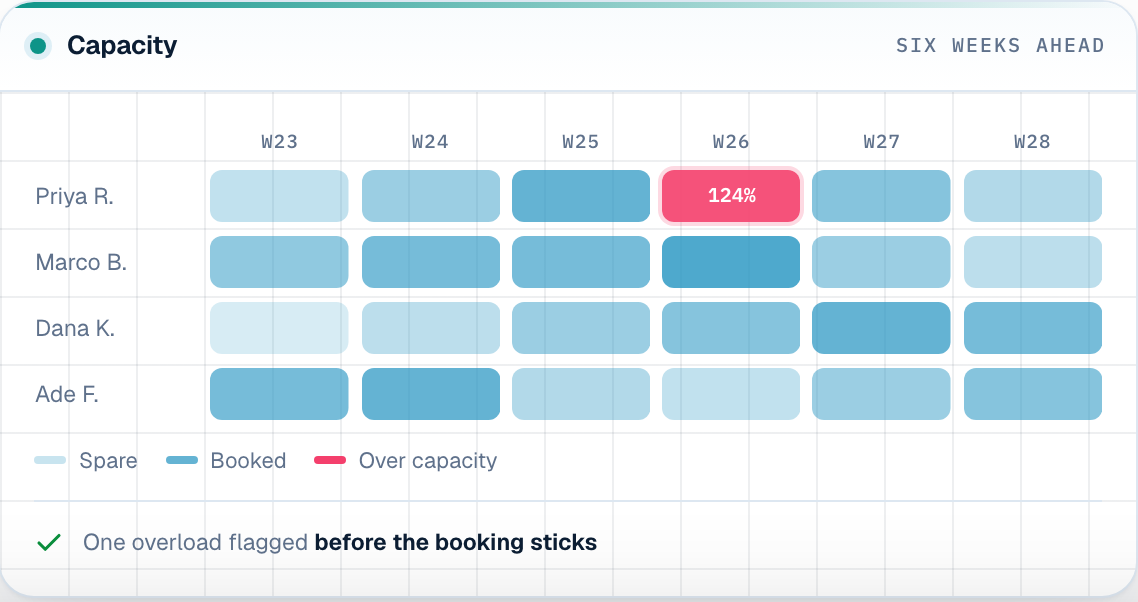
Finding where you run out of people. Allocation is a percentage of a resource's work hours or a fixed effort, and two 100 percent tasks in one week show a resource as overloaded on the Resource Load chart. The features page shows a capacity heat map by person and week, instant overload alerts and analytics by role, skill or custom field. The pricing table lists workload tracking and capacity planning on every plan from Core, while job roles, work calendars and instant resource conflicts start at Essentials. The features-page FAQ words that step more broadly, so check it in a demo.
Modeling one hire. Not documented. Celoxis's documentation describes roles and allocations but no hiring plan and no supply-side scenario.
Core costs $10, Essentials $25, Professional $35 and Business $45 per user per month billed annually, with at least 5 full-access users and a 14-day trial without a card. The Jira, Azure DevOps and QuickBooks Online connectors and Zapier are add-ons below Enterprise, and the integrations page lists a Microsoft Project import and a REST API.
- You want capacity, intake and portfolio reports with prices you can budget before a demo
- You test new projects against current resource load before approving them and accept a manual what-if
- You want a tool teams adopt in days: G2 complaint themes are the learning curve and a complex interface
- You need native copy-and-compare scenarios or a hiring plan: the documented what-if is a manual project state with no undo
- Users like
- project management, tracking, ease of use, time tracking and dashboards
- Users dislike
- a learning curve and a complex interface
- Source: G2, 759 reviews
- Starting price
- Core $10, Essentials $25, Professional $35, Business $45 per user per month billed annually; Enterprise by quote
- Program tier
- Essentials, $25 per user per month (executive portfolio reporting)
- Dependencies
- All four types across projects, with lead and lag
- Portfolio reports
- 8 built in
- Resource workload and capacity
- Workload tracking and capacity planning listed on every plan from Core; job roles, work calendars, timesheets and instant conflicts from Essentials
- Optimal load
- Admin sets a range (for example 80 to 90 percent); blue under, green optimal, red over-allocated
- Auto vs manual scheduling
- Each task is auto-scheduled or manually scheduled; auto tasks follow predecessors and the assignee's work calendar
- Baselines
- Every plan per the pricing table
- Work calendars
- Essentials and up
- Intake
- Requests from email, web forms and spreadsheets go into one queue and are ranked against your own KPIs; project intake management starts on Professional
- Capacity
- Workload is read across every project a person is booked on; capacity planning is listed on every plan from Core; job roles, work calendars, timesheets and resource-conflict visibility from Essentials
- Financials
- Budgets at project and task level, job-role rates, planned versus actual by project and portfolio; expenses and costing from Professional, billing from Business
- Seats
- Minimum 5 full-access users; read-only users free; 14-day free trial, no credit card
- Integrations
- Jira, Azure DevOps, QuickBooks and Zapier are add-ons below Enterprise
- Scenario planning
- The features page names what-if analysis under request tracking and gives no detail
- What-if
- Manual project state, no undo
- Minimum
- 5 full-access users
- Trial
- 14 days, no credit card
- Capacity by plan
- Pricing table: from Core; roles, calendars and instant conflicts from Essentials
Jira
Jira
Sprint capacity and scenarios inside Jira Plans, plus a weekly per-person view, all from Premium.
Jira fits a program whose delivery teams already plan in Jira and want sprint capacity next to the issues, if the organization can pay for Premium.
Absorbing a new project. Plans, formerly Advanced Roadmaps, includes scenarios: a what-if copy of a plan whose changes aren't written to Jira work items until you save them. Scenario modeling is a Premium and Enterprise feature. How capacity behaves inside a scenario isn't covered in Atlassian's scenario documentation.
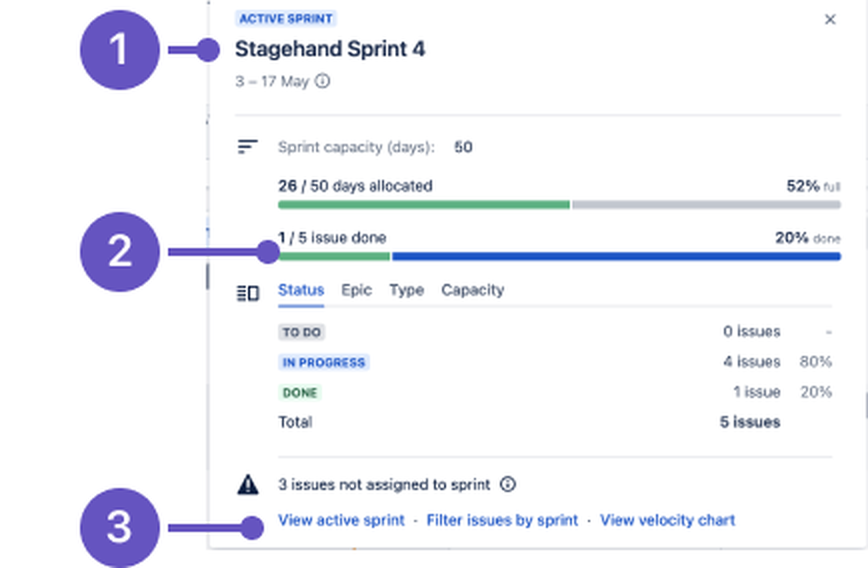
Finding where you run out of people. Two mechanisms exist, and they don't overlap. In Plans, capacity is per team and per sprint, in story points or hours, and defaults to 30 story points. Each team swimlane shows a bar that turns red when assigned work exceeds capacity. Plans divides a team's capacity equally across its members, and a partner answer on Atlassian's community forum says Plans doesn't flag individual overallocation. The second mechanism is the Capacity view that Atlassian announced on July 27, 2026: a weekly grid of each person's allocations in percent, hours or days, with a red bar above 100 percent. It uses a fixed 40-hour week, and allocations over 100 percent are flagged, not blocked.
Modeling one hire. Not documented for either mechanism, and role or skill based capacity isn't described either.
Capacity, scenarios and the Capacity view all need Premium, which was $15.56 per user per month at 300 users on the monthly toggle; Atlassian's price per user changes with team size. The plan has to use boards as its work sources and issues need estimates, because work pulled in through spaces or filters shows no capacity.
- Your teams already estimate in Jira and you want sprint capacity and a cross-team timeline in one place
- You have Premium or can move there: Plans capacity, scenarios and the Capacity view all sit on that tier
- You're on Free or Standard: capacity management, scenarios and Plans are Premium and Enterprise features
- You need role or skill based supply against pipeline demand: it isn't documented, and team capacity splits equally across members
- Users like
- ease of use (1,157 mentions in G2's pros summary) and flexibility (857)
- Users dislike
- the learning curve (682 mentions), interface complexity (504), difficulty for new users (455), feeling overwhelmed (344) and slow performance on large projects (327); the first four overlap
- Source: G2, 7,964 reviews
- Starting price
- Free for 10 users; at 300 users billed monthly Standard $8.48, Premium $15.56 per user per month; Enterprise by quote
- Program tier
- Premium, $19.60 per user per month (monthly, 10 to 100 users); annual 10 users $1,950 per year
- Dependencies
- Single project on Free and Standard, cross-project on Premium and Enterprise
- Automation
- Free 150 steps per subscription, Standard 400, Premium 750, Enterprise 1,000 steps per user per month
- WIP limits
- Min and max per column; header turns red or yellow, moves are not blocked
- Trello import
- Official importer; archived cards, checklists and custom fields not imported in software spaces
- Other reviews
- TrustRadius 8.4 of 10 (4,390 ratings), Software Advice 4.4 of 5, checked 2026-10-26
- SSO and SCIM
- Atlassian Guard Standard; included with Enterprise, a separate subscription on Standard and Premium
- Data residency
- Standard, Premium and Enterprise; regions include US, EU, UK, Canada, Australia, India, Japan, Singapore, Germany, Switzerland, South Korea
- Strategy Collection
- Focus and Jira Align; needs Jira Cloud Premium or higher
- Enterprise
- Contact sales; 99.95% uptime guarantee
- Data Center
- End of sale for new customers March 30, 2026, for existing customers March 30, 2028, end of life March 28, 2029; Server support ended February 15, 2024 (Atlassian)
- Price update
- List prices rose again on October 13, 2026: Standard $9.05 to $9.70, Premium $18.30 to $19.60 per user per month (1 to 100 users); Atlassian's 2025 increase was 5 percent Standard, 7.5 percent Premium
- Free plan
- Up to 10 users, 2 GB storage, 150 automation steps per subscription per month, community support
- Export
- CSV export of up to 10,000 work items at a time; Backup manager includes attachments only if ticked, with 48 hours between backups with attachments; automation flows and app data are not in the backup
- Capacity in Plans
- Per team and sprint, story points or hours, default 30 points
- Capacity view
- Weekly grid per person, fixed 40-hour week, announced July 27, 2026
- Plan needed
- Premium or Enterprise
- Work sources
- Boards only; spaces and filters show no capacity
Adobe Workfront
Adobe Workfront
Role, project and user capacity views with budgets up to 15 years ahead, and a scenario tool closed to new buyers.
Adobe Workfront fits an enterprise that already runs work in Workfront and wants role-level capacity against budgets, and that doesn't need to buy scenario planning new.
Absorbing a new project. Workfront's Scenario Planner models this. Plans define the supply of people and budget, initiatives define the demand, and when they conflict you change initiative demand, priorities or the supply on the plan. Several scenarios can be built and compared, and publishing one updates linked projects. The access documentation says it needs the Ultimate package and is no longer available for purchase to new customers, while the feature page says it needs a separate license. Adobe community posts call it a forgotten function, and one user reports being told in 2024 that it isn't being actively developed. We found no Adobe statement either way, so ask what's planned before you count on it.
Finding where you run out of people. Resource Planner works in role, project and user views. It shows available, planned, budgeted and net hours, in hours, FTE or cost, by week, month or quarter. Net is available minus budgeted, or minus planned if you switch that on, and red marks overallocation. The user allocation chart shows overallocated users in red and underutilized users in blue. Budgeting runs up to 15 years ahead, with a week as the smallest period. A role with no users shows zero available hours, and the role view counts only work assigned to a role or to someone who holds it.
Modeling one hire. Through Scenario Planner, where supply can change on a plan. Without it you'd budget extra hours for the role in Resource Planner instead.
Select, Prime and Ultimate are sold by quote, and Adobe publishes no price. Resource Planner is available in any package, and Workfront Fusion is a separate low-code connector sold as an add-on.
- You already run on Workfront and need available, planned and budgeted hours by role for a week, month or quarter
- You plan budgets years ahead: Resource Planner budgets up to 15 years
- You're a new customer who needs scenario planning: Adobe's access page says Scenario Planner is no longer available for purchase
- You want a price before a sales call or a light rollout: G2 reviewers name the learning curve and a tool that isn't intuitive
- Users like
- project management and ease of use
- Users dislike
- learning curve and not intuitive
- Source: G2, 1,234 reviews

- Starting price
- Select, Prime and Ultimate by quote; no public price
- Plans
- Select, Prime and Ultimate; Prime adds advanced work management and security, Ultimate adds enhanced automation and data management
- Portfolio management
- Prime and Ultimate; not in Select
- Review and approval
- Listed in all three plans; advanced proofs allow guest reviewers without a Workfront login, optional login, e-signature and locking
- Creative Cloud
- Comments and approvals inside InDesign, Illustrator, Photoshop, XD, Premiere Pro and After Effects via an Adobe Exchange add-in
- Intake
- Request queues with custom forms and auto-routing, listed in all three plans
- Resource management
- Project-level and global allocation, listed in all three plans; depth per tier not confirmed
- Dependencies
- Task predecessors with lag, cross-project predecessors and a Gantt view
- Client seat rule
- Not confirmed for the core app; proof guest reviewers need no login
- Billing
- Billing records track billable hours and expenses; Workfront doesn't issue invoices
- Retainers
- No retainer feature found
- Connectors
- Slack, Microsoft Teams and Figma through Workfront Fusion, a separate licence
- Portfolio Optimizer
- A project request carries a Business Case; the portfolio manager reviews it, then ranks projects in the Portfolio Optimizer by value, alignment, financials, scorecard and ROI, checks resources, and approves with a baseline
- Portfolios and programs
- A portfolio is a collection of projects with common goals; a program belongs to exactly one portfolio and a project links to one program at a time; the Optimizer can't compare projects inside a single program
- Scenario Planner
- Ultimate package; closed to new customers per Adobe's docs
- Portfolio budget
- Entered manually at portfolio level
- G2 implementation time
- 4 months on average, 14 months to ROI
- Integrations (docs)
- Adobe Experience Manager Assets, Jira, Salesforce, Slack, Google Workspace, Creative Cloud; Fusion is a separate low-code connector
- Resource Planner
- Role, project and user views; hours, FTE or cost; week as smallest period
- Packages
- Select, Prime, Ultimate; quote only
- Horizon
- Budgeting up to 15 years
Planview
Planview
Enterprise portfolio tool that checks demand against capacity targets in four ordered views, sold by user band.
Planview Portfolios fits a large PMO that decides which investments to fund by checking demand against capacity and budget, and has the admin team to run it.
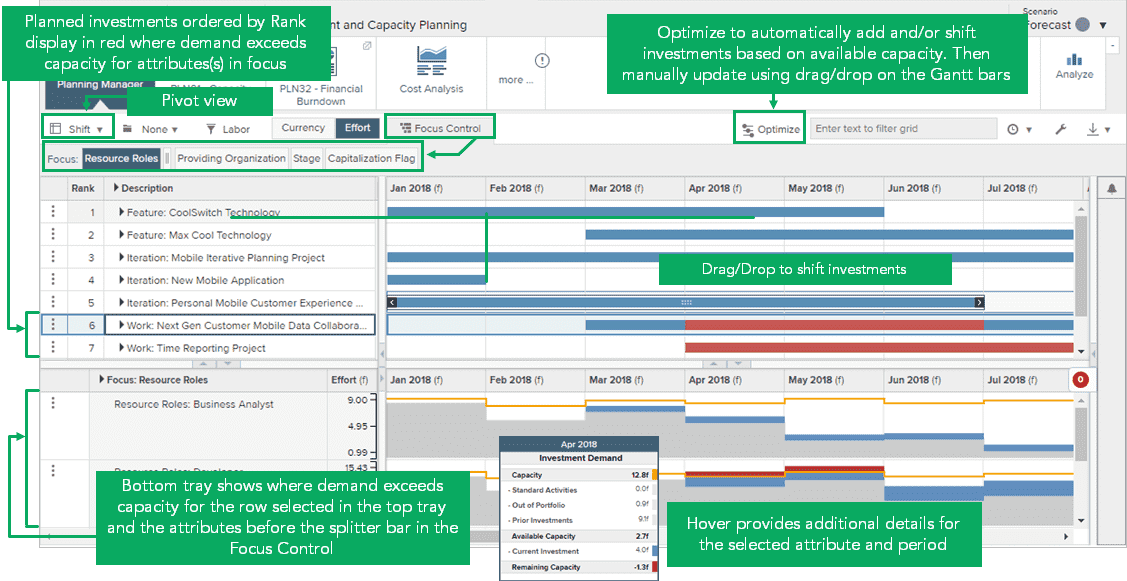
Absorbing a new project. Planview's Planning Manager walks through four views in order. Rank sorts investments by scoring criteria. Analyze moves investments above or below the funding line and shows the effect on budget and capacity. Shift shows where demand exceeds capacity by period and lets you shift investments to fit. Balance shows the time-profiled impact of accepted investments against capacity and budget targets. Planview's documentation warns that what-if work on the Shared Scenario is easy to do by accident, and user scenarios change nothing in the financial plan until you publish them.
Finding where you run out of people. Capacity is set as time-phased resource capacity targets that Planview compares with demand from the forecast of work in the portfolio. The resource management capability tracks vacations and absences, identifies over- and under-allocated resources and measures demand by role classification. Demand that is pending approval or outside the planning horizon is left out of the analysis. A maximum horizon isn't documented.
Modeling one hire. No dedicated hiring plan is documented. The Balance view can model changes to defined capacity, but Planview's documentation doesn't say whether that covers a hire.
Planview publishes no price, but the Planning Package is sold by Portfolio Management FLEX users: Base up to 50, Standard up to 100 and Custom above that, with a fixed-price FastTrack implementation. Reporting and FLEX Sandbox are add-ons, and the edition that unlocks scenarios isn't named. Jira, Azure DevOps, ServiceNow and Microsoft Project Server connect through Planview Hub; whether Hub is included isn't documented.
- You fund and prioritize many initiatives and need to see demand against capacity before approving them
- Agile teams stay in Jira while leadership plans in a portfolio tool, connected through Planview Hub
- You have fewer than a few dozen planners or need a published price: packages start at a 50-user band and are sold by quote
- You want a quick rollout: PeerSpot reviewers say configuration needed external consultants and end users find the product hard to work with
- Users like
- project and resource management, tracking and reporting
- Users dislike
- a long support ticket process and a UX that needs rework
- Source: G2, 90 reviews
- Starting price
- Quote only; Planning Package by user band (Base up to 50, Standard up to 100, Custom above)
- Packages
- Base up to 50, Standard up to 100, Custom above, by Portfolio Management FLEX users
- Reporting
- Embedded Power BI; Reporting add-on
- Lighter option
- Planview AdaptiveWork (formerly Clarizen)
- SAML SSO
- Via Planview Admin, IdP and SP initiated (Entra ID, ADFS, Okta, OneLogin); plan tier not stated in docs
- Trust Center (Oct 2026)
- ISO/IEC 27001, ISO/IEC 27701, SOC 2, CSA STAR, GDPR
- Integrations (product page)
- SAP, NetSuite, Oracle ERP, Salesforce, Workday, ServiceNow, Atlassian, Microsoft; Jira through Planview Hub
- Demand management
- Collects demand from unstructured ideas to formal program and project requests
- Investment prioritization
- Rank view sorts investments by scoring criteria; rankings can be applied automatically by criteria, set manually by scenario users, or both
- Scenarios
- Shared scenario plus user scenarios, published when ready
- Capacity vs demand
- Compares available capacity, either resource capacity or a financial budget, with demand from the portfolio work forecast; demand with a Pending approval status or outside the planning horizon is excluded
- Reports
- More than 200 out-of-the-box reports and visualizations
- Jira and Azure DevOps
- Through Planview Hub toolchain integrations, not described as native Portfolios integrations
- Capacity views
- Planning Manager: Rank, Analyze, Shift (where demand exceeds capacity by period) and Balance
- Views
- Rank, Analyze, Shift and Balance
- Add-ons
- Reporting and FLEX Sandbox
Broadcom Clarity
Clarity (Broadcom)
Enterprise portfolio platform with role capacity, hard and soft bookings and scenarios against the Plan of Record.
Broadcom Clarity fits a large IT or portfolio office with admin support that wants capacity, demand and funding on one governed record.
Absorbing a new project. Clarity's capacity planning scenarios make temporary changes. You can modify team allocations, move investment start dates, switch investments between approved and unapproved, or add investments, then compare the scenario with the Plan of Record or another scenario, with the differences shown in red. Some data is read-only in scenario mode, and only some fields are editable in scenario properties. Broadcom's scenario documentation describes the Classic UI of version 16.2, so check the Modern UX in a demo.
Finding where you run out of people. Broadcom's older documentation defines capacity as the time a resource makes available and demand as requested time on a resource or role, split into hard-booked and soft-booked time. Unused capacity below zero means over-allocation. The resource planning pages offer a role capacity histogram, unfilled allocations and workload views, from organization-wide totals down to booking detail. A July 2026 thread on Broadcom's community site reports that roles used as placeholder demand also add to capacity in Modern UX reports on version 16.4.1, which overstates it. Broadcom's reply says release 16.3.2 added a system option to hide role contributions.
Modeling one hire. A dedicated hiring plan isn't documented. Roles act as placeholder demand, and scenarios let you change team allocations.
Broadcom publishes no price, edition page or minimum, and it doesn't say which edition has scenarios. Reviewers on PeerSpot describe setups of three to six months, name cost as a concern and call the Jira connection cumbersome.
- A large IT or portfolio office wants governed intake, funding decisions and capacity scenarios on one record
- You have admins or configuration partners and can run an implementation measured in months
- You're a small team or want a published price: Broadcom lists none, and G2 reviewers name cost and a steep learning curve
- Your delivery data lives mostly in Jira: PeerSpot reviewers call that integration cumbersome
- Users like
- customization, ease of use and time tracking
- Users dislike
- cost and a steep learning curve for advanced features
- Source: G2, 91 reviews
- Starting price
- Quote only; Broadcom lists no price or editions
- Former names
- CA PPM, Clarity PPM
- Portfolio plans
- A plan is a what-if copy of portfolio data with start and finish dates and cost, resource and benefit targets; versions compare on a Waterline view where projects above the line are funded; one version becomes the Plan of Record
- Capacity scenarios
- Temporary versions of a plan: change team allocations, shift start dates, switch investments between approved and unapproved, then compare against another scenario or the Plan of Record with the differences marked
- Financial planning
- Investment planning, cost accounting, forecasting and automated software capitalization (vendor page)
- Roadmaps
- Interactive drag-and-drop roadmaps and scenario modeling (vendor page)
- Deployment
- SaaS and on-premises documentation both exist
- Customer size (PeerSpot reviewers)
- 92 large enterprise, 9 midsize, 15 small business
- Implementation (PeerSpot reviewers)
- One reviewer says 3 to 6 months, another up to 12 months for complex setups; many used consultants or partners
- Priority scoring
- The docs read do not explain how priority scores are calculated
- Integrations (vendor page)
- Rally, ConnectALL and Insights from Broadcom ValueOps; Jira, SAP and ERP connectors not confirmed on vendor pages
- Roles as placeholders
- July 2026 community thread: can inflate capacity reports on 16.4.1
- Capacity model
- Capacity is time made available; demand is hard-booked plus soft-booked time
- Scenarios
- Compared with the Plan of Record; some fields read-only
- Other reviews
- PeerSpot 4.0 of 5 from 143 reviews
Which plan unlocks scenarios and capacity views?
Capacity views are rarely the paywalled part, but scenarios and role-level views often are. The table names the lowest tier where each capability is documented, and "not documented" means the vendor's own pages don't say.
| Tool | Capacity views | Scenarios | Role-based demand | Modeling a hire |
|---|---|---|---|---|
| Runn | Lite | Standard per the help article; tentative toggle on Lite | Placeholders, unlimited on every plan | Placeholders carry no capacity |
| Float | Starter | Not documented | Roles report; 1 placeholder on Starter, 5 on Pro | Placeholders carry no capacity |
| Meisterplan | Basic | Pro | Roles; the role capacity article covers all editions | Role capacity change inside a scenario (Pro) |
| Celoxis | Core per the pricing table | Manual What-if state, plan not documented | Job roles from Essentials | Not documented |
| Jira | Premium | Premium | Not documented | Not documented |
| Workfront | Resource Planner in any package | Ultimate package, closed to new customers | Role view | Supply change inside Scenario Planner |
| Planview | Not documented by edition | Not documented by edition | Role classifications | Not documented |
| Clarity | Not documented by edition | Not documented by edition | Roles as placeholders | Not documented |
Meisterplan shows the staircase most clearly, because each tier changes what a PMO can do with it.
Meisterplan- BasicTeam Planner, Resource Pool, capacity reports with heat map and absence management, from 50 resources; no scenarios
- ProScenarios, portfolio dashboard, prioritization, financials, and the Jira, Asana and Wrike integrations; onboarding cost is mandatory
- PremiumFrom 150 resources, annual payment only, a dedicated customer success manager, Entra ID auto-provisioning and a self-service sandbox
What is the process of capacity planning?
Capacity planning is a loop of five steps, and the software only automates the arithmetic. Doing it once by hand shows what the tools calculate.
List supply by role
Count the hours each role can give to projects after leave, public holidays and non-project time such as support or meetings.
List demand
Add the hours each confirmed project needs from each role, and keep tentative projects in a separate column.
Find the gap
Divide demand by supply for each role and month. Above 100 percent means the plan doesn't fit.
Test scenarios
Move a start date, drop a project, or add capacity for a hire, and read the gap again.
Decide and revisit
Commit to one plan, tell the project owners what moved, and repeat the check when a project or a person changes.
The example below uses five backend engineers over one month.
| Line | Hours per month | Note |
|---|---|---|
| Gross hours, 5 engineers at 160 | 800 | Supply before deductions |
| Leave and holidays | -80 | 10 working days |
| Non-project time, 20 percent of the remaining 720 | -144 | Support and meetings |
| Project capacity | 576 | 115.2 hours per engineer |
| Project A, confirmed | 300 | |
| Project B, confirmed | 200 | |
| Confirmed demand | 500 | 87 percent of capacity |
| Project C, tentative | 160 | |
| Demand with Project C | 660 | 115 percent of capacity |
| Gap if C goes ahead | 84 | About 0.7 of one engineer |
The confirmed work fits with 76 hours to spare, but adding Project C overshoots by 84 hours. You can move C, drop part of A or B, or add about 0.7 of an engineer. That last choice is the third question in the tools above.
A capacity planning model is the rule you follow when supply and demand differ. You can add capacity ahead of expected demand, add it only after demand shows up, or add it in small steps as demand grows. Tools help most with the second and third, since they show the gap early enough to act on it.
How to choose capacity planning software
Choosing is the smaller job. Most plans fail because the inputs are wrong, not because the tool is: leave isn't entered, estimates are guesses, and nobody owns the weekly update. Decide who maintains the data before you compare tools, then match the tool to the hardest of the three questions. Don't start with the demo that looks best. If your program also needs a view of schedule risk across projects, the project scheduling software guide covers that side.
- You want utilization with and without pipeline projects, and the planner also reads the resultRunn
- A team needs a visual schedule with role totals and the pipeline is smallFloat
- A PMO has 50 or more schedulable people and needs scenarios against a Plan of RecordMeisterplan
- You need capacity and intake on published prices and accept a manual what-ifCeloxis
- Delivery teams estimate in Jira and the organization pays for PremiumJira
- You already run on Workfront and plan hours by role and budgetAdobe Workfront
- A large PMO funds initiatives and checks demand against capacity before approvalPlanview
- An IT portfolio office with admin support compares scenarios with a Plan of RecordClarity (Broadcom)
- Name who keeps leave, hours and project estimates current, and how often
- Pick your hardest question: a pipeline project, one overloaded role, or a hire
- Ask the vendor to show that question on screen with your own tentative project
- Find the plan that holds scenarios and role views, and note seat or resource minimums
- Check whether a placeholder can carry capacity, or only demand
- Check which tools it connects to (Jira, Asana, an HR system) and which plan has the connector
- Ask what happens to a scenario when the live plan changes, and who can see it
Is there free capacity planning software?
None of the eight tools lists a free plan that includes capacity planning. Jira has a Free plan for up to 10 users, but capacity management and scenario modeling start at Premium. Trials are the practical route: Float and Runn give 30 days without a credit card, Meisterplan gives 30 days with Pro features, and Celoxis gives 14 days without a card. For a first pass, the supply and demand table in the process section works in any spreadsheet.
Where The Program Manager fits
The Program Manager doesn't do capacity planning, and it isn't a ranked entry here. It doesn't hold calendars, hours or utilization, so it doesn't replace any tool above. It sits next to one. If your delivery work lives in Jira and Asana, it maps the dependencies between the two, watches milestones for risk and keeps blockers, decisions and approvals in one graph. A capacity tool shows that a role is overbooked in March. The graph shows which milestones depend on the work that role owns.
FAQ
What are some effective tools for resource capacity planning?
Effective tools for resource capacity planning include Runn, Float, Meisterplan, Celoxis, Jira Premium, Adobe Workfront, Planview and Broadcom Clarity. Float and Runn start at $7 per seat per month, Celoxis at $10 per user, Jira's capacity features need Premium, and Workfront, Planview and Clarity are sold by quote.
What is the process of capacity planning?
The process of capacity planning has five steps: list supply by role after leave and non-project time, list confirmed and tentative demand, divide demand by supply to find the gap, test scenarios such as moving a project or adding a hire, then commit and revisit when something changes. In a worked example, five engineers with 576 project hours face 660 hours of demand once a tentative project is added, which is 115 percent.
What is a capacity planning model?
A capacity planning model is the rule for matching supply to demand. You can add capacity ahead of expected demand, add it only after demand appears, or add it in small steps as demand grows. Scenario tools let you test each choice against the same demand.
What is the best capacity planning software?
The best capacity planning software depends on the hardest question. Runn is the clearest on pipeline what-ifs, Float on role totals and overbooking, Meisterplan on portfolio scenarios, and Jira Premium for teams that already estimate in Jira. Workfront, Planview and Clarity suit large organizations that buy by quote.
Is there free capacity planning software?
Free capacity planning software is rare: none of the eight tools lists a free plan with capacity planning. Jira's Free plan covers up to 10 users but excludes capacity management and scenarios. Float and Runn offer 30-day trials without a card, Meisterplan 30 days and Celoxis 14 days.
What is the difference between capacity planning and resource management?
Resource management books named people onto work that is about to start. Capacity planning compares the hours your people will have with the hours planned projects need, usually weeks or months ahead, and shows where you run out. Most tools do both.