Project accounting software tracks the money of each project separately from the company ledger: the budget, the time and expenses booked against it, what has been billed and how much revenue has been earned. Eight tools cover that job in different ways. Sage Intacct, Oracle NetSuite, Deltek Vantagepoint and Acumatica are ERP systems with a project module, QuickBooks Online adds a Projects feature to small business books, and Kantata, Productive and Runn are services tools that plan budgets and rates and hand the ledger work to an accounting system.
We judged each one by where it books a project's cost, billing and revenue, which edition or add-on you must buy to get that, and what it costs to start. We read vendor material and didn't run these products.
What is project accounting software?
Project accounting software is software that records the costs, billing and revenue of each project as its own set of numbers, so that you can see profit per project and not only per company. It holds a budget for every project, takes in the time and expenses of the people who work on it, prices them at a cost rate, bills the client by time and materials, fixed fee or milestone, and recognises the revenue in the right period.
The difference from general accounting sits in the project ID. A general ledger knows that $40,000 of salaries were paid in March. A project ledger knows which share of that went to which project, whether the client has been billed for it and how much of the fixed fee the work has earned so far. Two ideas decide how useful a tool is:
- Work in progress (WIP): costs or revenue that exist but haven't been billed yet. Over-billing and under-billing are the gaps between what a project has billed and what it has earned.
- Revenue recognition: the rule for when billed money counts as earned revenue. A fixed-fee project can recognise revenue by percent complete or by milestone, while time and materials work is usually recognised as hours are worked.
Best project accounting software by situation
The best project accounting software depends on who owns the numbers. Finance-led firms choose between ERP modules, small teams that already keep books in QuickBooks stay there, and services firms that plan budgets and rates before the ledger sees anything pick a services tool.
 Best when finance owns project profit in a cloud ledgerSage IntacctProject ID on every ledger entry, billing for five project types and revenue recognition on its own schedule.
 Best when projects must post to the same ledger as sales and inventoryOracle NetSuiteBilling rules, budgets and revenue rules in the ERP, with a separate PSA application for larger services teams.
 Best for architecture, engineering and consulting firmsDeltek VantagepointBilling terms per phase or task, revenue method per cost category and overhead allocation.
 Best for percent-of-completion revenue without per-seat feesAcumaticaChange orders, progress billing and monthly cost forecasting in a cloud ERP priced by resources used.
 Best for small firms already on QuickBooksQuickBooks OnlineProject profit from invoices, expenses and time you already enter, from $140 per month on Plus.
 Best for services firms that want budgets, billing and resourcing togetherKantataBudget, actuals, forecast to complete and revenue forecasts in one professional services tool.
 Best for agencies that bill fixed fee, time and retainersProductiveBudgets, rate cards, invoices from the budget and profit per project; Professional starts at $25.
 Best for budgets and profit forecasts tied to a resource planRunnProject budgets, rate cards and planned against actual profit; no invoicing.
How the eight tools compare
The table shows how each tool books a project and what it costs to begin. Four of the eight publish no price at all, but the quote-only tools are also the ones that hold the most project features.
| Tool | How it books a project | Starting price | G2 rating |
|---|---|---|---|
| Sage Intacct | Project dimension on every ledger entry; costing, billing for five project types, revenue recognition on a separate schedule | Quote only, based on the modules you license | 4.3 (4,577) |
| Oracle NetSuite | SuiteProjects posts budgets, billing and revenue rules to the NetSuite general ledger | Quote only, modules licensed separately | 4.1 (5,272) |
| Deltek Vantagepoint | Billing terms per project, phase or task; revenue method per cost category; overhead allocation | Quote only, demo request | 4.1 (741) |
| Acumatica | Budgets against actuals, fixed-price, cost-plus and T&M billing, percent-of-completion revenue | Quote only, priced by applications and resources, not per user | 4.4 (2,056) |
| QuickBooks Online | Projects group invoices, bills, expenses and time under one customer and show profit margin | Plus $140 and Advanced $340 per month list price | 4.0 (3,913) |
| Kantata | Budget, actual fees, forecast to complete and revenue forecasts, linked to an accounting ledger | Quote only | 4.2 (1,576) |
| Productive | Budgets by project with invoices created from the budget and profit per project | Essential $10 to $12, Professional $25 to $29 per user per month | 4.7 (109) |
| Runn | Project budgets, rate cards and planned against actual profit inside a resource plan | Lite $7 and Standard $11 per resource seat per month, 20 seats minimum | 4.8 (Capterra, 33) |
 The Program Manager Our product | Maps dependencies across Jira and Asana and watches milestones for risk | Team from $59 per workspace per month; card required at checkout | No reviews yet |
List prices in USD from the vendor pages, checked November 2026. G2 ratings cover each product as a whole and are shown as of November 2026; Runn's rating is from Capterra.
Sage Intacct, NetSuite and Deltek Vantagepoint suit firms where the finance team owns project margin, Acumatica fits project-driven firms that want a cloud ERP without per-user fees, and QuickBooks Online suits a small firm that keeps its books there already. Kantata, Productive and Runn start from the project plan and the rate card and need a separate ledger for the books. For general project delivery tools, see project management software.
Which edition holds budgets, billing and revenue recognition
Project accounting features sit in different modules, and the one that adds billing often isn't the one that adds budgets. The table shows what each tool says it needs for each step, and where it says nothing.
| Tool | Budgets against actuals | Billing | Revenue recognition | Roll-up across projects |
|---|---|---|---|---|
| Sage Intacct | Dashboards for budget against actuals from Project Costing | Project Costing and Billing adds invoicing | Separate schedule needs a Revenue Management subscription | Parent and child projects up to 5 levels, project groups for reports |
| NetSuite | Job Costing and Project Budgeting with Time Tracking | Milestone billing needs Advanced Billing | As Charged rule needs Charge-Based Billing and Advanced Revenue Management | Project Center and project dashboards; no program roll-up described |
| Deltek Vantagepoint | Accounting tab on each project; no edition named | Terms set per WBS level, with fallback to the parent | Method per cost category, optional overall revenue limit | Project, phase and task levels |
| Acumatica | Original and revised budgets with change orders; no edition named | Fixed price, cost-plus, time and materials, progress billing | Percent of completion or completed tasks | Parent-child project hierarchies on the Construction Edition page |
| QuickBooks Online | Estimates against actuals on Advanced only | Billable costs carry onto the next invoice, Plus and Advanced | Deferred revenue on Advanced; no percent complete named | One project per customer, with a list view to compare projects |
| Kantata | Budget, actual fees, forecast to complete and variance | One invoice can combine fixed fee, time and expenses | Revenue Management needs the Financial Management package | Margin and cost dashboards; no program roll-up described |
| Productive | Budgets on every plan; rate cards and recurring budgets on Professional | Invoices created from the budget, synced to an accounting tool | Fixed-fee revenue spread over time or on one date; plan not stated | Revenue forecasting and Scenario Builder on Ultimate |
| Runn | Budgets, rate cards and planned against actuals on every plan | None listed on the pricing page | Fixed-price revenue by percent complete against a T&M benchmark | Budget by Phase on Standard and up |
Only NetSuite and Sage Intacct spell out the module list in their own documentation, and QuickBooks Online keeps estimates against actuals for its $340 tier. Read the revenue column before you budget, because it decides whether the number in the quote includes revenue recognition.
How a project dollar moves from time entry to the ledger
A project dollar goes through four steps, and each tool covers a different stretch of them. Time and expenses come in first, a cost rate turns them into project cost, billing turns hours or milestones into invoices, and revenue recognition decides when the money counts as earned.
- Step 1Time and expenses land on a project
- Productive
- Kantata
- Runn
Breaks when an hour is logged without a cost rate and posts to the project at zero cost - Step 2Budgets and rates price the work
- Productive
- Runn
- Kantata
Breaks when the bill rate in the plan differs from the rate on the invoice - Step 3Billing turns hours, fees and milestones into invoices
- Sage Intacct
- Acumatica
- QuickBooks Online
Breaks when a fixed fee is billed up front and nobody tracks what is still unearned - Step 4Revenue is recognised
- Oracle NetSuite
- Deltek Vantagepoint
Breaks when billing and revenue follow the same schedule although the work does not
The first two steps are where services tools such as Productive, Runn and Kantata are far stronger, because they start from the project plan. The last two are where ERP modules earn their price, because billing and revenue post to the ledger the auditors read. However, nothing in the eight tools replaces the other end: a services tool without a ledger can't close the books, and an ERP module without resource plans can't tell a PMO who is free next month.
What it costs to start with each tool
Four tools publish no price, which makes the published ones the only ones you can budget before a sales call. The table shows what a ten-person team pays where the vendor lists a price, and what each of the others says about quoting.
| Tool | What the vendor publishes | Ten people per month |
|---|---|---|
| Runn | Lite $7 and Standard $11 per resource seat, 20 seats minimum | $140 on Lite and $220 on Standard at the 20-seat minimum |
| Productive | Essential $10 to $12 and Professional $25 to $29 per user; the pricing page shows both figures | $90 on Essential and $240 on Professional, as quoted on the page |
| QuickBooks Online | Plus $140 and Advanced $340 per month, 5 users on Plus and 25 on Advanced | $340 on Advanced, since Plus covers 5 users |
| Kantata | Quote only; a PSA advisor contacts you | Not published |
| Sage Intacct | Quote only, based on the modules you license | Not published |
| NetSuite | Quote only; modules are licensed separately | Not published |
| Deltek Vantagepoint | Demo request only | Not published |
| Acumatica | Custom pricing by applications, usage and deployment, not by user seat | Not published |
QuickBooks Online lists a promotional price for the first months, and the figures here are the list prices. Runn's financials come with every plan, but its plans start at 20 resource seats, so a ten-person team still pays for twenty. For the ERP tools the licence is only part of the cost: G2 reports an average implementation of 4 months for Sage Intacct, 6 months for NetSuite and a median of 7 months for Acumatica.
Eight project accounting tools reviewed
Each entry follows the project's money: how the tool costs a project, how it bills it, how revenue is recognised, and who should skip it.
Sage Intacct
Sage Intacct
Project dimension, five billing types, separate recognition
Sage Intacct fits finance teams that want the project ID on every ledger entry and billing and revenue recognition kept on separate schedules.
Costing: projects come in tiers. Basic Project Tracking adds a project dimension that tags payables, receivables, purchasing, order entry and journal entries, and projects nest up to five levels with project groups for reports. Project Costing adds time, expenses and task tracking, and a Grants Tracking and Billing tier covers nonprofit grants.
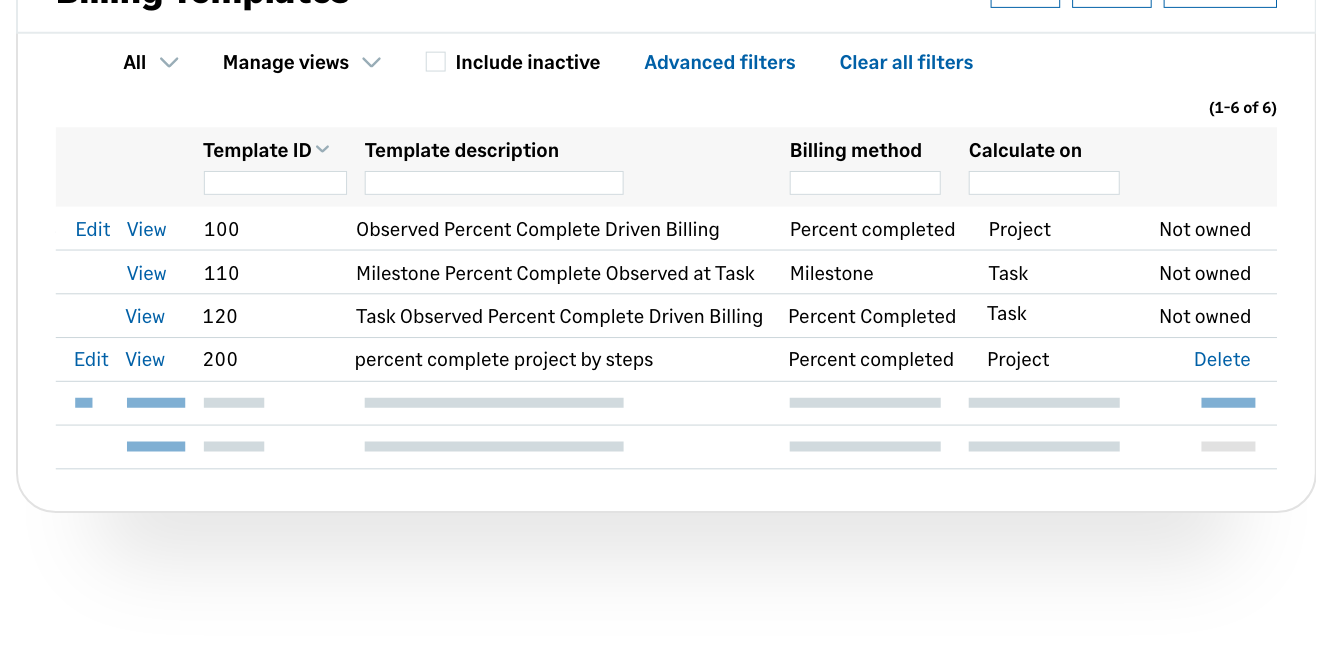
Billing: Project Costing and Billing adds invoicing for time and materials, scheduled, fixed price, percent complete and milestone projects. Different billing terms can sit on one project or across several and land on a single consolidated invoice. Resource Management with Gantt charts, skills and utilization reports comes bundled in the same tier.
Revenue: recognition runs on its own schedule, by milestone, schedule, percent complete or project completion, and a schedule can be paused, changed or resumed mid-project. Sage's help center says a separate recognition schedule needs a Revenue Management subscription. Dashboards show budget against actuals, billed against unbilled and billable against unbillable hours, and change orders and not-to-exceed triggers are tracked.
- Finance owns project profit and you need invoices for time and materials, fixed price, percent complete and milestone projects, combined on one invoice if needed
- you want the project ID on every payable, receivable and journal entry so margin reports come straight from the ledger
- you need a separate revenue recognition schedule: it needs a Revenue Management subscription on top of Project Costing and Billing
- you want task planning for delivery teams: the Gantt and skills views arrive with Resource Management, bundled with Project Costing and Billing only
- Users like
- reporting and project tagging across grants and projects
- Users dislike
- a steep learning curve, limited report customization and rigid edits to posted transactions
- Source: G2, 4,577 reviews
- Starting price
- Not published; custom quote based on the modules you license
- Project tiers
- Basic Project Tracking, Project Costing, Project Costing and Billing, Grants Tracking and Billing
- Hierarchy
- Parent and child projects up to 5 levels
- Billing types
- Time and materials, scheduled, fixed price, percent complete, milestone
- Revenue recognition
- Separate schedule, needs a Revenue Management subscription
- Implementation (G2 average)
- 4 months
- Edition for billing
- Project Costing and Billing
- Revenue schedule
- Revenue Management subscription
- G2 average implementation
- 4 months
NetSuite
Oracle NetSuite
Project rules that post to the NetSuite ledger
NetSuite fits companies that run, or plan to run, NetSuite ERP and want project billing, budgets and revenue in the same general ledger.
Costing: you turn on Projects for basic records and Project Management for tasks, schedules and Gantt charts with a baseline. Job costing and project budgeting need the Job Costing and Project Budgeting feature plus Time Tracking, and they compare revenue and cost budgets with actuals to estimate margin. Every project transaction ties to a general ledger account, and projects can be created from sales orders or from templates.
Billing: NetSuite bills time and materials, fixed price, recurring and charge-based projects through a rules engine with approvals. Milestone billing needs Advanced Billing, and charge-based billing needs Project Management and Advanced Billing.
Revenue: revenue rules for labor, fixed, percent complete and charge-based work are kept separate from billing. The As Charged rule recognises revenue as charges are created and needs Charge-Based Billing and Advanced Revenue Management. SuiteProjects Pro is a separate services application with its own resource and time and expense tools, linked through an optional NetSuite integration and an add-on connector for Microsoft Project.
- you run or plan to run NetSuite ERP and want project billing, budgets and revenue in one ledger
- you bill time and materials, fixed fee, recurring or charge-based work and need revenue rules for labor, fixed, percent complete and charge-based projects
- you only need project accounting: SuiteProjects is a module of a NetSuite licence, and OneWorld for several subsidiaries is licensed separately
- your project data sits in Jira: Oracle names a Project Connector for Microsoft Project in SuiteProjects Pro, and Jira needs third-party connectors
- Users like
- customization and reporting across finance, CRM and operations
- Users dislike
- a steep learning curve and saved searches that are hard to build
- Source: G2, 5,272 reviews
- Starting price
- Not published; modules are licensed separately and quoted
- Milestone billing
- Advanced Billing
- Job costing and budgets
- Job Costing and Project Budgeting plus Time Tracking
- As Charged revenue rule
- Project Management, Charge-Based Billing and Advanced Revenue Management
- SuiteProjects Pro
- Separate PSA application linked through an optional NetSuite Integration
- Implementation (G2 average)
- 6 months
- G2 average implementation
- 6 months
Deltek Vantagepoint
Deltek Vantagepoint
Billing terms per WBS level, overhead allocation
Deltek Vantagepoint fits architecture, engineering and consulting firms that bill fixed fees by phase and need overhead allocation next to project billing.
Costing: each project has an Accounting tab, and billable or non-billable defaults for expenses are set per project. Overhead allocation is prorated or assigned, normally on direct labor or revenue, and it runs company-wide or by organization in two passes. It doesn't post to the general ledger and appears on cost-basis project reports.
Billing: terms are set at project, phase or task level, and a level without terms falls back to its parent. Fee methods include percent complete, fixed amounts, unit-based fees and percentage of construction, and scheduled billings run by amount or percent on dates or milestones. Terms can be copied between projects or saved in templates.
Revenue: the revenue method is set per cost category, such as labor, consultant and expenses, at phase or task level, and each is calculated independently. An optional overall revenue limit caps what a project can earn. Deltek's published pages name neither a WIP report nor a time and materials billing type.
- you bill fixed fees by phase, percent complete or scheduled milestones and want billing terms set at project, phase or task level
- you run an architecture, engineering or consulting firm and need overhead allocation on direct labor or revenue in the same system as CRM and resource planning
- you need government-contract compliance such as DCAA: Deltek positions Costpoint, not Vantagepoint, for that
- you are a very small firm: Deltek's own menu points small architecture and engineering firms to Ajera
- Users like
- reporting and financial management
- Users dislike
- complexity and a steep learning curve
- Source: G2, 741 reviews
- Starting price
- Not published; the vendor page offers a demo request only
- Billing terms
- Per project, phase or task
- Fee methods
- Percent complete, fixed amount, unit-based, percentage of construction, scheduled
- Revenue method
- Set per category (labor, consultant, expense, units) with an optional overall revenue limit
- Overhead
- Prorated or assigned, not posted to the GL
- CRM and resourcing
- In the same product
Acumatica
Acumatica
Percent-of-completion revenue and S-curve forecasts
Acumatica fits project-driven firms that want budgets, change orders and percent-of-completion revenue in a cloud ERP that isn't priced per user.
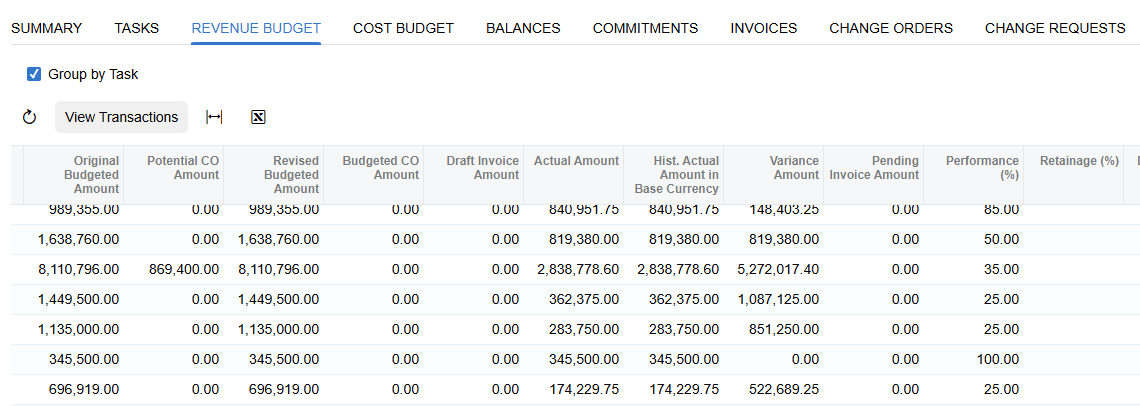
Costing: budgets are tracked against actuals for labor, materials and services, with original and revised budgets, and change orders populate budget lines. Transactions can be reclassified between project, task and account. Time and expenses come in through a portal or the mobile app, and costs are allocated as billable, non-billable, overhead or shared. Monthly cost forecasts use front-loaded, back-loaded, bell or linear S-curves.
Billing: the tool bills fixed-price, cost-plus and time and materials projects with rules by customer, employee or project type. Progress billing tracks billed against pending change-order amounts.
Revenue: recognition uses percentage of completion, based on budgeted quantities, amounts or milestones, or completed tasks. Billed but unearned amounts sit as a liability, and the ledger takes only the difference. Parent-child project hierarchies for consolidated billing are listed on the Construction Edition page for the 2026 R2 release. Acumatica prices by applications, usage and deployment, not by user.
- you want project accounting inside a cloud ERP that is priced by resources used instead of per user seat
- you manage change orders and progress billing and recognise revenue by percentage of completion based on budgeted quantities, amounts or milestones
- you need a native Microsoft Project link: the vendor pages list none, and Jira timecards come in through a free third-party app
- you need a published price: Acumatica quotes by applications, usage and deployment, and G2 reports a median of 7 months to implement
- Users like
- cloud access and an open API
- Users dislike
- a long implementation and customization effort
- Source: G2, 2,056 reviews
- Starting price
- Not published; custom pricing by applications, resources and deployment, not per user
- Billing types
- Fixed price, cost-plus, time and materials, progress billing
- Forecasting
- Monthly cost forecast with front-loaded, back-loaded, bell or linear S-curves
- Licensing
- Applications, usage and deployment
- Implementation (G2 median)
- 7 months
- Revenue methods
- Percentage of completion, completed tasks
- G2 median implementation
- 7 months
QuickBooks Online
QuickBooks Online
Customer projects with a profit margin
QuickBooks Online fits small firms that already keep their books in it and want to see the profit of a customer project without a new system.
Costing: you switch on Projects under Account and settings, create a project under a customer and assign invoices, estimates, bills, expenses and time entries to it. Costs marked billable carry onto a future invoice, and the project shows its profit margin as income and expenses arrive. Labor costs update automatically only with QuickBooks Time or QuickBooks Workforce, which are sold separately.
Billing: invoices come from the same customer record, so a project's billing is whatever you invoice against it. Estimates against actuals on the project dashboard are an Advanced feature.
Revenue: Intuit's pages name deferred revenue automation on Advanced and describe no percent-of-completion method or work-in-progress report. A project belongs to one customer, and a list view compares projects, but no program roll-up across customers is described. Projects isn't available on Simple Start or Essentials.
- you already keep your books in QuickBooks Online and want profit per customer project from invoices, expenses and time you already enter
- you want the lowest entry cost in this list: Plus lists at $140 per month with 5 users
- you need work in progress, over and under billing or percent-of-completion revenue: Intuit's pages name only deferred revenue on Advanced
- you need estimates against actuals: the report is Advanced only at $340 per month
- Users like
- ease of use and cloud access
- Users dislike
- missing features and cost
- Source: G2, 3,913 reviews
- Starting price
- Plus $140 and Advanced $340 per month list price; Projects is not on Simple Start or Essentials
- Users
- Plus 5, Advanced 25
- Labor costs
- Update automatically only with QuickBooks Time or Workforce, sold separately
- Projects
- Created under a single customer
- Plans with Projects
- Plus and Advanced
- Estimates against actuals
- Advanced
Kantata
Kantata
Budget to actuals, forecasts and a ledger link
Kantata fits professional services firms that want budgets, time, billing and revenue forecasts in one tool and a link to the firm's accounting ledger.
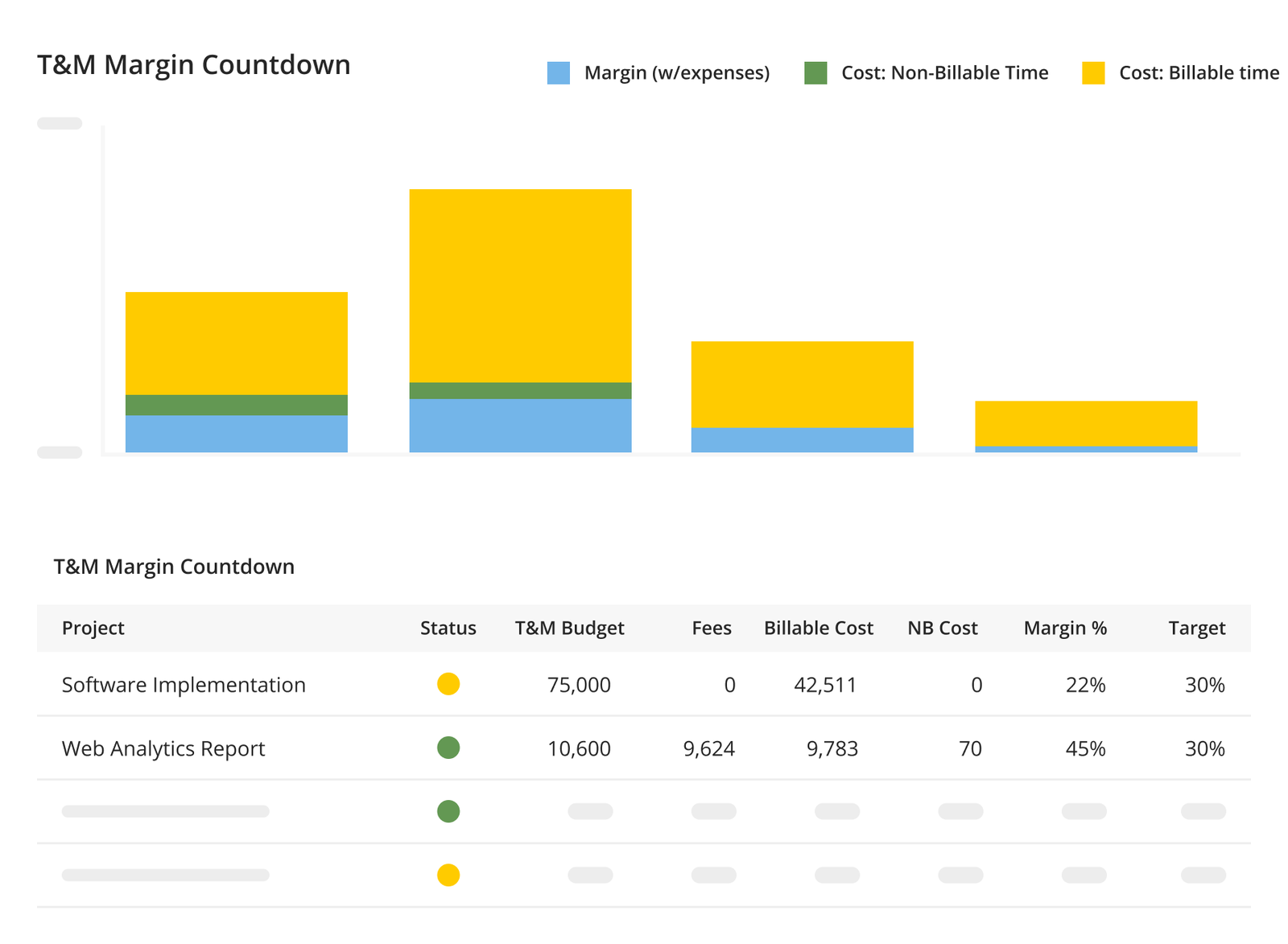
Costing: a project's budget is the baseline. Actual fees are billable hours times bill rates by default and can include billable expenses and invoice items, and the tool projects the estimate to complete and the estimate at completion, with variance in the project side panel. The basis for future hours is selectable: hard allocations, soft and hard allocations or scheduled hours. Timesheets, approvals and expense reports with receipts feed those numbers.
Billing: one invoice can combine fixed-fee, time and expense items, and billing preferences are set per project. Batch billing and intercompany accounting are listed on the project accounting page, and a sub-ledger connection links the tool to NetSuite, Intacct, QuickBooks, Xero and other finance systems.
Revenue: revenue forecasting uses milestone weighting from 0 to 100 on tasks together with the estimate to complete, and Kantata says it supports ASC 606. Revenue Management needs the Financial Management package. What-If Modeling shows the effect of rate and exchange-rate changes on margins. Neither finance page mentions WIP.
- You run a services or consulting organization and want utilization, project margins, burn and billing in one system rather than a standalone planner.
- You need formal staffing requests with named approvers, skills matching and approval history across many projects.
- You want published, self-serve pricing or a quick trial: pricing is quote only and a PSA Advisor contacts you.
- You have a small team with simple workflows: reviewers on Capterra describe it as overwhelming with too many moving parts for small teams.
- Users like
- project tracking and reporting efficiency
- Users dislike
- complex usability and a learning curve
- Source: G2, 1,576 reviews
- Starting price
- Quote only, no published prices
- Resource requests
- Admin enables them and names approvers; statuses Draft, Submitted, Cancelled, Rejected
- Timeline
- Resource Center: allocated hours, scheduled hours or both
- Skills
- Skills library for matching and filtering requests
- Security
- SSO and SOC 2 are not listed on the published trust page
- Revenue Management
- Financial Management package
- Ledger links
- NetSuite, Intacct, QuickBooks, Xero
- Pricing
- Quote only
Productive
Productive
Budget, invoice and profit per project
Productive fits agencies and services firms that bill fixed fee, time and materials or retainers and want the budget, the invoice and the profit in one place.
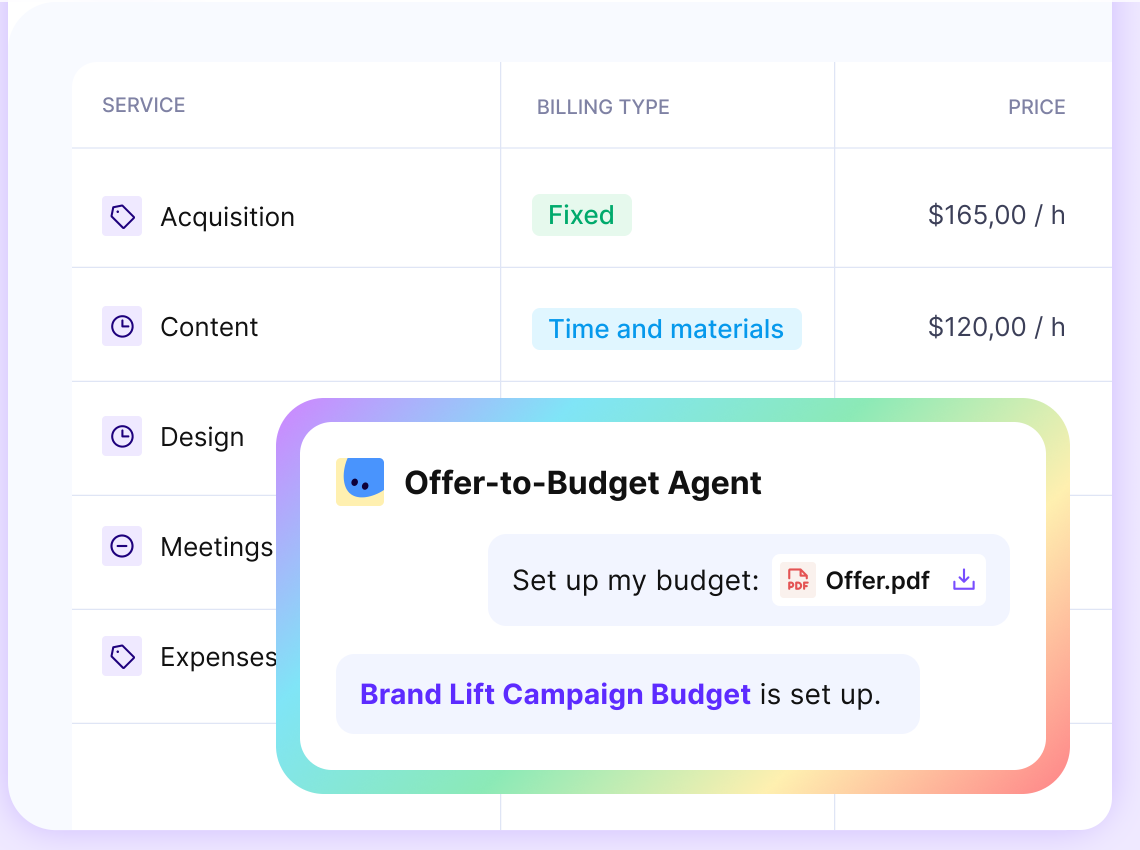
Costing: every project or deal gets a budget of type fixed, time and materials or non-billable, created from a template or from a won deal. Logged hours and expenses roll up against it, showing revenue, cost and profit side by side. Warnings appear when a budget runs low, and Budget Limits can block further time logging on a service. Rate cards and recurring budgets start on Professional.
Billing: delivered work becomes an invoice from the budget with the amounts filled in, which you finalize, send or sync to an accounting tool. Time and expense approval policies decide what reaches budgets and invoices, and invoicing integrations include Xero, QuickBooks and NetSuite.
Revenue: fixed-fee services can be recognised spread across time or on a single date. Revenue forecasting, Scenario Builder and the overhead calculator are on Ultimate, which has no published price. Productive syncs invoices to an accounting tool and doesn't replace the ledger.
- you bill by project or retainer and want budgets, rate cards and recurring retainer budgets in the same tool as time and resourcing
- you want clients added free, with budget visibility on Professional
- you need creative proofing: no annotation feature is documented, so you'd pair it with a separate review tool
- you need dependencies, a Gantt view or intake forms: none could be confirmed with a plan on vendor pages
- Users like
- ease of use and customization
- Users dislike
- missing features and reporting that's hard to work with
- Source: G2, 109 reviews
- Starting price
- Essential about $10 to $12, Professional about $25 to $29 per user per month
- Trial
- 14 days, no credit card
- Rate cards
- Professional
- Scenario Builder and revenue forecasting
- Ultimate
- Tentative bookings
- Excluded from scheduled hours until confirmed
- API
- From Essential
- Client seat rule
- No: clients are added free and unlimited. Freelancers and contractors are charged like employees. Essential clients get Client Collaborator (projects and tasks only); budget visibility for clients starts on Professional.
- Retainers
- Recurring budgets (weekly to annually, rollover of unused or overused hours, automatic invoice drafts) on Professional and up
- Minimum seats
- 3 on all plans per the pricing page
- Proofing
- Creative proofing and annotation are not listed on the vendor pages; approvals cover billable time, expenses and time off
- Intake, portfolio and dependencies
- Not listed on the plan pages
- Accounting integrations
- QuickBooks, Xero, HubSpot and Slack on the integrations page; Adobe Creative Cloud, Figma and Google Drive not listed
- Billable time approvals
- Professional and up
- Professional adds
- Rate cards, recurring budgets, billable time approvals
- Ultimate adds
- Revenue forecasting, Scenario Builder, overhead calculator
Runn
Runn
Budgets, rates and profit forecasts in a resource plan
Runn fits teams that plan resources first and want project budgets, rates and profit forecasts attached to the plan, not an invoicing system.
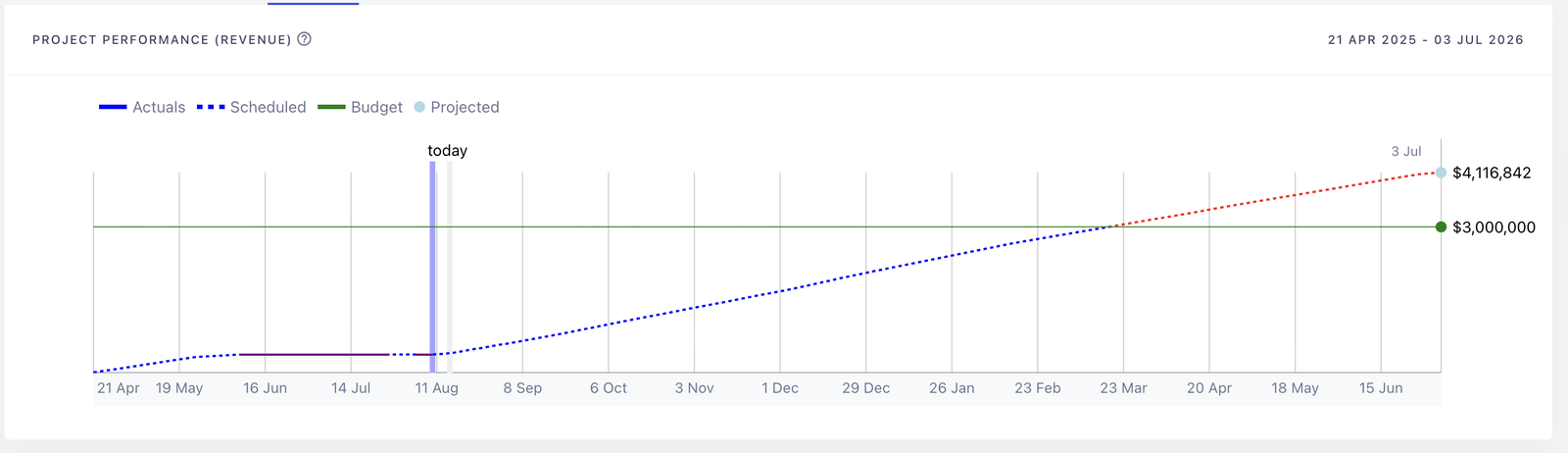
Costing: each project has a pricing model of time and materials, fixed price or non-billable, and a budget by role in money or hours, by phase in money only, or by phases and roles. Rates come from default role rates, rate cards or project-specific rates, and non-labor expenses can be added. Profit is revenue minus cost, and margin is profit over revenue.
Billing: the pricing page and the financials article list no invoicing and no accounting integration, so billing happens elsewhere.
Revenue: time and materials revenue is billable work at the project rates, and fixed-price revenue is recognised by percent complete against a time and materials benchmark. Only admins and managers with financial access see the numbers, and Runn says its figures use a generic calculation and may not match an accounting or billing system. Budget by Phase and timesheets start on Standard.
- You need to model hiring and pipeline demand with placeholders and tentative projects and see the effect on utilization before work is confirmed.
- You want transparent per-seat pricing (published $7 and $11 per resource seat per month) and can commit to at least 20 resource seats.
- You need SAML SSO or the placeholder resourcing-request workflow: both are Advanced-only (custom-priced), so Lite and Standard do not cover them.
- You need a full PSA with invoicing and billing in one system: Runn's pricing page lists project financials, not invoicing.
- Users like
- a clear visual planner
- Users dislike
- limited reporting and export options
- Source: Capterra, 33 reviews
- Starting price
- Lite $7, Standard $11 per resource seat per month, 20 seats minimum
- Minimum
- 20 resource seats
- Trial
- 30 days, no credit card
- Scheduling unit
- Hours per day, hours per week, FTE or capacity percent
- Timesheets
- Standard and up
- SAML SSO
- Advanced
- Security
- SOC 2 Type II
- Scenarios
- Saved scenarios (beta) are named sets of tentative projects, private to the creator; the help article lists them on Standard and Advanced, while the pricing page wording is less clear
- Placeholders
- Carry workload only, not capacity; unlimited on every plan; the Hiring Proposals report lists placeholders marked Hire Proposed
- Invoicing
- None listed
How to choose project accounting software
Start with who owns the numbers. If finance closes the books and needs project margin in the ledger, look at Sage Intacct, NetSuite, Deltek Vantagepoint or Acumatica, and ask each vendor which module adds billing and which adds revenue recognition, because you'll want that in the quote. If a project manager owns the budget and the books live elsewhere, a services tool such as Kantata, Productive or Runn gets you to a margin forecast faster, as long as you accept an accounting system next to it.
Then check the billing types you use. A firm that only bills hours can work with almost anything here, but that's rare once fixed fees enter the picture. A firm with fixed fees and milestones needs percent complete or milestone billing, and a firm that must report earned revenue needs recognition that runs apart from billing. Resource management software and capacity planning software cover the planning side that Runn, Productive and Kantata share.
- Create one fixed-fee and one time and materials project and bill both from the same time entries
- Log an hour with no cost rate and see what the project's cost shows
- Bill a fixed fee in full on day one and check what the tool reports as unearned
- Change the percent complete and see revenue move without touching the invoice
- Ask which module or edition holds each of these steps and get it in the quote
- Run a margin report across five projects and check that it matches the ledger
- Add a change order or a budget revision and check the original budget is kept
- Ask for the implementation time and who does it, the vendor or a partner
A demo on sample data hides most of the problems, especially the ones that only show up when billing and revenue differ. Run it on one real project from last year, which is really the only fair test,, with its real invoices, and compare the tool's margin with the number finance already trusts. A project accounting tool that agrees with finance on one old project is more useful than one with a better dashboard.
Where project accounting stops and a program view starts
Every tool above answers what a project cost, what it billed and what it earned, but it's a different question whether the program around it is on track. A program is several projects that depend on each other, often tracked in different tools, and the margin of one project says little about whether another will slip. A project that's 20 percent over budget can be on schedule, and a profitable project can hold up three others. See cross-project dependencies for how to track them, and project portfolio management software for tools that roll budgets and schedules up across projects.
Frequently asked questions
What is project accounting?
Project accounting means keeping each project's budget, costs, billing and revenue apart from the company ledger, so you can read profit per project. The work in progress and revenue recognition terms are explained in the first section of this page.
What is the difference between project accounting and general accounting?
General accounting records the company's transactions by account, such as salaries or rent. Project accounting adds a project ID to each cost and invoice, so you can see which project a cost belongs to, whether it has been billed and how much revenue the work has earned.
What are the top 5 accounting software tools for project work?
For project-based work, five that cover it in different ways are Sage Intacct, NetSuite, Acumatica, QuickBooks Online and Kantata. They differ in what they book: the first three are ERP modules, QuickBooks Online is small business accounting with Projects, and Kantata is a services tool linked to a ledger.
What software do most project managers use?
Project managers mostly run delivery in a work tool such as Jira, Asana or monday.com, and they rely on finance's accounting system for costs and invoices. Project accounting software sits between the two when a project manager has to own budget, billing or margin.
Does Microsoft make accounting software?
Yes, Microsoft makes accounting software. It sells Dynamics 365 products for finance and operations, and Dynamics 365 Project Operations covers project accounting with time and material, fixed-price and other project types. Microsoft's documentation describes revenue recognition for fixed-price projects by percent complete or completed contract, and it integrates with Dynamics 365 Finance or an external ERP. It isn't one of the eight tools reviewed here.
Is there free project accounting software?
None of the eight tools here publishes a permanent free plan. Productive offers a 14-day trial and Runn a 30-day trial, both without a credit card, and QuickBooks Online's Projects is on its paid Plus and Advanced plans.