An executive project status report is a one-page briefing that tells a sponsor or leadership team whether a project will deliver what was promised, what has changed since the last report and which decision they need to make. It's shorter and more selective than the weekly update a project team keeps for itself, and it answers a different question. Download or copy the template below, replace the fictional example values with your own and send it with the evidence behind each number a click away.
The test of a good executive report is simple: a leader who reads only the first third of the page should know the status, the reason and the ask. Everything else exists so they can check your claim, not discover it. This guide gives you the template, a filled-in example, the rules for each field and the mistakes that make executives stop reading.
- Put the overall status, the reason for it and the decision you need in the top third of the page.
- Show baseline and forecast side by side for every milestone and budget line, and never overwrite the baseline.
- Give every risk one owner and every executive ask a named decision maker, a deadline and the cost of waiting.
- Define green, amber and red with your sponsor before the first report goes out.
- Keep the report to one page and link to the team-level detail instead of pasting it in.
What is an executive project status report?
An executive project status report is a decision-focused summary of a project's outcome, schedule, budget, risks and open requests, written for people who sponsor or govern the work rather than run it. Its job is to support a decision, not to prove that the team was busy. A reader should finish it knowing whether to do nothing, watch something or act, and they shouldn't have to ask you.
That purpose changes what goes in. A team-level status report lists tasks, assignees and blockers. The executive version keeps only what changes a leadership decision: a forecast that moved, a budget line that will land differently, a risk that needs a sponsor's authority or a dependency outside the project's control.
| Team status report | Executive status report | |
|---|---|---|
| Reader | Project team and workstream leads | Sponsor, steering committee, senior leadership |
| Length | As long as the work needs | One page, with links to detail |
| Lead with | What was done this week | Overall status, reason and decision needed |
| Schedule | Task and sprint level | Milestones that move an outcome or a commitment |
| Risks | Full register | Top few that need leadership attention |
| Ends with | Next steps | A specific ask, or "No executive decision requested this period" |
If you're running several projects under one umbrella, the program status report template rolls them up, whereas this page covers one project. For the working-level version your team keeps every week, use the project status report template. This page sits between the two: the single project, written for the people above it.
What should an executive status report include?
An executive status report should include eight things, and it shouldn't include much else: the reporting period and owners, an overall status with a one-sentence reason, the business outcome, a milestone forecast, a budget position, the top risks and dependencies, the decisions you need and the date of the next update. Anything beyond that earns its place only if it changes a decision. If you're unsure, leave it out.
The order matters as much as the content. Executives read from the top and stop when they've got what they need, so the first lines carry the verdict. The detail follows in the order a skeptical reader would ask for it: where are we against the plan, what could hurt us, what do you need from me. That's the order they'd ask in anyway, so you're saving them a question.
The template below puts those eight elements into six sections on one page. It's tool-neutral, so you can paste it into an email, a slide, a wiki page or a spreadsheet tab. Replace the example values, keep the labels and don't add fields until a reader asks for one.
Executive project status report template
One page, six sections. All names, dates and amounts are fictional examples; replace them with your project's real data and source dates.
- Project
- Customer Portal ReplacementName as leadership knows it
- Reporting period
- Nov 9 to Nov 20, 2026Start and end date
- Sponsor
- Dana Whitfield, COO
- Accountable owner
- Priya Raman, program manager
- Overall status
- Amber (was green in the last report)Green, amber or red, using the agreed definitions
- Reason in one sentence
- Identity provider approval is 3 weeks late and blocks the single sign-on milestone.The cause, not a description of the color
- Decision requested
- Approve a phased login cutover. Dana Whitfield, by Nov 27.The choice, the approver and the deadline, or 'No executive decision requested this period'
- Next update
- Dec 4, 2026Date of the next report
- Outcome
- Customers can self-serve account changes without calling support.What the project is for, in the sponsor's words
- Measure and baseline
- Account-change calls per week: 420 at baseline (support log, Sep 2026)Write 'not measured' if nothing exists yet
- Current observation
- Not measured until pilot goes live in FebruarySource and date
| Milestone | Owner | Baseline | Forecast | Confidence | Note |
|---|---|---|---|---|---|
| Design approved | UX lead | Sep 30, 2026 | Sep 30, 2026 | n/a | Done, signed off by sponsor |
| Single sign-on live | Platform lead | Nov 20, 2026 | Dec 11, 2026 | Medium | Waiting on identity provider approval |
| Pilot with 200 customers | Program manager | Jan 22, 2027 | Feb 12, 2027 | Medium | Jan 22 holds only if the phased cutover is approved |
| Full launch | Program manager | Mar 26, 2027 | Mar 26, 2027 | Low | Holds only if the pilot starts by Feb 12 |
| Line | Amount | Source | Note |
|---|---|---|---|
| Approved budget | $1,200,000 | Finance, Jan 2026 | Unchanged |
| Actual spend to date | $640,000 | Ledger, Nov 20, 2026 | Reconciled |
| Committed, not yet spent | $210,000 | Purchase orders, Nov 20, 2026 | Includes vendor retainer |
| Forecast at completion | $1,280,000 | Owner estimate, Nov 20, 2026 | $80,000 over approved (6.7%); $430,000 still to come |
| Type | Item | Impact | Mitigation | Owner | Decide by |
|---|---|---|---|---|---|
| Issue | Identity provider approval late | Single sign-on slips 3 weeks | Phased cutover, password login stays for pilot | Platform lead | Nov 27, 2026 |
| Risk | Support team not trained before pilot | Pilot calls go unanswered | Book two training sessions in January | Support manager | Dec 18, 2026 |
| Dependency | Billing API change from Finance IT | Invoices can't show new plan names | Confirm delivery date in writing | Finance IT lead | Dec 4, 2026 |
| Decision | Recommendation | Options considered | Decision maker | Deadline | Cost of delay |
|---|---|---|---|---|---|
| Phased login cutover | Approve | Wait for approval; phased cutover; drop single sign-on from pilot | Dana Whitfield | Nov 27, 2026 | Pilot slips to Feb 12 and the Mar 26 launch is left with no slack |
Field rules: The reason sentence names a cause ("identity provider approval is late"), never a mood ("some concerns"). It shouldn't need a second sentence to be understood. The baseline is the last approved plan and stays on the page even when the forecast moves. Every budget figure carries a source and a date, because "approved", "committed" and "spent" are three different numbers that finance and delivery teams often mix up. A risk row without an owner and a decide-by date is a worry, not a managed risk.
If pasted text lands in one column, use your spreadsheet's split-text-to-columns function with a tab delimiter. Word users can paste the sections as tables straight into a document or a slide.
How do you fill in an executive status report?
You fill in an executive status report by collecting evidence from the people who own it, comparing it with the approved baseline and writing the verdict last. Work from the bottom of the page up, so the summary reflects what you've verified, not what you'd hoped to report.
Collect changes from owners
Ask each workstream owner one question: what's changed since the last report, and what's the effect on the next milestone? Request the evidence with the answer, such as a schedule export, a finance extract or a risk log entry.
Compare against the baseline
Set every date and amount next to the approved baseline. Record the movement in a sentence. If the baseline itself changed, note who approved the change and when.
Reconcile the numbers
Check dates against the schedule, spend against finance and risks against the issue log. If finance hasn't reconciled the latest spend, say so on the page and show the date of the last reconciled figure.
Decide the status
Apply the agreed definitions mechanically. If the status differs from the last report, write one sentence explaining the change and who agreed to it.
Write the ask
State the choice, your recommendation, the decision maker, the deadline and what happens if nobody decides. Remove any request that leadership can't act on.
Cut and send
Remove every line that wouldn't change a decision, add links to the detail and send a dated version from one accountable editor. Keep the earlier versions so readers can trace changes.
How does the filled-in example read?
The fictional example in the template shows a project that was green last period and is amber now. The sponsor sees the cause (a late identity provider approval), the effect (single sign-on slips three weeks, and the pilot slips with it unless leadership approves a workaround) and the commitment that's still at stake (the March 26 launch). The report doesn't ask for guidance, since guidance isn't a decision. Instead, it asks for approval of one specific option by one specific date.
Notice what the example leaves out: the individual tasks that make up the single sign-on workstream, the names of the engineers waiting on the approval and the history of the email exchange with the identity provider. All of that lives in the team's tracker. The executive page carries the consequence and a link, nothing more.
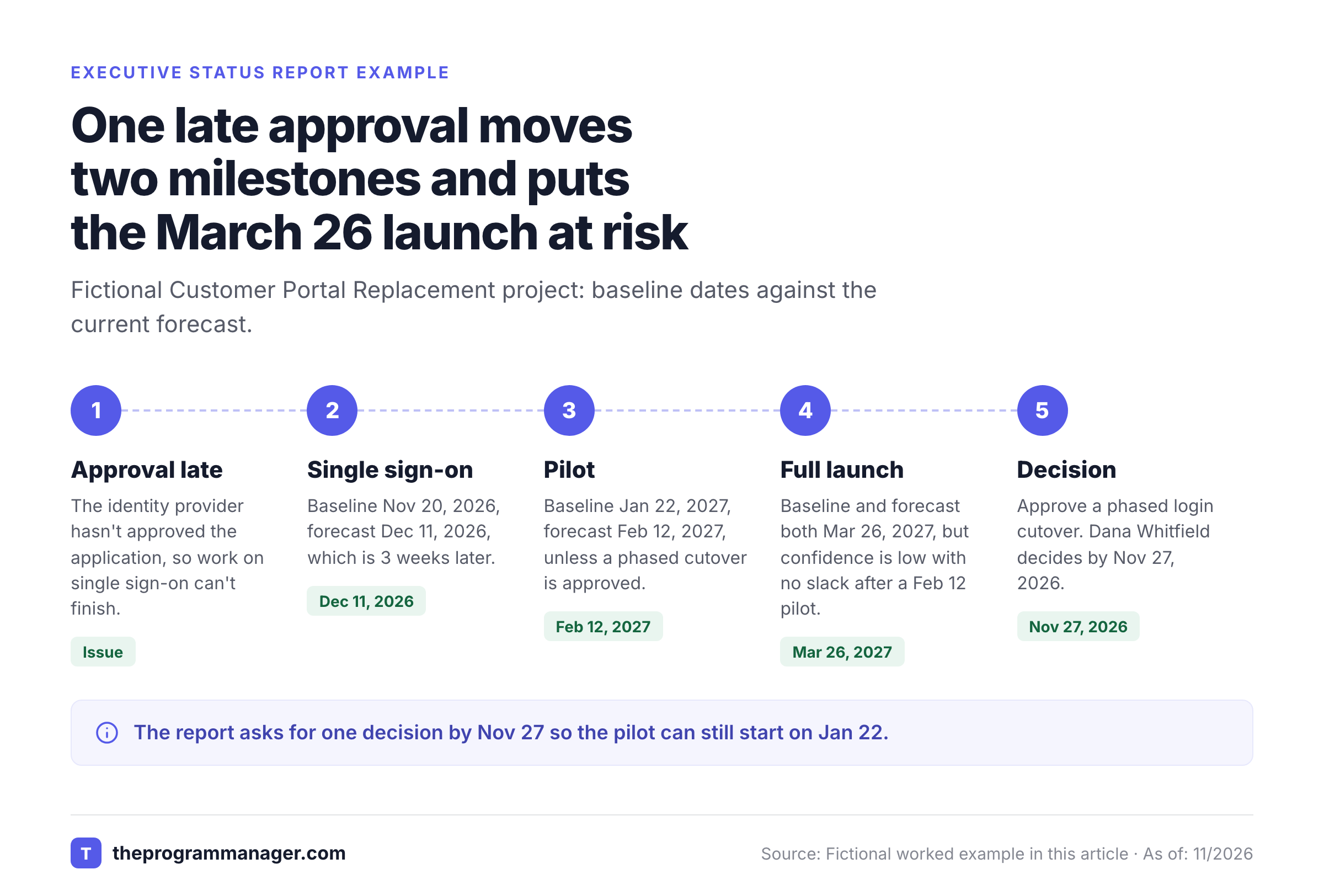
The budget block shows the same discipline. The forecast at completion of $1,280,000 is $80,000 above the $1,200,000 approved budget, which is about 6.7 percent. The report states that gap plainly, labels the forecast as an owner estimate and shows when finance last reconciled spend. A leader reading it knows what's fact and what's an estimate, which is the point.
What do green, amber and red mean in an executive report?
Green means the forecast sits within the tolerance the sponsor approved, amber means a credible threat to a commitment that needs a recovery plan, and red means a commitment is already breached or recovery would need leadership to change the commitment itself. The labels only work if sponsor and project team agreed on them before the first report, because a color nobody's defined is just an opinion.
Don't copy a universal threshold from a template. A two-week slip can be irrelevant for one project, yet fatal for another that's tied to a regulatory date or a contract. Agree tolerances per project, write them into the project charter or the first report and apply them mechanically afterwards, so nobody's arguing about colors later.
| Status | Working definition | What the report must contain | What leadership does |
|---|---|---|---|
| Green | Forecast within approved tolerance on schedule, budget and scope | One-line confirmation, any watch items | Nothing; read and move on |
| Amber | A credible threat to a commitment, with a recovery action available inside the team's authority | Cause, recovery plan, owner, date the plan must work by, and any approval you need | Approve the plan if asked, otherwise watch |
| Red | A commitment is breached, or recovery would need leadership to change the commitment itself (date, budget or scope) | Cause, options, recommendation, decision maker, deadline | Decide, or remove the obstacle |
Two rules keep the colors honest, and neither is complicated. First, the overall status can't be greener than the worst critical item beneath it: a blocked dependency on the critical path makes the report amber at best, whatever the task counts say. Second, a status change needs a sentence of explanation, even when it's an improvement. Silent upgrades from red to green cost you a sponsor's trust.
Record who approved each rebaseline, too. If the plan was reset twice and the report always shows green against the latest plan, the history is the story, and it should stay visible. The steering committee guide covers who sets those tolerances and who can approve a rebaseline.
How do you write the executive summary and the ask?
You write the executive summary as three short statements: where the project stands, why, and what you need. Lead with the conclusion, give the cause in plain words and end with a request that names a person and a date. Skip the history, because the reader already knows the project and doesn't need the backstory.
Compare weak and strong versions of the same two situations.
| Weak version | Strong version |
|---|---|
| "Budget is tracking broadly in line, with some pressure expected." | "Forecast at completion is $1,280,000, $80,000 over the approved $1,200,000. Finance reconciled spend on Nov 20." |
| "Good progress was made this period across workstreams. A few dependencies are being monitored. We'd welcome leadership guidance on next steps." | "Amber. Single sign-on will land Dec 11, not Nov 20, because the identity provider hasn't approved our application. Please approve a phased login cutover by Nov 27 so the pilot can start Jan 22." |
The weak versions state no status, name no cause, give no date and ask for nothing a person can do. The strong versions can be answered with a yes, a no or a different option. That's the standard every executive ask should meet.
Each ask needs six parts, and they're all required: the choice, your recommendation, the options you considered, the decision maker, the deadline and the consequence of delay. If you can't name the consequence, the request probably isn't urgent enough for the executive page. When nothing's needed, say so in those words: "No executive decision requested this period." That sentence tells a busy reader they can stop.
PM Network's 2014 article on effective status reports, published by the Project Management Institute, quotes program manager Daniel Glasow on why brevity matters. He says reports have to be "simple, short and clearly structured" and that a project manager who can't explain the status in a few words may have an underlying problem. He recalls reports of up to 10 slides full of activity detail that never answered how the project was doing. Mattias Hallberg of Rakuten describes the fix on a global platform launch involving more than 150 team members: a brief color-coded section that works as an executive summary, so decision makers can judge whether they need to read further, with links to detail for those who want it. See Swanson's "Anatomy of an effective status report" on pmi.org. That's the structure of the template above, with the verdict on top and the evidence one link away.
Avoid jargon the sponsor wouldn't use in conversation. "Resource bandwidth optimization" hides the real constraint, which might be that two engineers are shared with another project until December. Name that constraint instead; it's what the sponsor can actually fix.
How do you report schedule and budget honestly?
You report schedule and budget honestly by showing the approved baseline next to the current forecast, labeling estimates as estimates and dating every figure. Leadership can handle a forecast that moved, but it can't handle finding out later that the baseline moved with it.
For the schedule, list only milestones that influence an executive decision: gates, external commitments, launch dates and benefit checkpoints. For each, show the baseline date, the latest forecast, the owner and a confidence level. Explain a date change in one sentence and name the upstream cause, as the example does for single sign-on and the pilot. The program roadmap template shows how to track those chains across several projects.
For the budget, keep four numbers apart:
- Approved budget: the amount leadership authorized.
- Actual spend: money already booked, as of a stated date.
- Committed spend: purchase orders and contracts not yet invoiced.
- Forecast at completion: actual plus committed plus the owner's estimate of what's still to come.
Report the gap between forecast at completion and approved budget in both dollars and percent, and mark whether finance has reconciled it. Escalate decisions about capacity, vendor contracts and trade-offs; that's what leadership can actually change. Don't use the executive page to ask for routine purchase approvals that a delegated budget holder can sign; they'd only clutter it.
Where you haven't got a number, write "not measured" or "pending verification" with a named follow-up owner and a date. An honest gap's cheaper than a percentage you'll have to retract.
Which risks, issues and dependencies belong on the page?
Only the few that need leadership attention belong on the page: risks you can't mitigate inside the project, issues that are already hurting a commitment and dependencies on teams or suppliers you don't control. The full list lives in your risk register or RAID log and is linked from the report.
Use the three terms precisely, because they aren't interchangeable. A risk might happen, an issue's already happening and a dependency is work you need from someone else. Mixing them hides the action. A risk needs a mitigation and a trigger, an issue needs a fix and a date, and a dependency needs a written delivery commitment from the other party.
Give every item one accountable owner, a plain-language impact, a mitigation and a decide-by date; it's the minimum for anyone to act. "Support team not trained before pilot" is a good risk line because it names the consequence (pilot calls go unanswered), the mitigation (two sessions in January) and the person who owns it. "Resourcing concerns" isn't, because nobody can act on it.
Never bury a blocked dependency under a green overall status. If a critical-path item is waiting on another team and nobody's committed to a date, the report shows it in the top third of the page, whatever color the rest of the project has.
How often should you send an executive status report?
Send it at the rhythm of the decisions it supports. Weekly suits a project with a live critical path or frequent sponsor decisions. A stable project, however, can report every two weeks or monthly. If a threshold's breached between reports, send an exception note immediately instead of waiting for the next cycle.
A simple weekly rhythm keeps the report accurate without making it a full-time job:
- Monday: workstream owners submit milestone, budget and risk changes with evidence.
- Tuesday: the program manager checks the source records and drafts the one-page narrative.
- Wednesday: the sponsor reviews unresolved trade-offs before they appear in print.
- Thursday: leadership receives the report with decisions due and links to evidence.
Adjust the days to your governance cycle, but keep the order: collect, verify, draft, pre-wire the sponsor, send. The sponsor pre-read matters most, and it's the step teams drop first because it feels optional. It isn't. An executive who's surprised by a red status in a distribution email will assume you hid it, and one who's heard it from you a day earlier will treat it as managed.
Keep one accountable editor and one dated version. Conflicting copies in different folders are a quiet way to lose credibility, so store each report where earlier ones sit and name files by date.
What mistakes make executives stop reading?
Executives stop reading when a report shows green while a critical dependency is overdue, lists achievements without a forecast, or asks for a decision after the deadline has passed. These errors share a cause: the report describes effort instead of reporting position.
- A green status with a blocked critical dependency. One surprise like this costs you credibility. Apply the status rule mechanically, even when it's uncomfortable.
- A page of achievements and no forecast. Completed work matters only through what it does to the next milestone and the outcome, not for its own sake.
- Unexplained rebaselines. Moving the plan to match reality, without saying so, makes every later report look better than it is.
- Stale budget figures. An undated number may be three months old. Show the source and the date.
- Vague ownership. "The team is looking into it" names nobody. One person, one date.
- A late ask. A decision requested after its deadline has already been made by default. Put the deadline in the first lines.
- Pasting the team report. If the page needs scrolling, the reader will start skimming and skip the one line that matters.
The cure's the same for all of them: require evidence for each claim and write explicit escalation criteria into the status definitions. The project charter template is a good place to record the tolerances and the reporting rhythm once, so the report doesn't have to argue for them each time.
How do you adapt the template to your situation?
You adapt the template by changing what sits around the six sections rather than the sections themselves. Keep the status definitions and field labels identical across projects so leadership reads every report the same way.
- Small initiative: use one page with the verdict, outcome, milestones and asks. Fold budget into a single line when there's little spend.
- Several projects under one sponsor: produce one page per project and a summary page that lists only exceptions. The project portfolio dashboard template shows a roll-up view.
- Regulated or contractual work: add a row for compliance sign-offs and evidence links, and record the approver of any rebaseline.
- External sponsor or client: remove internal-only risks and budget lines before sending, and confirm with the account owner what the client has already agreed to see.
- Agile delivery: replace date milestones with release goals and the forecast range from the team's own delivery data, and label the range as a forecast.
Whatever you change, check the result against the question each section answers; that's what keeps the page consistent. If a new field doesn't help a leader decide, drop it, however useful it feels to the team. Share confidential material only with the readers who're authorized to see it, and put a line saying so in the footer.
What should you check before you send it?
Check that every number has a source and a date, every status has a reason, every amber or red item has an action and every ask has a decision maker and a deadline. Then read the page once as the sponsor, starting from the top and stopping where you'd stop.
- The reporting period and version date are on the page
- The overall status uses the agreed definitions and has a one-sentence reason
- Any status change since the last report is explained
- Baseline and forecast are both shown for every milestone
- Every budget figure has a source and a date, and unreconciled spend is labeled
- Every risk, issue and dependency has one owner and a decide-by date
- Every executive ask names the choice, the recommendation, the decision maker and the deadline
- Details that don't change a decision are removed or moved behind a link
- Confidential information goes only to authorized readers
If the report still runs past one page after that pass, the cause is usually a section that belongs in the team report. Move it to an appendix or leave it in the source system and link to it.
Frequently asked questions about executive status report templates
What belongs in an executive project status report?
An overall status with a one-sentence reason, the business outcome, a milestone forecast against the baseline, the budget position, the top risks and dependencies, and the decisions leadership needs to make.
How long should an executive status report be?
One page. Link to schedules, finance records and the full risk log for readers who want detail, but keep the verdict, the reason and the ask on the page itself.
How often should executives receive a status report?
Match the rhythm to the decisions. Weekly suits projects with an active critical path, while stable projects can report every two weeks or monthly. Send an exception note when a threshold is breached between reports.
What does amber mean in a status report?
Amber signals a credible threat to an agreed commitment. The report should show the cause, a recovery action inside the team's authority, an owner and the date by which the recovery must work.
How is an executive report different from a team status report?
The team report lists tasks and blockers for the people doing the work. The executive report keeps only what changes a leadership decision: the verdict, forecast changes, budget position, top risks and a specific ask.
Can I use this template in Excel, Word or Google Sheets?
Yes. Download the Word or Excel file, or use the copy button and paste a section into Google Sheets, a slide or an email. The labels matter more than the file format, so don't rename them.
Related templates and guides
An executive report's the top layer of a reporting system. Use the guides below for the working-level update beneath it, the risk log behind it and the governance around it.