A RAID log template is a ready-made spreadsheet with one row per risk, assumption, issue or dependency and a fixed set of columns: ID, type, description, workstream, owner, probability, impact, score, response, status and two dates. The one below is filled in for a fictional point-of-sale rollout across a retail chain, with nine example entries you can overwrite.
Copy it into a sheet or download it as an Excel or Word file, whichever you'll actually use. The Excel file has dropdowns for type and status, a score formula and a red flag on overdue reviews. If you need the definition of RAID first, our RAID log guide explains it. This page is for the moment you've got to produce the file. It's free, and there's no sign-up.
- Copy or download the log below, replace the example entries and delete the rows you don't use. Twelve columns are included, and six of them are the minimum.
- Give every entry an ID, a type, one named owner, a status and a review date. A log without review dates is a list nobody reopens.
- Score risks as probability times impact on 1 to 5 scales, so the top score is 25. Issues have already happened, so they get an impact and no probability.
- On a program, keep one identical log per workstream and move only escalated entries and cross-workstream dependencies into a program log.
Free RAID log template: copy it or download it as Excel or Word
The RAID log template has 3 tabs and 12 columns. Tab 1 is the RAID log, with 9 example entries from a fictional point-of-sale rollout: two risks, two assumptions, two issues and three dependencies. Tab 2 holds the lists and scoring rules behind the dropdowns. Tab 3 lists six checks and the plain COUNTIFS formulas that run them. Everything in it is an example, so you'll want to replace the entries, names and dates with your own.
RAID log template for a program
Three linked tabs: a RAID log filled in for a fictional point-of-sale rollout across a retail chain, a tab with the lists and scoring rules, and a tab of checks. Every entry, name and date is an example. Replace them with your own and delete the rows you don't use.
| ID | Type | Description | Workstream | Owner | Probability | Impact | Score | Response | Status | Date raised | Review date |
|---|---|---|---|---|---|---|---|---|---|---|---|
| R-01 | Risk | If the card terminal vendor ships after 14 December, the 12 pilot stores can't go live before the holiday freeze | Hardware | Hardware lead | 3 | 5 | 15 | Ask the vendor for a firm ship date and line up the backup terminal model | Escalated | 2026-11-02 | 2026-11-23 |
| R-02 | Risk | Two trainers may be pulled onto the January stock count | Training | Training lead | 3 | 3 | 9 | Book the trainers for the pilot weeks now | Open | 2026-11-02 | 2026-11-30 |
| A-01 | Assumption | Store Wi-Fi can carry the new till software without upgrades | Hardware | Program manager | n/a | n/a | n/a | Survey six pilot stores by 27 November | Open | 2026-11-02 | 2026-11-27 |
| A-02 | Assumption | Finance approves the new receipt layout within three weeks | Software | Software lead | n/a | n/a | n/a | Submit the layout by 9 November and check at the next review | Open | 2026-11-02 | 2026-11-30 |
| I-01 | Issue | The test payment gateway rejects refunds, so returns can't be tested | Payments | Payments lead | n/a | 4 | n/a | Run the manual refund script while the vendor ticket is open | Open | 2026-11-09 | 2026-11-16 |
| I-02 | Issue | Pilot store 3 has no network port at the till | Hardware | Hardware lead | n/a | 2 | n/a | Electrician booked for 18 November | Resolved | 2026-11-09 | 2026-11-23 |
| D-01 | Dependency | Till software testing needs the new product catalog from merchandising | Software, needs Merchandising | Program manager | n/a | n/a | n/a | Delivery date requested from the merchandising lead | Open | 2026-11-02 | 2026-11-16 |
| D-02 | Dependency | Training videos need the final screens from design | Training, needs Design | Training lead | n/a | n/a | n/a | Final screens due 30 November | Open | 2026-11-02 | 2026-11-30 |
| D-03 | Dependency | Pilot go-live needs the card terminals tracked in R-01 | Hardware | Program manager | n/a | n/a | n/a | Linked to R-01, review together | Escalated | 2026-11-02 | 2026-11-23 |
| Field | Allowed values | Rule |
|---|---|---|
| Type | Risk, Assumption, Issue, Dependency | One type per row. When a risk happens, log a new issue and keep the risk's ID in the response. |
| Status | Open, Escalated, Resolved, Closed | Resolved means the work is done. Closed means someone confirmed it at a review. |
| Probability | 1 rare, 2 unlikely, 3 possible, 4 likely, 5 almost certain | Risks only. Issues have already happened. |
| Impact | 1 minor, 2 small, 3 moderate, 4 major, 5 severe | Risks and issues. Use the same scale in every workstream. |
| Score | Probability times impact, 1 to 25 | Risks only. Formula in the Excel file. |
| Bands (example) | 1 to 7 low, 8 to 14 medium, 15 to 25 high | Our example thresholds. Agree your own with the steering committee. |
| ID | Type letter plus number, such as R-01 | Add a workstream prefix for a program, such as HW-R-01. |
| Check | Pass condition | Formula (log in rows 2 to 200, columns as in Tab 1) |
|---|---|---|
| Entries without an owner | 0 | =COUNTIFS(B2:B200,"<>",E2:E200,"") |
| Open or escalated entries past their review date | 0 | =COUNTIFS(J2:J200,"Open",L2:L200,"<"&TODAY())+COUNTIFS(J2:J200,"Escalated",L2:L200,"<"&TODAY()) |
| Risks without a response | 0 | =COUNTIFS(B2:B200,"Risk",I2:I200,"") |
| High risks (score 15 or more) | Each one escalated or has a named reason | =COUNTIFS(B2:B200,"Risk",H2:H200,">=15") |
| Resolved entries still waiting for a review | Closed at the next review | =COUNTIFS(J2:J200,"Resolved") |
| Open risks | Compare with last review | =COUNTIFS(B2:B200,"Risk",J2:J200,"Open") |
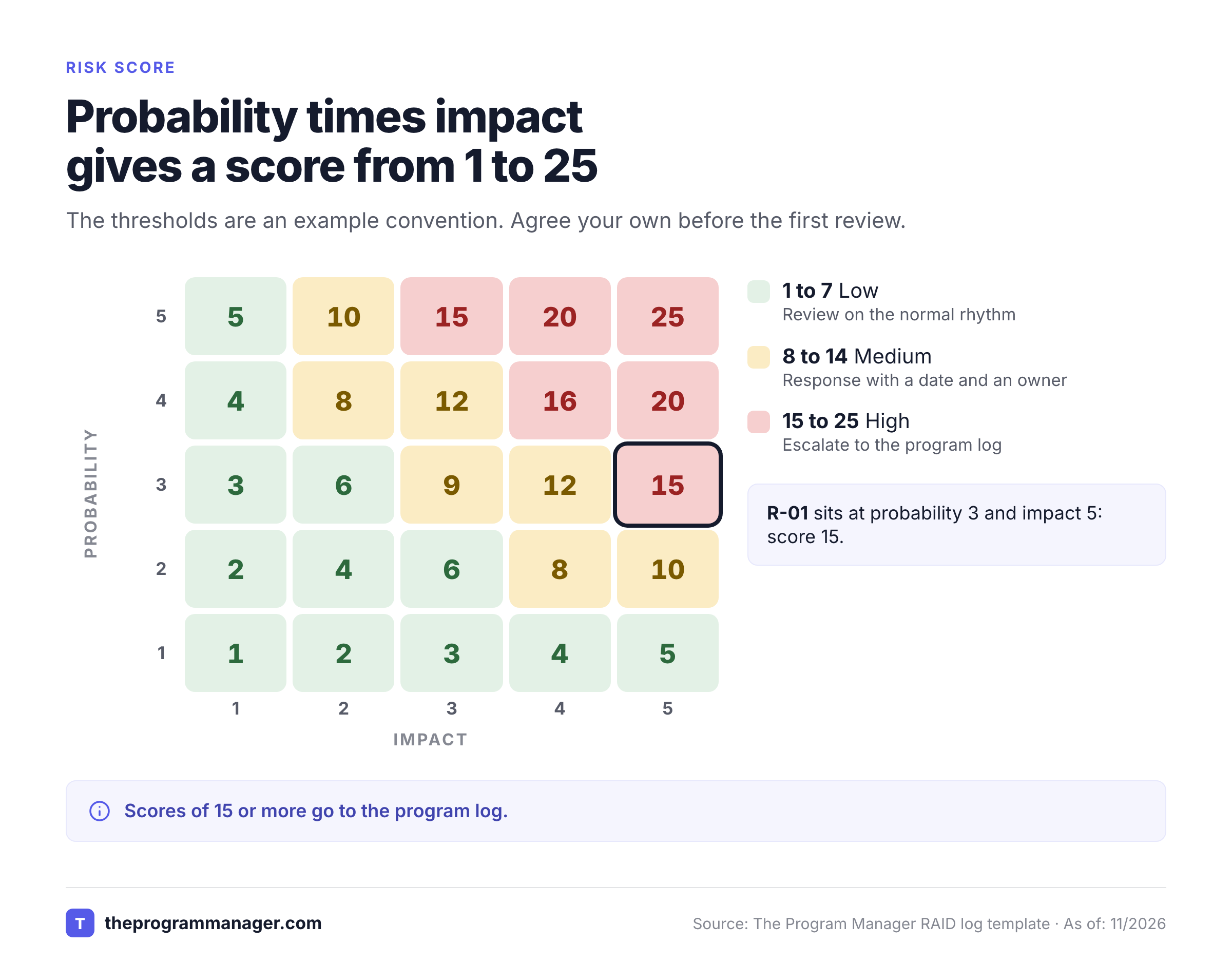
How to read the example: R-01 scores 15 and is escalated because the whole pilot depends on the card terminals. D-03 is the dependency side of the same problem, so the two entries are linked and reviewed together. The assumptions each carry a check, since an assumption nobody plans to validate is just a risk nobody has named. I-02 is resolved but not closed, which is intentional: it stays on the log until the next review confirms the port works.
Cells that read n/a aren't gaps. A probability doesn't apply to an issue because it has already happened, and an assumption gets no score at all. Leave those cells empty in your own log. The check formulas still work, but a stray zero would throw them off.
What should a RAID log template include?
A RAID log template needs 6 fields at minimum: an ID, the type, a description, one owner, a status and a review date. The other 6 in the file (workstream, probability, impact, score, response and date raised) turn it from a list into a log you can run a program with. Add contingency only if your risks need a separate fallback plan.
| Column | What to write | Applies to | Needed from day one |
|---|---|---|---|
| ID | A unique number with a type letter, such as R-01 or D-03 | All | Yes |
| Type | Risk, assumption, issue or dependency | All | Yes |
| Description | One sentence: the condition and what it affects | All | Yes |
| Owner | One named person who keeps the entry moving | All | Yes |
| Status | Open, escalated, resolved or closed | All | Yes |
| Review date | The day someone must look at it next | All | Yes |
| Workstream | The project or team the entry belongs to | All | Programs |
| Probability | 1 to 5 | Risks | Optional |
| Impact | 1 to 5 | Risks and issues | Optional |
| Score | Probability times impact | Risks | Optional |
| Response | The mitigation, validation step, workaround or the date you're waiting for | All | Yes, for anything scoring 8 or more |
| Date raised | The day the entry was added | All | Optional |
| Contingency | What you'll do if the risk happens | Risks | Optional |
The column set follows what the published templates ask for, and it's much shorter than most people expect. Smartsheet's basic RAID template has columns for the RAID category, description, impact and priority. Career Smarter's template has 10 columns: ID, type, description, owner, impact, probability, status, actions, date raised and review date. Smartsheet also says every item should carry its category, an ID number, a deadline, a description and an assignee. Cafe Associates keeps contingency apart from mitigation and points out that likelihood doesn't apply to issues.
Asana's template cuts it differently: it separates the log into risks, assumptions and dependencies found during planning, and issues, actions, dependencies and decisions raised after kickoff. If your project already has a kickoff date, a column for the phase in which the entry was raised does the same job inside one sheet.
How do you fill in a RAID log template?
Fill in a RAID log template by gathering the entries as a team, writing each one as a single sentence, giving it an ID and one owner, scoring the risks and setting a review date. Atlassian suggests workshops, stand-ups or focused discussions to collect the first list, because individual contributors miss things others see. The five steps below add the scoring and the review rhythm.
Collect the first entries as a team
Bring the project leads, and for a program the workstream leads and the PMO, into one session. Ask three questions: what might go wrong, what are we treating as true without proof, and what do we need from another team. Log everything before you argue about scores.
Write each entry as one sentence
Use the pattern "If X happens, Y is affected" for risks and a plain statement of what's broken for issues. Vague entries such as "vendor problems" can't be scored, assigned or closed, and they're the first ones people stop reading.
Give every entry an ID and one owner
Cafe Associates advises numbering each entry, because names alone get confusing when you refer back to them. The owner is the person who keeps the entry moving, not necessarily the person who fixes it.
Score the risks and write the response
Rate probability and impact from 1 to 5 and let the formula multiply them. Anything scoring 8 or more gets a response with a date. Issues get an impact and a workaround, and dependencies get the date you're waiting for.
Set a review date and keep it
Every entry needs a date when someone must look at it again. Rebel's Guide to Project Management reviews dependencies about once a month and suggests reviewing everything on the log at least monthly. Fast-moving programs usually review weekly.

How do you score risks and set up dropdowns in a RAID log spreadsheet?
Score a risk by multiplying probability by impact on two 1 to 5 scales, which gives a top score of 25, then put dropdowns on Type and Status and a formula on the score column so nobody types it by hand. The scales and the 15 threshold below are our convention, not a published standard, so agree your own with the steering committee before the first review.
| Score | Band | What to do |
|---|---|---|
| 1 to 7 | Low | Keep it in the workstream log and review on the normal rhythm |
| 8 to 14 | Medium | Write a response with a date and an owner |
| 15 to 25 | High | Escalate to the program log and review it at every steering meeting |
The Excel file already has all of this built in. If you're setting up your own sheet, the steps are short:
- Score formula: in the Score column, use
=IF(B2="Risk",F2*G2,""), where B is Type, F is Probability and G is Impact. It leaves issues, assumptions and dependencies empty. - Dropdowns in Excel: select the Type cells, open Data, then Data Validation, set Allow to List and enter the four types. Repeat for Status.
- Dropdowns in Google Sheets: select the cells and choose Insert, then Dropdown. Google's help page also describes Data, then Data validation, then Add rule for a list from a range.
- Red flag on high scores: add a conditional formatting rule with the custom formula
=$H2>=15on the Score column. - Red flag on overdue reviews: use
=AND($L2<TODAY(),$J2<>"Closed",$J2<>"Resolved")on the Review date column, where J is Status and L is the review date.
The formulas in this RAID log template cover rows 2 to 200, which leaves room for 199 entries before you extend the range. Keep the lists on their own tab, as in Tab 2, and point the dropdowns at it. That way, when someone adds a status later, every dropdown picks it up instead of just one column.
How do you check a RAID log before a review meeting?
Check a RAID log by looking for five failures before the meeting: entries without an owner, reviews that are overdue, risks without a response, high scores that haven't been escalated and resolved entries nobody has closed. Tab 3 counts the first four with COUNTIFS formulas and the last with a simple COUNTIFS on status, so you can read the result at a glance.
| Check | What a failure means | Formula in Tab 3 |
|---|---|---|
| Entries without an owner | Nobody is keeping the entry moving | =COUNTIFS(B2:B200,"<>",E2:E200,"") |
| Reviews past their date | The log has stopped being reviewed | =COUNTIFS(J2:J200,"Open",L2:L200,"<"&TODAY()) plus the same for "Escalated" |
| Risks without a response | The risk is recorded but not managed | =COUNTIFS(B2:B200,"Risk",I2:I200,"") |
| High risks | Scores of 15 or more that aren't on the program log | =COUNTIFS(B2:B200,"Risk",H2:H200,">=15") |
| Resolved but not closed | Entries waiting for a confirming review | =COUNTIFS(J2:J200,"Resolved") |
Atlassian lists two drawbacks of a RAID log that these checks target: it needs frequent updates, and logging every small question can bury the items that matter. The overdue check handles the first, and the high-risk count shows whether the second has happened. If a log has 60 open entries and four of them score above 15, those four are the meeting, not the other 56.
- Every entry has an ID, a type and one named owner
- Every open entry has a review date in the future
- Every risk scoring 8 or more has a response with a date
- Every entry scoring 15 or more is on the program log
- Resolved entries are closed, with a note on why
- The log sits in one place and everyone knows where
Which RAID log template format should you use?
The best RAID log template format depends on the job (the file here covers 2 of the 4 below): Excel when the log will be edited and checked with formulas, Word when it sits inside a plan or charter, Google Sheets when several people edit at once and slides when you present a summary to the steering committee. The download above covers Excel and Word, and the other two take one extra step each.
| Format | Best when | How to get it from this page |
|---|---|---|
| Excel (.xlsx) | The log is edited weekly and checked with formulas | Download the Excel file, which has dropdowns, the score formula and the overdue flag |
| Word (.docx) | The log is an appendix to a plan, charter or kickoff pack | Download the Word file |
| Google Sheets | Several people edit the log at the same time | In Sheets, choose File, then Import, and upload the Excel file |
| PowerPoint or slides | You summarize the log for a steering committee | Paste the high-risk rows from Tab 1 onto one slide |
Google's help page for importing files describes the path: open Sheets, choose File and Import, select the Excel file and pick whether to create a new spreadsheet or insert the tab as a new sheet. If you only need one tab, use Copy as text on the template card and paste it straight into a sheet.
Smartsheet publishes 5 RAID templates: a basic log, a matrix log with swimlanes by phase, a presentation, an Agile version with one sheet per category and a Gantt-style timeline, and an analysis report. They come in 7 formats: Excel, Word, PDF, PowerPoint, Google Docs, Google Slides and Google Sheets. That's a useful reference if you want a visual layout, though the licence terms of any template you take from another site are yours to check before you redistribute it.
If the log is going to live in a project tool, Asana's template shows the usual setup: custom fields for category, impact and status, a list view to see everything at once and task dependencies to mark which entries wait on others. Start in the spreadsheet if the process isn't settled yet; it's the cheaper place to be wrong. Moving a settled log into a tool is a simple import, and moving an unsettled one means rebuilding the fields.
How is a program RAID log template different from a project one?
A program RAID log template adds a workstream column and an ID prefix, and the program keeps one identical log per workstream plus a thinner program log above them. The project version is a single sheet. The program version is a set of sheets with identical columns, so a rollup is a filter instead of a rewrite.
| Dimension | Project RAID log | Program RAID log |
|---|---|---|
| Number of logs | One | One per workstream, plus a program log |
| IDs | R-01, I-02 | A workstream prefix, such as HW-R-01 or TR-D-02 |
| What moves up | Nothing | Escalated entries and every dependency between workstreams |
| Who reviews | The project manager and team | Workstream leads weekly, the program manager and PMO before each steering meeting |
| Escalation rule | Usually none | Written in the header, for example a score of 15 or more or any cross-workstream impact |
Any RAID log entry scoring 15 or more moves up to the program log, and the 8 to 14 band stays in the workstream log with a dated response. The ID prefix is what keeps the rollup honest. When the program log copies R-01 from the hardware workstream, the entry keeps its ID, and the hardware log stays the record. Dependencies belong in both logs: the waiting workstream records the dependency so its lead sees it, and the program log carries every dependency between workstreams, since no single workstream sees them all. For the escalation rules and the full program method, see the RAID log guide. For the handoffs themselves, the project dependency matrix template lays them out as a grid.
A spreadsheet handles this well up to a handful of workstreams, but it's weak when an entry has to follow the state of work in other systems. The Program Manager doesn't replace the log, but it covers the dependency part: it maps links between work items across Jira and Asana, tracks blockers through an eight-state workflow with owners, due dates and the milestones each blocker holds, and keeps a decision log with options, rationale and approver. That means the D entries and the blockers can come from the tools your teams already use, rather than being retyped into a sheet.
What is the difference between a RAID log, a risk register and a RACI chart?
A RAID log tracks risks, assumptions, issues and dependencies in one sheet, a risk register tracks risks only and a RACI chart assigns who does what. They answer different questions, and a program usually uses all three.
| Document | What it covers | Use it for |
|---|---|---|
| RAID log | Risks, assumptions, issues and dependencies | One working log per project or workstream |
| Risk register | Risks only, with analysis and responses | Detailed risk analysis, see our risk register guide |
| RACI chart | Who is responsible, accountable, consulted or informed | Settling ownership, see our RACI template |
Give the owner column of the RAID log the same names that are accountable in the RACI chart, and the two documents stop contradicting each other. Our collection of program management templates links the rest of the set, including the status report template where the top entries from the log usually end up.
RAID log template FAQs
These answers cover the questions that come up when a team moves a RAID log template from a workshop into everyday use.
What should be on a RAID log?
A RAID log needs an ID, the type (risk, assumption, issue or dependency), a one-sentence description, one named owner, a status and a review date. Add the workstream, probability, impact, score, response and date raised once the log has more than a handful of entries.
Is there a free RAID log template in Excel?
Yes, there's a free RAID log template on this page, and it downloads as an Excel or Word file with no sign-up. The Excel file has dropdowns for type and status, a score formula and a flag for overdue reviews.
Can I use this RAID log template in Google Sheets?
Yes, you can use this RAID log template in Google Sheets. Choose File, then Import, and upload the Excel file. You can also use Copy as text on the template card and paste a tab straight into a sheet.
What does RAID stand for in a PMO?
RAID stands for risks, assumptions, issues and dependencies. Some teams use risks, actions, issues and decisions instead, which is how Smartsheet's help center and Asana describe the alternative. Write your version at the top of the log.
How often should you update a RAID log?
Update a RAID log at least monthly, which is the minimum Rebel's Guide to Project Management suggests for reviewing the whole log. Programs that move quickly usually review each workstream log weekly and the program log before each steering meeting.
What is the difference between a RAID log and a RACI chart?
A RAID log tracks what could go wrong or is waiting on someone. A RACI chart says who is responsible, accountable, consulted or informed for each task or decision. Use both, and keep the owner names consistent.