A program status report tells sponsors whether a group of related projects is delivering the outcomes it promised. A useful report doesn't stop at coloring project rows green, amber or red. It explains progress toward business benefits, shows cross-project dependencies, names the decisions executives must make and lists what's next.
This guide includes a copy-ready template with a downloadable file, a worked example and a repeatable reporting process. The structure suits a weekly or biweekly leadership review, and the same layout works for a monthly steering committee. If your reader is one executive following a single project, the executive project status report template is the shorter fit.
- Open with an executive summary of what changed and which decision the sponsor must make, then give the evidence.
- Set the overall status from approved success criteria, never by averaging project colors.
- Keep approved, forecast and actual dates in separate fields.
- Write Not available with an owner and a date instead of guessing a figure.
What is a program status report?
A program status report is a recurring summary that shows sponsors the health of a program: whether its outcomes, committed dates, funding and cross-project dependencies are still achievable, and which decisions are needed now. It differs from a project status report because it connects deliverables from several projects to shared business outcomes.
A project manager reports tasks, milestones and deliverables. A program manager's job is to link those deliverables to the outcomes the program promised and to explain how a problem in one workstream affects the others. A sponsor usually wants four answers: is the program still viable, which benefits are on track, what's changed since the last report, and what's needed from them.
Include the reporting period, accountable program manager, overall status, outcome measures, key milestones, budget and forecast, risks, dependencies, decisions and next steps. Keep the executive view short. Put task detail in an appendix or in linked project records, because a status report shouldn't replace the underlying schedule, financial ledger or risk register.
Use the same definitions in every reporting cycle, and don't change them mid-program without telling sponsors. If amber means a credible recovery plan needs sponsor attention, write that down. If red means a commitment is unlikely to be met without a significant change, describe the affected commitment. A status color without evidence hides a problem instead of showing it, and a sponsor can't act on a color they can't check.
Copy the program status report template
Copy the template below into Word, Excel, Google Docs or Google Sheets, or download it as a DOCX or XLSX file. Replace the example values with verified program information. Don't insert a guessed figure. Mark the field Not available instead.
Program status report template
Part 1 is the report header and summary. Parts 2 to 6 are the evidence sections, and part 7 is a checklist for before you send it. All example values come from a fictional customer onboarding program: replace them with verified facts, or write Not available.
- Program
- Customer onboarding transformation
- Reporting period
- 2 Nov to 13 NovStart date to end date
- Program owner
- Priya Shah, program managerName and role
- Sponsor
- Elena Brandt, COO
- Overall status
- AmberGreen, Amber, Red or Not assessed
- Change since last report
- DeterioratedImproved, Unchanged or Deteriorated
- Executive summary
- Workflow configuration is complete. Migration testing found inconsistent account records, so the pilot date is at risk. The sponsor must choose between funding extra data cleanup and moving the pilot window.Two to four sentences: outcomes, changes, required action
| Outcome | Baseline | Target | Current evidence | Owner | Confidence |
|---|---|---|---|---|---|
| Shorter time from signed agreement to first onboarding milestone | Set in the approved business case | Approved by the sponsor | Not available until the pilot starts | Customer operations lead | Medium |
| Milestone | Approved date | Forecast date | Actual date | Status | Dependency |
|---|---|---|---|---|---|
| Workflow configuration complete | 6 Nov | Not needed | 6 Nov | Complete | None |
| Data migration validated | 13 Nov | 11 Dec | Not yet | Amber | Account record cleanup |
| Training rehearsal | 20 Nov | 18 Dec | Not yet | Amber | Stable test environment |
- Approved budget
- Not available, finance partner supplies it by 13 NovAmount or Not available
- Actual spend to date
- Not available, finance partner supplies it by 13 NovFrom the finance source
- Estimate at completion
- Not available until the cleanup is costedCurrent forecast
- Variance against approved budget
- Not available until the cleanup is costed (data lead, 20 Nov)Amount and explanation
- Assumptions
- Forecast dates assume the sponsor approves the cleanup on 20 Nov. Cleanup cost is excluded until then.Inclusions, exclusions and confidence
| ID | Risk or issue | Impact on outcome | Owner | Mitigation | Due date |
|---|---|---|---|---|---|
| I-01 | Migration testing found inconsistent account records | Data migration validation slips | Data lead | Clean the records and rerun the validation | 11 Dec |
| R-04 | Cleaned records may still fail validation during the pilot | Pilot date moves | Data lead | Deliver a tested sample before the next review | 20 Nov |
| I-02 | Test environment is unstable | Training rehearsal slips | Platform lead | Stabilize the environment. A demo copy is the fallback, pending sponsor approval. | 27 Nov |
- Cross-project dependencies
- Platform team to training team: stable test environment by 4 Dec. Fallback is a demo environment, not yet approved.Source workstream, receiving workstream, deliverable, acceptance condition, due date, contingency
- Decisions required
- Fund two weeks of cleanup or move the pilot window. Sponsor decides by 20 Nov. A later decision pushes migration validation and training into late December.Decision, decision-maker, options, deadline, consequence of delay
- Actions before next report
- Data lead delivers a tested sample by 20 NovAction, owner, due date, expected evidence
- Evidence links
- Roadmap, finance forecast, decision log and benefit tracker, linked in the program workspaceRoadmap, financial source, decision log, benefit tracker
- Next review
- 27 Nov
- Reporting period is stated
- Overall status follows the agreed definitions and the summary explains why
- Approved dates and forecast dates sit in separate columns
- Every figure has a source, an owner and a date
- Every decision has a decision-maker and a deadline
- Missing data says Not available, not green
The format deliberately separates facts from judgments. The forecast date is a prediction, while the approved date is a commitment. The benefit target is a goal, and the current result needs evidence. Keeping them apart shows sponsors exactly what's changed since the last report.
Worked example: customer onboarding transformation
Imagine a fictional organization running a program to improve customer onboarding. Three related projects cover a new workflow, a data migration and employee training. The intended outcome is a faster, more consistent onboarding experience. The example is illustrative, not a claim about any real company, and it's the same example used in the template above.
Overall status: Amber, trend deteriorating. The workflow configuration is complete, but migration testing uncovered inconsistent account records. Training materials are drafted, and the rehearsal depends on a stable test environment. The sponsor must decide whether to fund additional data cleanup or accept a revised pilot date.
Outcome: Reduce the elapsed time between the signed agreement and the first successful onboarding milestone. The baseline and target are approved internally, but the current measurement isn't available until the pilot starts. The program manager reports measurement readiness instead of pretending a benefit's already been realized.
Milestones: Workflow configuration is complete. Data migration validation is forecast later than the original commitment. Training rehearsal depends on a stable test environment. The report names the receiving teams, not merely the delayed project, so nobody has to guess who's affected.
Top risk: Cleaned account records may still fail validation during the pilot. The data lead owns the cleanup and will provide a tested sample before the next review. If validation stays incomplete, the program manager will bring the sponsor a third option, a limited pilot, instead of a full rollout.
Decision: Approve a time-limited cleanup effort or shift the pilot window. The sponsor receives the trade-offs, an owner and a deadline. That's more actionable than a vague statement that leadership support is needed.
The example reports uncertainty openly. It doesn't invent a benefit percentage, and it doesn't forecast a financial return without a baseline. That's what makes the report credible and easy to update.
How do you calculate an overall program status?
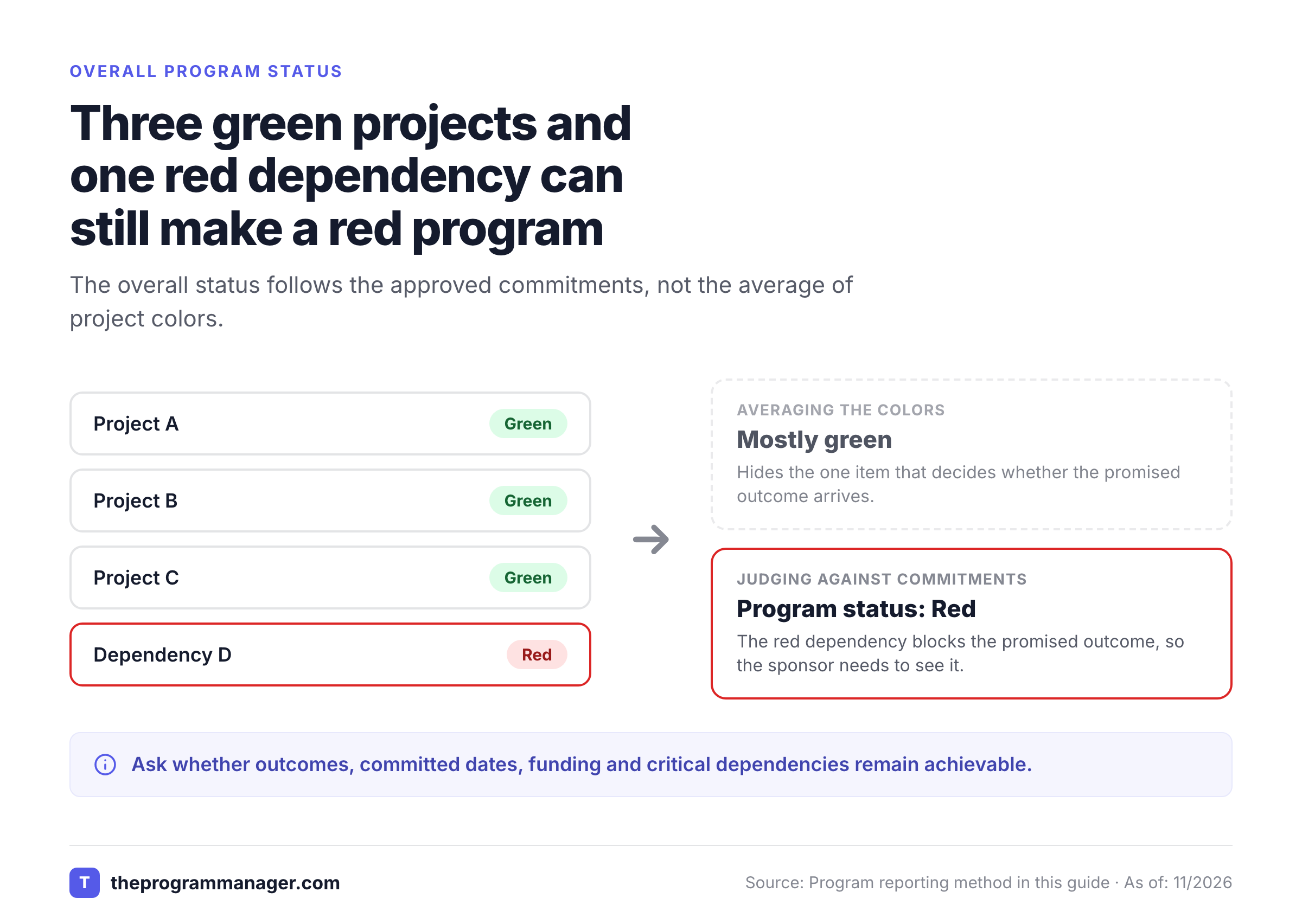
An overall program status shouldn't be an average of project colors. Three green projects and one red dependency can still make a red program if that dependency blocks the promised outcome, and the sponsor won't see it unless the report says so. Begin with the program's approved success criteria, then ask whether outcomes, committed dates, funding, critical dependencies and governance decisions remain achievable.
A practical policy uses the four definitions in the table below, agreed with the sponsor before the first report.
| Status | Definition | What the report must show |
|---|---|---|
| Green | Commitments remain achievable without material intervention | The evidence behind the status and the next review date |
| Amber | A credible recovery plan needs sponsor attention | The affected commitment, the recovery option and the decision owner |
| Red | A commitment is unlikely to be met without a significant change | The commitment at risk, the options and the deadline for a decision |
| Not assessed | Evidence is missing or not yet reviewed | The owner and the date evidence will arrive |
Apply the definitions consistently and document any override. If you don't, sponsors can't compare one cycle with the next. A minor delay in a noncritical documentation task may not change program status. A delayed security approval that prevents a launch could. In both cases, explain the reason, the impact, the proposed action and the date on which status will be reassessed.
Include a trend indicator when you can, and don't skip it for green programs. An amber program improving over several cycles needs different sponsor attention than an amber program deteriorating. Support the trend with changes in evidence, not a feeling. Sponsors won't trust an arrow nobody can explain.
How often should a program manager report?
A program manager should choose the cadence based on decision speed and risk. A weekly report suits a fast-moving implementation with shared dependencies. A biweekly report works when milestone evidence doesn't change as quickly. A monthly steering pack can summarize the weekly reports for executives, and a few slides in PowerPoint or Google Slides are usually enough when the full report is linked. Don't force every audience to read the same level of detail.
Set a reporting cutoff so contributors know which evidence belongs in each cycle, and don't accept late updates without flagging them. Ask workstream owners to submit updates before the cutoff, then reconcile contradictions with the integrated roadmap and risk register. Publish the report early enough for sponsors to review decisions before the meeting, because they can't decide well on the spot.
A consistent schedule also makes trend comparisons fair, and it's what lets sponsors plan their own time. If one report covers five business days and another covers an unusually long holiday period, note the difference. Report the actual period, because cycles aren't always comparable.
How to gather reliable status evidence
Reliable status evidence comes from approved sources. Use the approved program roadmap for milestone commitments and the latest integrated schedule for forecasts. Use the finance team's approved source for spend and forecast values, not a number someone's remembered. Use the benefit owner's measurement system for outcomes. Use the decision log to identify unresolved sponsor actions. Task status from Jira or Asana is a useful input for milestone and blocker updates, but check it against the approved roadmap before it goes into the report. Every important figure needs an owner and a date, and if it doesn't have them it isn't ready for the report.
Ask each project lead the same six questions: what was completed, what evidence proves completion, which commitment changed, which dependency threatens another team, what decision is needed and what will be demonstrably complete by the next report. The answers are more useful than a color alone.
Reconcile conflicts before you distribute the report. It's far easier to settle a disagreement privately than in the sponsor meeting. A workstream may say a milestone is complete while the receiving team says the handoff failed acceptance. Record the acceptance gap and assign an owner. If data can't be verified, say so and name the person responsible for resolving it.
Keep a short change log between reporting cycles. It shouldn't be long, but it should capture newly closed milestones, revised forecasts, escalated risks and resolved decisions. That makes the executive summary easier to write and prevents accidental rewriting of history.
Reporting dependencies across projects
Cross-project dependencies are one of the main reasons to report at program level. A dependency record should name the supplying team, receiving team, deliverable, acceptance condition, required date and escalation path. Saying "data team is delayed" isn't enough, because it doesn't tell the receiving team what they can't start. Explain which downstream milestone will be affected and when.
Separate a dependency from a risk. A dependency is a required handoff or condition. A risk is an uncertain event that may affect objectives, and it hasn't happened yet. An issue is a problem that's already occurring. A late handoff may be an issue and may create additional risks for downstream work. Label each one clearly so the actions fit. Treating an issue as a risk is how problems wait too long, and they shouldn't.
For critical dependencies, identify a fallback. Training could use a stable demonstration environment, a pilot might proceed with a smaller population, or a release might be sequenced. Don't present a fallback as approved until the relevant decision-maker agrees, and don't plan on one that nobody's confirmed. For a fuller method, see the guide to cross-project dependencies and the RAID log.
Budget and benefits: avoid misleading numbers
Financial summaries should distinguish approved budget, actual expenditure, committed spend and estimate at completion. They answer different questions. An underspend isn't necessarily good news if planned work has slipped. Likewise, a forecast can change before cash has been spent. Explain what the variance means for delivery, because sponsors can't read a number without that context.
When benefits depend on adoption, distinguish operational readiness from realized value. A new process may be deployed without yet producing the intended reduction in effort or delay, and that's not a realized benefit. Show leading indicators such as training completion only when they're defined and measured, and keep them separate from final outcome measures.
If the program has no reliable baseline, make establishing one an action. Don't use an attractive percentage merely because executives expect a number, because they'll remember it when the real figure arrives. A clear "measurement pending" with an owner and due date is more useful than unsupported precision.
Common program reporting mistakes
The first mistake is reporting activity rather than outcomes. A long list of completed workshops may hide whether customers or employees are seeing the intended improvement. Link completed work to an approved milestone or measurable result.
The second mistake is hiding bad news behind a green dashboard. If a committed date is threatened, say which commitment is at risk. Describe the recovery options and what support is required. Sponsors can act on a well-defined problem, but they can't act on vague reassurance, and they'll notice when the green never changes.
The third mistake is mixing facts and forecasts. Label actual completion dates, planned dates and revised forecasts separately. Record who approved any baseline change. Otherwise a late milestone can appear on time simply because the target moved, and nobody's the wiser.
The fourth mistake is creating an unmanageable report. Keep the first page focused on decisions, outcomes and exceptions. Store supporting detail in the relevant systems. A concise report backed by accessible evidence beats a large document nobody's reviewed.
The fifth mistake is assigning actions without owners, which means nobody's accountable. Every escalation should identify the decision-maker or accountable team and the deadline, so nobody's left guessing who's acting. Review outstanding actions in the next reporting cycle so they don't disappear.
A repeatable reporting workflow
Confirm period and commitments
Confirm the reporting period and the approved program commitments from the roadmap and management plan.
Collect consistent updates
Ask each workstream owner the same questions in the same format before the cutoff.
Check claims against evidence
Compare each claim with the schedule, financial record, acceptance evidence or benefit tracker, and update the risk and dependency records.
Draft around changes and decisions
Write the executive summary around what changed and what must be decided, then apply the agreed status definitions and explain the reasoning.
Review, distribute and record
Review the report with accountable owners for factual accuracy, send it with a clear decision deadline, record the decisions and carry unresolved items into the next cycle.
A reporting workflow should be lightweight. Automating the collection of status fields can reduce manual copying, but automation can't replace judgment about outcome risk or sponsor trade-offs. The program manager stays accountable for the narrative and for separating verified evidence from assumptions.
Where manual status reporting breaks down
Many reporting problems start with the data feeding the report, not with the template. Delivery tools such as Jira and Asana keep task status inside each team's own projects, so a dependency between two teams can be hard to see until a milestone slips. Reconciling those views by hand before every report is slow, and that's where stale dates slip into the executive summary.
Related templates and next steps
Use the program roadmap template to reconcile milestone forecasts before drafting the status report. The program management plan template helps identify the approved baseline against which changes should be reported. For decisions spanning several programs, compare the project portfolio dashboard template with this program-level view. Clarify responsibility for decisions using a RACI chart. If an audience needs task-level detail rather than cross-project outcomes, use a project status report template for the component projects.
Program status report FAQ
Is a program status report different from a project status report?
Yes, a program report differs from a project report. A project report covers one project's scope, schedule, resources and risks. A program report explains the combined outcome, shared dependencies, benefits and decisions across related projects.
What should a program status report include?
Include the reporting period, owner, sponsor, overall status, outcome measures, milestone health, budget and forecast, top risks, dependencies, decisions needed and actions before the next report.
Should every project be included?
Include enough detail to explain program health and important dependencies, but don't list every task. A summary table can list all workstreams, while the executive narrative focuses on exceptions and decisions.
What if no progress data is available?
Mark the information as Not available, name its owner and give a date for obtaining it. Don't treat missing evidence as a green status, because it isn't evidence of progress.
Can a program be green when a project is red?
A program can be green when a project is red, if the red project doesn't threaten the approved program outcome and an accepted mitigation exists. Explain the reasoning and keep watching the dependency.
Who owns the report and who acts on it?
The program manager usually owns its accuracy, while sponsors or governance groups make the decisions it escalates. Agree the approval workflow in the program's governance plan.
What makes a good executive summary?
A good executive summary answers what changed, which outcome is affected, what decision is required and what happens next, and it's understandable without reading every project update.
A program status report succeeds when the sponsor can act on it. Use the template as a decision instrument, not a decorative dashboard. After each cycle, drop any field nobody used and add any question the sponsor had to ask.