
Teams rarely leave Basecamp because it stopped working. They leave because every client counts toward a user cap, time tracking starts at $99 a month, and the features page describes no Gantt chart, no task dependencies and no workload view. The flat price that attracted them also makes the next step expensive to think about: a tool with those features usually charges per person.
We looked at eight tools: Teamwork, ProofHub, ClickUp, monday.com, Asana, Trello, Wrike and OpenProject. Each is judged on its vendor pricing page, a feature page, its help center and review-site summaries, with a focus on what a small team or a PMO needs when it outgrows one project at a time: which plan adds dependencies, who counts as a paid seat, and what a Basecamp import brings across. We read vendor material and didn't run these products.
Which Basecamp alternative fits your reason for leaving?
The best Basecamp alternative depends on what you hit first. Teamwork fits client work, ProofHub keeps a flat price, ClickUp and monday.com add planning features, and Trello strips things back. Each pick below names the plan that unlocks the feature, because every tool here keeps part of the planning layer on a paid tier.
 Best if client work is the reasonTeamwork.comClient users are free from Basics at $9.99, and dependencies, Gantt and billable time tracking are on every plan. Its importer documents what comes across from Basecamp.
 Best if the flat price is what you'll missProofHub$45 a month for unlimited users, with Gantt, dependencies, time tracking and file proofing. It has an importer for Basecamp Classic, Next and 3.
 Best for one configurable workspace at a low seat priceClickUpDependencies and time tracking on every plan, Gantt from Core at $9. It has an official Basecamp importer.
 Best if non-project people update the planmonday.comVisual boards with Gantt from Standard at $12. Dependencies, time tracking and workload need Pro at $19. Its importer brings across to-dos only.
 Best for work that crosses departmentsAsanaTimeline, forms and free guests from Starter at $10.99. Portfolios, approvals and proofing need Advanced at $24.99.
 Best if Basecamp is already too muchTrelloCards and checklists from $5 a seat, with a free plan for 10 collaborators. There are no built-in task dependencies.
 Best if you need portfolios on the entry paid tierWrikeDependencies, Gantt and portfolios from Team at $10, with workload, request forms and proofing on Business at $25.
 Best if you want free and self-hostedOpenProjectCommunity edition with Gantt, boards, time tracking and a per-project forum that mirrors the message board.
Why teams leave Basecamp
Teams leave Basecamp for four reasons, and none of them is that the basics stopped working: the user caps count clients, the planning features are missing from the plan pages, time tracking sits on a higher plan, and review of design files has no native tool. G2 shows the same pattern from the user side.
Every person counts toward the cap. Basecamp's paid plans are flat but capped: Freelancer allows 5 users and 3 active projects at $29 a month, Pro 10 users and 8 projects at $79, and Pro Plus 15 users and 12 projects at $99. Its pricing FAQ says every person you add is counted, including clients, contractors and guests. Only Pro Unlimited, at $199 a month billed yearly or $329 billed monthly, removes the cap.
The planning layer isn't there. Basecamp's features page describes to-do lists, Card Table kanban boards, a message board, group chat and a Lineup timeline of projects. It doesn't list Gantt charts, task dependencies, a workload view, custom fields or intake forms. A G2 reviewer says the same in plain words: advanced tracking such as Gantt charts or built-in time tracking is missing.
Time tracking costs a plan upgrade. Timesheets come with Pro Plus and Pro Unlimited, and Basecamp's help center says they can't be added to other plans. Project templates and multiple tools per project start at Pro.
Clients see a narrow slice. Client mode lets clients post messages, upload files and complete to-dos, but they can't open Hill Charts or add people. There's no native proofing tool, and Basecamp's integrations page points to third-party apps for it. One G2 reviewer calls the permission model somewhat coarse.
Basecamp alternatives compared
| Tool | Where it differs from Basecamp | Starting price (USD) | G2 rating |
|---|---|---|---|
 Basecamp | Flat plans with user caps, no Gantt or dependencies on the features page, time tracking from Pro Plus | Free (3 users); Freelancer $29, Pro $79, Pro Plus $99 per month flat; Pro Unlimited $199 billed yearly | 4.1 (5,489) |
| Teamwork.com | Dependencies, Gantt and time tracking on every plan, free client users from Basics | Free (5 users); Basics $9.99, Accelerate $24.99 per user, billed yearly | 4.4 (1,223) |
| ProofHub | Flat price for unlimited users, Gantt with dependencies, proofing and request forms | Essential $45, Ultimate Control $89 for the first three months then $135, per month flat; no free plan | 4.6 (121) |
| ClickUp | Dependencies and time tracking on every plan, Gantt from Core, workload on Business | Free; Core $9, Business $17 per user, billed yearly | 4.6 (15,685) |
| monday.com | Gantt from Standard, dependencies, time tracking and workload from Pro | Free (2 seats); Basic $9, Standard $12, Pro $19 per seat, billed yearly | 4.7 (17,965) |
| Asana | Timeline, dependencies and free guests from Starter, portfolios and proofing on Advanced | Free for 2 users; Starter $10.99, Advanced $24.99 per user, billed yearly | 4.4 (14,132) |
| Trello | Kanban boards with checklists, no built-in dependencies, Timeline on Premium | Free (10 collaborators); Standard $5, Premium $10 per user, billed yearly | 4.4 (14,068) |
| Wrike | Dependencies, Gantt and portfolios from Team, workload, forms and proofing on Business | Free; Team $10, Business $25 per user, billed yearly | 4.2 (4,553) |
| OpenProject | Gantt, boards, time tracking and forums in the free Community edition | Free (self-hosted); Basic $7.25, Premium $19.50 per user, one-year term | 4.6 (Capterra, 189) |
 The Program Manager Our product | Maps dependencies across Jira and Asana and watches milestones for risk | Team from $59 per workspace per month; card required at checkout | No reviews yet |
Against Basecamp, Trello costs less per seat at $5 and has no message board, Asana at $10.99 adds timelines, forms and portfolios on Advanced, and ClickUp at $9 adds dependencies and time tracking on every plan. None of the three has Campfire group chat, so teams that lean on it usually connect Slack or Microsoft Teams. The Basecamp-versus-Trello-versus-Asana choice comes down to how much planning the work needs.
Two things come up often that aren't ranked here. Slack is a chat tool and covers only the Campfire part of Basecamp, and Notion is a docs-first workspace that our Notion alternatives guide covers. If you're coming from a different tool, see our monday.com alternatives and Trello alternatives guides.
Flat price versus per-seat price for 10 people
Leaving Basecamp's flat price costs a 10-person team between nothing and about $190 a month, depending on the plan that holds the features you're leaving for. Basecamp Pro costs $79 for up to 10 people, clients included, and the per-seat tools below start higher or lower depending on the tier. Use the slider to price your own headcount at each tool's cheapest paid tier.
Monthly cost on each vendor's cheapest paid tier, annual billing except Basecamp, which lists monthly prices. Wrike Team ($10 per user) allows 2 to 15 users and isn't shown.
The cheapest paid tier doesn't always hold what you left Basecamp for. This table prices 10 people at the plan that first adds both dependencies and time tracking, or the closest option, using list prices.
| Tool | Plan with dependencies | Plan with time tracking | Cost for 10 people per month |
|---|---|---|---|
| Basecamp | None listed | Pro Plus | $99 (flat, up to 15 people) |
| ProofHub | Essential lists Gantt with dependencies | Essential lists time tracking | $45 (flat, unlimited users) |
| Trello | Not built in; Premium for Timeline | Power-Ups | $100 |
| ClickUp | Every plan, Gantt from Core | Every plan | $90 |
| Teamwork | Every plan | Every plan | $99.90 |
| Asana | Starter | Paid add-on with no listed price | $109.90 |
| Wrike | Team | Business or Pinnacle | $100 on Team, $250 on Business |
| monday.com | Pro | Pro | $190 |
Basecamp bills monthly and the others bill yearly, so the gap is smaller if you pay monthly: ClickUp Core is $12 and Trello Standard $6 per user on monthly billing. Wrike lists annual billing only, and ProofHub's Ultimate Control plan costs $89 a month for the first three months, then $135.
Who counts as a client seat?
Client access is where Basecamp's cap bites, and it's where the alternatives differ most. Teamwork, ProofHub and Asana let clients in without a paid seat under conditions; ClickUp, monday.com and Trello give a free allowance and then bill; Wrike and OpenProject charge for external editors.
| Tool | Do clients or guests count as paid seats? | What the rule is |
|---|---|---|
| Basecamp | Yes, on every plan | Free 3 users, Freelancer 5, Pro 10, Pro Plus 15; unlimited only on Pro Unlimited |
| Teamwork | No, from Basics | Client users are free, limited to 5 projects each; not available on Free. Proof reviewers need no account |
| ProofHub | No per-user fee | Unlimited users on both plans; custom roles set view, add or manage rights per section |
| ClickUp | Partly | Free: unlimited guests with full edit. Core: 5 guest seats for one paid user plus 2 per added paid user. Business: 10 plus 5. View-only guests are unlimited |
| monday.com | Partly | Guests start on Standard: 3 free, then the 4th counts as a paid member. Pro has unlimited guests. Viewers are free |
| Asana | No, if the domain differs | Guests are free on Starter and up only when their email domain differs from the organization's |
| Trello | Partly | Single-board guests are free on paid plans; multi-board guests bill as a seat on Standard and Premium and are free on Enterprise |
| Wrike | Partly | Viewers are free and can comment; external users who edit need a paid seat; guest reviewers on files need no seat |
| OpenProject | Not stated | Sharing a work package with non-members is an Enterprise add-on |
What each plan unlocks: dependencies, time tracking and workload
Dependencies and time tracking are on every plan at Teamwork and ClickUp, and they sit one or two tiers up at monday.com and Wrike. Trello has no built-in dependencies, and Basecamp's plan pages list none. "Not documented" in the table means the vendor's plan pages don't say.
| Tool | Dependencies | Gantt or timeline | Time tracking | Workload |
|---|---|---|---|---|
| Basecamp | Not documented | Lineup timeline of projects | Pro Plus and up | Not documented |
| Teamwork | All plans | All plans; critical path from Accelerate | All plans; timesheets and budgets from Accelerate | Accelerate and up |
| ProofHub | Listed on the Gantt page | Gantt chart | Built in | Workload and resource reports listed |
| ClickUp | All plans | Core and up | All plans | Business |
| monday.com | Pro and up | Standard and up | Pro and up | Pro and up |
| Asana | Starter and up | Starter and up | Add-on, no listed price | Portfolio workload on Advanced |
| Trello | Not built in | Premium (Timeline, per board) | Power-Ups | None |
| Wrike | Team and up | Team and up | Business per its help center; its pricing page names Pinnacle | Business and up |
| OpenProject | Community and up | Community and up | Community and up | Team planner is an Enterprise add-on |
Eight Basecamp alternatives, by team shape
Each entry below starts with the team the tool fits, then what a Basecamp project becomes in it, which plan holds the planning features, and what a move from Basecamp carries over. Prices are USD list prices from the vendor's pricing page.
Teamwork.com
Client work with dependencies and time tracking
Teamwork fits a small agency or services team that bills clients and wants client logins, proofs and time tracking in one tool. It's the closest match to how agencies use Basecamp.
What a Basecamp project becomes: a Teamwork project. To-do lists become task lists, to-dos become tasks, and the message board maps to project Messages, which you switch on in project settings. Campfire chat has no direct equivalent in the project tool.
Clients and proofing: client users are free from Basics and can create and complete tasks, add messages and upload files, but they can't open Templates, Reports or Resourcing, and each is limited to 5 projects. Proofs let a reviewer approve a PDF, Word, PowerPoint or image file up to 105 MB through an email invite with no account. The allowance is 5 proofs a month on Free, 20 on Basics and unlimited from Accelerate.
Planning: dependencies and Gantt are on every plan, including Free, and critical path starts at Accelerate. Billable and non-billable time tracking is on every plan too, with timesheets and time budgets from Accelerate at $24.99. Portfolios start on Basics. The workload planner needs Accelerate, which has a 5-user minimum.
Coming from Basecamp: the importer is documented for Basecamp Classic, 2 and 3. It brings people, projects, tasks, files and comments. Tasks aren't mapped to Board stages, history isn't carried over, and the import needs an active Basecamp subscription while it runs. Teamwork lists more than 150 integrations, including Slack and a Microsoft Office add-in.
- you bill clients by the hour and want client logins, proofs and intake forms together
- you want client users and proof reviewers who cost no seat on a paid plan
- you need workload planning or accounting sync: those start on Accelerate at $24.99 with a 5-user minimum
- you want profitability budgets: those sit on Optimize, which has no public price
- Users like
- project management capabilities (52 mentions)
- Users dislike
- steep learning curve (22 mentions) and missing features (19 mentions)
- Source: G2, 1,223 reviews
- Starting price
- Free for up to 5 users; Basics $9.99 and Accelerate $24.99 per user per month billed yearly; Optimize and Enterprise by quote
- Free plan
- 5 users, 5 projects
- Dependencies
- All plans, including Free; critical path from Accelerate
- Client users
- Free from Basics, up to 5 projects each
- Automations
- Basics 5,000, Accelerate 20,000 per month
- Seat minimum
- Basics 3, Accelerate 5
- Critical path
- Accelerate and up ($24.99), not Free or Basics
- Date changes
- Dependents move only if you pick 'including dependents' in the date picker
- Dependency types
- Finish-to-start and finish-to-finish shown in help; others not documented
- Microsoft Project
- Accelerate and up
- Client project cap
- Up to 5 active projects each
- Free proof reviewers
- No license or account needed to approve
- Collaborators
- Free, limited to completing tasks, comments, viewing files
- Client invoicing and intake forms
- Accelerate and up ($24.99)
- SSO
- Enterprise only; 2FA on all plans
- White label or custom domain
- Not documented
- Audit log
- Not documented
- Client seat rule
- No: client users are free and unlimited on Basics and up; only standard users count toward the subscription. Collaborators are free on every plan but can't log time.
- Active project cap
- Free 5, Basics 300, Accelerate 600, Optimize and Enterprise unlimited
- Client proofing
- Proofs area: one file up to 105 MB or a link, reviewers invited by email with no Teamwork account; 'Can approve' lets them request changes or approve. Free 5 proofs, Basics 20, Accelerate and up unlimited
- Billable time
- All plans including Free; user rates and company timesheets from Accelerate; timesheet approvals from Optimize
- Retainers and budgets
- Time budgets and time-based retainers from Accelerate; financial budgets, fixed-fee budgets and profitability from Optimize
- Intake forms
- Basics and up; conditional logic from Accelerate
- Workload planner
- Accelerate and up; resource scheduling, placeholders and tentative projects from Optimize
- Accounting integrations
- Xero, QuickBooks and FreshBooks from Accelerate; Salesforce and NetSuite from Optimize
- Basecamp import
- Classic, 2 and 3; tasks not mapped to Board stages
- Integrations
- 150+ stated by the vendor
- Message board
- Project-scoped Messages, enabled in project settings
ProofHub
Flat price, Gantt and proofing
ProofHub is the nearest thing here to Basecamp's pricing model: one monthly price for the whole team with no per-user fee, plus the planning features Basecamp leaves out.
The flat price: Essential is $45 a month billed yearly ($50 monthly) for unlimited users, 40 projects and 15 GB. Ultimate Control is $89 a month billed yearly for the first three months and $135 after that, with unlimited projects and 100 GB. There's no free plan, and clients don't cost extra because there's no per-user fee.
What it adds over Basecamp: a Gantt chart with dependencies, built-in time tracking with estimates, request forms, and project, resource and workload reports. Tasks, task lists, discussions, chat and a Kanban board cover the Basecamp basics. ProofHub's pricing page doesn't show which of these features are Ultimate Control only.
Clients and proofing: access is set with custom roles that give view only, view and add, or view and manage rights per section, and there's no dedicated client role. Proofing works on PDF, JPG, PNG, GIF and BMP files: reviewers mark up the file, comments get resolved, and an Approved button closes the review. Outside reviewers use a proofing link with an email and a name, no account.
Coming from Basecamp: the built-in importer covers Basecamp Classic, Next and 3. It brings people (clients excluded from Basecamp 3), discussions, to-do lists and to-dos, documents and files. The Basecamp account owner becomes the ProofHub admin. Basecamp 4 and 5 aren't mentioned in the help article.
- you want to keep a flat team price but need Gantt, dependencies and time tracking
- you review PDFs and images with clients and want outside reviewers to approve through a link
- you need a free plan: the first paid step is $45 a month
- you rely on a long integration list: the vendor names seven, among them Slack, Box, Dropbox and QuickBooks
- Users like
- organization and task management (6 mentions each)
- Users dislike
- a less intuitive mobile interface (2 mentions); the sample is small
- Source: G2, 121 reviews
- Starting price
- Essential $45 a month billed yearly ($50 monthly); Ultimate Control $89 for the first three months, then $135; unlimited users, no free plan
- Pricing model
- Flat per plan, unlimited users
- Essential
- $45 per month billed yearly, 40 projects, 15 GB
- Ultimate Control
- $89 per month billed yearly for the first three months, then $135; unlimited projects, 100 GB
- Free plan
- None
- Gantt and dependencies
- Gantt chart with dependencies
- Time tracking
- Built in, with estimates and utilization reports
- Proofing
- PDF, JPG, PNG, GIF and BMP files; outside reviewers use a link without an account
- Request forms
- Native
- Reports
- Project, resource, workload and custom reports
- Client access
- Custom roles with view, add or manage rights per section; no dedicated client role
- Basecamp import
- Classic, Next and 3; Basecamp 4 and 5 not mentioned
- Integrations
- Slack, Box, Dropbox, Google Calendar, OneDrive, FreshBooks, QuickBooks
- Ultimate-only features
- Not documented
ClickUp
One workspace with dependencies on every plan
ClickUp fits a team that wants to fold Basecamp's lists, comments and docs into one configurable workspace at a low per-seat price.
What a Basecamp project becomes: ClickUp's own importer maps a Basecamp project to a Space or a Folder, a to-do list to a List, a to-do to a task, and to-do groups to statuses. Discussion moves to task comments and to ClickUp Chat, which replaced the older Chat view.
Planning: dependencies (Blocks and Blocked by) and time tracking are on every plan, including Free Forever. Gantt is unlimited from Core at $9. Workload, advanced dashboards and Timesheets are on Business at $17, which also holds unlimited proofing: comment pins on images, video and PDFs, with 100 uses on Free. There's no approval object, so teams use statuses and an automation to flag the approver.
Guests: Free Forever allows unlimited members and guests. On Core you get 5 guest seats for one paid user plus 2 for each additional paid user, and on Business 10 plus 5. Plan costs are in ClickUp pricing.
Coming from Basecamp: the official importer works with Basecamp 3. Lists, to-dos, comments and assignees come across, and to-do groups can become statuses. Message boards, Campfires, project docs and files don't. ClickUp lists more than 1,000 integrations.
- you want dependencies and time tracking on every plan at a low per-seat price
- you want to rebuild Basecamp's to-do lists as Lists with statuses and keep the comments
- you need formal approvals: ClickUp uses custom statuses and proofing comments, not an approval object
- you want a quiet, simple tool: G2 reviewers name the learning curve (779 mentions) and a slow interface (762)
- Users like
- flexible customization (1,605 mentions), centralized work in one workspace (1,408) and intuitive day-to-day use (1,346)
- Users dislike
- steep learning curve (780 mentions), slow interface (762) and an overwhelming number of features (597)
- Source: G2, 15,685 reviews
- Starting price
- Free Forever; Core $9 and Business $17 per user per month billed yearly; Max $100; Enterprise by quote
- Board view
- Kanban Boards on Free Forever, subgroups (swimlanes) on every plan, WIP limits on Business and above
- Dependencies
- All plans, including Free Forever
- Trello import
- Official importer, unlimited on all plans, imports assignees, comments, checklists, attachments up to 1GB, custom fields; cover images not supported
- Free limits
- 60 MB storage, Gantt, Dashboards and Custom Fields trial only
- Automations
- Actions per workspace per month: Free 100, Core 1,000, Business 10,000, Enterprise and Max 1M; webhooks, email, SMS and integration actions from Business
- Client seat rule
- Paid plans: Core 5 guest seats for a 1-user workspace plus 2 per additional paid user; Business and up 10 plus 5; unlimited read-only guests; Free Forever guests have full edit
- Proofing
- Comment on the spot of an image, video or PDF; unlimited on Business and up, 100 uses on Free; no formal approval object, so teams use statuses
- Time tracking
- All plans
- Intake forms
- Free 1 form; unlimited on Core and up; each submission creates a task
- Workload
- Trial on Free and Core, included on Business; custom capacity on Enterprise; Resource Management listed on Business
- Adobe Creative Cloud
- Not found on the integrations page; Figma, Slack, Google Drive, Harvest and Toggl listed
- Retainers and invoicing
- Not documented
- Critical path
- Critical Path & Slack Time: trial on Core, included on Business and above
- Gantt
- Included from Core; trial on Free; Gantt PDFs from Business
- Dashboards
- Trial on Free and Core, included on Business and above; Advanced Dashboards named on Business
- AI credits
- Pooled per user per month: Core 1K (trial models), Business 1.5K, Enterprise 3K, Max 10K; top-up $10 per 10K credits
- Governance
- Business: Google SSO + SMS 2FA, private views and docs; Enterprise: SAML/SCIM, audit logs, custom roles, data residency, HIPAA with BAA, restrict guest invites
- Upgrades
- Upgrade applies to the whole Workspace
- Basecamp import
- Official importer for Basecamp 3; message boards, Campfires and files not imported
- Integrations
- 1,000+ stated by the vendor
- Chat
- ClickUp Chat replaces Chat views; task comments carry per-task discussion
monday.com
Visual boards for non-project teams
monday.com fits a team that wants Basecamp's simplicity turned into visual boards that non-project people will actually update.
What a Basecamp project becomes: a board. To-do lists become groups and to-dos become items, with Kanban, Calendar, Timeline and Gantt views over the same items. Discussion lives in each item's Updates section, with threaded replies and mentions, and there's no board-level message board.
Guests and files: shareable boards for clients start on Standard, which includes 3 free guests, and the fourth counts as a paid member. Pro has unlimited guests, and viewers are free on paid plans. File annotations let reviewers pin comments on images, PDFs and videos, and monday labels that a trial feature.
Plan gates: Gantt is on Standard at $12. Dependencies, the time tracking column, formulas and workload need Pro at $19, and milestones and critical path are Pro and Enterprise. Portfolio and resource management are Enterprise only. Seats are sold from 3.
Coming from Basecamp: the importer (profile menu, Import data, Basecamp) creates a board with all to-dos and a column that links back to the Basecamp project, and an automation adds new items when to-dos appear in Basecamp. It works with Basecamp version 4 only, and the help article mentions to-dos, not messages or files. monday lists more than 850 integrations.
- you want boards, timeline and forms that people outside the project team pick up quickly
- you can pay for Pro to get dependencies, time tracking and workload
- you have many clients logging in on Standard: the fourth guest bills as a paid member
- you need billable rates or invoicing: neither is native in work management
- Users like
- intuitive everyday use (1,318 mentions) and flexible customization of boards and workflows (802)
- Users dislike
- steep learning curve (217 mentions), slow on large boards (172), high pricing (171) and limited integrations (168)
- Source: G2, 17,965 reviews

- Starting price
- Free (2 seats); Basic $9, Standard $12 and Pro $19 per seat per month billed yearly; Enterprise by quote
- Kanban
- Available on every plan including Free; cards come from Status labels, per-column task limit via Set column limit, lanes via Divide by
- Trello import
- Built-in importer carries task name, label and dates; descriptions, checklists, activities and files are not supported; 10K rows at a time
- Dependencies
- Pro and Enterprise
- Automation actions per month
- Standard 250, Pro 25,000, Enterprise 250,000; multi-recipient notifications use one action each
- Guests
- Standard: 3 free, then billed; Pro: unlimited
- Portfolio
- Portfolio management on Enterprise; Pro projects are standalone
- SCIM
- Enterprise only
- Trust center
- SOC 2 Type II, ISO 27001:2022, ISO 27017, 27018, 27701, HIPAA through a BAA; FedRAMP not listed
- Enterprise limits
- 250 workflows, 250,000 automation and integration actions per month, 25,000 API calls per day (Pro: 20, 25,000, 10,000); 99.9% uptime SLA
- Guests on Basic
- Not available; shareable boards start at Standard
- Guests on Standard
- 3 free, then every 4 guests use 1 billed seat
- Guests on Pro/Enterprise
- Unlimited guests
- Viewers
- Unlimited, free, read-only; see all Main boards
- Guest scope
- Only shareable boards they are invited to
- Guest edits
- Can add items, columns, comments; cannot own boards
- WorkForms
- Public link, no account needed; creates board items
- Guest email rule
- Must use a different email domain than your account
- Client seat rule
- Partly: Standard includes 3 free guests, then every group of 4 guests counts as one billed seat; Pro and Enterprise have unlimited guests. Basic has none. Viewers are free.
- Time tracking
- Time Tracking column on Pro and Enterprise only; no native billable rates or invoicing (billable cost is a formula column)
- Proofing
- No plan-tiered proofing product confirmed; file annotations (pin comments on images, PDFs and video) are described as a trial feature
- Intake forms
- Forms view on Free and all paid plans
- Workload
- Workload view on Pro and Enterprise; resource planner and capacity manager on Enterprise
- Adobe Creative Cloud
- Plugin exists per the vendor's Adobe integration page
- Retainers and invoicing
- Not documented in work management (invoices exist in monday CRM, a separate product)
- Dashboards
- Connected boards per dashboard: Free 1, Standard 5, Pro 20, Enterprise 50; total items under 20,000
- AI credits
- Basic 1,000, Standard 2,000, Pro 3,000 a month; Enterprise custom
- Seat rules
- Seats sold in buckets: minimum 3, then multiples of 5 (support article 4405633151634); quote above 40 users; Enterprise minimum term 12 months
- Resource management
- Enterprise (Resource planner, Capacity manager)
- Basecamp import
- Version 4 only; to-dos only
- Updates and files
- Discussion lives in each item's Updates section, there's no board-level message board; file annotations on images, PDFs and videos are labeled a trial feature
- Integrations
- 850+ stated by the vendor
Asana
Cross-team work with timelines and portfolios
Asana fits a team whose work crosses departments and wants Basecamp's to-do lists replaced by a task tool with timelines, forms and a portfolio view.
What a Basecamp project becomes: an Asana project. To-do lists become sections, to-dos become tasks, and comments stay on the task. Asana has no Campfire equivalent, so teams connect Slack or Microsoft Teams for chat.
Plan gates: Starter at $10.99 holds Timeline and Gantt, dependencies, forms, custom fields, reporting dashboards and unlimited free guests. Advanced at $24.99 adds unlimited portfolios, workload inside a portfolio, approvals, proofing and estimated versus actual time. Enterprise adds organization-wide resource management. Timesheets and Budgets are a paid add-on on Starter and up with no published price. Plan costs are in Asana pricing.
Guests: guests are free on Starter and up only when their email domain differs from the organization's, so a client at another company is free and a contractor on your own domain is a paid seat.
Coming from Basecamp: Asana documents no Basecamp importer. The route is the CSV importer, which means exporting data and rebuilding structure by hand. Asana lists Slack, Google Drive, Microsoft Teams, Zapier and Dropbox among its integrations.
- your clients and freelancers sit on other email domains and you want them free
- you run many requests through forms and want proofing, approvals and portfolio views on Advanced
- you need billable rates or budgets: they come from an add-on with no published price
- you want a quiet tool: G2 reviewers name overwhelming notifications (162 mentions) and features locked to higher tiers (163)
- Users like
- easy daily use (770 mentions)
- Users dislike
- confusing at first and a learning curve (252 mentions) and useful features locked to higher tiers (163)
- Source: G2, 14,132 reviews
- Starting price
- Personal is free for 2 users; Starter $10.99 and Advanced $24.99 per user per month billed yearly; Enterprise by quote
- Board view
- Included on the free Personal plan with list and calendar views; no native WIP limits per Asana forum answers
- Dependencies
- Starter and up
- Automations
- Custom builder from Starter, no monthly cap shown on the pricing page; 50 automations per project, 20 triggers and 20 actions each
- Portfolios
- Advanced and up
- Import from Trello
- No first party Trello importer found; CSV importer lists Trello, about 2,000 rows, no comments or attachments per partner guide; Migrator.xyz listed as app
- Integrations
- Jira Cloud two way sync, Slack, Microsoft Teams and GitHub pull request sync listed on asana.com/apps
- Enterprise tier
- SAML SSO, SCIM provisioning, portfolios and dashboards, universal resource management, goals, Audit Log API (pricing page); quote only
- Trust page
- SOC 2 Type 2, ISO/IEC 27001:2022, HIPAA, GDPR
- Data residency
- Data centers in Europe, Australia and Japan; opt-in for Enterprise
- Client seat rule
- Guests are free on Starter and up but must use a different email domain. The Client Management add-on gives clients a private portal on top of a Starter or Advanced base plan.
- Client Management
- Add-on with a client portal (progress updates, shared tasks, New request); Asana's agency page says agencies must join a waitlist
- Proofing
- Advanced and up: click a spot on an image or PDF to add feedback, which creates a subtask
- Approvals
- Approval tasks on Advanced and up (Approved, Changes requested, Rejected)
- Time and budgets
- Timesheets and Budgets add-on (Starter and up), no published price; billable rates and cost budgets sit there; no retainer feature found
- Intake forms
- Forms on Starter; branching and customization on Advanced
- Portfolio and workload
- Portfolios and workload within one portfolio on Advanced; universal resource management on Enterprise
- Integrations for agencies
- Adobe Creative Cloud, Figma, Slack, Google Drive, Xero and Harvest listed
- Basecamp import
- None documented; CSV importer
- Guest rule
- Guests are free only when their email domain differs from the organization's; same-domain users are paid seats
- Guests
- Free on Starter and up, only on a different email domain
Trello
Simple cards at the lowest seat price
Trello fits a team that finds Basecamp too heavy and wants cards and checklists at the lowest per-seat price here.
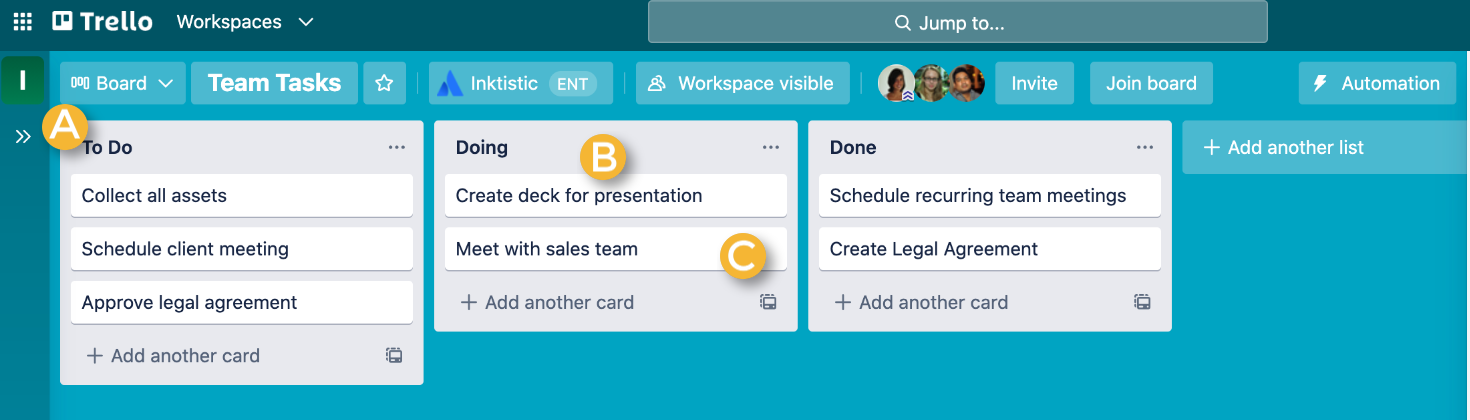
What a Basecamp project becomes: a board. Lists hold cards, to-do lists become checklists on a card, and files attach to cards from your computer or from Google Drive, Dropbox, Box and OneDrive. Uploads are limited to 10 MB per file, or 250 MB for paid members. There's no message-board equivalent, so discussion happens in card comments.
Plans and views: Free allows 10 collaborators and 10 boards per Workspace. Standard at $5 gives unlimited boards. Premium at $10 adds Timeline, Dashboard, Calendar, Table and Map views, and assignees and due dates on checklist items. Trello has no built-in task dependencies, so scheduling stays manual.
Guests: single-board guests are free on paid plans. Multi-board guests bill as a seat on Standard and Premium and are free on Enterprise. On Free, guests count toward the 10 collaborators.
Coming from Basecamp: Trello documents no Basecamp import. Its import page offers copy-paste, where each line becomes a card, the API and third-party Power-Ups. The vendor lists 238 Power-Ups and integrations.
- you run simple kanban flows and want a free or $5 per user entry point with many Power-Ups
- you only need Timeline or Table views for one board at a time
- you need real task dependencies: Trello has no built-in dependency management
- you need cross-board portfolio planning or free external stakeholders on many boards
- Users like
- ease of use (776 mentions in G2's pros summary), then task management (456)
- Users dislike
- limited features, especially on boards (270 mentions), missing built-in documents and useful statistics (259) and limited budgeting functions (198)
- Source: G2, 14,068 reviews
- Starting price
- Free (10 collaborators, 10 boards); Standard $5 and Premium $10 per user per month billed yearly; Enterprise $17.50
- Free limits
- 10 collaborators and 10 boards per Workspace
- Views
- Calendar, Timeline, Table, Dashboard, Map on Premium and Enterprise; Workspace Table and Calendar on Premium
- Dependencies
- Not built in
- Automation
- Free 250 runs, Standard 1,000, Premium and Enterprise unlimited runs; 20 operations per run on all plans
- Export
- Board JSON for any member, CSV only on Premium, Trello cannot re-import JSON or CSV
- Card limits
- 5,000 open cards and 475 open lists per board (API example values, limits may vary)
- Basecamp import
- None documented; copy-paste, API or Power-Ups
- Guests
- Single-board guests are free on paid plans; multi-board guests bill as a seat on Standard and Premium and are free on Enterprise; free Workspace guests count toward the 10 collaborators
- Message board
- No message-board equivalent; discussion happens in card comments
- Integrations
- 238 stated by the vendor
Wrike
Scheduling and request intake
Wrike fits a team that has outgrown Basecamp's flat model and needs scheduling, request intake and approvals, with a PMO view on its entry paid tier.
What a Basecamp project becomes: a project or folder, with tasks and subtasks in place of to-do lists. Wrike lists no dedicated message board, so discussion lives in task comments and mentions.
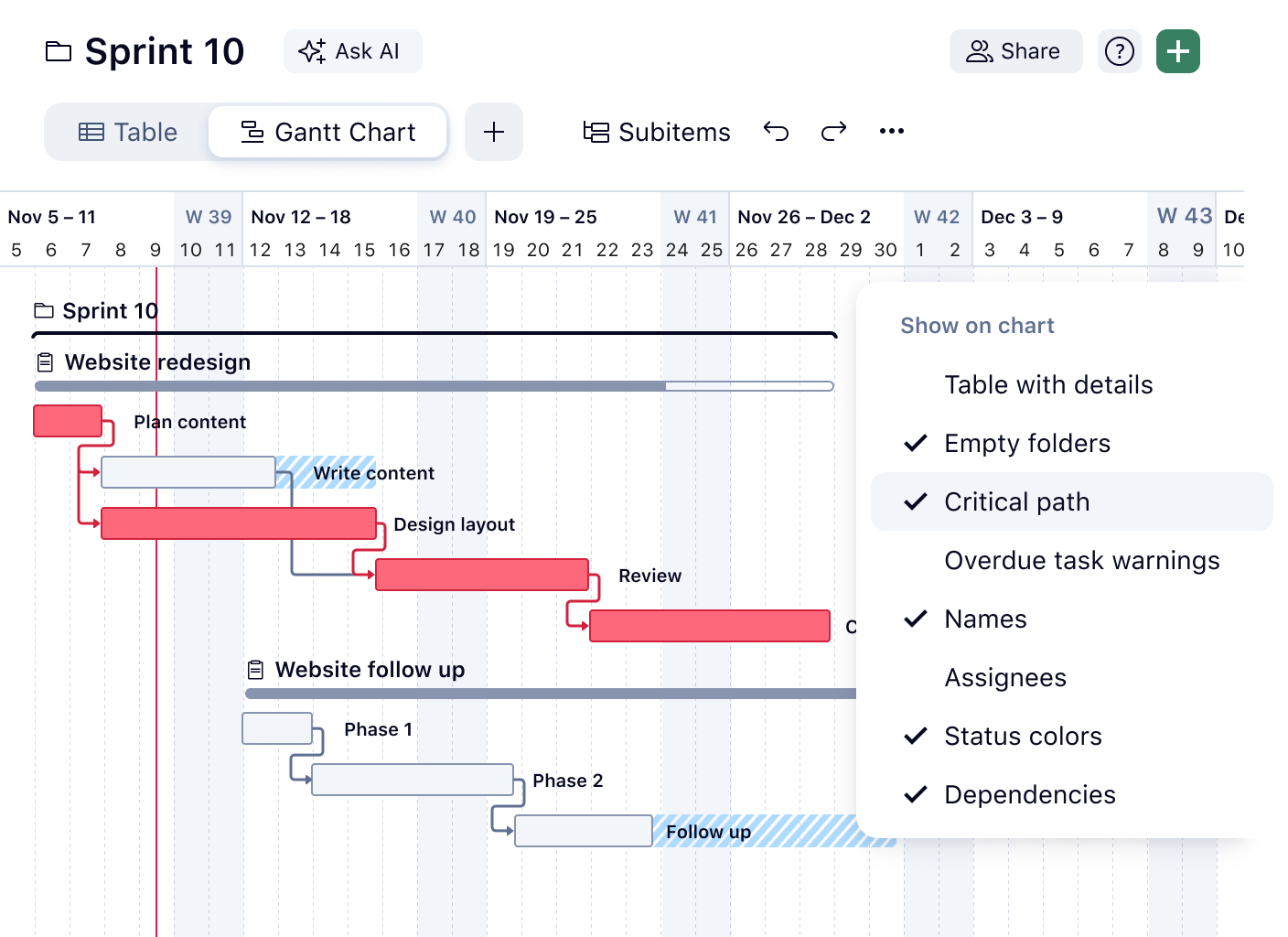
Plan gates: Team at $10 per user (2 to 15 users) adds Gantt charts with dependencies, portfolios and shareable dashboards. Business at $25 (5 to 200 users) adds workload charts, request forms with a public link, file proofing with guest approvals and critical path. Wrike's help center lists timesheets from Business, while its pricing page names time tracking only under Pinnacle. Billable time and budgets start on Pinnacle, which is priced by quote. Plan costs are in Wrike pricing.
Clients: viewers are free and can comment. External users who edit need a paid seat. Guest reviewers on files need no seat, and a request form's public link lets clients submit work without logging in.
Coming from Basecamp: Wrike documents no Basecamp import. Its import help covers Excel, Outlook and Microsoft Project files. Wrike lists more than 400 integrations and bills annually only.
- you run client reviews on creative files and want guest reviewers and approval flows
- you need request forms so clients can submit work without a seat
- you need billable time or budgets: they start on Pinnacle, which has no public price
- you want a quick, flat start: G2 reviewers name the learning curve (305 mentions) and call it not intuitive (239)
- Users like
- project tracking (477 mentions in G2's pros summary)
- Users dislike
- a steep learning curve (305 mentions), not intuitive (239) and a lack of built-in templates (203)
- Source: G2, 4,553 reviews
- Starting price
- Free; Team $10 and Business $25 per user per month billed yearly; Pinnacle and Apex by quote
- Free plan limit
- 200 active tasks and one shared space, no Gantt
- Board view
- All plans including Free
- Task dependencies
- Team and up, FS, SS, FF, SF
- Workload charts and request forms
- Business and up
- Programme timeline
- Pinnacle and Apex (quote)
- Automation actions per month
- 50 per seat Team, 200 Business
- SAML SSO
- Pinnacle and Apex only; SCIM also Pinnacle and Apex
- Audit reports
- Pinnacle and Apex: logins, role changes, SSO and 2FA changes, exports, sharing; export cap 65,000 events as XLS
- Portfolios
- Team and up
- Resource management
- Workload and time tracking from Business; job roles, bookings, budgeting and utilization dashboard on Pinnacle and Apex
- Trust Center
- SOC 2 Type II, ISO 27001, ISO 27018, HIPAA, GDPR
- Regions
- US and EU data centers; plan tier not stated
- Critical path
- Business, Pinnacle and Apex; not Free or Team (Wrike help)
- Gantt dependencies
- All four types with lead and lag; dependents move with a moved task, completed tasks stay put (Wrike Gantt page)
- Client seat rule
- Partly: viewers are free (view and comment); contributors and external users who edit are paid limited seats. Guest reviewers need no seat but start on Business.
- Client proofing
- File proofing, guest approvals and custom approval flows on Business and up; HTML5 proofing on Pinnacle and up. Guest reviewers get an email invite and see only files assigned to them.
- Time tracking
- Business and up (timer, manual entries, timesheets)
- Billable time and budgets
- Billable vs non-billable time and budgeting with bill and cost rates on Pinnacle and up, not Business
- Request forms
- Business and up
- Resource planning
- Resources view and workload charts on Business; job roles, bookings and utilization on Pinnacle
- Adobe Creative Cloud
- Extension on Business and up; QuickBooks and Power BI on Pinnacle and up
- Native client invoicing
- Not documented
- Basecamp import
- None documented; Excel and Microsoft Project files
- Time tracking source note
- Wrike's help center lists timesheets from Business; the pricing page names time tracking only in the Pinnacle feature summary
- Integrations
- 400+ stated by the vendor
- Dependencies
- Team and up
OpenProject
Free and self-hosted with Gantt
OpenProject fits a team that wants a free, self-hosted tool with Gantt, boards and a per-project forum, and has someone to run the server.
What a Basecamp project becomes: an OpenProject project, with work packages in place of to-dos and Kanban boards for status flow. The Forums module is the closest thing to Basecamp's message board: messages and replies per project, enabled in project settings. Work package activity carries comments and mentions. There's no Campfire equivalent.
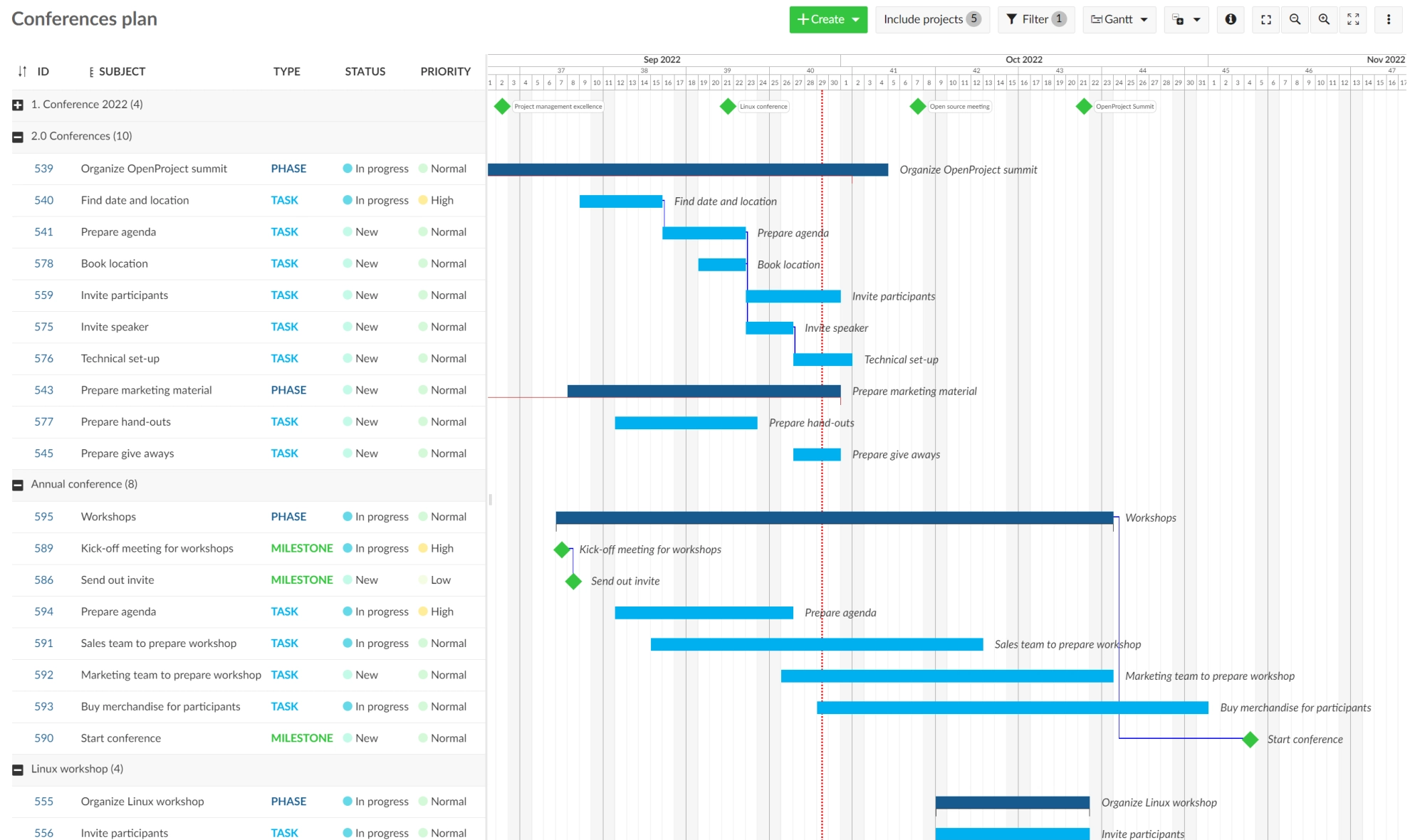
What the free edition includes: Community has work packages, Gantt, agile and Kanban boards, time tracking, costs, a wiki, forums, custom fields and the Nextcloud integration. It lacks full baselines (it compares to yesterday only), guaranteed support, and the Enterprise add-ons, which include the team planner, internal comments and sharing a work package with people outside the project.
Paid editions: cloud Basic is EUR 5.95 per user per month with a 25-user minimum on the vendor's page, Professional EUR 10.95 and Premium EUR 15.95, and Premium holds portfolios and has a 100-user minimum. The USD view lists $7.25, $13.50 and $19.50 on a one-year term.
Coming from Basecamp: OpenProject documents no Basecamp import. It lists Trello and Jira only as workarounds, and Community includes a Jira migrator.
- you want Kanban boards that update real work package status, plus Gantt dependencies, at no license cost
- you want a per-project forum that works like a message board
- you're under 25 people and want paid portfolios: paid editions have a 25-user minimum and Premium needs 100
- you need client file proofing: no annotation tool for client review was found
- Users like
- Gantt and planning tools, a free core and self-hosting, configurability
- Users dislike
- no offline access or mobile app in older reviews, and some features behind paid editions
- Source: Capterra, 189 reviews
- Starting price
- Free (Community, self-hosted); Basic $7.25, Professional $13.50, Premium $19.50 per user per month on a one-year term
- Editions
- Community free; Basic €5.95, Professional €10.95, Premium €15.95 per user per month; Corporate on request
- User minimums
- 25 for Basic and Professional, 100 for Premium, 250 for Corporate; none for Community
- Portfolios
- Portfolios and programs sit in Premium; portfolios always exist at the top level and can hold programs, projects or both
- Baselines
- Full baseline comparison from Basic; Community compares to yesterday only
- Gantt dependencies
- A follower cannot start earlier than its predecessor finishes; moving the predecessor pushes the follower later
- Nextcloud
- Link Nextcloud files to work packages; automatically managed project folders need the Nextcloud Team folders app
- Boards
- Basic, status, assignee, version, subproject and parent-child boards; status board moves change the work package status; the pricing page lists board types in the Community column
- Trello import
- Not documented as native; vendor blog suggests Trello Enterprise Excel export then Excel import
- Automatic scheduling
- Automatic mode pushes a successor when its predecessor moves; manual mode leaves dates alone
- Baseline comparison
- Compare to yesterday free; any period from Basic
- Resource management
- Premium add-on
- MS Project files
- Not supported directly per the Gantt docs
- Basecamp import
- None documented
- Forums
- Per-project module with messages and replies
- External sharing
- Enterprise add-on
- Community edition
- Free, self-hosted, no user limit
How to move out of Basecamp
Moving out starts with the export: an account owner can download a full HTML copy of selected or all projects from Adminland, active and archived, and Basecamp emails a link when it's ready. Finish the download before you cancel. The export is a readable archive, and Basecamp's help doesn't describe a way to import it back, so treat it as your record and use the importers below to move live work.
This table summarizes what each route brings across, from each vendor's help documentation.
| Tool | Route from Basecamp | What comes across | What doesn't |
|---|---|---|---|
| Teamwork | Settings, Import, Basecamp | People, projects, tasks, files, comments from Classic, 2 and 3 | Board stages, activity history; needs an active Basecamp account |
| ProofHub | Importer from the gear menu | People, discussions, to-dos, documents, files from Classic, Next and 3 | Clients from Basecamp 3, archived messages; Basecamp 4 and 5 not mentioned |
| ClickUp | Settings, Imports, Basecamp | Lists, to-dos, comments, assignees, to-do groups as statuses (Basecamp 3) | Message boards, Campfires, project docs and files |
| monday.com | Import data, Basecamp | To-dos into a board, with a link column and a sync automation (version 4 only) | Messages and files aren't mentioned |
| Asana | CSV importer | Whatever you export and map by hand | No Basecamp importer is documented |
| Trello | Copy-paste, API or Power-Ups | One card per pasted line | No Basecamp import is documented |
| Wrike | Excel or Microsoft Project files | Tasks and folders from a spreadsheet | No Basecamp import is documented |
| OpenProject | Excel or API | Whatever you map by hand | No Basecamp import is documented |
Are there free Basecamp alternatives?
Several Basecamp alternatives are free, but the limits differ. Basecamp itself has a free plan for 3 users and 1 project with 1 GB of storage. Trello's free plan covers 10 collaborators and 10 boards per Workspace. Teamwork's allows 5 users and 5 projects, ClickUp's Free Forever has unlimited members and guests with 60 MB of storage, monday.com's has 2 seats, 3 boards and 200 items, and Asana's Personal plan covers 2 users. Wrike has a free plan, and OpenProject's Community edition is free to self-host with no user limit.
The only open source Basecamp alternative in this list is OpenProject, whose Community edition is free to self-host with Gantt, boards, time tracking and a Forums module that works like a message board. Someone has to run the server, and the Enterprise add-ons for internal comments and sharing with outside people cost extra.
For a free tool that still has dependencies and Gantt, Teamwork Free, ClickUp Free Forever and OpenProject Community are the three worth a pilot. Our task management software and agency project management software guides cover the paid tools in more depth, and client portal software covers the case where clients need their own login.
How to choose: a two-week pilot
A good pilot for a Basecamp alternative uses two finalists from the picks list, not four, and it includes the import test. Run one live project in each for two weeks and score the same items so you compare like with like.
- Import one active Basecamp project and note what survived: to-dos, comments, files, assignees
- Invite one real client and check what they can see, edit and approve
- Build the one dependency chain your schedule relies on, and note which plan it needs
- Log a week of time and check whether the tool exports what you invoice from
- Rebuild your recurring check-ins and count the automation runs they use
- Price the plan for your real headcount, clients included, with seat minimums and add-ons
Where Basecamp stops and a program view starts
Basecamp and the tools above run projects one at a time, and they don't watch the dependencies that cross tool boundaries once your team spreads across several of them. The Program Manager maps dependencies across Jira and Asana, so it's relevant if you move to Asana while engineering stays on Jira. It reads dependencies and milestones from those tools and doesn't replace a scheduler, and connectors for Basecamp, Linear and ClickUp aren't live.
Frequently asked questions
What is the best alternative to Basecamp?
The best alternative to Basecamp depends on what made you leave. Teamwork fits client work with free client users from Basics at $9.99 per user, ProofHub keeps a flat price at $45 a month for unlimited users, ClickUp puts dependencies and time tracking on every plan, and Trello is the simplest at $5 per user. Check which plan unlocks dependencies and client access before you compare prices.
Is Basecamp free?
Basecamp has a free plan, but it's small: 3 users, 1 project and 1 GB of storage, with no templates and no time tracking. Paid plans are flat monthly prices of $29, $79 and $99 with caps of 5, 10 and 15 users, and Pro Unlimited is $199 a month billed yearly. Every paid plan has a 30-day trial.
Is Basecamp still relevant?
Basecamp still rates 4.1 on G2 from 5,489 reviews, and reviewers praise ease of use most. It fits a small team that wants lists, a message board and client access at a flat price. It's less relevant if you need Gantt charts, task dependencies or workload planning, because its features page lists none of them.
Is there a free alternative to Basecamp?
Yes, several free Basecamp alternatives exist. Teamwork's free plan allows 5 users and 5 projects, ClickUp's Free Forever plan has unlimited members and guests, Trello's covers 10 collaborators, and OpenProject's Community edition is free to self-host. Teamwork Free and ClickUp Free both include dependencies.
Is there an open source alternative to Basecamp?
OpenProject is the open source option in this list. Its Community edition is free to self-host and includes work packages, Gantt, boards, time tracking, a wiki and a Forums module that works like a message board. Enterprise add-ons, such as internal comments and sharing with outside people, cost extra.
Can I import my Basecamp projects into another tool?
Yes, for four of the eight tools. Teamwork imports Basecamp Classic, 2 and 3, ProofHub imports Classic, Next and 3, ClickUp imports Basecamp 3, and monday.com imports to-dos from version 4. Asana, Trello, Wrike and OpenProject document no Basecamp import.